Hello,
I have tested the lepton theme to produce this. Here is my finding:
<head>.This logic ensures your custom styles are positioned relative to the main stylesheet, affecting which styles are applied or overridden.
You can also see it in the source code:
//theme-lepton/src/lib/providers/styles.provider.ts
export function injectStyle(injector: Injector) {
  const rendererFactory = injector.get(RendererFactory2);
  const domInsertion = injector.get(DomInsertionService);

  rendererFactory
    .createRenderer(document.body, null)
    .addClass(document.body, 'abp-application-layout');

  const appStyles: HTMLElement = document.querySelector('link[rel="stylesheet"][href*="styles"]');
  let content: StyleContentStrategy;
  if (appStyles) {
    const domStrategy = DOM_STRATEGY.BeforeElement(appStyles);
    content = new StyleContentStrategy(styles, domStrategy, undefined, {
      id: LEPTON_STYLE_ELEMENT_ID,
    });
  } else {
    content = CONTENT_STRATEGY.AppendStyleToHead(styles, { id: LEPTON_STYLE_ELEMENT_ID });
  }

  domInsertion.insertContent(content);
}
If you think that your version does not rely on this configuration, you can create a separate ticket and I can assist further in the thread. Thank you for your cooperation.
Your problem may not be related to this since it is already loaded at the end 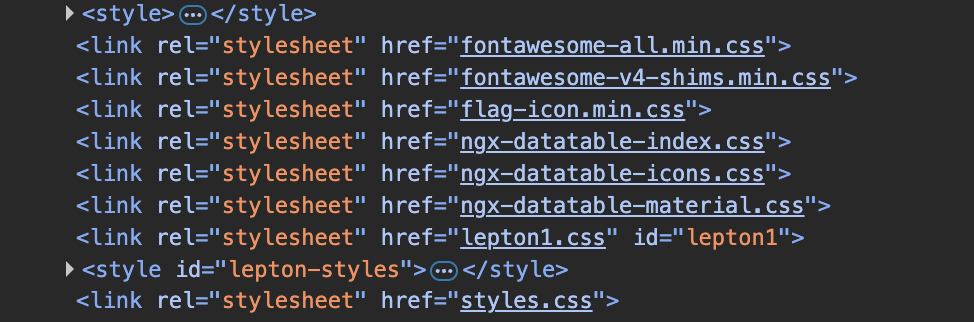
If you have replaced some components in the related part, this may cause this problem. You can follow this guide. https://abp.io/docs/latest/framework/ui/angular/component-replacement
Angular ui extensions may also cause this if you missed a point here https://abp.io/docs/latest/framework/ui/angular/extensions-overall
If this is not the case, I can assist you further based on the details you could give since it is not producible on a generated app.
Hello again, This problem will be solved within the next patch releases. You can follow the process here https://github.com/abpframework/abp/releases I am also processing a refund for your ticket.
Hello,
I have tried to produce the problem using the specific 9.0.3 version. However, I did not encounter the same problem.
Could you clarify whether you have added a customization or make changes in your template to impact this part?
You can also send a minimal reproducible example to this e-mail address if you prefer: sumeyye.kurtulus@volosoft.com.
Hello, We will be looking into this issue and get back to you soon. Thank you for your cooperation.
Hi,
I didn't really get an answer for this topic before it was auto-closed. Could you have another look into this, or give me some feedback on what the right approach would be on providing global styling, that can override LeptonX Themes?
Kind Regards, Marc
Hello Marc,
The questions are automatically closed when we do not get interaction. Seeing that, we will be managing this issue internally. You can follow the process here https://github.com/abpframework/abp/releases
Until we publish the fix, you can extend the default service to override the related function.
import { DOCUMENT, inject, Injectable } from '@angular/core';
import { LPX_STYLE_FINAL, LpxStyle, StyleService } from '@volo/ngx-lepton-x.core';
@Injectable({
  providedIn: 'root',
})
export class MyStyleService extends StyleService {
  private myDocument = inject<Document>(DOCUMENT);

  constructor() {
    super(inject(LPX_STYLE_FINAL), inject(DOCUMENT));
  }

  override loadStyle(style: LpxStyle, direction: 'ltr' | 'rtl'): Promise<HTMLStyleElement | void> {
    return new Promise(resolve => {
      const linkElement = this.createLinkElem(style, direction, resolve);
      const styleLinks = Array.from(
        this.myDocument.head.querySelectorAll('link[rel="stylesheet"]')
      );
      const firstStyleLink = styleLinks[0];

      if (firstStyleLink) {
        firstStyleLink.insertAdjacentElement('beforebegin', linkElement);
      } else {
        this.myDocument.head.appendChild(linkElement);
      }

      this.lastInjectedStyle = linkElement;
      resolve(linkElement);
    });
  }
}
Then, in your app.config.ts
export const appConfig: ApplicationConfig = {
  providers: [
    // ...
    {
      provide: StyleService,
      useClass: MyStyleService,
    },
  ],
};
You can let us know if you need further assistance. Thank you for your cooperation.
I assumed that you were using the latest version. Could you try this instead?
// app.module.ts
 ThemeLeptonXModule.forRoot({
  styleFactory: styles => {
      const filtered = styles.filter(s => s.bundleName !== 'abp-bundle');
      filtered.push({ bundleName: 'my-bundle' }); // ← Matches your filename
      return filtered;
  },
}),
2- for call abp end points I didn't find a solution to replace abp controller call from angular
I may not fully understand what you meant here, but this document might be helpful https://abp.io/docs/latest/framework/ui/angular/environment
Yes, it will be fixed in an internal issue.
From my perspective, the only two possible solutions would be either to avoid the page refresh when LeptonX switches to mobile view (which is the case with Lepton), or to completely disable the mobile view.
You are right on this matter. However, the transition can be considered normal. Normally, if you suppress this setting, it should work as expected. For more details you can also check this source code https://github.com/abpframework/abp/blob/dd192604ac4da609c997daa4d63a16491999d14d/npm/ng-packs/packages/theme-shared/src/lib/components/modal/modal.component.ts#L40
Since mobile view switches automatically, you may not directly disable this.









