Hello, thank you for reporting this. It will be fixed by next patch release. So, I am refunding your ticket.
Thank you for reaching out again. The current React Native template remains supported, and the issues you’ve pointed out are actively being managed. There should be no problem with using and publishing apps at this time. Running the expo doctor command can help ensure compatibility with the latest updates.
That said, the template continues to be a priority, and we are consistently testing and refining it. We appreciate your patience and feedback.
Yes, you can use this workaround until we release the solution:
//app.component.ts
import { SettingTabsService } from '@abp/ng.setting-management/config';
import { NewFeatureManagementTabComponent } from './new-feature-management-tab/new-feature-management-tab.component';

@Component(...)
export class AppComponent {
  protected settingTabs = inject(SettingTabsService);

  constructor() {
    this.settingTabs.patch('AbpFeatureManagement::Permission:FeatureManagement', {
      name: 'New Feature Management',
      order: 100,
      requiredPolicy: 'FeatureManagement.ManageHostFeatures',
      component: NewFeatureManagementTabComponent,
    });
  }
}
NewFeatureManagementTabComponent as follows:// new-feature-management-tab.component.ts
import { LocalizationModule } from '@abp/ng.core';
import { Component } from '@angular/core';
import { NewFeatureManagementComponent } from '../new-feature-management/new-feature-management.component';
import { FeatureManagementTabComponent } from '@abp/ng.feature-management';
@Component({
selector: 'app-new-feature-management-tab',
imports: [LocalizationModule, NewFeatureManagementComponent],
template: `
<p class="pt-2 text-wrap">
{{ 'AbpFeatureManagement::ManageHostFeaturesText' | abpLocalization }}
</p>
<button class="btn btn-primary" type="button" (click)="openFeaturesModal()">
<i class="me-1 fa fa-cog" aria-hidden="true"></i>
{{ 'AbpFeatureManagement::ManageHostFeatures' | abpLocalization }}
</button>
@if (visibleFeatures) {
<app-new-feature-management
[(visible)]="visibleFeatures"
providerName="T"
[providerKey]="providerKey"
/>
}
`,
styleUrl: './new-feature-management-tab.component.scss',
})
export class NewFeatureManagementTabComponent extends FeatureManagementTabComponent {}
NewFeatureManagementComponent.// new-feature-management.component.ts
import { LocalizationModule } from '@abp/ng.core';
import { ThemeSharedModule } from '@abp/ng.theme.shared';
import { Component } from '@angular/core';
import { CommonModule, NgTemplateOutlet } from '@angular/common';
import { FormsModule } from '@angular/forms';
import { NgbNavModule } from '@ng-bootstrap/ng-bootstrap';
import { FeatureManagementComponent, FreeTextInputDirective } from '@abp/ng.feature-management';
@Component({
selector: 'app-new-feature-management',
imports: [
CommonModule,
ThemeSharedModule,
LocalizationModule,
FormsModule,
NgbNavModule,
FreeTextInputDirective,
NgTemplateOutlet,
],
template: `
@if (visible) {
<abp-modal [(visible)]="visible" [busy]="modalBusy" [options]="{ size: 'lg' }">
<ng-template #abpHeader>
<h3>
{{ 'AbpFeatureManagement::Features' | abpLocalization }}
@if (providerTitle) { - {{ providerTitle }}
}
</h3>
</ng-template>
<ng-template #abpBody>
<div class="row">
@if (groups.length) {
<div class="col-md-4">
<ul
ngbNav
#nav="ngbNav"
[(activeId)]="selectedGroupDisplayName"
class="nav-pills"
orientation="vertical"
>
@for (group of groups; track group.name) {
<li [ngbNavItem]="group.displayName">
<a ngbNavLink>{{ group.displayName }}</a>
<ng-template ngbNavContent>
<h4>{{ selectedGroupDisplayName }}</h4>
<hr class="mt-2 mb-3" />
@for (feature of features[group.name]; track feature.id || i; let i = $index) {
<div class="mt-2" [ngStyle]="feature.style" (keyup.enter)="save()">
@switch (feature.valueType?.name) { @case (valueTypes.ToggleStringValueType) {
<div class="form-check" [class.px-4]="!!feature.parentName">
<input
class="form-check-input"
type="checkbox"
[id]="feature.name"
[(ngModel)]="feature.value"
(ngModelChange)="onCheckboxClick($event, feature)"
/>
<label class="form-check-label" [htmlFor]="feature.name">{{
feature.displayName
}}</label>
<ng-container
*ngTemplateOutlet="descTmp; context: { $implicit: feature.description }"
></ng-container>
</div>
} @case (valueTypes.FreeTextStringValueType) {
<div class="mb-3 form-group" [class.px-2]="!!feature.parentName">
<label [htmlFor]="feature.name" class="form-label">{{
feature.displayName
}}</label>
<input
class="form-control"
type="text"
[id]="feature.name"
[(ngModel)]="feature.value"
[abpFeatureManagementFreeText]="feature"
/>
<ng-container
*ngTemplateOutlet="descTmp; context: { $implicit: feature.description }"
></ng-container>
</div>
} @case (valueTypes.SelectionStringValueType) { @if
(feature.valueType.itemSource?.items?.length) {
<div class="mb-3 form-group" [class.px-2]="!!feature.parentName">
<label [htmlFor]="feature.name" class="form-label">{{
feature.displayName
}}</label>
<select class="form-select" [id]="feature.name" [(ngModel)]="feature.value">
@for ( item of feature.valueType.itemSource?.items; track item.value ) {
<option [ngValue]="item.value">
{{
item.displayText?.resourceName + '::' + item.displayText?.name
| abpLocalization
}}
</option>
}
</select>
<ng-container
*ngTemplateOutlet="descTmp; context: { $implicit: feature.description }"
></ng-container>
</div>
} } @default {
{{ feature.displayName }}
} }
</div>
}
</ng-template>
</li>
}
</ul>
</div>
<ng-template #descTmp let-description>
@if (description) {
<small class="d-block form-text text-muted">{{ description }}</small>
}
</ng-template>
<div class="col-md-8"><div class="py-0" [ngbNavOutlet]="nav"></div></div>
} @if (!groups.length) {
<div class="col">
{{ 'AbpFeatureManagement::NoFeatureFoundMessage' | abpLocalization }}
</div>
}
</div>
</ng-template>
<ng-template #abpFooter>
<button abpClose type="button" class="btn btn-link">
{{ 'AbpFeatureManagement::Cancel' | abpLocalization }}
</button>
@if (groups.length) {
<abp-button
buttonClass="btn btn-outline-primary"
[disabled]="modalBusy"
(click)="resetToDefault()"
aria-hidden="true"
>
{{ 'AbpFeatureManagement::ResetToDefault' | abpLocalization }}
</abp-button>
} @if (groups.length) {
<abp-button
iconClass="fa fa-check"
[disabled]="modalBusy"
(click)="save()"
aria-hidden="true"
>
{{ 'AbpFeatureManagement::Save' | abpLocalization }}
</abp-button>
}
</ng-template>
</abp-modal>
}
`,
styleUrl: './new-feature-management.component.scss',
})
export class NewFeatureManagementComponent extends FeatureManagementComponent {}
What could be causing this error in ABP Angular?
Hello, this problem occurs because of your angular version. That is to say, ABP version 9.0 supports Angular version 18. If you want to use Angular v19, you need to use the latest ABP version that is 9.1.
You can follow the release notes and migration guide to sustain version compatibility.
Glad to hear your issue is resolved! We’re continuously updating our templates to align with the latest Angular framework updates. You can stay informed about these changes by following our release notes and migration guides:
📌 Release Notes: https://abp.io/docs/latest/release-info/release-notes 📌 Migration Guides: https://abp.io/docs/latest/release-info/migration-guides
Glad to hear your issue is resolved! We will be updating our documentation to clarify the naming convention. If you need any further assistance, do not hesitate to reach out.
Hello, thank you for reporting this, and it will be fixed within the next release. I am refunding your ticket as well.
Thank you for sharing a screenshot of how your library is generated.
I caught that the service name you use is AIService. This generates a library like a-i-service. When I tried with AiService instead, it will work fine. Can I kindly ask for you to try in this way as well?
Yes, I can share the steps to create a microservice and add a CRUD page in Abp Studio and Suite.
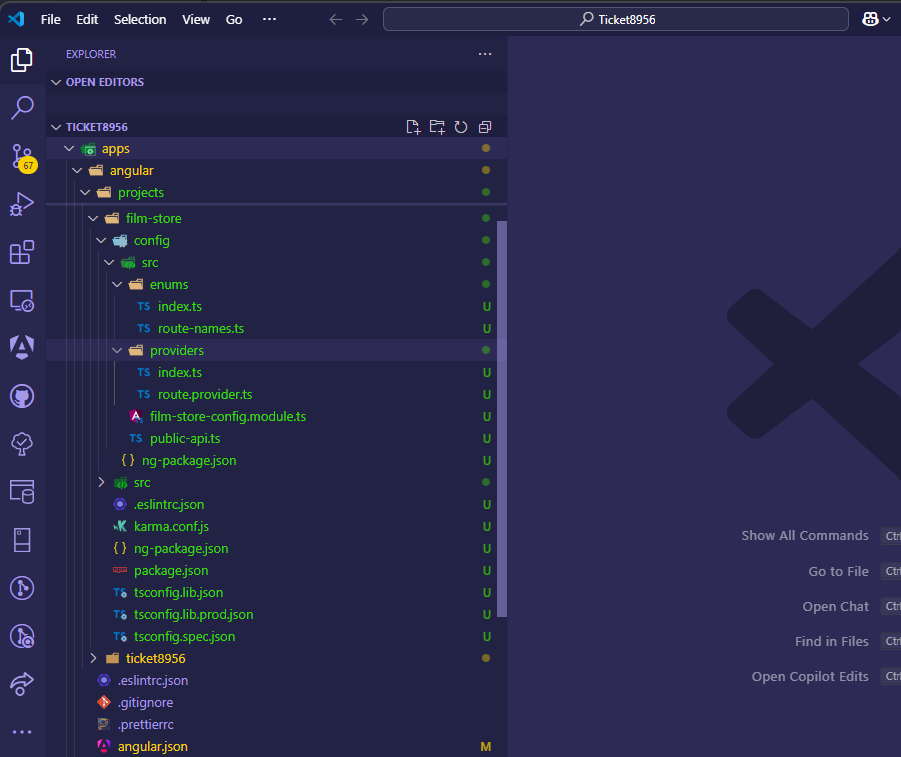
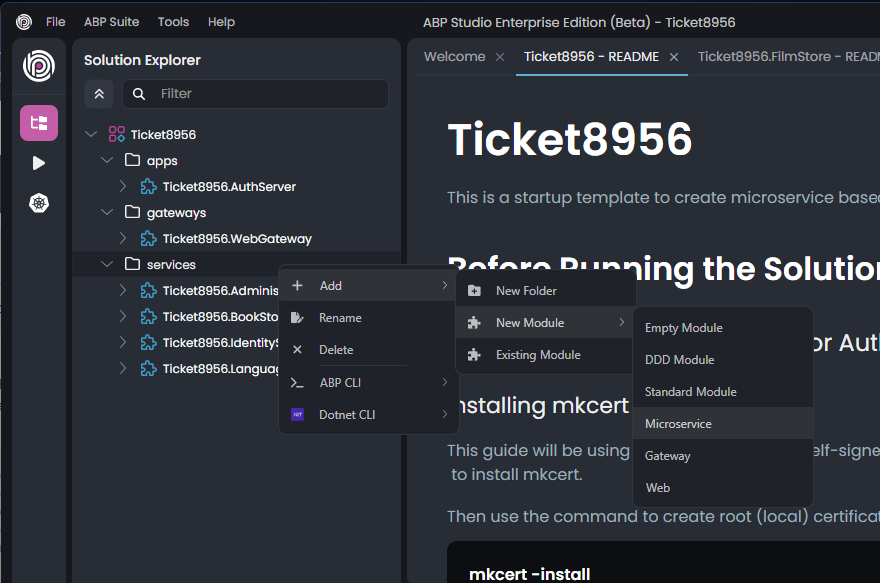 After adding the service the solution folder structure will look like this:
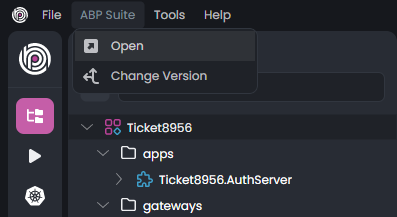 After code generation you will see the created pages
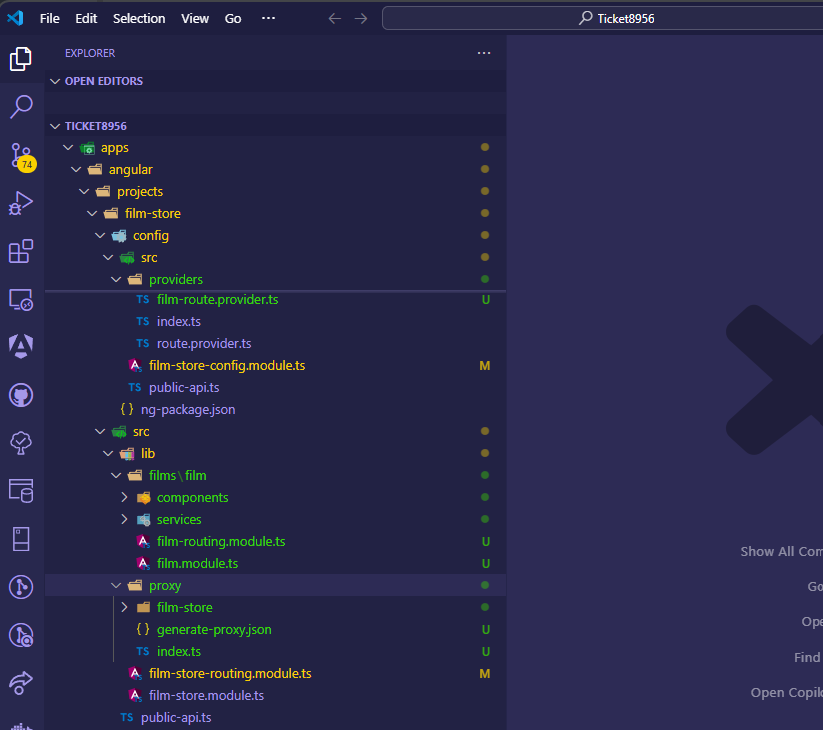
If the generation isn't successful in Angular but works in C#, ensure:
Please try these steps and let us know if you need further assistance!
Thank you for informing about the update. Let us know if you need help troubleshooting!









