[maliming] said: Please check the logs in http://localhost:44325/ gateway website.
I have resolved the issue. Thank you.
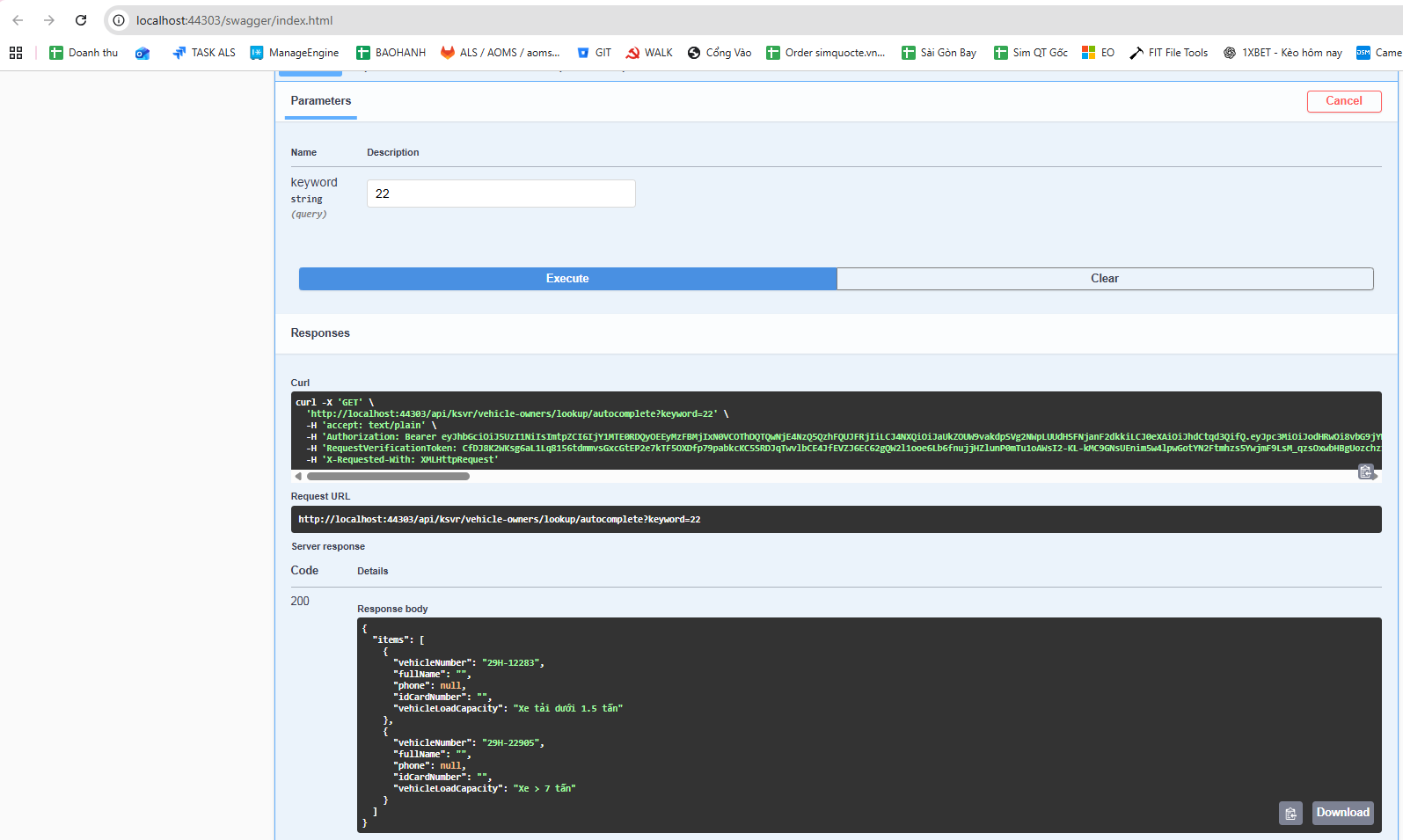
It works fine when running in Swagger in the KSVR service.
[maliming] said: hi
It works fine when tested in Swagger, but when calling it from the web, it returns Not Found. also works fine in Swagger, and it works fine when called from the web as well.
How did you call it from your web?
Can you share the call codes for the
works and not workingcases?Thanks.
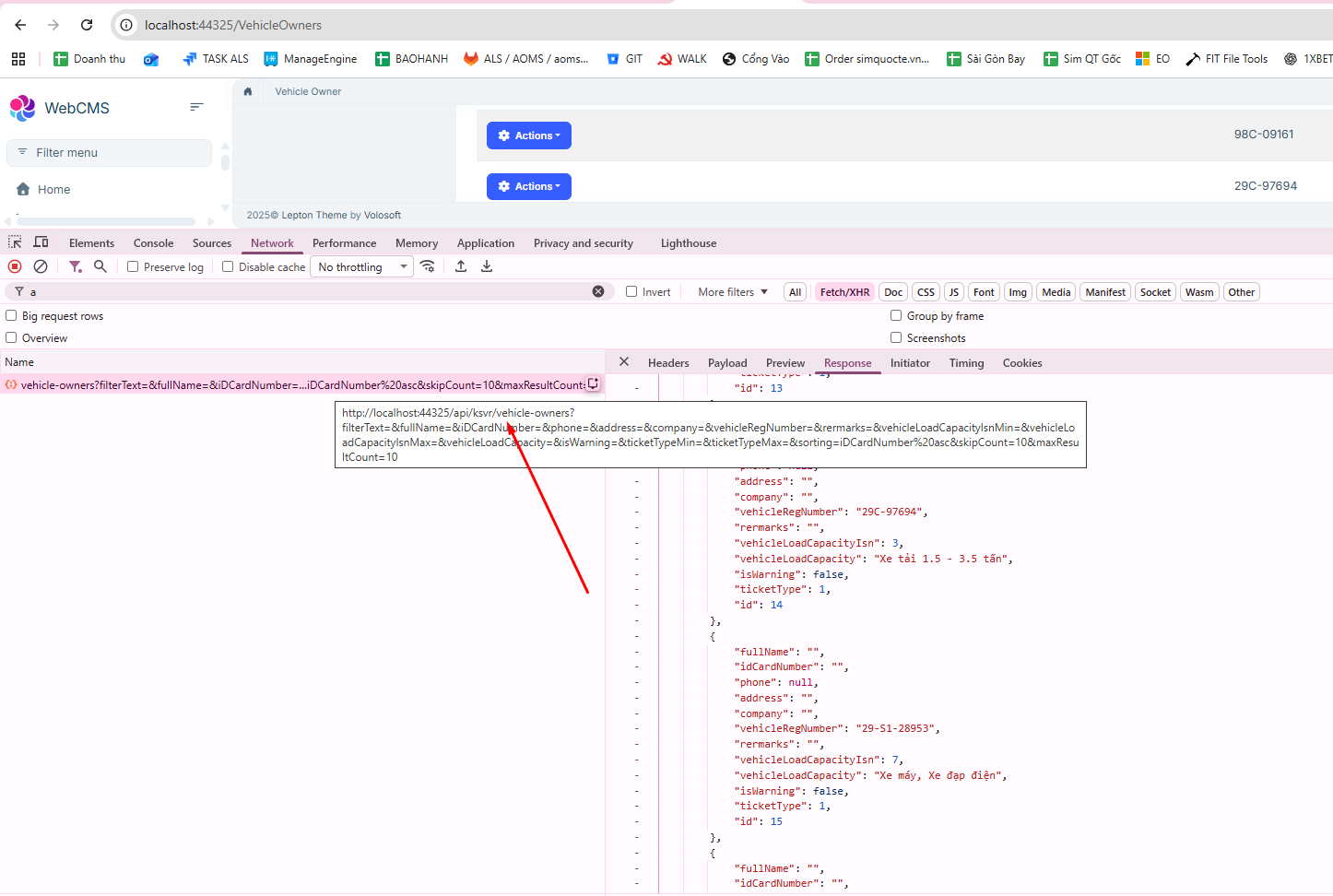
The APIs generated when I create CRUD using ABP Suite work normally when running on the web, as shown in the image.
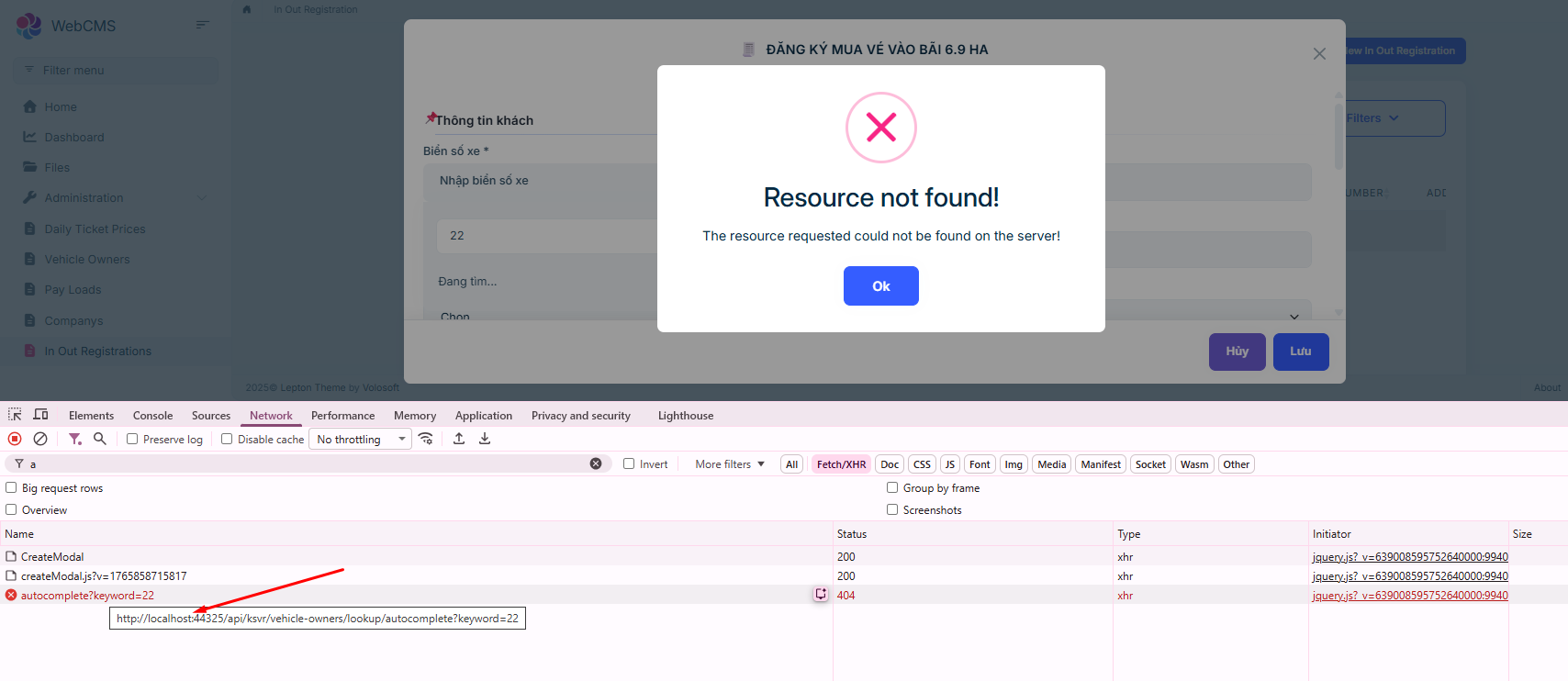
 However, the API that I manually added to the AppService returns Not Found when called from the web.
[maliming] said: : )
I have a self-written API in the AppService of the KSVR service:
http://localhost:44303/api/ksvr/vehicle-owners/lookup/autocomplete?keyword=29.
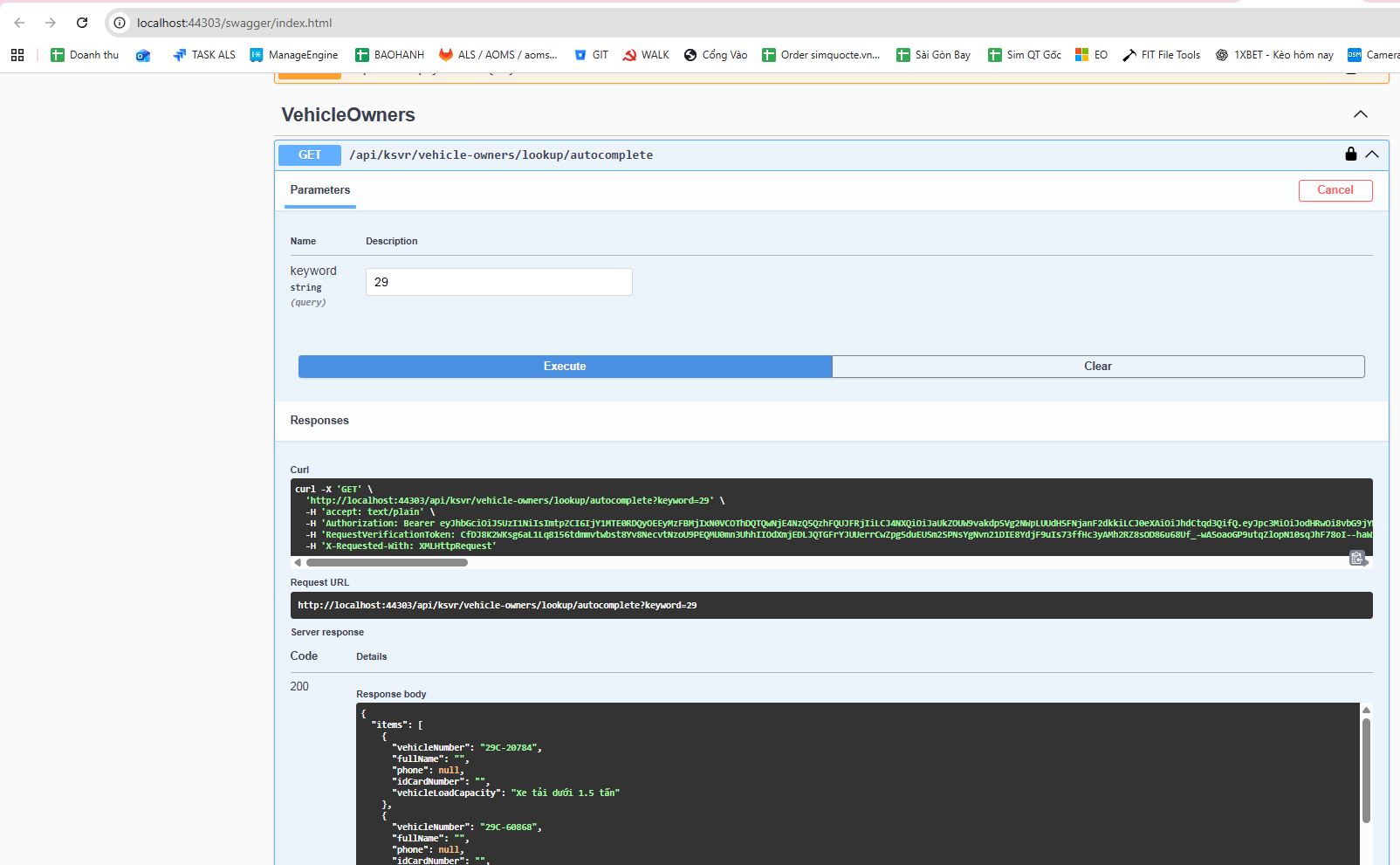 It works fine when tested in Swagger, but when calling it from the web, it returns Not Found.
Meanwhile, another API: http://localhost:44303/api/ksvr/vehicle-owners/1 also works fine in Swagger, and it works fine when called from the web as well.
This is my AppService code file.
using Microsoft.AspNetCore.Authorization;
using Microsoft.AspNetCore.Mvc;
using Microsoft.EntityFrameworkCore;
using System.Collections.Generic;
using System.Linq;
using System.Threading.Tasks;
using Volo.Abp;
using Volo.Abp.Application.Dtos;
using Volo.Abp.Application.Services;
using WebCMS.KSVR.Data.KSVRVehicleOwner;
using WebCMS.KSVR.Entities.KSVRVehicleOwner;
using WebCMS.KSVR.Permissions;
using WebCMS.KSVR.Services.Dtos.KSVRVehicleOwner;
using WebCMS.KSVR.Services.Dtos.Shared;

namespace WebCMS.KSVR.Services.KSVRVehicleOwner;

[Authorize(KSVRPermissions.VehicleOwners.Default)]
[Route("api/ksvr/vehicle-owners")]
public abstract class VehicleOwnersAppServiceBase : ApplicationService
{
    protected readonly IVehicleOwnerRepository _vehicleOwnerRepository;
    protected readonly VehicleOwnerManager _vehicleOwnerManager;

    protected VehicleOwnersAppServiceBase(
        IVehicleOwnerRepository vehicleOwnerRepository,
        VehicleOwnerManager vehicleOwnerManager)
    {
        _vehicleOwnerRepository = vehicleOwnerRepository;
        _vehicleOwnerManager = vehicleOwnerManager;
    }

    // ==============================
    // LOOKUP – PHẢI ĐỂ TRƯỚC {id:int}
    // ==============================

    // GET /api/ksvr/vehicle-owners/lookup/autocomplete?keyword=29
    [HttpGet("lookup/autocomplete")]
    public virtual async Task<ListResultDto<VehicleAutocompleteDto>> AutocompleteAsync(
        [FromQuery] string keyword)
    {
        var query = await _vehicleOwnerRepository.GetQueryableAsync();

        query = query.WhereIf(
            !keyword.IsNullOrWhiteSpace(),
            x => x.VehicleRegNumber.Contains(keyword)
        );

        var items = await query
            .OrderBy(x => x.VehicleRegNumber)
            .Take(100)
            .Select(x => new VehicleAutocompleteDto
            {
                VehicleNumber = x.VehicleRegNumber,
                FullName = x.FullName,
                Phone = x.Phone,
                IdCardNumber = x.IDCardNumber,
                VehicleLoadCapacity = x.VehicleLoadCapacity
            })
            .ToListAsync();

        return new ListResultDto<VehicleAutocompleteDto>(items);
    }

    // ==============================
    // LIST
    // ==============================

    // GET /api/ksvr/vehicle-owners
    [HttpGet]
    public virtual async Task<PagedResultDto<VehicleOwnerDto>> GetListAsync(
        GetVehicleOwnersInput input)
    {
        var totalCount = await _vehicleOwnerRepository.GetCountAsync(
            input.FilterText,
            input.FullName,
            input.IDCardNumber,
            input.Phone,
            input.Address,
            input.Company,
            input.VehicleRegNumber,
            input.Rermarks,
            input.VehicleLoadCapacityIsnMin,
            input.VehicleLoadCapacityIsnMax,
            input.VehicleLoadCapacity,
            input.IsWarning,
            input.TicketTypeMin,
            input.TicketTypeMax
        );

        var items = await _vehicleOwnerRepository.GetListAsync(
            input.FilterText,
            input.FullName,
            input.IDCardNumber,
            input.Phone,
            input.Address,
            input.Company,
            input.VehicleRegNumber,
            input.Rermarks,
            input.VehicleLoadCapacityIsnMin,
            input.VehicleLoadCapacityIsnMax,
            input.VehicleLoadCapacity,
            input.IsWarning,
            input.TicketTypeMin,
            input.TicketTypeMax,
            input.Sorting,
            input.MaxResultCount,
            input.SkipCount
        );

        return new PagedResultDto<VehicleOwnerDto>
        {
            TotalCount = totalCount,
            Items = ObjectMapper.Map<List<VehicleOwner>, List<VehicleOwnerDto>>(items)
        };
    }

    // ==============================
    // GET BY ID
    // ==============================

    // GET /api/ksvr/vehicle-owners/{id}
    [HttpGet("{id:int}")]
    public virtual async Task<VehicleOwnerDto> GetAsync(int id)
    {
        var entity = await _vehicleOwnerRepository.GetAsync(id);
        return ObjectMapper.Map<VehicleOwner, VehicleOwnerDto>(entity);
    }

    // ==============================
    // CREATE
    // ==============================

    // POST /api/ksvr/vehicle-owners
    [Authorize(KSVRPermissions.VehicleOwners.Create)]
    [HttpPost]
    public virtual async Task<VehicleOwnerDto> CreateAsync(
        VehicleOwnerCreateDto input)
    {
        var vehicleOwner = await _vehicleOwnerManager.CreateAsync(
            input.FullName,
            input.IDCardNumber,
            input.Phone,
            input.Address,Please help me resolve this issue.
            input.Company,
            input.VehicleRegNumber,
            input.Rermarks,
            input.VehicleLoadCapacityIsn,
            input.VehicleLoadCapacity,
            input.IsWarning,
            input.TicketType
        );

        return ObjectMapper.Map<VehicleOwner, VehicleOwnerDto>(vehicleOwner);
    }

    // ==============================
    // UPDATE
    // ==============================

    // PUT /api/ksvr/vehicle-owners/{id}
    [Authorize(KSVRPermissions.VehicleOwners.Edit)]
    [HttpPut("{id:int}")]
    public virtual async Task<VehicleOwnerDto> UpdateAsync(
        int id,
        VehicleOwnerUpdateDto input)
    {
        var vehicleOwner = await _vehicleOwnerManager.UpdateAsync(
            id,
            input.FullName,
            input.IDCardNumber,
            input.Phone,
            input.Address,
            input.Company,
            input.VehicleRegNumber,
            input.Rermarks,
            input.VehicleLoadCapacityIsn,
            input.VehicleLoadCapacity,
            input.IsWarning,
            input.TicketType
        );

        return ObjectMapper.Map<VehicleOwner, VehicleOwnerDto>(vehicleOwner);
    }

    // ==============================
    // DELETE
    // ==============================

    // DELETE /api/ksvr/vehicle-owners/{id}
    [Authorize(KSVRPermissions.VehicleOwners.Delete)]
    [HttpDelete("{id:int}")]
    public virtual async Task DeleteAsync(int id)
    {
        await _vehicleOwnerRepository.DeleteAsync(id);
    }
}
here is js code
abp.ajax({ url: abp.appPath + 'api/ksvr/vehicle-owners/lookup/autocomplete', type: 'GET', data: { keyword: params.data.q } }).then(success).catch(failure);
Please help me resolve this issue.
Maliming, please help me !!!!!!!!
[maliming] said: hi
Currently, you need to generate them manually if your API has changed.
Thanks.
ok Thanks.
[maliming] said: Great
Hi Maliming, Every time I make changes to the KSVR service, I have to run the command abp generate-proxy --type csharp --module ksvr --url http://localhost:44303 --without-contracts to regenerate the Client Proxies. Is there any way to generate them automatically whenever changes are made, or is it mandatory to run the command manually?
[maliming] said: hi
Please zip your static proxy files and
appsettings.jsonofWebGatewayto liming.ma@volosoft.comThanks.
I found the cause. Thank you. :D
[maliming] said: ok, you can continue to test it.
Thanks.
I continued running the application and was able to call
var bangGiaVeNgayService = window.webCMS.kSVR.services.bangGiaVeNgays.bangGiaVeNgays;
but now I’m getting this error. Please help me with this.

[maliming] said: : )
:v I mistakenly thought the Module Name was the name of the .cs file. :((









