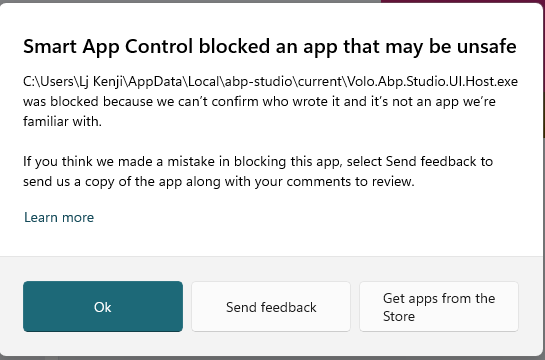
Dear ABP Support Team, I would like to report a critical issue with ABP Studio on Windows 11. Issue Description:
When launching the file Volo.App.Studio.UI.Host.exe from the directory C:\Users[User]\AppData\Local\abp-studio\current, the application is blocked by Windows Smart App Control
Error message: "Smart App Control blocked an app that may be unsafe"
Blocking reason: "we can't vouch for it and it's not an app we're familiar with"
When clicking the "Ok" button, the notification window closes and the application fails to launch
I am currently unable to use ABP Studio at all
 System Information:
Operating System: Windows 11 Edition Windows 11 Pro Version 25H2 Installed on 29/11/2025 OS build 26200.7628 Experience Windows Feature Experience Pack 1000.26100.275.0 File path: C:\Users[User]\AppData\Local\abp-studio\current\Volo.App.Studio.UI.Host.exe
Please assist with resolving this issue. Thank you! Best regards, Lj Kenji
I have a self-written API in the AppService of the KSVR service:
http://localhost:44303/api/ksvr/vehicle-owners/lookup/autocomplete?keyword=29.
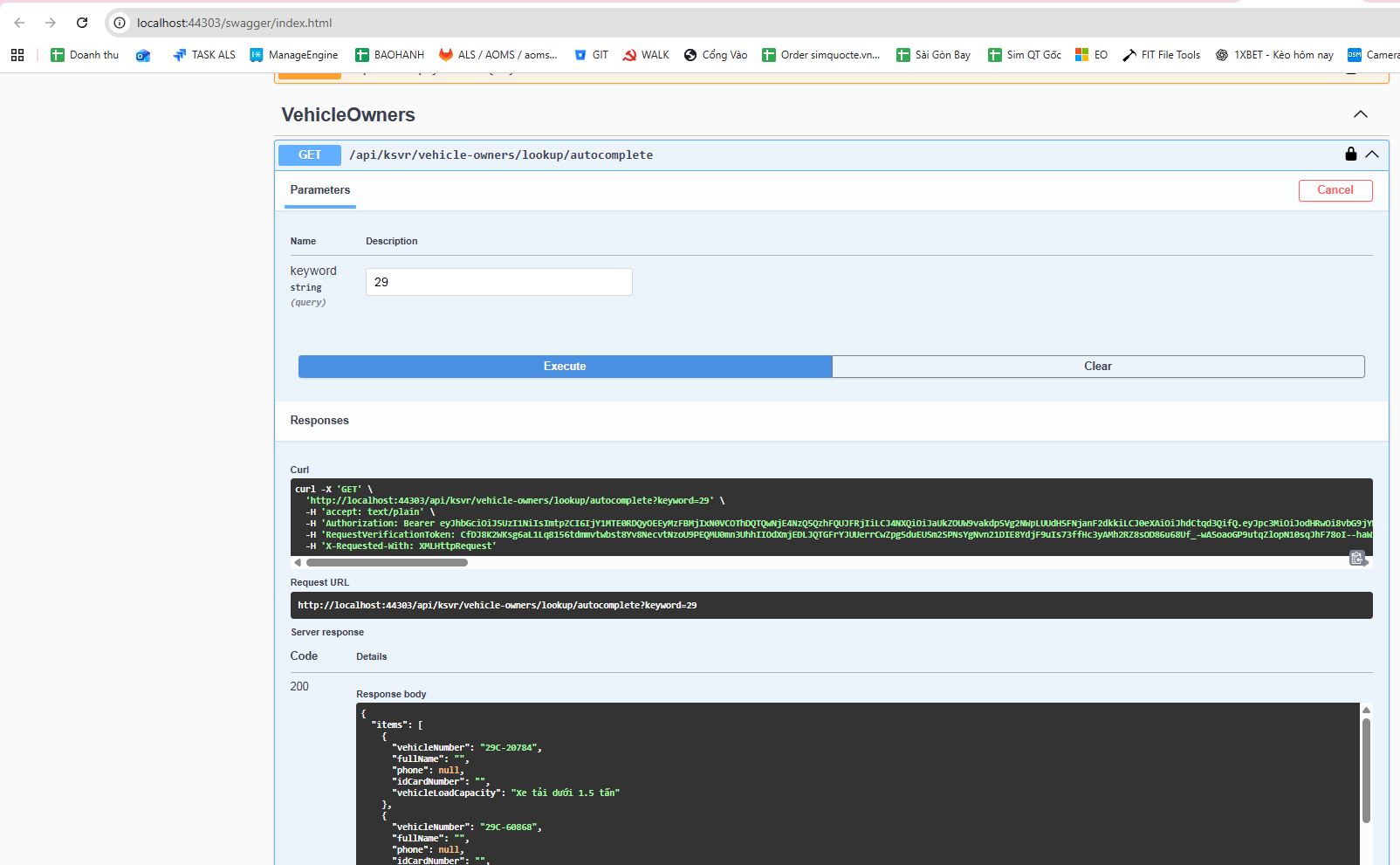 It works fine when tested in Swagger, but when calling it from the web, it returns Not Found.
Meanwhile, another API: http://localhost:44303/api/ksvr/vehicle-owners/1 also works fine in Swagger, and it works fine when called from the web as well.
This is my AppService code file.
using Microsoft.AspNetCore.Authorization;
using Microsoft.AspNetCore.Mvc;
using Microsoft.EntityFrameworkCore;
using System.Collections.Generic;
using System.Linq;
using System.Threading.Tasks;
using Volo.Abp;
using Volo.Abp.Application.Dtos;
using Volo.Abp.Application.Services;
using WebCMS.KSVR.Data.KSVRVehicleOwner;
using WebCMS.KSVR.Entities.KSVRVehicleOwner;
using WebCMS.KSVR.Permissions;
using WebCMS.KSVR.Services.Dtos.KSVRVehicleOwner;
using WebCMS.KSVR.Services.Dtos.Shared;

namespace WebCMS.KSVR.Services.KSVRVehicleOwner;

[Authorize(KSVRPermissions.VehicleOwners.Default)]
[Route("api/ksvr/vehicle-owners")]
public abstract class VehicleOwnersAppServiceBase : ApplicationService
{
    protected readonly IVehicleOwnerRepository _vehicleOwnerRepository;
    protected readonly VehicleOwnerManager _vehicleOwnerManager;

    protected VehicleOwnersAppServiceBase(
        IVehicleOwnerRepository vehicleOwnerRepository,
        VehicleOwnerManager vehicleOwnerManager)
    {
        _vehicleOwnerRepository = vehicleOwnerRepository;
        _vehicleOwnerManager = vehicleOwnerManager;
    }

    // ==============================
    // LOOKUP – PHẢI ĐỂ TRƯỚC {id:int}
    // ==============================

    // GET /api/ksvr/vehicle-owners/lookup/autocomplete?keyword=29
    [HttpGet("lookup/autocomplete")]
    public virtual async Task<ListResultDto<VehicleAutocompleteDto>> AutocompleteAsync(
        [FromQuery] string keyword)
    {
        var query = await _vehicleOwnerRepository.GetQueryableAsync();

        query = query.WhereIf(
            !keyword.IsNullOrWhiteSpace(),
            x => x.VehicleRegNumber.Contains(keyword)
        );

        var items = await query
            .OrderBy(x => x.VehicleRegNumber)
            .Take(100)
            .Select(x => new VehicleAutocompleteDto
            {
                VehicleNumber = x.VehicleRegNumber,
                FullName = x.FullName,
                Phone = x.Phone,
                IdCardNumber = x.IDCardNumber,
                VehicleLoadCapacity = x.VehicleLoadCapacity
            })
            .ToListAsync();

        return new ListResultDto<VehicleAutocompleteDto>(items);
    }

    // ==============================
    // LIST
    // ==============================

    // GET /api/ksvr/vehicle-owners
    [HttpGet]
    public virtual async Task<PagedResultDto<VehicleOwnerDto>> GetListAsync(
        GetVehicleOwnersInput input)
    {
        var totalCount = await _vehicleOwnerRepository.GetCountAsync(
            input.FilterText,
            input.FullName,
            input.IDCardNumber,
            input.Phone,
            input.Address,
            input.Company,
            input.VehicleRegNumber,
            input.Rermarks,
            input.VehicleLoadCapacityIsnMin,
            input.VehicleLoadCapacityIsnMax,
            input.VehicleLoadCapacity,
            input.IsWarning,
            input.TicketTypeMin,
            input.TicketTypeMax
        );

        var items = await _vehicleOwnerRepository.GetListAsync(
            input.FilterText,
            input.FullName,
            input.IDCardNumber,
            input.Phone,
            input.Address,
            input.Company,
            input.VehicleRegNumber,
            input.Rermarks,
            input.VehicleLoadCapacityIsnMin,
            input.VehicleLoadCapacityIsnMax,
            input.VehicleLoadCapacity,
            input.IsWarning,
            input.TicketTypeMin,
            input.TicketTypeMax,
            input.Sorting,
            input.MaxResultCount,
            input.SkipCount
        );

        return new PagedResultDto<VehicleOwnerDto>
        {
            TotalCount = totalCount,
            Items = ObjectMapper.Map<List<VehicleOwner>, List<VehicleOwnerDto>>(items)
        };
    }

    // ==============================
    // GET BY ID
    // ==============================

    // GET /api/ksvr/vehicle-owners/{id}
    [HttpGet("{id:int}")]
    public virtual async Task<VehicleOwnerDto> GetAsync(int id)
    {
        var entity = await _vehicleOwnerRepository.GetAsync(id);
        return ObjectMapper.Map<VehicleOwner, VehicleOwnerDto>(entity);
    }

    // ==============================
    // CREATE
    // ==============================

    // POST /api/ksvr/vehicle-owners
    [Authorize(KSVRPermissions.VehicleOwners.Create)]
    [HttpPost]
    public virtual async Task<VehicleOwnerDto> CreateAsync(
        VehicleOwnerCreateDto input)
    {
        var vehicleOwner = await _vehicleOwnerManager.CreateAsync(
            input.FullName,
            input.IDCardNumber,
            input.Phone,
            input.Address,Please help me resolve this issue.
            input.Company,
            input.VehicleRegNumber,
            input.Rermarks,
            input.VehicleLoadCapacityIsn,
            input.VehicleLoadCapacity,
            input.IsWarning,
            input.TicketType
        );

        return ObjectMapper.Map<VehicleOwner, VehicleOwnerDto>(vehicleOwner);
    }

    // ==============================
    // UPDATE
    // ==============================

    // PUT /api/ksvr/vehicle-owners/{id}
    [Authorize(KSVRPermissions.VehicleOwners.Edit)]
    [HttpPut("{id:int}")]
    public virtual async Task<VehicleOwnerDto> UpdateAsync(
        int id,
        VehicleOwnerUpdateDto input)
    {
        var vehicleOwner = await _vehicleOwnerManager.UpdateAsync(
            id,
            input.FullName,
            input.IDCardNumber,
            input.Phone,
            input.Address,
            input.Company,
            input.VehicleRegNumber,
            input.Rermarks,
            input.VehicleLoadCapacityIsn,
            input.VehicleLoadCapacity,
            input.IsWarning,
            input.TicketType
        );

        return ObjectMapper.Map<VehicleOwner, VehicleOwnerDto>(vehicleOwner);
    }

    // ==============================
    // DELETE
    // ==============================

    // DELETE /api/ksvr/vehicle-owners/{id}
    [Authorize(KSVRPermissions.VehicleOwners.Delete)]
    [HttpDelete("{id:int}")]
    public virtual async Task DeleteAsync(int id)
    {
        await _vehicleOwnerRepository.DeleteAsync(id);
    }
}
here is js code
abp.ajax({ url: abp.appPath + 'api/ksvr/vehicle-owners/lookup/autocomplete', type: 'GET', data: { keyword: params.data.q } }).then(success).catch(failure);
Please help me resolve this issue.
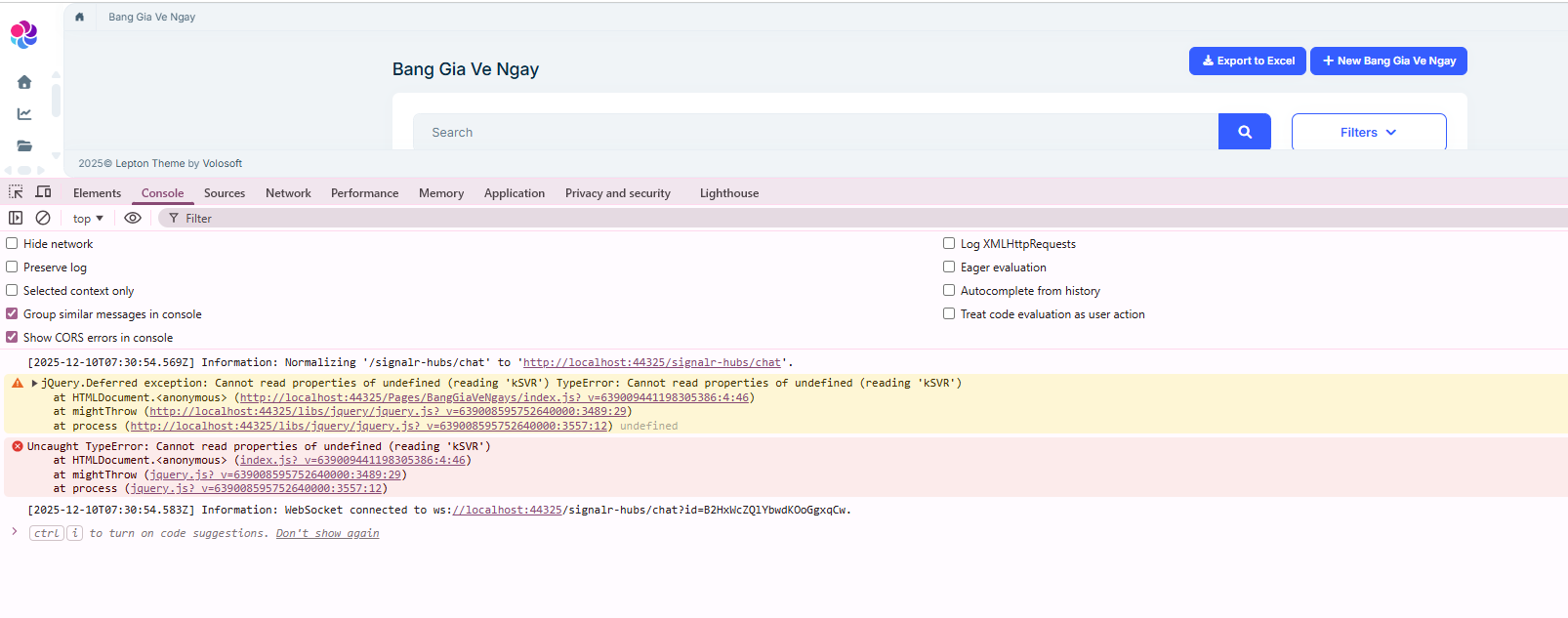
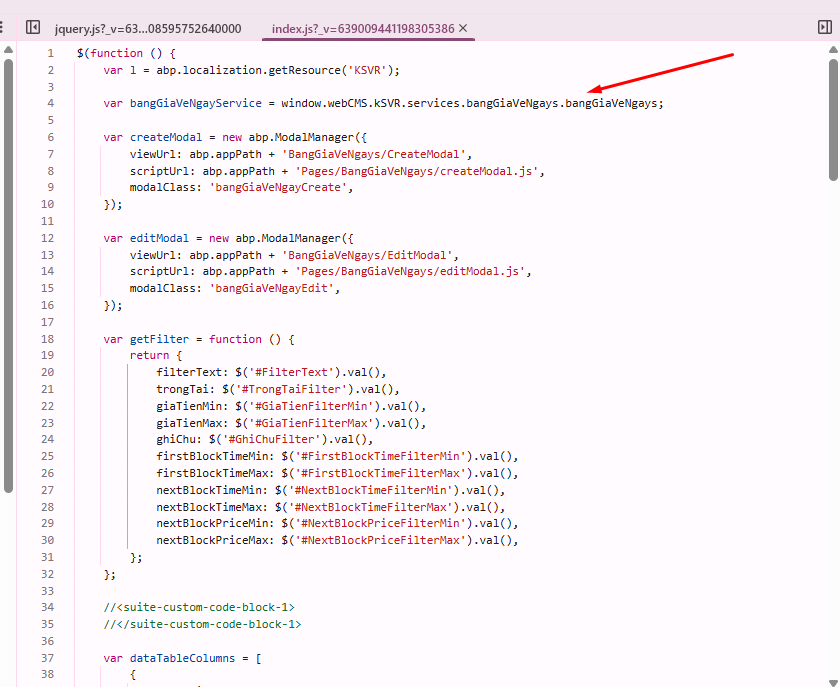
I’m using the latest paid version of ABP to generate a microservice solution with MVC Razor Pages. In my JS file, I use this command to call the service:
var bangGiaVeNgayService = window.webCMS.kSVR.services.bangGiaVeNgays.bangGiaVeNgays;
but it doesn’t work.
With the older version of ABP, it still worked normally. Please help me resolve this issue. Does the latest ABP version still support calling services the old way like before?
I used ABP Suite to automatically generate the entity (my project is using MVC Razor Pages), but when I run the website, I get the error shown in the image.
Can anyone help me fix this issue?