






I’m using the latest paid version of ABP to generate a microservice solution with MVC Razor Pages. In my JS file, I use this command to call the service:
var bangGiaVeNgayService = window.webCMS.kSVR.services.bangGiaVeNgays.bangGiaVeNgays;
but it doesn’t work.
With the older version of ABP, it still worked normally. Please help me resolve this issue. Does the latest ABP version still support calling services the old way like before?
26 Answer(s)
-
0
- Solution In recent ABP versions, the static JavaScript API proxy global namespace and loading flow have changed. The old pattern like: var bangGiaVeNgayService = window.webCMS.kSVR.services.bangGiaVeNgays.bangGiaVeNgays; will no longer work unless your solution defines the same global namespace and generates the proxies into it.
Do this to make it work reliably in MVC Razor Pages:
Ensure static JS proxies are enabled and generated
- In your Web project, add the Static JavaScript Proxy tag helper to your layout (once, typically in _Layout.cshtml, near the end of body): @await Html.PartialAsync("_AbpScripts")
- Configure the proxy generation file abp-generate-proxy.json in the Web project (created by the template). Make sure:
- target is set to jQuery
- output folder is wwwroot/libs/proxy or your desired location
- moduleName and remoteServiceName match your app service module and remote service. Example: { "type": "javascript", "module": "MyCompany.MyApp", "namespace": "myCompany.myApp", "source": { "type": "remote", "url": "https://localhost:44322", "remoteServiceName": "Default" }, "target": { "type": "jquery", "moduleName": "myCompany.myApp" }, "output": "wwwroot/libs/proxy" }
- Run the proxy generation: abp generate-proxy or from VS Task Runner/ABP Suite if configured.
Use the new global namespace when calling APIs
- The generated proxies are exposed under window.[namespace].[remoteServiceName].[service-alias].[method]
- The default namespace is based on your configured "namespace" or "moduleName". For example, if you set namespace to myCompany.myApp and remoteServiceName to default (or your microservice name), you can call: // Example: app service BangGiaVeNgays in module MyCompany.MyApp, remoteServiceName: default var service = window.myCompany.myApp.default.bangGiaVeNgays.bangGiaVeNgays; service.getList({ /* params */ }) .then(res => console.log(res));
Verify the actual namespace at runtime
- Open the browser console and type window to inspect the nested objects. Start from window.myCompany or your configured namespace to see what is actually generated (e.g., window.myCompany.myApp.default...).
- If your older code expects window.webCMS.kSVR..., you must either:
- Update your JS calls to the new path (recommended), or
- Set "namespace" and "moduleName" in abp-generate-proxy.json to produce the same path structure you used before (e.g., namespace: webCMS.kSVR). Then regenerate the proxies.
Common pitfalls to check
- The remote service host must be running when generating proxies from a remote source.
- Make sure _AbpScripts partial is included once and after jQuery/abp.js are loaded.
- Clear browser cache or use a cache-busting query string when testing (the template already appends _v=...).
- For microservice solutions, you will have multiple remoteServiceName roots (e.g., identityService, cmsKit, default). Ensure you reference the correct one in the path: window.myCompany.myApp.identityService.... If it’s missing, either you didn’t generate the proxy for that microservice or the remoteServiceName differs from what you’re using in JS.
- If you used dynamic proxies before, ensure you are not mixing dynamic and static references on the same page; pick one approach. When using dynamic proxies, use abp.services.app.* style, when static proxies, use the generated window.[namespace] path.
Minimal working example // 1) After correct proxy generation and layout setup: // window.myCompany.myApp.default.bangGiaVeNgays.bangGiaVeNgays.create({ ... }) window.myCompany.myApp.default.bangGiaVeNgays.bangGiaVeNgays .getList({ skipCount: 0, maxResultCount: 10 }) .then(result => console.log(result)) .catch(err => console.error(err));
Does the latest ABP still support calling services like before?
- Yes, ABP still supports Static JavaScript API Client Proxies for MVC/Razor Pages. However, the generated object path under window depends on your configuration (namespace/moduleName/remoteServiceName). If you align those settings with your previous namespace, your old-style code can continue to work. Otherwise, update your JS to the new generated path as shown above.
- Sources
- Static JavaScript Proxies (MVC/Razor Pages):
- https://abp.io/docs/latest/framework/ui/mvc-razor-pages/static-javascript-proxies
- Dynamic JavaScript Proxies (for comparison and migration):
- https://abp.io/docs/latest/framework/ui/mvc-razor-pages/dynamic-javascript-proxies
This response was generated by AI. If it didn’t solve your problem, feel free to post a new answer — our support team will jump in to help you soon.
-
0
hi toan.nguyen2
Have you created the static proxy files?
What is the response of
/abp/serviceproxyscriptendpoint?Thanks.
-
0
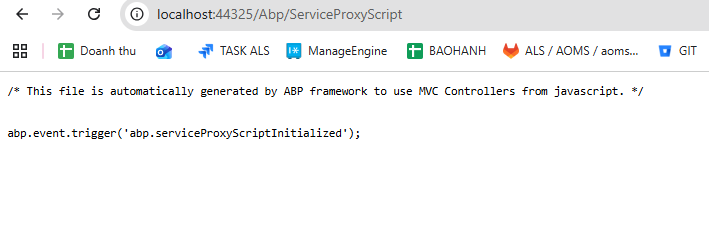 !
! -
0
hi
Have you created the static proxy files?
See https://abp.io/docs/latest/guides/add-module-to-microservice#using-the-static-proxy https://abp.io/docs/latest/framework/api-development/static-csharp-clients#code-generation
-
0
[maliming] said: hi
Have you created the static proxy files?
See https://abp.io/docs/latest/guides/add-module-to-microservice#using-the-static-proxy https://abp.io/docs/latest/framework/api-development/static-csharp-clients#code-generation
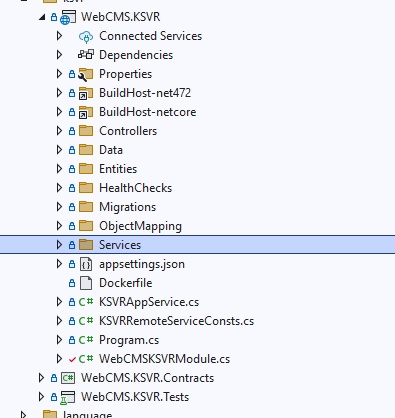
I can’t find the HttpApiClientModule.
 My ABP version is the latest one, and its structure does not contain any of the files described in the documentation.
-
0
hi
You can run the
abp generate-proxycommand in your web project(localhost:44325)abp generate-proxy --type csharp --module YourWebCMSKSVRModuleName --url https://YourWebCMSKSVRModuleName-website-url --without-contractsThanks.
-
0
[maliming] said: hi
You can run the
abp generate-proxycommand in your web project(localhost:44325)abp generate-proxy --type csharp --module YourWebCMSKSVRModuleName --url https://YourWebCMSKSVRModuleName-website-url --without-contractsThanks.

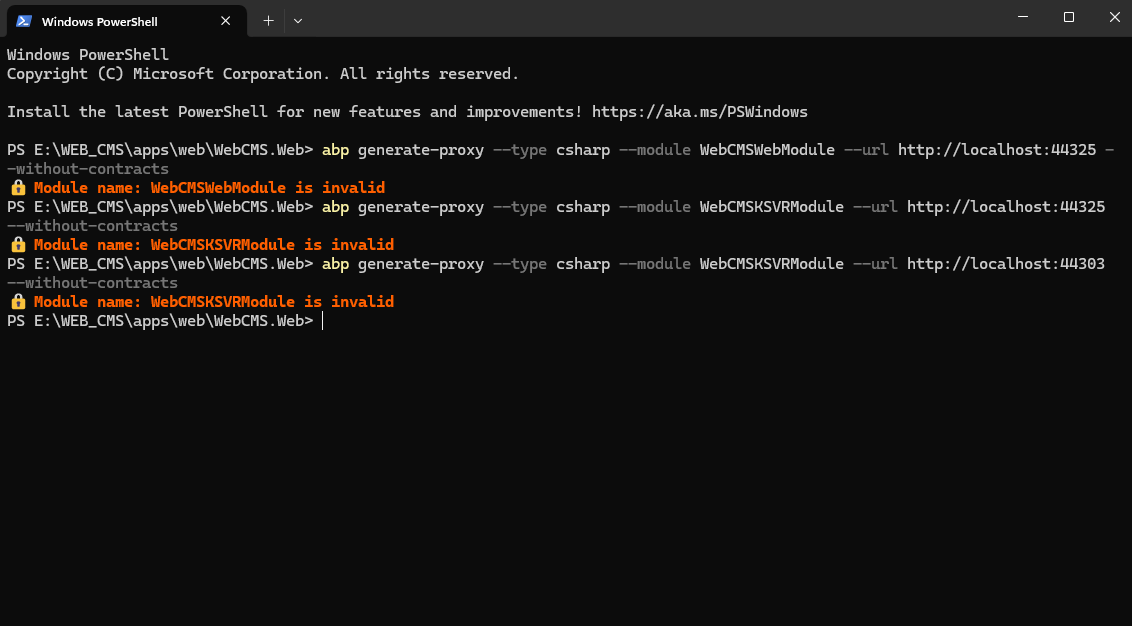 I tried it, but it didn’t work.
Url WebCMS.Web: http://localhost:44325/ Url WebCMS.KSVR (microservice) : http://localhost:44303/
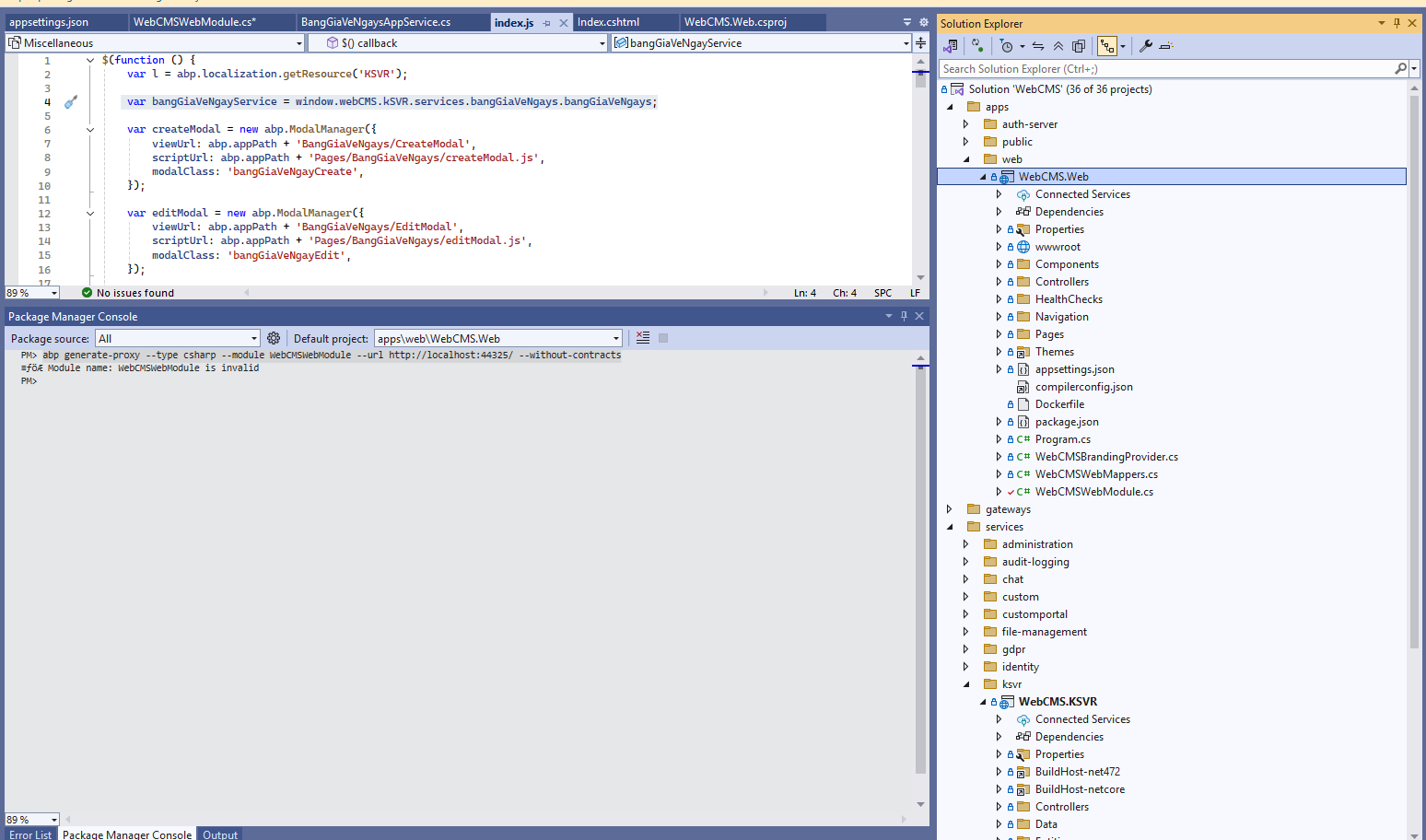
From WebCMS.Web, I’m calling a service in WebCMS.KSVR.
-
0
[maliming] said: hi
You can run the
abp generate-proxycommand in your web project(localhost:44325)abp generate-proxy --type csharp --module YourWebCMSKSVRModuleName --url https://YourWebCMSKSVRModuleName-website-url --without-contractsThanks.
help me please!
-
0
hi
: Module name: webCMSwebModule is invalid
You can check all modules at
http://localhost:44303/api/abp/api-definitionThen generate a proxy again
abp generate-proxy --type csharp --module NewModuleName --url http://localhost:44303 --without-contractsThanks
-
0
[maliming] said: hi
: Module name: webCMSwebModule is invalid
You can check all modules at
http://localhost:44303/api/abp/api-definitionThen generate a proxy again
abp generate-proxy --type csharp --module NewModuleName --url http://localhost:44303 --without-contractsThanks
this is data in
http://localhost:44303/api/abp/api-definition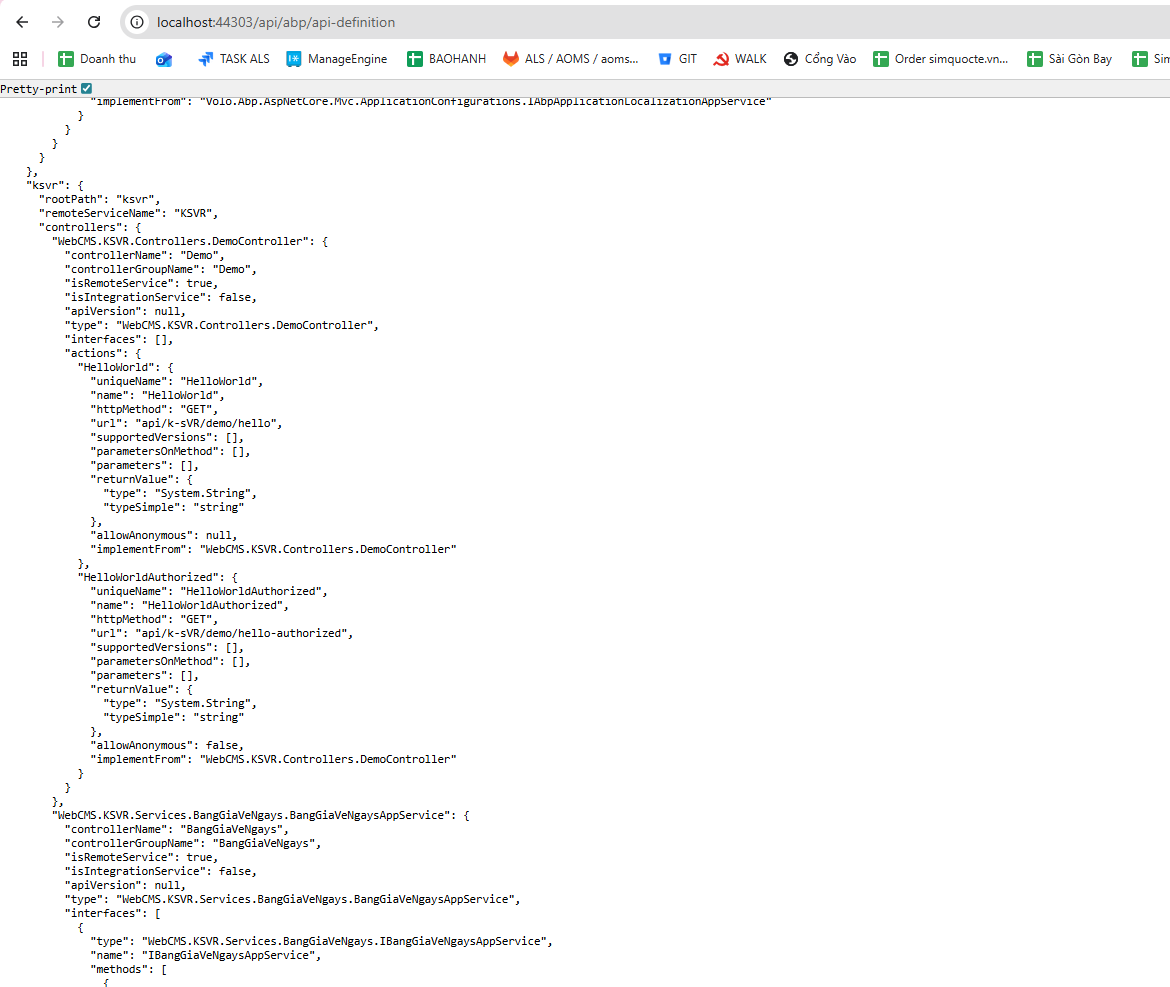
Please help me write the correct command.
-
0
hi
abp generate-proxy --type csharp --module ksvr --url http://localhost:44303 --without-contractsAfter that, run the
WebCMS.Web: http://localhost:44325/and checkabp/serviceproxyscriptendpoint -
0
[maliming] said: hi
abp generate-proxy --type csharp --module ksvr --url http://localhost:44303 --without-contractsAfter that, run the
WebCMS.Web: http://localhost:44325/and checkabp/serviceproxyscriptendpointok nice ! Thank you very much
-
0
: )
-
0
[maliming] said: : )
:v I mistakenly thought the Module Name was the name of the .cs file. :((
-
0
ok, you can continue to test it.
Thanks.
-
0
[maliming] said: ok, you can continue to test it.
Thanks.
I continued running the application and was able to call var bangGiaVeNgayService = window.webCMS.kSVR.services.bangGiaVeNgays.bangGiaVeNgays; but now I’m getting this error. Please help me with this.

-
0
hi
Please zip your static proxy files and
appsettings.jsonofWebGatewayto liming.ma@volosoft.comThanks.
-
0
[maliming] said: hi
Please zip your static proxy files and
appsettings.jsonofWebGatewayto liming.ma@volosoft.comThanks.
I found the cause. Thank you. :D
-
0
Great
-
0
hi
Same command, it will maintain the proxy files.
abp generate-proxy --type csharp --module ksvr --url http://localhost:44303 --without-contractsThanks.
-
0
[maliming] said: Great
Hi Maliming, Every time I make changes to the KSVR service, I have to run the command abp generate-proxy --type csharp --module ksvr --url http://localhost:44303 --without-contracts to regenerate the Client Proxies. Is there any way to generate them automatically whenever changes are made, or is it mandatory to run the command manually?
-
0
hi
Currently, you need to generate them manually if your API has changed.
Thanks.
-
0
[maliming] said: hi
Currently, you need to generate them manually if your API has changed.
Thanks.
ok Thanks.
-
0
: )
-
0
[maliming] said: : )
I have a self-written API in the AppService of the KSVR service: http://localhost:44303/api/ksvr/vehicle-owners/lookup/autocomplete?keyword=29.
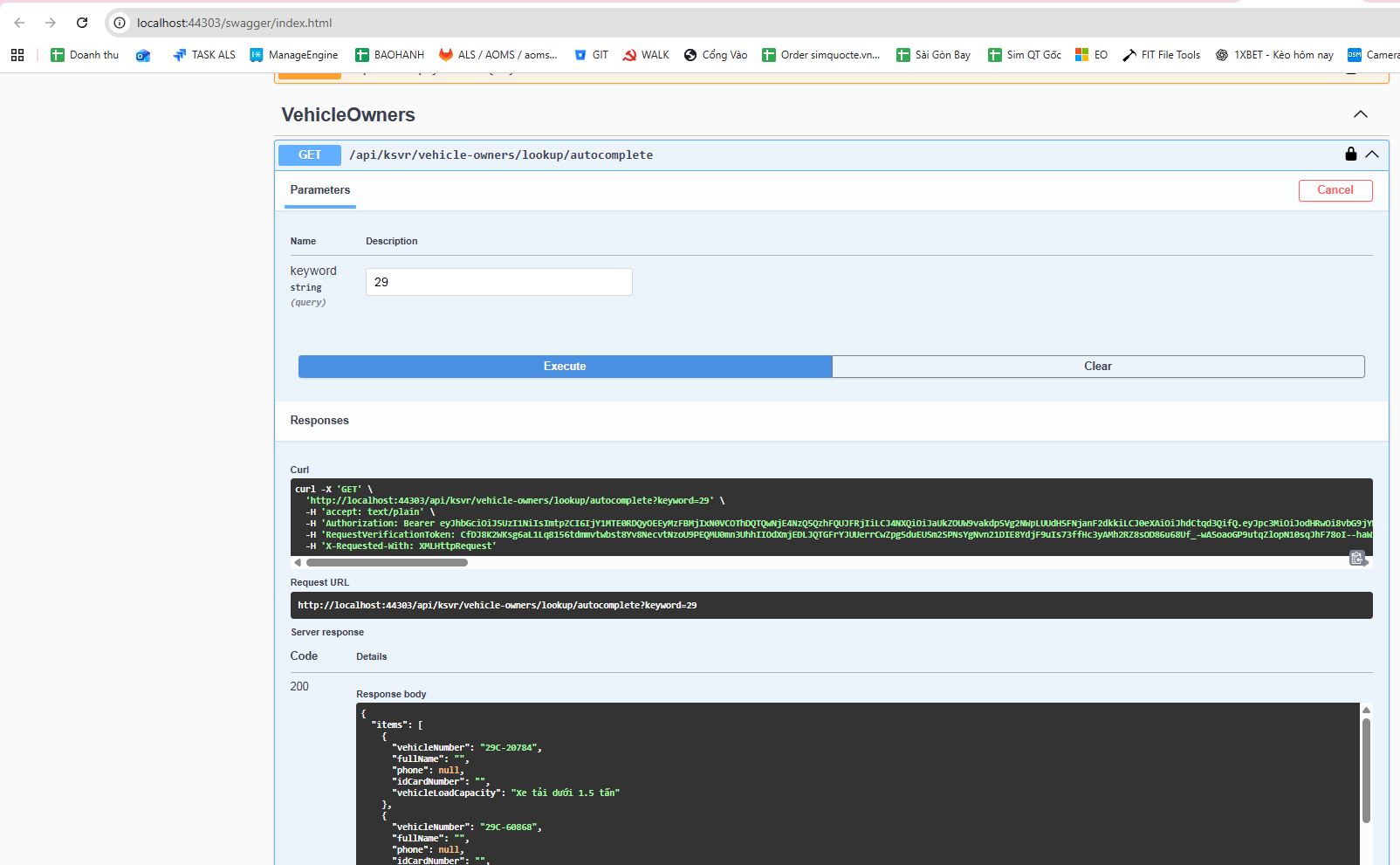 It works fine when tested in Swagger, but when calling it from the web, it returns Not Found.
Meanwhile, another API: http://localhost:44303/api/ksvr/vehicle-owners/1 also works fine in Swagger, and it works fine when called from the web as well.
This is my AppService code file.
using Microsoft.AspNetCore.Authorization;
using Microsoft.AspNetCore.Mvc;
using Microsoft.EntityFrameworkCore;
using System.Collections.Generic;
using System.Linq;
using System.Threading.Tasks;
using Volo.Abp;
using Volo.Abp.Application.Dtos;
using Volo.Abp.Application.Services;
using WebCMS.KSVR.Data.KSVRVehicleOwner;
using WebCMS.KSVR.Entities.KSVRVehicleOwner;
using WebCMS.KSVR.Permissions;
using WebCMS.KSVR.Services.Dtos.KSVRVehicleOwner;
using WebCMS.KSVR.Services.Dtos.Shared;

namespace WebCMS.KSVR.Services.KSVRVehicleOwner;

[Authorize(KSVRPermissions.VehicleOwners.Default)]
[Route("api/ksvr/vehicle-owners")]
public abstract class VehicleOwnersAppServiceBase : ApplicationService
{
    protected readonly IVehicleOwnerRepository _vehicleOwnerRepository;
    protected readonly VehicleOwnerManager _vehicleOwnerManager;

    protected VehicleOwnersAppServiceBase(
        IVehicleOwnerRepository vehicleOwnerRepository,
        VehicleOwnerManager vehicleOwnerManager)
    {
        _vehicleOwnerRepository = vehicleOwnerRepository;
        _vehicleOwnerManager = vehicleOwnerManager;
    }

    // ==============================
    // LOOKUP – PHẢI ĐỂ TRƯỚC {id:int}
    // ==============================

    // GET /api/ksvr/vehicle-owners/lookup/autocomplete?keyword=29
    [HttpGet("lookup/autocomplete")]
    public virtual async Task<ListResultDto<VehicleAutocompleteDto>> AutocompleteAsync(
        [FromQuery] string keyword)
    {
        var query = await _vehicleOwnerRepository.GetQueryableAsync();

        query = query.WhereIf(
            !keyword.IsNullOrWhiteSpace(),
            x => x.VehicleRegNumber.Contains(keyword)
        );

        var items = await query
            .OrderBy(x => x.VehicleRegNumber)
            .Take(100)
            .Select(x => new VehicleAutocompleteDto
            {
                VehicleNumber = x.VehicleRegNumber,
                FullName = x.FullName,
                Phone = x.Phone,
                IdCardNumber = x.IDCardNumber,
                VehicleLoadCapacity = x.VehicleLoadCapacity
            })
            .ToListAsync();

        return new ListResultDto<VehicleAutocompleteDto>(items);
    }

    // ==============================
    // LIST
    // ==============================

    // GET /api/ksvr/vehicle-owners
    [HttpGet]
    public virtual async Task<PagedResultDto<VehicleOwnerDto>> GetListAsync(
        GetVehicleOwnersInput input)
    {
        var totalCount = await _vehicleOwnerRepository.GetCountAsync(
            input.FilterText,
            input.FullName,
            input.IDCardNumber,
            input.Phone,
            input.Address,
            input.Company,
            input.VehicleRegNumber,
            input.Rermarks,
            input.VehicleLoadCapacityIsnMin,
            input.VehicleLoadCapacityIsnMax,
            input.VehicleLoadCapacity,
            input.IsWarning,
            input.TicketTypeMin,
            input.TicketTypeMax
        );

        var items = await _vehicleOwnerRepository.GetListAsync(
            input.FilterText,
            input.FullName,
            input.IDCardNumber,
            input.Phone,
            input.Address,
            input.Company,
            input.VehicleRegNumber,
            input.Rermarks,
            input.VehicleLoadCapacityIsnMin,
            input.VehicleLoadCapacityIsnMax,
            input.VehicleLoadCapacity,
            input.IsWarning,
            input.TicketTypeMin,
            input.TicketTypeMax,
            input.Sorting,
            input.MaxResultCount,
            input.SkipCount
        );

        return new PagedResultDto<VehicleOwnerDto>
        {
            TotalCount = totalCount,
            Items = ObjectMapper.Map<List<VehicleOwner>, List<VehicleOwnerDto>>(items)
        };
    }

    // ==============================
    // GET BY ID
    // ==============================

    // GET /api/ksvr/vehicle-owners/{id}
    [HttpGet("{id:int}")]
    public virtual async Task<VehicleOwnerDto> GetAsync(int id)
    {
        var entity = await _vehicleOwnerRepository.GetAsync(id);
        return ObjectMapper.Map<VehicleOwner, VehicleOwnerDto>(entity);
    }

    // ==============================
    // CREATE
    // ==============================

    // POST /api/ksvr/vehicle-owners
    [Authorize(KSVRPermissions.VehicleOwners.Create)]
    [HttpPost]
    public virtual async Task<VehicleOwnerDto> CreateAsync(
        VehicleOwnerCreateDto input)
    {
        var vehicleOwner = await _vehicleOwnerManager.CreateAsync(
            input.FullName,
            input.IDCardNumber,
            input.Phone,
            input.Address,Please help me resolve this issue.
            input.Company,
            input.VehicleRegNumber,
            input.Rermarks,
            input.VehicleLoadCapacityIsn,
            input.VehicleLoadCapacity,
            input.IsWarning,
            input.TicketType
        );

        return ObjectMapper.Map<VehicleOwner, VehicleOwnerDto>(vehicleOwner);
    }

    // ==============================
    // UPDATE
    // ==============================

    // PUT /api/ksvr/vehicle-owners/{id}
    [Authorize(KSVRPermissions.VehicleOwners.Edit)]
    [HttpPut("{id:int}")]
    public virtual async Task<VehicleOwnerDto> UpdateAsync(
        int id,
        VehicleOwnerUpdateDto input)
    {
        var vehicleOwner = await _vehicleOwnerManager.UpdateAsync(
            id,
            input.FullName,
            input.IDCardNumber,
            input.Phone,
            input.Address,
            input.Company,
            input.VehicleRegNumber,
            input.Rermarks,
            input.VehicleLoadCapacityIsn,
            input.VehicleLoadCapacity,
            input.IsWarning,
            input.TicketType
        );

        return ObjectMapper.Map<VehicleOwner, VehicleOwnerDto>(vehicleOwner);
    }

    // ==============================
    // DELETE
    // ==============================

    // DELETE /api/ksvr/vehicle-owners/{id}
    [Authorize(KSVRPermissions.VehicleOwners.Delete)]
    [HttpDelete("{id:int}")]
    public virtual async Task DeleteAsync(int id)
    {
        await _vehicleOwnerRepository.DeleteAsync(id);
    }
}
here is js code
abp.ajax({ url: abp.appPath + 'api/ksvr/vehicle-owners/lookup/autocomplete', type: 'GET', data: { keyword: params.data.q } }).then(success).catch(failure);Please help me resolve this issue.



