Hi @raff
It is not related with memory leak as i see. It is related with a virtualization problem and we are going to fix it.
Hi @Raff, I'm sorry for the late response. Nowadays i am really busy with the next generation of ABP Studio and did not see this ticket.
The AI assistant will be replaced soon, and redesigned version of ABP Studio will be released. Stay tuned for updates from us.
When I create a new project, I get a 'Dbmigrator' error.
What happens when you run *.DbMigrator project manually?
(if it is a non-layered template, you have to run the main project with --migrate-database arg.)
Abp Suite won't open.
Could you manually run it on console? Using the following command:
abp suite
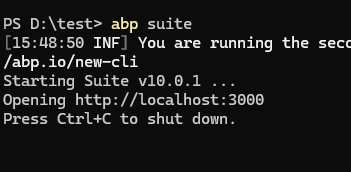
Was someone able to check this and if so when might a new version release with the fix?
Yes, it is fixed. We will release a new patch version soon.
Hi
It's not always blocked by another process but when it creates the new project I am not entirely sure wether all files were created correctly or still blocked by another process.
This may be due to the anti-virus program or operating system inspecting the file, thus blocking it temporarily.
In the microservice project in the ProcessServiceDbContext.cs this first line was added, which symbol cannot be resolved:
We'll check this and fix it if needed.
Hi @Spospisil
Untill we figure out the issue, following workaround may resolve it for you:
Volo.Abp.Studio.Extensions.StandardSolutionTemplates to the project on manage nuget packages dialog.This should bring the package to the cache.
I could not reproduce the problem.

Every time we modify a CRUD page and regenerate the list page (which uses the index.js file), this bug appears
Could you provide more details?
The new modules will continue being DDD layered.
Any update on this?
The issue is in the test process.
Can you ensure that anti-virus or something else is not blocking the file from read/write operations?









