






Description
Hello ABP Team,
Following the successful resolution of ticket #10222 regarding Domain/Subdomain Tenant Resolver implementation, we have encountered a critical issue when integrating this functionality with Azure AD B2C as an external authentication provider.
The domain/subdomain tenant resolution works perfectly in local development environments using OpenIddict, but fails when Azure AD B2C is enabled as the external provider, which is required for our QA, Preproduction, and Production environments in Azure.
Environment
- ABP Framework: 9.1.3
- UI: Blazor Interactive (WebAssembly only)
- Multi-tenancy: Enabled
- Authentication:
- Local development: OpenIddict ✅ (Working)
- Azure environments: Azure AD B2C ❌ (Not working)
URL Structure / Scenario
Our application is deployed with environment-based subdomains and tenant resolution:
QA: https://tenant1.app-app1-qa.commondomain.com
Preproduction: https://tenant2.app-app1-pre.commondomain.com
Production: https://tenant3.app-app1.commondomain.com
The tenant (e.g., tenant1, tenant2) is resolved from the first subdomain label, following the implementation described in ticket #10222.
What We Have Tried
1. Successful Implementation with OpenIddict
Following the solution provided by @maliming in ticket #10222, we successfully implemented:
AbpOpenIddictWildcardDomainOptionsconfiguration with wildcard domain formatsAbpTenantResolveOptionswith domain-based tenant resolversTokenWildcardIssuerValidatorfor JWT validation with wildcard issuers- Custom
MyWebAssemblyMultiTenantUrlProviderin Blazor WASM client to extract tenant from subdomain
Result: ✅ Works perfectly in local development with OpenIddict.
2. Azure AD B2C Integration Attempt
When attempting to replicate this behavior in Azure environments using Azure AD B2C as the external provider, we encounter authentication flow failures.
3. Azure AD B2C App Registration Redirect URIs Limitation
We identified a fundamental conflict between Azure AD B2C requirements and the subdomain-based tenant resolution strategy:
Current Redirect URIs registered in Azure AD B2C "App1 QA" app:
https://app-app1server-qa-qa-we-001.azurewebsites.net/signin-azuread-oidchttps://server-app1-qa.commondomain.com/signin-azuread-oidchttps://localhost:44329/signin-azuread-oidchttps://app-app1-qa.commondomain.com/authentication/loginhttps://app-app1-qa.commondomain.com/authentication/logouthttps://app-app1-qa.commondomain.com/signout/B2C_1_signupsignin01https://app-app1-qa.commondomain.com/signin-azuread-oidchttps://localhost:44385/signin-azuread-oidchttps://localhost:44385/authentication/logouthttps://localhost:44385/authentication/loginhttps://localhost:44385/signout/B2C_1_signupsignin01
The Problem: To support subdomain-based tenant resolution, we would need to register one redirect URI per tenant, for example:
https://tenant1.app-app1-qa.commondomain.com/authentication/loginhttps://tenant2.app-app1-qa.commondomain.com/authentication/loginhttps://tenant3.app-app1-qa.commondomain.com/authentication/login- ... (one per tenant and endpoint)
Azure AD B2C Limitation: According to Microsoft documentation, there is a hard limit on the number of redirect URIs that can be registered per App Registration.
This makes the manual registration approach not scalable for multi-tenant scenarios with subdomain resolution.
Wildcard Support: Azure AD B2C does support wildcards in redirect URIs (e.g., https://*.app-app1-qa.commondomain.com/authentication/login), but Microsoft does not recommend this practice for security reasons.
4. Latest Attempt and Current Error
After researching and implementing various solutions found in documentation and forums, we have advanced in the authentication flow but now encounter a correlation cookie error:
'.AspNetCore.Correlation.Kh3ihYshY6FPVHu7SpFA9Uka76CC_IBMV0yO8yMcZxQ' cookie not found.
This error indicates that the correlation cookie used by ASP.NET Core during the OAuth/OpenID Connect authentication flow is not found or is not available when Azure AD B2C attempts to redirect back to the application.
Potential causes:
- Cookie domain configuration issues when using subdomains
- SameSite cookie policy conflicts in the authentication flow
- Incompatibilities between the cookie domain and the subdomain used in redirection
- Tenant resolution interfering with the authentication middleware pipeline
Expected Behavior
- User accesses
https://tenant1.app-app1-qa.commondomain.com - Tenant
tenant1is automatically resolved from the subdomain - User is redirected to Azure AD B2C for authentication
- After successful authentication, user is redirected back to the application
- The tenant context (
tenant1) remains correctly applied throughout the session - API requests include the correct tenant context
- The authentication flow works seamlessly with Azure AD B2C just as it does with OpenIddict
Actual Behavior
- ✅ User accesses
https://tenant1.app-app1-qa.commondomain.com - ✅ Tenant
tenant1is correctly resolved from the subdomain - ✅ User is redirected to Azure AD B2C for authentication
- ❌ Correlation cookie error occurs during redirect back to application
- ❌ Authentication flow fails
- ❌ User cannot access the application with the tenant context
Use Case: Direct Links with Automatic Tenant Resolution
The primary use case for this functionality is to facilitate direct links to specific entities without requiring manual tenant specification.
Previous URL (without automatic resolution):
https://app-app1-qa.commondomain.com/Entity/36512651
Users had to manually select their tenant before accessing the patient record.
Implemented Solution (Working with OpenIddict)
With subdomain-based tenant resolution, the tenant is automatically resolved from the URL:
Improved URL (with automatic resolution):
https://tenantCliente.app-app1-qa.commondomain.com/Entity/36512651
The system automatically detects tenantCliente from the subdomain, configures the appropriate context, and allows direct access to the record without intermediate steps.
This works perfectly in local development with OpenIddict, but fails when Azure AD B2C is enabled.
Questions
Is the Domain/Subdomain Tenant Resolver compatible with Azure AD B2C external authentication providers?
Are there additional configurations or workarounds required to make subdomain-based tenant resolution work with Azure AD B2C?
How can we resolve the correlation cookie error when using subdomains with Azure AD B2C authentication?
Is there a recommended approach for handling redirect URI configuration in Azure AD B2C for multi-tenant applications with subdomain resolution?
- Should we use wildcards despite security concerns?
- Is there a proxy/middleware pattern recommended by ABP?
- Should we implement a different tenant resolution strategy for Azure environments?
Are there known limitations or incompatibilities between:
- ABP's domain-based tenant resolver
- Azure AD B2C authentication flow
- Cookie-based authentication state management
- Subdomain-based tenant isolation
Has ABP team tested or validated the Domain/Subdomain Tenant Resolver with Azure AD B2C in production scenarios?
Azure AD B2C Configuration Attempts
We have tried various approaches to integrate Azure AD B2C, including:
- Cookie domain configuration for subdomain sharing
- SameSite cookie policies adjustments
- Custom authentication handlers for tenant-aware redirects
- Middleware ordering adjustments
- Correlation cookie storage modifications
None of these attempts have successfully resolved the correlation cookie error when using subdomain-based tenant resolution with Azure AD B2C.
Request for Guidance
We would greatly appreciate:
Official guidance or documentation on integrating Domain/Subdomain Tenant Resolver with external authentication providers like Azure AD B2C
Sample implementation or reference project demonstrating this integration
Clarification on whether this scenario is supported in the current ABP Framework version
Recommended architectural patterns for handling this use case in production Azure environments
Any known workarounds or alternative approaches that maintain the automatic tenant resolution functionality while working with Azure AD B2C
Additional Context
- This functionality is critical for our production deployment in Azure
- We have successfully implemented the base functionality with OpenIddict (local development)
- The solution works as expected when Azure AD B2C is disabled
- Our application requires external authentication via Azure AD B2C for all Azure environments (QA, Pre, Prod)
- We need to maintain the direct link functionality with automatic tenant resolution
Thank you in advance for any guidance or assistance you can provide.
Related Issues:
- #10222 - Domain/Subdomain Tenant Resolver not working (Resolved for OpenIddict)
11 Answer(s)
-
0
hi
Wildcard Support: Azure AD B2C does support wildcards in redirect URIs (e.g., https://*.app-app1-qa.commondomain.com/authentication/login), but Microsoft does not recommend this practice for security reasons.
I think you have to use wildcard domains for your apps.
Correlation cookie
You can configure this cookie share across wildcard domains.
See https://abp.io/community/articles/how-to-share-the-cookies-between-subdomains-jfrzggc2#gsc.tab=0
Thanks.
Markdown supported.Copy, paste, or drag & drop images and files (max 100 MB per file, 100 MB total per post) -
0
[maliming] said: hi
Wildcard Support: Azure AD B2C does support wildcards in redirect URIs (e.g., https://*.app-app1-qa.commondomain.com/authentication/login), but Microsoft does not recommend this practice for security reasons.
I think you have to use wildcard domains for your apps.
Correlation cookie
You can configure this cookie share across wildcard domains.
See https://abp.io/community/articles/how-to-share-the-cookies-between-subdomains-jfrzggc2#gsc.tab=0
Thanks.
After several attempts, it has not worked.
Would it be possible to resolve the tenant in another way, similar to how Azure DevOps does it?
Something like: http:app.commondomain.com/tenant1/entity
Markdown supported.Copy, paste, or drag & drop images and files (max 100 MB per file, 100 MB total per post) -
0
hi
You can see : https://abp.io/community/articles/resolving-tenant-from-route-in-abp-framework-ah7oru97
But using sub-domains will be easy.
Thanks.
Markdown supported.Copy, paste, or drag & drop images and files (max 100 MB per file, 100 MB total per post) -
0
[maliming] said: hi
You can see : https://abp.io/community/articles/resolving-tenant-from-route-in-abp-framework-ah7oru97
But using sub-domains will be easy.
Thanks.
Even so, the URL limitation in Azure remains; I cannot use wildcards. Does it support this?
Markdown supported.Copy, paste, or drag & drop images and files (max 100 MB per file, 100 MB total per post) -
0
[maliming] said: hi
Do you mean Azure doesn't support https://abp.io/community/articles/resolving-tenant-from-route-in-abp-framework-ah7oru97
Thanks.
No, sorry, what I mean is that with this way of resolving the tenant, using the path, should I also configure the URLs with the wildcard in Azure App Registration, the original problem in this thread (with subdomains).
In Azure App Registrations, I have to configure the return URLs. I cannot add one URL per client due to a limitation in Azure itself, nor does it allow me to add wildcards, which is the recommended practice.
https://learn.microsoft.com/en-us/entra/identity-platform/reply-url#maximum-number-of-redirect-uris-and-uri-length https://learn.microsoft.com/en-us/entra/identity-platform/reply-url#restrictions-on-wildcards-in-redirect-uris
Markdown supported.Copy, paste, or drag & drop images and files (max 100 MB per file, 100 MB total per post) -
0
hi
If you use a path as a tenant name, you don't need to use sub-domains. Path or subdomain you can only select one. I recommend to use sub-domain.
100 or 256 tenants are not enough for you?
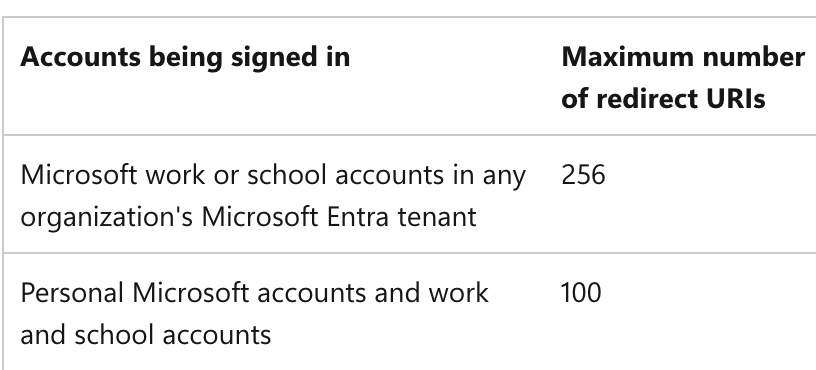
Thanks.
Markdown supported.Copy, paste, or drag & drop images and files (max 100 MB per file, 100 MB total per post) -
0
[maliming] said: hi
If you use a path as a tenant name, you don't need to use sub-domains. Path or subdomain you can only select one. I recommend to use sub-domain.
100 or 256 tenants are not enough for you?
Thanks.
For each tenant, I need to configure several URLs for login and logout. Even if it is only one per customer, there are more than one of those customers.
I know that this should be resolved with subdomains or paths, but not with both. That is not the question. The question is how to resolve it using Azure as an external provider.
Markdown supported.Copy, paste, or drag & drop images and files (max 100 MB per file, 100 MB total per post) -
0
hi
I'm not familiar with Azure.
Let’s make it clear:
- Can you use a different subdomain in Azure for tenants?
eg: https://tenant1.myazure.com https://tenant2.myazure.com
- For each tenant, I need to configure several URLs for login and logout. Even if it is only one per customer, there are more than one of those customers.
Where do you need to confiture URL? In the database or Azure?
Because you can use a wildcard redirect URL and a post-redirect URL in the database.
Thanks.
Markdown supported.Copy, paste, or drag & drop images and files (max 100 MB per file, 100 MB total per post) -
0
[maliming] said: hi
I'm not familiar with Azure.
Let’s make it clear:
- Can you use a different subdomain in Azure for tenants?
eg: https://tenant1.myazure.com https://tenant2.myazure.com
- For each tenant, I need to configure several URLs for login and logout. Even if it is only one per customer, there are more than one of those customers.
Where do you need to confiture URL? In the database or Azure?
Because you can use a wildcard redirect URL and a post-redirect URL in the database.
Thanks.
- Yes, I can, in the app registration, but I have a maximum limit of 100/256 URLs.
- I must register those redirect URLs in the app registration, as mentioned above. Azure does not allow me to use a wildcard, as it is not recommended practice.
Markdown supported.Copy, paste, or drag & drop images and files (max 100 MB per file, 100 MB total per post) -
0
hi
I don't think your tenants will exceed 100 out of 256, so this can be ignored for now.
Maybe you can call Azure's API in your application to add or remove new URLs when tenants are created or deleted.
Markdown supported.Copy, paste, or drag & drop images and files (max 100 MB per file, 100 MB total per post)


