






We have an existing ASP.NET MVC (.NET 4.8) application. We are embedding an ABP Microservice Angular application inside this existing app using an iframe.
The user is already authenticated in the existing application.
Authentication Flow
- The ABP Angular application is loaded inside an iframe.
- We do not use redirect-based login.
- We perform programmatic login using a grant in ABP Angular:
this.abpOAuthService.loginUsingGrant('password', { username, password, scope: 'openid profile offline_access AeroMiles' });
Authentication succeeds:
- Access token is stored
- Authorized API calls work correctly
Problem
After successful login using loginUsingGrant:
- The user is authenticated
- API calls succeed
- ABP Angular menus do not appear
- Menu contributors are not re-executed
- UI does not reflect authenticated state
This works correctly when using standard redirect login, but not with loginUsingGrant.
Expected Behavior
After successful programmatic login:
- ABP Angular menus should be initialized
- Menu contributors should run
- UI should reflect authenticated state
4 Answer(s)
-
0
Hi, Thank you for reaching out. This is a known behavior when using
loginUsingGrantinstead of the standard redirect-based login flow.Root Cause
When using standard redirect login, the entire application reloads, which triggers
APP_INITIALIZERs to run again. This refreshes:- User configuration and claims
- Permissions
- Routes and menu items
However, when using
loginUsingGrant:- The page doesn't reload
APP_INITIALIZERs don't re-execute- ConfigState (which holds user info, permissions, and menu visibility data) remains stale
- Menu contributors have already run during initial load and won't re-trigger
Solution
After a successful
loginUsingGrant, you need to manually refresh the application state by callingrefreshAppState():import { ConfigStateService, AbpOAuthService } from '@abp/ng.core'; import { firstValueFrom } from 'rxjs'; @Component({...}) export class YourLoginComponent { private oAuthService = inject(AbpOAuthService); private configStateService = inject(ConfigStateService); async performLogin(username: string, password: string) { // 1. Perform programmatic login await this.oAuthService.loginUsingGrant('password', { username, password, scope: 'openid profile offline_access AeroMiles' }); // 2. Refresh ConfigState to update permissions and trigger menu visibility await firstValueFrom(this.configStateService.refreshAppState()); // 3. Optional: Navigate to a route // this.router.navigate(['/']); } }Why This Works
| Scenario | APP_INITIALIZER | ConfigState | Menus | |----------|-----------------|-------------|-------| | Redirect Login | ✅ Runs | ✅ Updated | ✅ Visible | |
loginUsingGrantonly | ❌ Doesn't run | ❌ Stale | ❌ Not visible | |loginUsingGrant+refreshAppState()| ❌ Doesn't run | ✅ Updated | ✅ Visible |The
refreshAppState()method fetches the latest application configuration from the server, including the current user's permissions. This update triggers the permission-based visibility checks on menu items, making them appear correctly.Additional Notes
ABP Version: This solution applies to ABP 7.0+. If you're using an older version, please let us know.
Alternative approach: If
refreshAppState()doesn't work in your specific scenario, you could usewindow.location.reload()after login, though this is less elegant.iframe considerations: Since your ABP Angular app runs inside an iframe, you may also want to use
postMessageAPI to communicate the login success to the parent window if needed.
Please try this solution and let us know if you need further assistance.
Best regards
-
0
Hi, Thank you for reply. I am using ABP 9.2.3 version
I have tried the same but Menus are still not visibal.
SsoAuthService Class import { Injectable } from '@angular/core'; import { AbpOAuthService } from '@abp/ng.oauth';
@Injectable({ providedIn: 'root' }) export class SsoAuthService {
constructor(private abpOAuthService: AbpOAuthService) {}
login(username: string, password: string) { return this.abpOAuthService.loginUsingGrant('password', { username, password, scope: 'openid profile offline_access AeroMiles' }); } }
App Component Class
import { Component, OnInit } from '@angular/core'; import { AbpOAuthService } from '@abp/ng.oauth'; import { ConfigStateService, RoutesService } from '@abp/ng.core'; import { SsoAuthService } from './shared/sso/sso-auth.service'; import { Router, NavigationError } from '@angular/router'; import { firstValueFrom } from 'rxjs';
@Component({ standalone: false, selector: 'app-root', template:
<abp-loader-bar></abp-loader-bar> <abp-dynamic-layout></abp-dynamic-layout> <abp-gdpr-cookie-consent></abp-gdpr-cookie-consent>, }) export class AppComponent implements OnInit{ constructor( private ssoAuthService: SsoAuthService, private abpOAuthService: AbpOAuthService, private router: Router, private configStateService: ConfigStateService, private routesService: RoutesService, ) {}async ngOnInit() {
this.router.events.subscribe(event => {
if (event instanceof NavigationError) {
  if (event.error?.name === 'ChunkLoadError') {
    console.warn('Chunk load failed, reloading app...');
    window.location.reload();
  }
}
});
window.addEventListener('message', async (event) => {

  if (event.origin !== 'http://localhost:3139') {
    return;
  }

  if (this.abpOAuthService.isAuthenticated) {
    return;
  }

  if (event.data?.type === 'NGEN_SSO_LOGIN') {

    const { username, password } = event.data;

    try {
      await this.ssoAuthService.login(username, password);

      await firstValueFrom(this.configStateService.refreshAppState());

      this.abpOAuthService.isAuthenticated === true

      // Reload menus & routes
      this.routesService.refresh();

      await this.router.navigateByUrl('/');

      console.log('SSO login successful');
    } catch (err) {
      console.error('SSO login failed', err);
    }
  }
});
} }
Environment Variables
const oAuthConfig = { issuer: 'http://localhost:44385/', redirectUri: baseUrl, clientId: 'Angular', responseType: 'code', scope: 'offline_access openid profile email phone AuthServer IdentityService AdministrationService AuditLoggingService GdprService SaasService LanguageService AeroMiles', requireHttps: false, oidc: false, impersonation: { tenantImpersonation: true, userImpersonation: true, } };
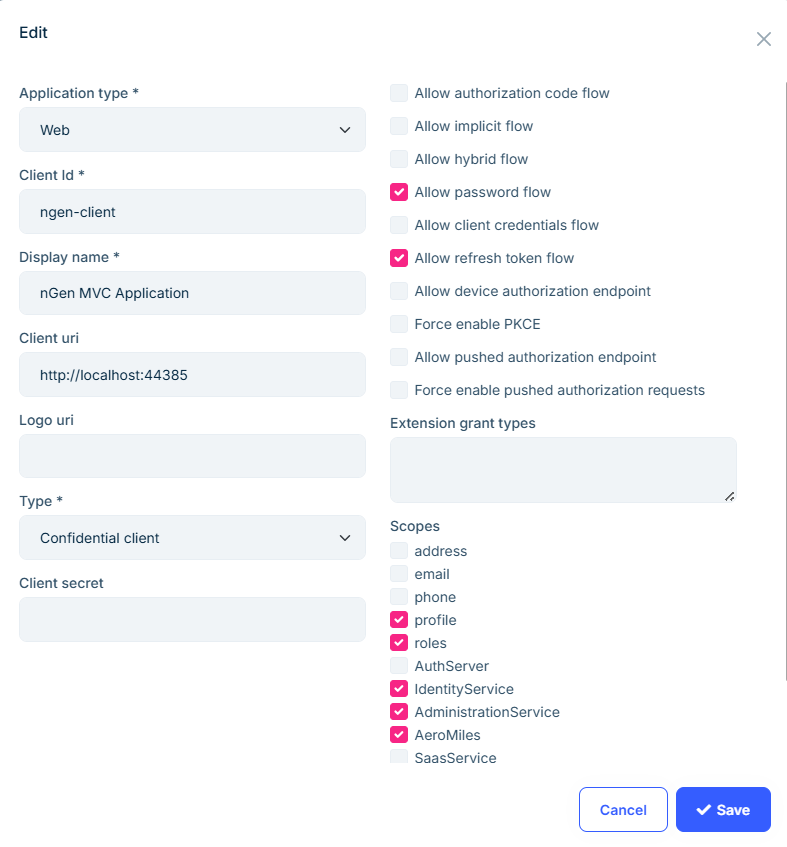
Application Configuration Also provided the permission of complete module
-
0
Hello,
We have reviewed and re-tested this scenario, and this is something we have also discussed and experimented with in the past.
In short, the described setup is not a supported authentication flow in ABP Angular.ABP Angular establishes its authentication and UI state during the application bootstrap phase, which relies on:
- Redirect-based login
- A full page reload
- Re-initialization of the application configuration (
/api/abp/application-configuration) - Permission, menu, and layout initialization
When using
loginUsingGrantfor programmatic login:- An access token is successfully obtained
- Authorized API calls work as expected
However, since the Angular application is already bootstrapped in an anonymous state, the following are not re-initialized:
- Menu contributors
- Permission-based UI visibility
- Layout and application state
In iframe-based scenarios specifically:
- The authentication state of the parent ASP.NET MVC application
- Cannot be securely or reliably propagated to the embedded ABP Angular application
- Therefore, the expectation of “logging in once in MVC and automatically authenticating the iframe Angular app” is not supported nor recommended by ABP
Supported and recommended approaches are:
- Using the standard redirect-based login flow
- Running the Angular application as a standalone SPA with its own authentication lifecycle
Because of these reasons, the missing menus and UI state are not a bug, but a known architectural limitation of this setup.
Thank you for your understanding.
-
0
Thanks for reply I am closing this thread.


