






Dear ABP Support Team, I would like to report a critical issue with ABP Studio on Windows 11. Issue Description:
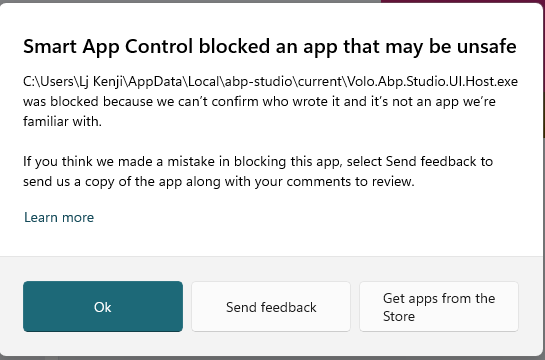
When launching the file Volo.App.Studio.UI.Host.exe from the directory C:\Users[User]\AppData\Local\abp-studio\current, the application is blocked by Windows Smart App Control
Error message: "Smart App Control blocked an app that may be unsafe"
Blocking reason: "we can't vouch for it and it's not an app we're familiar with"
When clicking the "Ok" button, the notification window closes and the application fails to launch
I am currently unable to use ABP Studio at all
 System Information:
Operating System: Windows 11 Edition Windows 11 Pro Version 25H2 Installed on 29/11/2025 OS build 26200.7628 Experience Windows Feature Experience Pack 1000.26100.275.0 File path: C:\Users[User]\AppData\Local\abp-studio\current\Volo.App.Studio.UI.Host.exe
Please assist with resolving this issue. Thank you! Best regards, Lj Kenji
4 Answer(s)
-
0
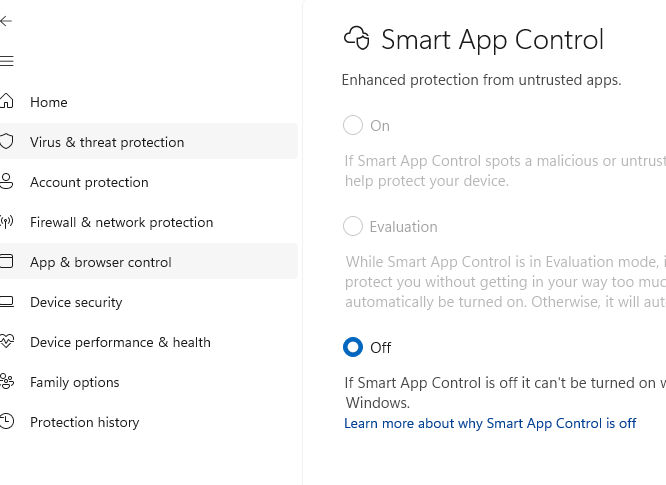
I turned this off and its now starts up
 Markdown supported.Copy, paste, or drag & drop images and files (max 100 MB per file, 100 MB total per post)
 -
0
Hi,
Thank you for reporting this issue. The behavior you’re experiencing is related to Windows Smart App Control, a security feature in Windows 11 that blocks applications it cannot verify. Since ABP Studio currently includes unsigned DLLs, Smart App Control flags the executable (Volo.App.Studio.UI.Host.exe) as potentially unsafe and prevents it from launching.
At this time:
Smart App Control can only be enabled or disabled during Windows installation. If it is enabled, unsigned applications may be blocked.
We are actively working on digitally signing ABP Framework DLLs to ensure compatibility with Smart App Control. This will be available in upcoming releases.
The current version of ABP Studio will remain affected until the signing process is completed.
Workarounds:
If you need immediate access, you can disable Smart App Control (note: this must be done during Windows installation; it cannot be toggled afterward).
Alternatively, you may run ABP Studio on a system where Smart App Control is not enabled.
We understand the inconvenience and appreciate your patience while we finalize the signing process. Your feedback helps us prioritize this fix, and we’ll update you as soon as the signed version is available.
Markdown supported.Copy, paste, or drag & drop images and files (max 100 MB per file, 100 MB total per post) -
0
Just to note, I disabled it after installation so it is possible to disable it, its just not possible to re-enable it again afterwards (it warns you about this)
Markdown supported.Copy, paste, or drag & drop images and files (max 100 MB per file, 100 MB total per post)



