


- ABP Framework version: v4.3.0. The ABP packages were upgraded from 3.0.4 to 4.3.0
- UI type: Angular
- DB provider: EF Core
- Tiered (MVC) or Identity Server Separated (Angular): yes
- Exception message and stack trace:
- After Upgrading to Latest framework 4.3.0 and related Volo.Abp.Identity.EntityFrameworkCore and Volo.Abp.EntityFrameworkCore.PostgreSql, We are facing issues connecting to each table. for every repository call, even if it is not a relationship and plain table, we are getting the following error
Npgsql.PostgresException (0x80004005): 42P01: relation "XXX" does not exist
at Npgsql.NpgsqlConnector.<ReadMessage>g__ReadMessageLong|194_0(NpgsqlConnector connector, Boolean async, DataRowLoadingMode dataRowLoadingMode, Boolean readingNotifications, Boolean isReadingPrependedMessage)
at Npgsql.NpgsqlDataReader.NextResult(Boolean async, Boolean isConsuming, CancellationToken cancellationToken)
at Npgsql.NpgsqlDataReader.NextResult()
at Npgsql.NpgsqlCommand.ExecuteReader(CommandBehavior behavior, Boolean async, CancellationToken cancellationToken)
at Npgsql.NpgsqlCommand.ExecuteReader(CommandBehavior behavior, Boolean async, CancellationToken cancellationToken)
at Npgsql.NpgsqlCommand.ExecuteReader(CommandBehavior behavior)
at Npgsql.NpgsqlCommand.ExecuteDbDataReader(CommandBehavior behavior)
at System.Data.Common.DbCommand.ExecuteReader()
at Microsoft.EntityFrameworkCore.Storage.RelationalCommand.ExecuteReader(RelationalCommandParameterObject parameterObject)
at Microsoft.EntityFrameworkCore.Query.Internal.SplitQueryingEnumerable1.Enumerator.InitializeReader(DbContext _, Boolean result) at Npgsql.EntityFrameworkCore.PostgreSQL.Storage.Internal.NpgsqlExecutionStrategy.Execute[TState,TResult](TState state, Func3 operation, Func3 verifySucceeded) at Microsoft.EntityFrameworkCore.Query.Internal.SplitQueryingEnumerable1.Enumerator.MoveNext()
Exception data:
Severity: ERROR
SqlState: 42P01
MessageText: relation "XXX" does not exist
Position: 23
File: parse_relation.c
Line: 1180
Routine: parserOpenTable
- Steps to reproduce the issue:
36 Answer(s)
-
0
we have shared the bare minimal project without depedencies for you to reproduce the issue locally.
I can't use the project you shared before, as I said in the meeting, you should provide a project and steps that only depend on the local PostgreSQL database.
I remember another friend had agreed to do this in the meeting,
Yes, please check your email. We have just shared the project that depends on local PostgreSQL database. Kindly confirm.
Markdown supported.Copy, paste, or drag & drop images and files (max 100 MB per file, 100 MB total per post) -
0
HI
I checked the inbox,trash,spam did not receive any mail,
liming.ma@volosoft.com
Strange you didn't received it. May be the attachment and network connection could be causing it. Could you please check it after some time and confirm. I'll also try to send it from my personal email address.
 Markdown supported.Copy, paste, or drag & drop images and files (max 100 MB per file, 100 MB total per post)
-
0
HI
I checked the inbox,trash,spam did not receive any mail,
liming.ma@volosoft.com
Strange you didn't received it. May be the attachment and network connection could be causing it. Could you please check it after some time and confirm. I'll also try to send it from my personal email address.
I've resend the email and project from my official (repunjay.soni@ness.com) and personal (repunjaysoni@gmail.com) email addresses. Please check and confirm.
Markdown supported.Copy, paste, or drag & drop images and files (max 100 MB per file, 100 MB total per post) -
0
hi
Here is my steps:
- Replace all connection strings with my locally.
- Run
modules\litmus-core\src\SCV.Litmus.DbMigrator\SCV.Litmus.DbMigrator - Run
dotnet ef database updateinSCV.Litmus.ProfileManagement.HttpApi.Hostproject. - Run
SCV.Litmus.IdentityServerandSCV.Litmus.ProfileManagement.HttpApi.Host. - Call
https://localhost:44398/profile/api/ProfileManagement/sampleget success result. - Add a tenant in database.
- Then Call
https://localhost:44398/profile/api/ProfileManagement/sampleget success result.
@Repunjay Am I miss some steps?
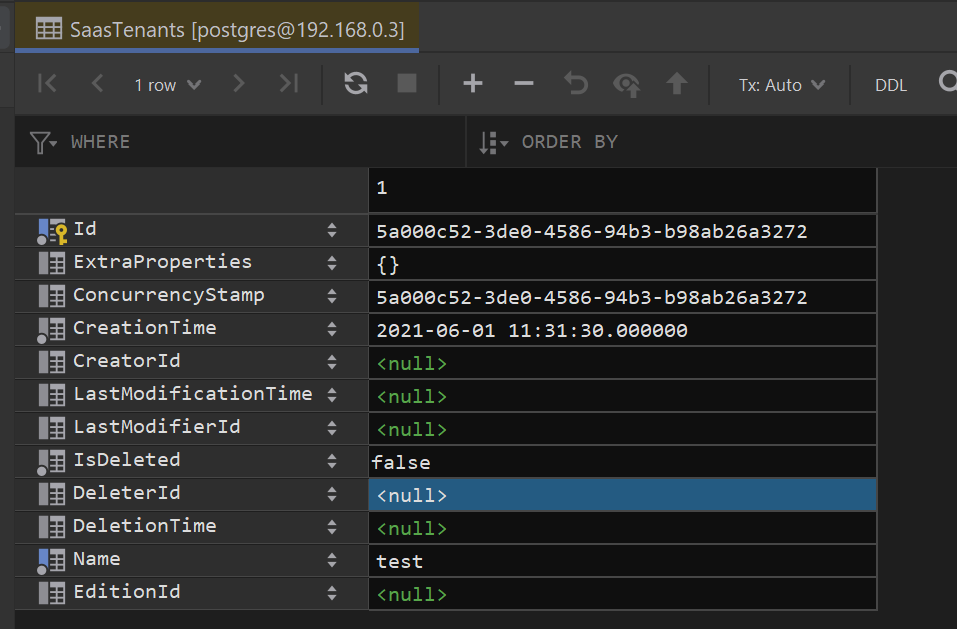
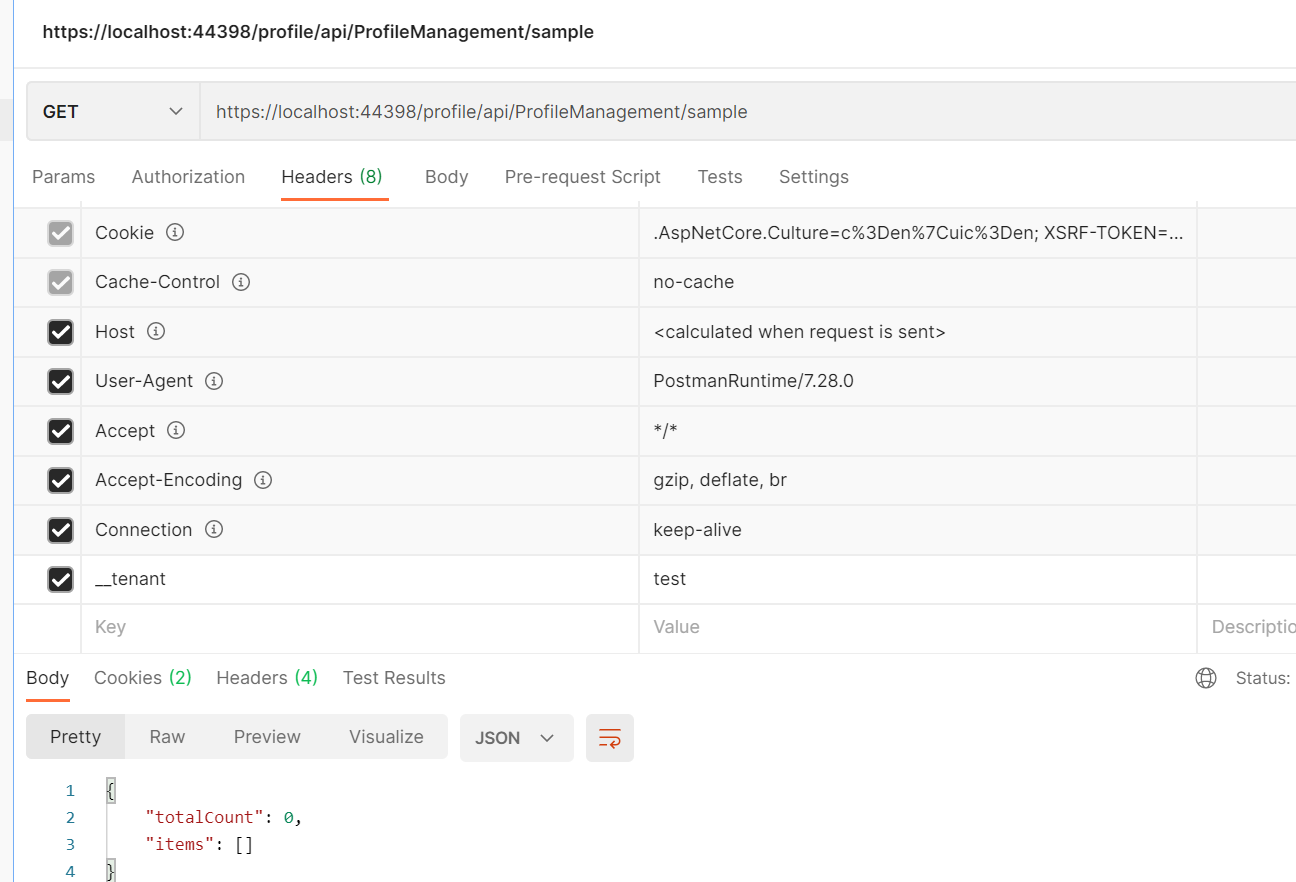 Markdown supported.Copy, paste, or drag & drop images and files (max 100 MB per file, 100 MB total per post)
-
0
hi
Here is my steps:
- Replace all connection strings with my locally.
- Run
modules\litmus-core\src\SCV.Litmus.DbMigrator\SCV.Litmus.DbMigrator - Run
dotnet ef database updateinSCV.Litmus.ProfileManagement.HttpApi.Hostproject. - Run
SCV.Litmus.IdentityServerandSCV.Litmus.ProfileManagement.HttpApi.Host. - Call
https://localhost:44398/profile/api/ProfileManagement/sampleget success result. - Add a tenant in database.
- Then Call
https://localhost:44398/profile/api/ProfileManagement/sampleget success result.
@Repunjay Am I miss some steps?
Hi maliming,
I've sent you an email with detailed steps to reproduce the error and do further debugging. Kindly check and advise.
Markdown supported.Copy, paste, or drag & drop images and files (max 100 MB per file, 100 MB total per post) -
0
The structure of the sql you shared is different from the project I received. Please try to reproduce the problem through the code, you can share the necessary code to create the data. Please keep it simple, thanks.
Markdown supported.Copy, paste, or drag & drop images and files (max 100 MB per file, 100 MB total per post) -
0
The structure of the sql you shared is different from the project I received.
Please try to reproduce the problem through the code, you can share the necessary code to create the data. Please keep it simple, thanks.I'm not sure how does it prevent you to debug the issue. You can create the Litmus_Lenovo_ProfileManagement database thru code migration by executing "update-database" command and selecting "SCV.Litmus.ProfileManagement.HttpApi.Host" project. Once the DB is created, you can setup one record in Samples table using below query -
INSERT INTO public."Samples"( "Id", "ExtraProperties", "ConcurrencyStamp", "CreationTime", "CreatorId", "LastModificationTime", "LastModifierId", "IsDeleted", "DeleterId", "DeletionTime", "TenantId", "Value") VALUES ('e42f9b05-2e27-41f4-a562-c1c00cf49d39', '{}', '', '0001-01-01 00:00:00', null, null, null, false, null, null, 'd1be844b-d3a2-031a-f036-39f5d4380239', 123);
The host database Litmus_Admin and tenant database Litmus_Lenovo_Admin needs to be created thru script as it has the neccessary data and tenant information which is required to reproduce the issue. We cannot create all data thru code.
Markdown supported.Copy, paste, or drag & drop images and files (max 100 MB per file, 100 MB total per post) -
0
hi @Repunjay
Our problem may be related to migration, so we shouldn't create the host database Litmus_Admin and tenant database Litmus_Lenovo_Admin through SQL.
We need use migrations of ef core.
Markdown supported.Copy, paste, or drag & drop images and files (max 100 MB per file, 100 MB total per post) -
0
This question has been automatically marked as stale because it has not had recent activity.
Markdown supported.Copy, paste, or drag & drop images and files (max 100 MB per file, 100 MB total per post)



