






Used Module Startup Template to create module. it gives issue on run Update-Database command for the EF Core from Package Manager Console.

8 Answer(s)
-
0
Hi, Can you provide steps to reproduce?
Markdown supported.Copy, paste, or drag & drop images and files (max 100 MB per file, 100 MB total per post) -
0
https://docs.abp.io/en/commercial/latest/startup-templates/module/creating-a-new-solution
Created Module Solution without user interface and run Update-Database command for the EF Core from Package Manager Console to generate database. got issue that more than one DbContext found.
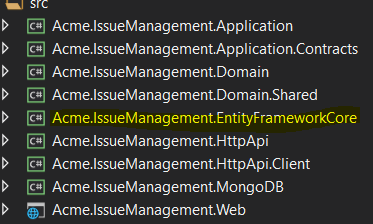
there are two database. how to create those? IssueManagement_Main and IssueManagement_Module
Markdown supported.Copy, paste, or drag & drop images and files (max 100 MB per file, 100 MB total per post) -
0
I see that your screenshot contains
.Webproject. Are you sure you are creating a solution without a user interface?For --no-ui option:
- Set
Acme.IssueManagement.HttpApi.Hostas startup project and setAcme.IssueManagement.HttpApi.Hostas PMC defualt project. Then executeupdate-databasecommand. - Set
Acme.IssueManagement.IdentityServeras startup project and setAcme.IssueManagement.IdentityServeras PMC defualt project. then executeupdate-databasecommand.
For has user interface:
Set
Acme.IssueManagement.Web.Unifiedas startup project and setAcme.IssueManagement.Web.Unifiedas PMC defualt project. Then executeupdate-databasecommand.Markdown supported.Copy, paste, or drag & drop images and files (max 100 MB per file, 100 MB total per post) - Set
-
0
Hi,
Yes, i have created a solution without a user interface. given screenshot was just for reference.
I have run the update-datebase on HttpApi.Host and Idnetityserver but i am able to find only one database _main and not the other _module
Also when i run the HttpApi.Host project then i got below exception
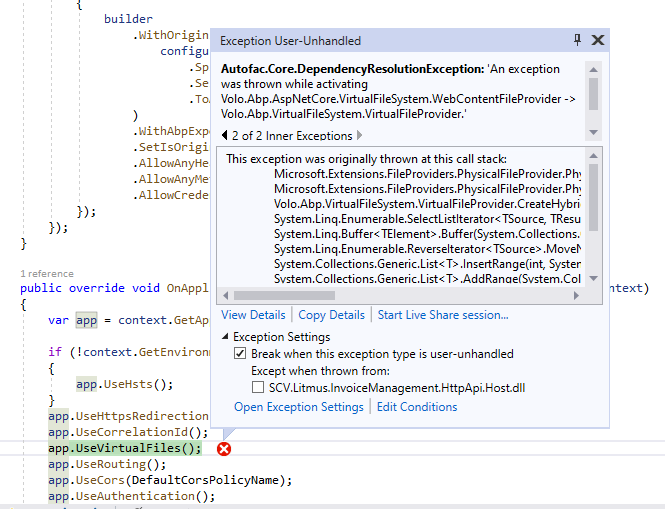
Idnetityserver project working fine.
Markdown supported.Copy, paste, or drag & drop images and files (max 100 MB per file, 100 MB total per post) -
0
I can't reproduce your problem. Can I check your problem remotely?
Markdown supported.Copy, paste, or drag & drop images and files (max 100 MB per file, 100 MB total per post) -
0
Hi Yes. We can. Let me know how we can processed
Markdown supported.Copy, paste, or drag & drop images and files (max 100 MB per file, 100 MB total per post) -
0
Do you have teamview?
You can email to me the connection Id.
liangshiw@outlook.com
Markdown supported.Copy, paste, or drag & drop images and files (max 100 MB per file, 100 MB total per post) -
0
Hi,
I dont have teamviewer. I have shared skype id on email.
Thanks
Markdown supported.Copy, paste, or drag & drop images and files (max 100 MB per file, 100 MB total per post)


