






When a Tenant Admin has the following Sinin options selected
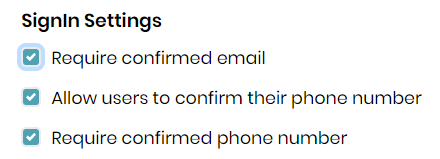
He then adds a user to the tenant by adding a user under the Identity, the user is not able to log in and get the following message.
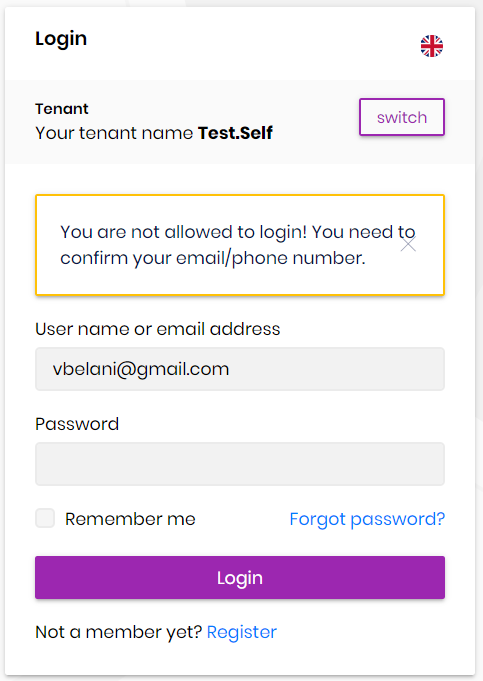
How is a user supposed to Verify their Email and Phone number if they can't login to the application.
6 Answer(s)
-
0
Dear Albert
I am using the Commercial MVC template 4.2.2
I have commented the below lines in the *.Domain project and have setup the SMTP setting currectly, other emails are being sent out currectly.
        //#if DEBUG
        //context.Services.Replace(ServiceDescriptor.Singleton<IEmailSender, NullEmailSender>());
        //#endif
The verification emails are not set out as part of the login flow, the user has to be logged in and access their profile and click on verify, however if it is a new user how can they login to access their profile. The verification process should be done during log on and an email should be sent out to the user so they can verify their email and phone number for TwoFactor authentication to kick in.
Can you please let me know if the Verification of email and phone number is part of the login flow?
i have looked at the source code of the Account.Pro module which comes with the commerical template and i can't see the verification process in the login flow can you please confirm?
Markdown supported.Copy, paste, or drag & drop images and files (max 100 MB per file, 100 MB total per post) -
0
Hi,
You can upgrade to 4.3.x, we have done confirm user UI in 4.3.0
Markdown supported.Copy, paste, or drag & drop images and files (max 100 MB per file, 100 MB total per post) -
0
I tried 4.3.2 and i can't even navigate to the setting page i am getting "access denied" error,
please see issue https://support.abp.io/QA/Questions/1424/Access-Denied-to-Settings-Management-for-Tenant-on-432
i think there is bug in the new 4.3.2 Commercial template it is trying to acess the Email Settings tab as a tenant and redirecting to "Access Denied"
Markdown supported.Copy, paste, or drag & drop images and files (max 100 MB per file, 100 MB total per post) -
0
https://support.abp.io/QA/Questions/1424 fixed
Can you try again?
Markdown supported.Copy, paste, or drag & drop images and files (max 100 MB per file, 100 MB total per post) -
0
This question has been automatically marked as stale because it has not had recent activity.
Markdown supported.Copy, paste, or drag & drop images and files (max 100 MB per file, 100 MB total per post)



