






- ABP Framework version: v4.3
- UI type: Angular
- DB provider: EF Core
- Identity Server Separated (Angular):No
- ABP Commercial application
Hi Team,
I'm trying to deploy both angular and asp-net core on single azure web service. Here is my project structure I have included the following source package(code) to my application 1. Account.pro module 2. LeptonTheme
Deployement steps to azure:
- I have deployed HttpApi.Host application to azure web service(https://abptest-dev.azurewebsites.net)
- I have deployed angular app to same azure web service(https://abptest-dev.azurewebsites.net) Both these application are deployed to root folder (say [wwwroo in](http://wwwroo](http://wwwroo in in) azure)
HttpApi.Host application is working perfectly fine, swagger api is working fine as i can autorise to login for swagger and i can call api's throught swagger. Login is also working with url: https://abptest-dev.azurewebsites.net/account/login
Angular application is not loading, attached the picture
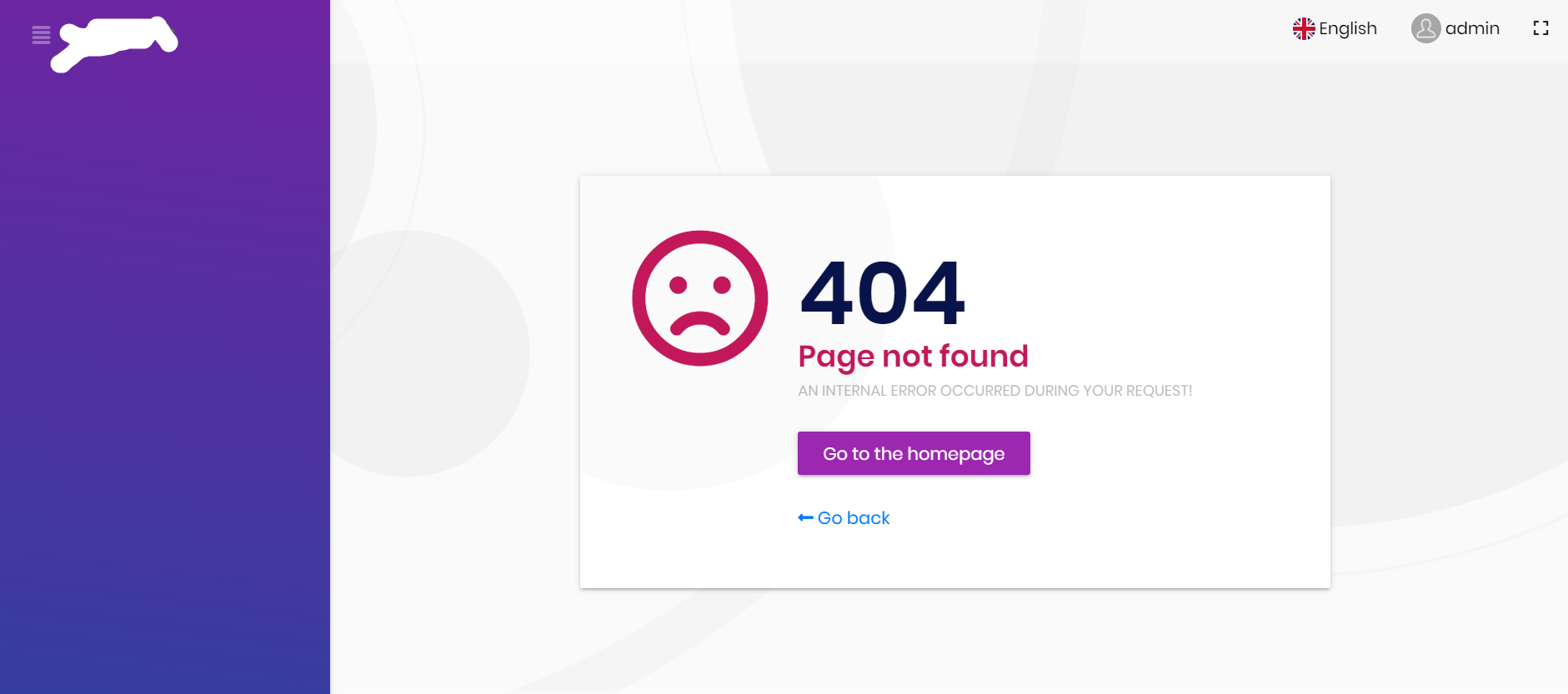
Asp-net core configuration Details: Appsettings.json
    "SelfUrl": "https://abptest-dev.azurewebsites.net",
    "AngularUrl": "https://abptest-dev.azurewebsites.net",
    "CorsOrigins": "https://*.abptest-dev.azurewebsites.net,http://abptest-dev.azurewebsites.net",
    "RedirectAllowedUrls": "http://abptest-dev.azurewebsites.net,https://abptest-dev.azurewebsites.net"
  },
  "Redis": {
    "Configuration": "127.0.0.1"
  }
  "AuthServer": {
    "Authority": "https://abptest-dev.azurewebsites.net",
    "RequireHttpsMetadata": "false",
    "SwaggerClientId": "abptest_Swagger",
    "SwaggerClientSecret": "1q2w3e*"
  },
Angular configuration:
Environment.prod.ts
import { Environment } from '@abp/ng.core';

const baseUrl = 'http://abptest-dev.azurewebsites.net';

export const environment = {
  production: true,
  application: {
    baseUrl,
    name: 'abptest',
  },
  oAuthConfig: {
    issuer: 'https://abptest-dev.azurewebsites.net',
    redirectUri: baseUrl,
    clientId: 'abptest_App',
    responseType: 'code',
    scope: 'offline_access openid profile role email phone abptest',
  },
  apis: {
    default: {
      url: '',
      rootNamespace: 'abptest',
    },
  },
} as Environment;
Could you please let me know is model deployment will work or supportted by ABP. if yes What configuration is missing?
49 Answer(s)
-
0
Hi Mailming,
with DomainResolver approch, it started working. but I don't see tenant swith(I hope is expected behavior) but
- If I create/add user in teant say t1. user is created in both tenant t1(t1.abptest.com) and also main site(abptest.com). because of this mylinkuser functionality is breaking and it redirecting to abptest.com always.
- Register is not working
- My User Links is also not working
*my DBmigration appsettings
"ConnectionStrings": {

  },
  "IdentityServer": {
    "Clients": {
      "AbpTest_Web": {
        "ClientId": "AbpTest_Web",
        "RootUrl": "https://{0}.abptest-dev.azurewebsites.net/"
      },
      "AbpTest_Web_Public": {
        "ClientId": "AbpTest_Web_Public",
        "RootUrl": "https://abptest-dev.azurewebsites.net/"
      },
      "AbpTest_Web_Public_Tiered": {
        "ClientId": "AbpTest_Web_Public_Tiered",
        "RootUrl": "https://abptest-dev.azurewebsites.net/"
      },
      "AbpTest_App": {
        "ClientId": "AbpTest_App",
        "RootUrl": "https://{0}.abptest-dev.azurewebsites.net/"
      },
       "AbpTest_Swagger": {
        "ClientId": "AbpTest_Swagger",
        "RootUrl": "https://{0}.abptest-dev.azurewebsites.net/"
      }
    }
  }
appsettings of HttpApi.Host
{
  {
  "App": {
    "SelfUrl": "https://abptest-dev.azurewebsites.net/",
    "AngularUrl": "https://abptest-dev.azurewebsites.net/",
    "CorsOrigins": "https://*.abptest-dev.azurewebsites.net/,https://abptest-dev.azurewebsites.net/",
    "RedirectAllowedUrls": "http://abptest-dev.azurewebsites.net/, https://abptest-dev.azurewebsites.net/"
  },
  "Redis": {
    "Configuration": "https://abptest-dev.azurewebsites.net/",
    "IsEnabled": "false"
  },
  "AuthServer": {
    "Authority": "https://abptest-dev.azurewebsites.net/",
    "RequireHttpsMetadata": "false",
    "SwaggerClientId": "AbpTest_Swagger",
    "SwaggerClientSecret": "1q2w3e*"
  }
}
Angular Environment.ts
const baseUrl = 'https://{0}.abptest-dev.azurewebsites.net';

export const environment = {
  production: true,
  application: {
    baseUrl,
    name: 'AbpTest',
  },
  oAuthConfig: {
    issuer: 'https://abptest-dev.azurewebsites.net',
    redirectUri: baseUrl,
    clientId: 'AbpTest_App',
    responseType: 'code',
    scope: 'offline_access openid profile role email phone AbpTest',
  },
  apis: {
    default: {
      url: '',
      rootNamespace: 'AbpTest',
    },
  },
} as Environment;
In HttpApiHost I have added below code
//To Configure domain Resolver
    context.Services.AddAbpStrictRedirectUriValidator();
    context.Services.AddAbpClientConfigurationValidator();
    context.Services.AddAbpWildcardSubdomainCorsPolicyService();
    Configure<AbpTenantResolveOptions>(options =>
    {
        options.AddDomainTenantResolver("{0}.abptest-dev.azurewebsites.net");
    });

    Configure<IdentityServerOptions>(options =>
    {
        options.IssuerUri = configuration["App:SelfUrl"];
    });
Please let me know anything is wrong in configuration.Markdown supported.Copy, paste, or drag & drop images and files (max 100 MB per file, 100 MB total per post) -
0
hi
it started working. but I don't see tenant swith(I hope is expected behavior)
This is expected. The application always tries to resolve the tenant from the domain name.
- If I create/add user in teant say t1. user is created in both tenant t1(t1.abptest.com) and also main site(abptest.com). because of this mylinkuser functionality is breaking and it redirecting to abptest.com always.
- Register is not working
- My User Links is also not working
Can you share some screenshots or log info?
Can you check if the current tenant is a domain name? Maybe it is not working properly.
We have related sample. https://github.com/abpframework/abp-samples/tree/master/DomainTenantResolver#angular https://github.com/abpframework/abp-samples/tree/master/DomainTenantResolver/NG
Markdown supported.Copy, paste, or drag & drop images and files (max 100 MB per file, 100 MB total per post) -
0
Hi Maliming,
I have refferred the links you provided and here is results:
When I logged with url https://apbtest.com
2021-06-28 07:05:41.929 +00:00 [INF] Request starting HTTP/1.1 GET https://AbpTest.com/connect/authorize?response_type=code&client_id=AbpTest_App&state=OWJsMnctaVJITlJNVEJ6SGlkOE9Fb0wzYXBMUFB6bEQ1YS1QVndvR3NWcWVJ&redirect_uri=https%3A%2F%2FAbpTest.com&scope=offline_access%20openid%20profile%20role%20email%20phone%20AbpTest&code_challenge=pGFRBF6JXiKpIshgnVW5aEwcOAfS0V3iBt_faPFnCmo&code_challenge_method=S256&nonce=OWJsMnctaVJITlJNVEJ6SGlkOE9Fb0wzYXBMUFB6bEQ1YS1QVndvR3NWcWVJ&culture=en&ui-culture=en - -
2021-06-28 07:05:41.989 +00:00 [INF] Invoking IdentityServer endpoint: IdentityServer4.Endpoints.AuthorizeEndpoint for /connect/authorize
2021-06-28 07:05:42.052 +00:00 [ERR] Invalid client configuration for client AbpTest_App: AllowedCorsOrigins contains invalid origin: https://{0}.AbpTest.com
2021-06-28 07:05:42.053 +00:00 [INF] {"ClientId":"AbpTest_App","ClientName":"AbpTest_App","Category":"Error","Name":"Invalid Client Configuration","EventType":"Error","Id":3001,"Message":"AllowedCorsOrigins contains invalid origin: https://{0}.AbpTest.com","ActivityId":"8000127e-1800-b500-b63f-84710c7967bb","TimeStamp":"2021-06-28T07:05:42.0000000Z","ProcessId":5328,"LocalIpAddress":"10.0.5.115:443","RemoteIpAddress":"113.193.237.54","$type":"InvalidClientConfigurationEvent"}
2021-06-28 07:05:42.053 +00:00 [ERR] Unknown client or not enabled: AbpTest_App
{"ClientId":null,"ClientName":null,"RedirectUri":null,"AllowedRedirectUris":null,"SubjectId":"anonymous","ResponseType":null,"ResponseMode":null,"GrantType":null,"RequestedScopes":"","State":null,"UiLocales":null,"Nonce":null,"AuthenticationContextReferenceClasses":null,"DisplayMode":null,"PromptMode":"","MaxAge":null,"LoginHint":null,"SessionId":null,"Raw":{"response_type":"code","client_id":"AbpTest_App","state":"OWJsMnctaVJITlJNVEJ6SGlkOE9Fb0wzYXBMUFB6bEQ1YS1QVndvR3NWcWVJ","redirect_uri":"https://AbpTest.com","scope":"offline_access openid profile role email phone AbpTest","code_challenge":"pGFRBF6JXiKpIshgnVW5aEwcOAfS0V3iBt_faPFnCmo","code_challenge_method":"S256","nonce":"OWJsMnctaVJITlJNVEJ6SGlkOE9Fb0wzYXBMUFB6bEQ1YS1QVndvR3NWcWVJ","culture":"en","ui-culture":"en"},"$type":"AuthorizeRequestValidationLog"}
2021-06-28 07:05:42.053 +00:00 [ERR] Request validation failed
2021-06-28 07:05:42.053 +00:00 [INF] {"ClientId":null,"ClientName":null,"RedirectUri":null,"AllowedRedirectUris":null,"SubjectId":"anonymous","ResponseType":null,"ResponseMode":null,"GrantType":null,"RequestedScopes":"","State":null,"UiLocales":null,"Nonce":null,"AuthenticationContextReferenceClasses":null,"DisplayMode":null,"PromptMode":"","MaxAge":null,"LoginHint":null,"SessionId":null,"Raw":{"response_type":"code","client_id":"AbpTest_App","state":"OWJsMnctaVJITlJNVEJ6SGlkOE9Fb0wzYXBMUFB6bEQ1YS1QVndvR3NWcWVJ","redirect_uri":"https://AbpTest.com","scope":"offline_access openid profile role email phone AbpTest","code_challenge":"pGFRBF6JXiKpIshgnVW5aEwcOAfS0V3iBt_faPFnCmo","code_challenge_method":"S256","nonce":"OWJsMnctaVJITlJNVEJ6SGlkOE9Fb0wzYXBMUFB6bEQ1YS1QVndvR3NWcWVJ","culture":"en","ui-culture":"en"},"$type":"AuthorizeRequestValidationLog"}
2021-06-28 07:05:42.053 +00:00 [INF] {"ClientId":"AbpTest_App","ClientName":null,"RedirectUri":null,"Endpoint":"Authorize","SubjectId":null,"Scopes":"","GrantType":null,"Error":"unauthorized_client","ErrorDescription":"Unknown client or client not enabled","Category":"Token","Name":"Token Issued Failure","EventType":"Failure","Id":2001,"Message":null,"ActivityId":"8000127e-1800-b500-b63f-84710c7967bb","TimeStamp":"2021-06-28T07:05:42.0000000Z","ProcessId":5328,"LocalIpAddress":"10.0.5.115:443","RemoteIpAddress":"113.193.237.54","$type":"TokenIssuedFailureEvent"}
2021-06-28 07:05:42.055 +00:00 [INF] Request finished HTTP/1.1 GET https://AbpTest.com/connect/authorize?response_type=code&client_id=AbpTest_App&state=OWJsMnctaVJITlJNVEJ6SGlkOE9Fb0wzYXBMUFB6bEQ1YS1QVndvR3NWcWVJ&redirect_uri=https%3A%2F%2FAbpTest.com&scope=offline_access%20openid%20profile%20role%20email%20phone%20AbpTest&code_challenge=pGFRBF6JXiKpIshgnVW5aEwcOAfS0V3iBt_faPFnCmo&code_challenge_method=S256&nonce=OWJsMnctaVJITlJNVEJ6SGlkOE9Fb0wzYXBMUFB6bEQ1YS1QVndvR3NWcWVJ&culture=en&ui-culture=en - - - 302 - - 125.6959ms
When I logged with url https:// t1.apbtest.com here is error logs
2021-06-28 07:03:13.434 +00:00 [INF] Request finished HTTP/1.1 GET **https://t1.AbpTest.com/**gb.35dbacd736781608964a.svg - - - 200 541 image/svg+xml 15.9464ms
2021-06-28 07:03:23.530 +00:00 [INF] Request starting HTTP/1.1 GET https://t1.AbpTest.com/connect/authorize?response_type=code&client_id=AbpTest_App&state=SnlzS0Jna01qMHZBLmJZQS1fTGNHVlA3NmRGcFJnY3RUR1FadnNLR0Eyb1FI&redirect_uri=https%3A%2F%2Ft1.AbpTest.com&scope=offline_access%20openid%20profile%20role%20email%20phone%20AbpTest&code_challenge=ce4OrqBCxawtkSe7axF7f9Y4jtiapFSJJ0Rekhj37mE&code_challenge_method=S256&nonce=SnlzS0Jna01qMHZBLmJZQS1fTGNHVlA3NmRGcFJnY3RUR1FadnNLR0Eyb1FI&culture=en&ui-culture=en - -
2021-06-28 07:03:23.616 +00:00 [INF] Invoking IdentityServer endpoint: IdentityServer4.Endpoints.AuthorizeEndpoint for /connect/authorize
2021-06-28 07:03:24.851 +00:00 [ERR] Invalid client configuration for client AbpTest_App: AllowedCorsOrigins contains invalid origin: https://{0}.AbpTest.com
2021-06-28 07:03:24.870 +00:00 [INF] {"ClientId":"AbpTest_App","ClientName":"AbpTest_App","Category":"Error","Name":"Invalid Client Configuration","EventType":"Error","Id":3001,"Message":"AllowedCorsOrigins contains invalid origin: https://{0}.AbpTest.com","ActivityId":"8000b037-1400-3d00-b63f-84710c7967bb","TimeStamp":"2021-06-28T07:03:24.0000000Z","ProcessId":5328,"LocalIpAddress":"10.0.5.115:443","RemoteIpAddress":"113.193.237.54","$type":"InvalidClientConfigurationEvent"}
2021-06-28 07:03:24.892 +00:00 [ERR] Unknown client or not enabled: AbpTest_App
{"ClientId":null,"ClientName":null,"RedirectUri":null,"AllowedRedirectUris":null,"SubjectId":"anonymous","ResponseType":null,"ResponseMode":null,"GrantType":null,"RequestedScopes":"","State":null,"UiLocales":null,"Nonce":null,"AuthenticationContextReferenceClasses":null,"DisplayMode":null,"PromptMode":"","MaxAge":null,"LoginHint":null,"SessionId":null,"Raw":{"response_type":"code","client_id":"AbpTest_App","state":"SnlzS0Jna01qMHZBLmJZQS1fTGNHVlA3NmRGcFJnY3RUR1FadnNLR0Eyb1FI","redirect_uri":"https://t1.AbpTest.com","scope":"offline_access openid profile role email phone AbpTest","code_challenge":"ce4OrqBCxawtkSe7axF7f9Y4jtiapFSJJ0Rekhj37mE","code_challenge_method":"S256","nonce":"SnlzS0Jna01qMHZBLmJZQS1fTGNHVlA3NmRGcFJnY3RUR1FadnNLR0Eyb1FI","culture":"en","ui-culture":"en"},"$type":"AuthorizeRequestValidationLog"}
2021-06-28 07:03:24.897 +00:00 [ERR] Request validation failed
2021-06-28 07:03:24.901 +00:00 [INF] {"ClientId":null,"ClientName":null,"RedirectUri":null,"AllowedRedirectUris":null,"SubjectId":"anonymous","ResponseType":null,"ResponseMode":null,"GrantType":null,"RequestedScopes":"","State":null,"UiLocales":null,"Nonce":null,"AuthenticationContextReferenceClasses":null,"DisplayMode":null,"PromptMode":"","MaxAge":null,"LoginHint":null,"SessionId":null,"Raw":{"response_type":"code","client_id":"AbpTest_App","state":"SnlzS0Jna01qMHZBLmJZQS1fTGNHVlA3NmRGcFJnY3RUR1FadnNLR0Eyb1FI","redirect_uri":"https://t1.AbpTest.com","scope":"offline_access openid profile role email phone AbpTest","code_challenge":"ce4OrqBCxawtkSe7axF7f9Y4jtiapFSJJ0Rekhj37mE","code_challenge_method":"S256","nonce":"SnlzS0Jna01qMHZBLmJZQS1fTGNHVlA3NmRGcFJnY3RUR1FadnNLR0Eyb1FI","culture":"en","ui-culture":"en"},"$type":"AuthorizeRequestValidationLog"}
2021-06-28 07:03:24.922 +00:00 [INF] {"ClientId":"AbpTest_App","ClientName":null,"RedirectUri":null,"Endpoint":"Authorize","SubjectId":null,"Scopes":"","GrantType":null,"Error":"unauthorized_client","ErrorDescription":"Unknown client or client not enabled","Category":"Token","Name":"Token Issued Failure","EventType":"Failure","Id":2001,"Message":null,"ActivityId":"8000b037-1400-3d00-b63f-84710c7967bb","TimeStamp":"2021-06-28T07:03:24.0000000Z","ProcessId":5328,"LocalIpAddress":"10.0.5.115:443","RemoteIpAddress":"113.193.237.54","$type":"TokenIssuedFailureEvent"}
2021-06-28 07:03:25.158 +00:00 [INF] Request finished HTTP/1.1 GET https://t1.AbpTest.com/connect/authorize?response_type=code&client_id=AbpTest_App&state=SnlzS0Jna01qMHZBLmJZQS1fTGNHVlA3NmRGcFJnY3RUR1FadnNLR0Eyb1FI&redirect_uri=https%3A%2F%2Ft1.AbpTest.com&scope=offline_access%20openid%20profile%20role%20email%20phone%20AbpTest&code_challenge=ce4OrqBCxawtkSe7axF7f9Y4jtiapFSJJ0Rekhj37mE&code_challenge_method=S256&nonce=SnlzS0Jna01qMHZBLmJZQS1fTGNHVlA3NmRGcFJnY3RUR1FadnNLR0Eyb1FI&culture=en&ui-culture=en - - - 302 - - 1628.3131ms
2021-06-28 07:03:25.218 +00:00 [INF] Request starting HTTP/1.1 GET https://t1.AbpTest.com/Account/Error?errorId=CfDJ8BOV1gFzz0RPgGWbIvFzLf2lJjy5G0v09x2j67sNSLw8XBi3vY5SxWLAGb2YcI1JExT8AdF93khWqYphzyycBAhQBM5-yyr_11AGBrfkI-9k7VWCuhZ_V1V7GM_sSOaUykP-QWpFcQE12BF7F4j0jqsSSlGCOXWj1h5s4-RI9C9E_fhsESRuIdEwAbSeUMuAVF3noYwgCQz_WP21j0pnmwStmOr_fM3cULpZCEzqHtqpenqaDIC2A-ZsXqq7wZCSqsL7KESFVc8eMV1OmlFyufgjKeT2pDHDZDcLEz1wqawj-eJh7DfWkOclYw2_RzFyrH_KPkeD8ZMMRJ_FSrXZ_AbWs9sjgKweT1Up9ALWDZA6IBqnmX5epxbudqpOGq9oRg - -
2021-06-28 07:03:25.290 +00:00 [INF] Executing endpoint 'Volo.Abp.Account.Web.Areas.Account.Controllers.ErrorController.Index (Volo.Abp.Account.Pro.Public.Web.IdentityServer)
Markdown supported.Copy, paste, or drag & drop images and files (max 100 MB per file, 100 MB total per post) -
0
AllowedCorsOrigins contains invalid origin: https://{0}.AbpTest.com
This method should resolve this issue, Can you debug it?
context.Services.AddAbpClientConfigurationValidator();services.Replace(ServiceDescriptor.Transient<IClientConfigurationValidator, AbpClientConfigurationValidator>());public class AbpClientConfigurationValidator : DefaultClientConfigurationValidator { public AbpClientConfigurationValidator(IdentityServerOptions options) : base(options) { } protected override Task ValidateAllowedCorsOriginsAsync(ClientConfigurationValidationContext context) { context.Client.AllowedCorsOrigins = context.Client .AllowedCorsOrigins.Select(x => x.Replace("{0}.", string.Empty, StringComparison.OrdinalIgnoreCase)) .ToHashSet(); return base.ValidateAllowedCorsOriginsAsync(context); } }Markdown supported.Copy, paste, or drag & drop images and files (max 100 MB per file, 100 MB total per post) -
0
Hi Maliming,
Thanks for the code, but services.Replace(ServiceDescriptor.Transient<IClientConfigurationValidator, AbpClientConfigurationValidator>());
There is no method called Replace() IcollectionService.
So I manually updated the database table and after that cors issue resolved. After that I faced one issue, invalid issuer in discovery document expected: https://t1.abptest.com current: https://{0}.abptest.com, for this I have went throug the links you provided and added
skipIssuerCheck: true,is this ok for our Production deployement in terms of security?As I moved to subdomain resolver way rolving entire this issue, now "my link user" feature is will not working between the tenants. We have requirement one user can login to multiple tenants with same user createntials or different credeantilas, how do we resolve this.
Markdown supported.Copy, paste, or drag & drop images and files (max 100 MB per file, 100 MB total per post) -
0
services.Replace(ServiceDescriptor.Transient<IClientConfigurationValidator, AbpClientConfigurationValidator>()); There is no method called Replace() IcollectionService.
using Microsoft.Extensions.DependencyInjection.Extensions;So I manually updated the database table and after that cors issue resolved.
You shouldn't do that, These extension methods will handle it. Please refer to the demo I provided above.
AddAbpStrictRedirectUriValidator
AddAbpClientConfigurationValidator
AddAbpWildcardSubdomainCorsPolicyService
now "my link user" feature is will not working between the tenants.
Can you explain? Is there any error or somthing?
We have requirement one user can login to multiple tenants with same user createntials or different credeantilas, how do we resolve this.
If this is a new question, please create a new thread.
Markdown supported.Copy, paste, or drag & drop images and files (max 100 MB per file, 100 MB total per post) -
0
Thnaks for the extension providedand it's wolring without manual intervention with database.
now "my link user" feature is will not working between the tenants.?
Meaning as we have moved to subdomain tenant resolver way of resolving problem of angular deployment on same host and same port. because of this, Now Tenant switch is hidden. Now I click on "my link users" from one tenant url(t1.abptest.com), it is not showing the switch to t2.abptest.com. how do we enable the swith when user wants to switch to other tenant?
Markdown supported.Copy, paste, or drag & drop images and files (max 100 MB per file, 100 MB total per post) -
0
Step1: I logged as tenant 1 with : https://t1.abptest.com
Step 2: I click on user profile and then click "my link users" menu option
Step 3: I want switch to https://t2.abptest.com, beacuse I want to link tenat 2 and tenant 1 account.
Please see the attached screen shots
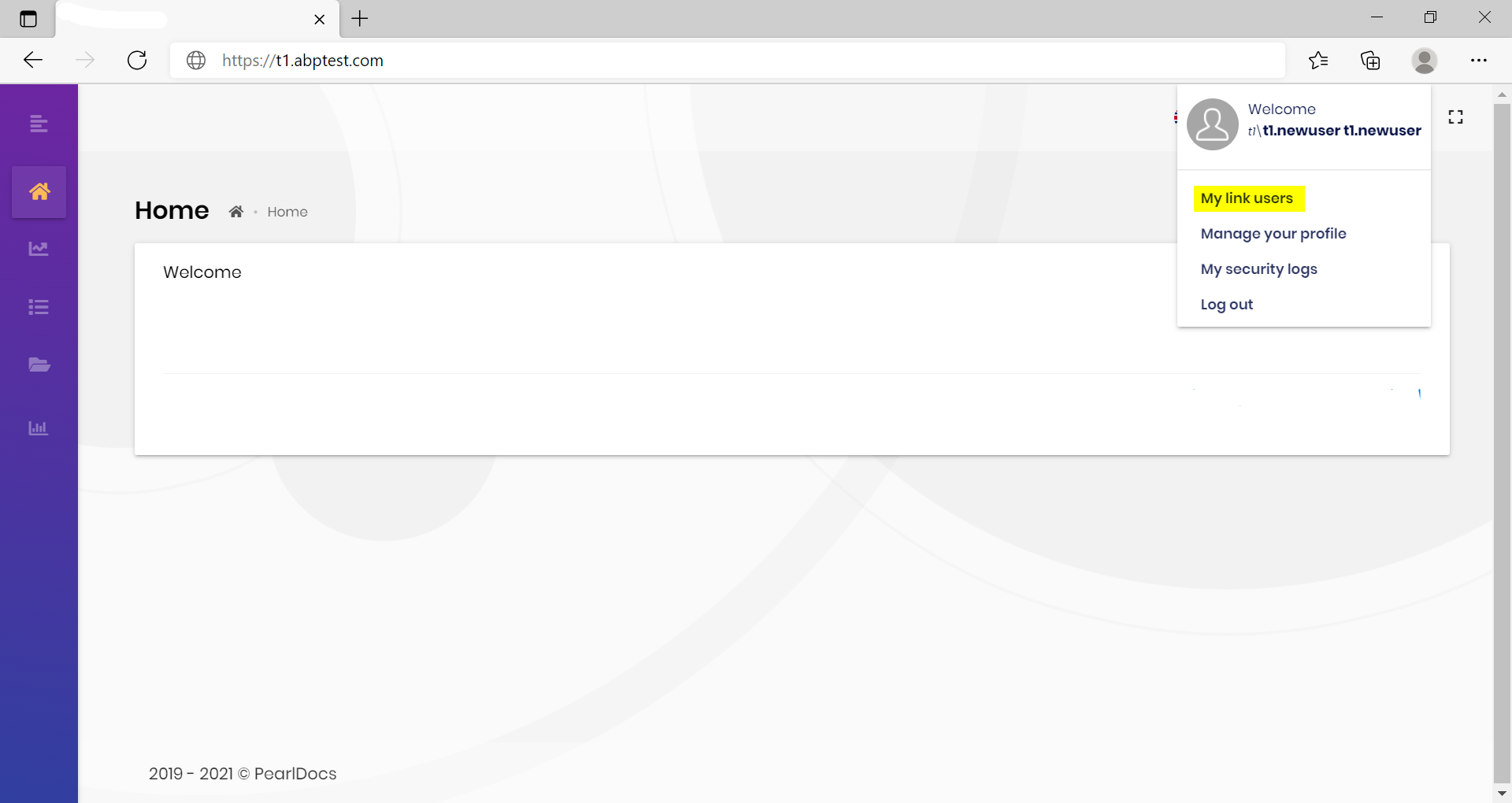
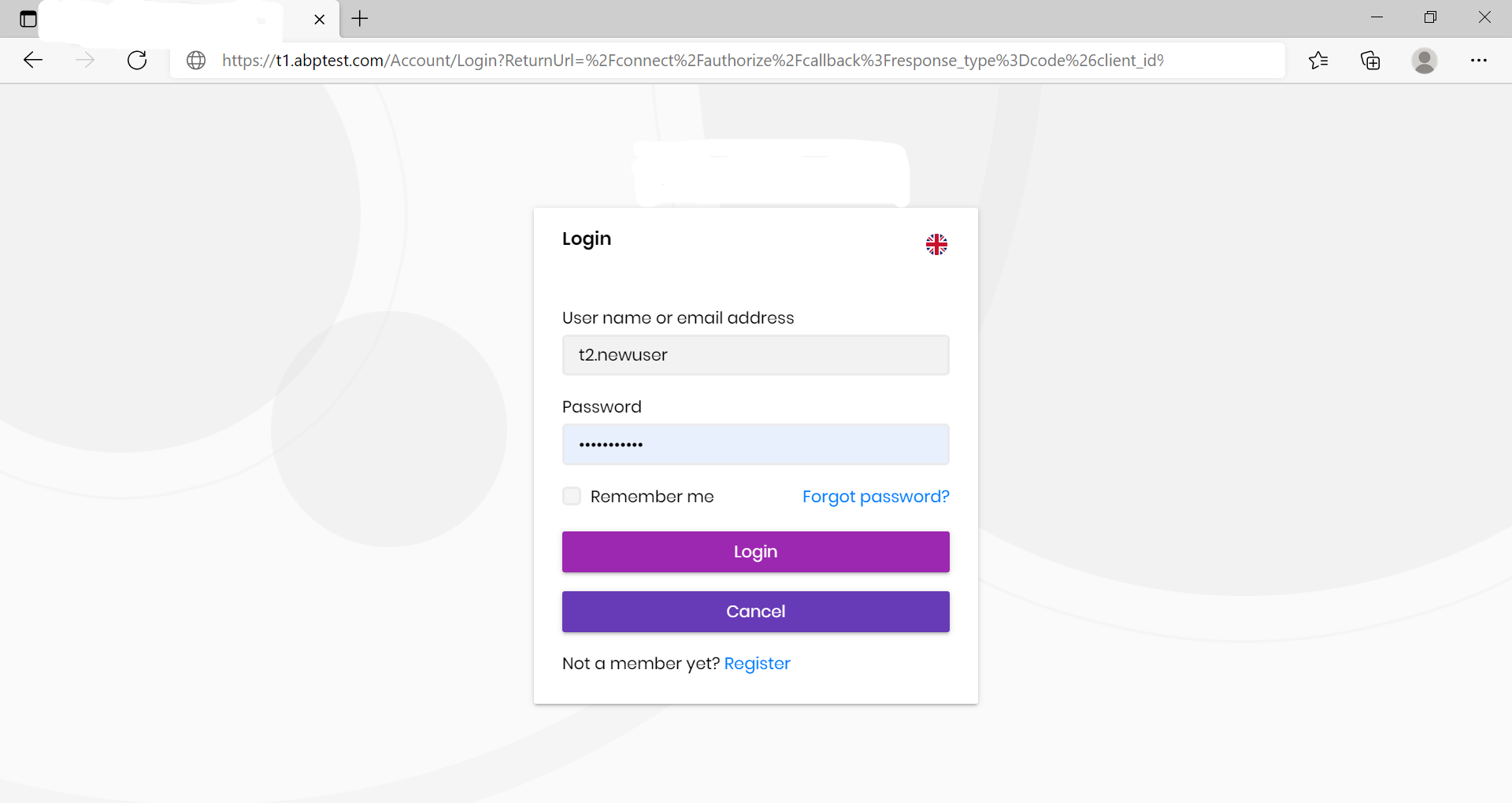
Step4 :I'm expecting a tenant switch in login page, so that I can enter "t1" name in the switch and log in to 2nd tenant.
But I don't see tenant switch option in the login page. so how do i add my link to the other tenant.
Markdown supported.Copy, paste, or drag & drop images and files (max 100 MB per file, 100 MB total per post) -
0
hi Ravisha
But I don't see tenant switch option in the login page. so how do i add my link to the other tenant.
After you use the domain name to resolve the tenant, you can only manually change the url.
Change
https://t1.abptest.comtohttps://t2.abptest.com.Markdown supported.Copy, paste, or drag & drop images and files (max 100 MB per file, 100 MB total per post) -
0
Hi Mailming,
Meaning "my link users" functionality will work for domain name to resolve the tenant? it's something like user has logout as tenant1 and lag in as tenant2?
We want to use "my link users" feature(using domain resolver way) without logging everytime. if "my link users" feature works, user doesn't have go through the login screen everytime when they want swith the tenant. How do we achive this?
-Ravisha
Markdown supported.Copy, paste, or drag & drop images and files (max 100 MB per file, 100 MB total per post) -
0
Thanks Maliming for the update. As we require this feature for our applciation and we'll wait for this feature to be released.
I just wanted to know what is tentative expected date of Release 5.0?
Markdown supported.Copy, paste, or drag & drop images and files (max 100 MB per file, 100 MB total per post) -
0
hi Ravisha
V5.0 will be available in November. When we finish developing this feature, I will provide you with the code as soon as possible, you don't need to wait until November.
Markdown supported.Copy, paste, or drag & drop images and files (max 100 MB per file, 100 MB total per post) -
0
This question has been automatically marked as stale because it has not had recent activity.
Markdown supported.Copy, paste, or drag & drop images and files (max 100 MB per file, 100 MB total per post) -
0
hi
5.0 already supported
Configure<AbpTenantResolveOptions>(options =>
{
    options.AddDomainTenantResolver("{0}.getabp.net");
});

Configure<AbpAccountOptions>(options =>
{
    options.IsTenantMultiDomain = true;
    options.GetTenantDomain = (httpContext, info) => Task.FromResult(string.IsNullOrWhiteSpace(info.Name) ? $"https://getabp.net" : $"https://{info.Name}.getabp.net");
});

Configure<AbpAccountIdentityServerOptions>(options =>
{
    options.IsTenantMultiDomain = true;
    options.GetTenantDomain = (httpContext, extensionGrantValidationContext, info) => Task.FromResult(string.IsNullOrWhiteSpace(info.Name) ? $"https://getabp.net" : $"https://{info.Name}.getabp.net");
});
Markdown supported.Copy, paste, or drag & drop images and files (max 100 MB per file, 100 MB total per post)



