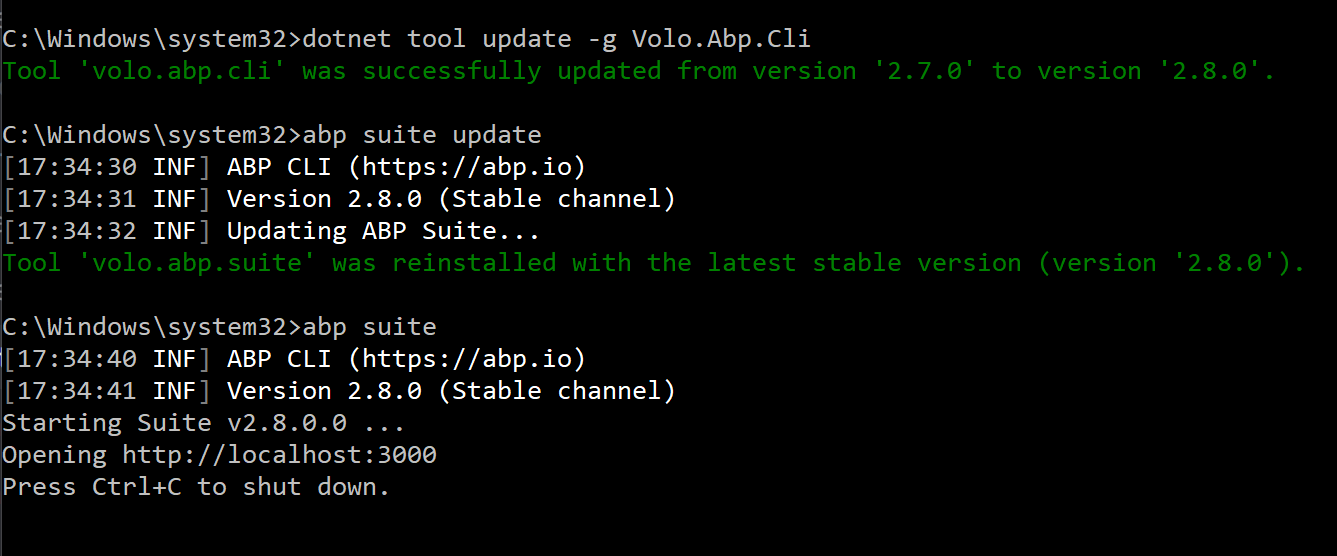
Update the ABP CLI:
dotnet tool update -g Volo.Abp.Cli
Update the ABP Suite:
abp suite update
- Release notes: https://docs.abp.io/en/commercial/latest/release-notes
52 Answer(s)
-
0
Cosmetic/Translation
This message should probably be read something like the following.
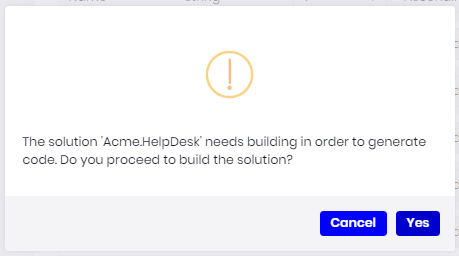
"The 'Acme.HelpDesk' solution needs to be built prior to code generation. Do you wish to continue?"
"The 'Acme.HelpDesk' solution must be built prior to code generation. Do you wish to continue?"
Markdown supported.Copy, paste, or drag & drop images and files (max 100 MB per file, 100 MB total per post) -
0
Gravatars are linked by email, correct? However, all my users are showing the same Gravatar. Even accounts with Gravators setup.
Can I change the default Gravator for users that don't have Gravator?
Thank you in advance.
Markdown supported.Copy, paste, or drag & drop images and files (max 100 MB per file, 100 MB total per post) -
0
Hi @ninomartini
We linked the Gravatar image with the email of the current user. But not released yet. It'll be released on May 21.
Can I change the default Gravator for users that don't have Gravator?
We'll work on this.
Thanks.
Markdown supported.Copy, paste, or drag & drop images and files (max 100 MB per file, 100 MB total per post) -
0
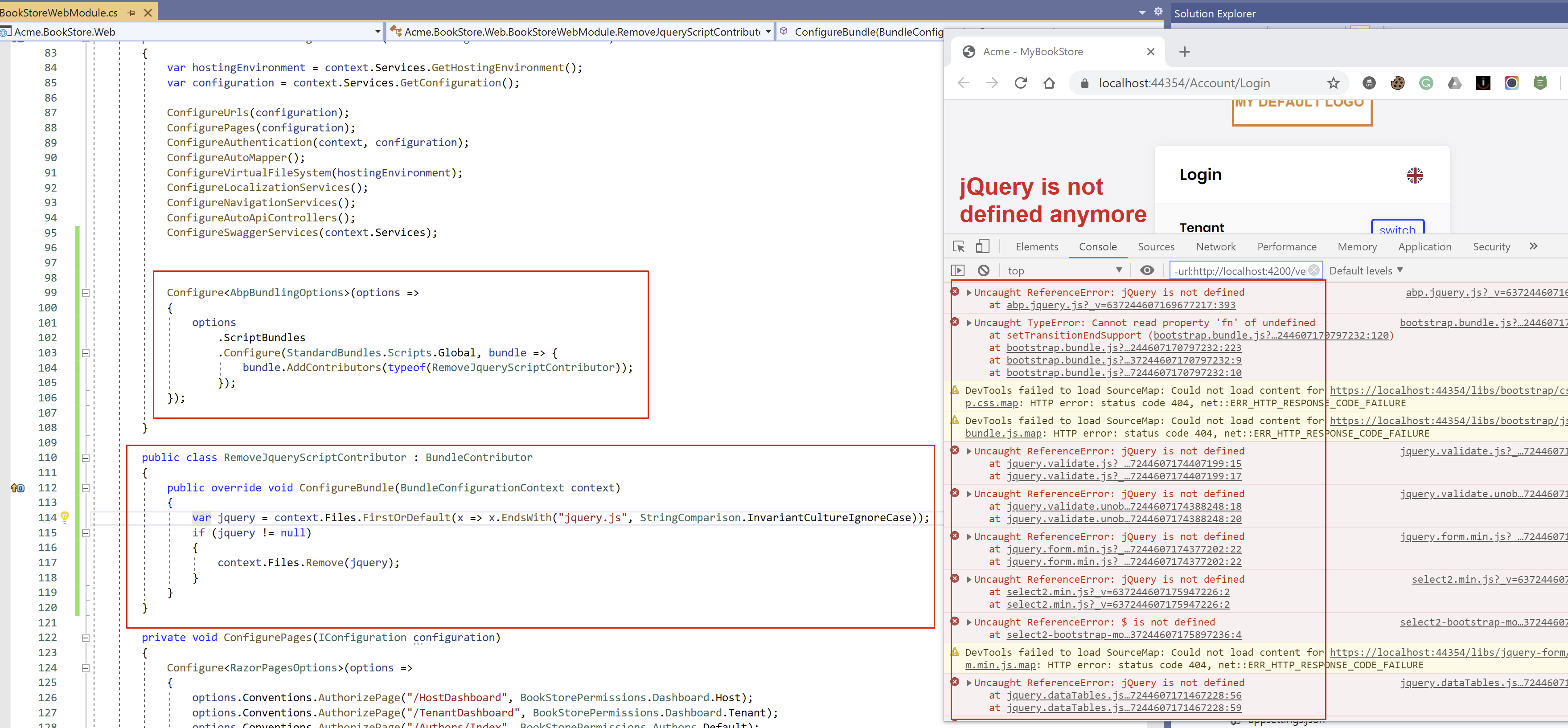
After upgrading form version 2.3 to 2.7, we encounter a problem in the BundleContributer. The below code worked with 2.3 but does not work with 2.7. Goal is to delete the jquery from the global script bundle and add it ourselves at the top of the page.
            // delete jquery from the standard global scripts (will be added later by the Telerik Layout hook at the top of the page)
            Configure<AbpBundlingOptions>(options =>
            {
                options
                    .ScriptBundles
                    .Configure(StandardBundles.Scripts.Global, bundle => {
                        bundle.AddContributors(typeof(Support.RemoveJqueryScriptContributor));
                    });
            });
            // Adds Telerik javascripts at the top of the page
            Configure<AbpLayoutHookOptions>(options =>
            {
                options.Add(
                    LayoutHooks.Body.First,
                    typeof(TelerikControlsScriptsLayoutHook)
                );
            });
Implementation of the RemoveJqueryScriptContributor
	public class RemoveJqueryScriptContributor : BundleContributor
	{
		public override void ConfigureBundle(BundleConfigurationContext context)
		{
			context.Files.RemoveAll(x => x.StartsWith("/libs/jquery/jquery.js", StringComparison.InvariantCultureIgnoreCase));
		}
	}
In the actual page the the jquery is included (once at the top and once at the bottom). Setting a breakpoint on the RemoveAll however shows the jquery is removed from the context.Files. I would expect only one instance of jquery at the top of the page. Any ideas ?
Markdown supported.Copy, paste, or drag & drop images and files (max 100 MB per file, 100 MB total per post) -
0
Account self registration not displaying correctly when switching tenants. When switching tenants, the login page does not show or hide the register link correctly unless the page is refreshed.
Steps to reproduce:
- Tenant-A has sef-registraion enabled
- Tenant-B has self registration disabled
- When switching from Tenant-A to Tenant-B on login form--the register link is showing even though the Tenant has self registration disabled
- Refreshing the page (F5) will hide the register link
Markdown supported.Copy, paste, or drag & drop images and files (max 100 MB per file, 100 MB total per post) -
0
@edirkzwager it seems like you are doing everything OK. but this code smells
context.Files.RemoveAll(x => x.StartsWith("/libs/jquery/jquery.js", StringComparison.InvariantCultureIgnoreCase));if you run it in a Docker container (Linux OS) and in Windows it'll behave different. because directory seperator is different in both systems.
I would write this code as below:
context.Files.RemoveAll(x => x.EndsWith("jquery.js", StringComparison.OrdinalIgnoreCase));Markdown supported.Copy, paste, or drag & drop images and files (max 100 MB per file, 100 MB total per post) -
0
@alper Thanks, for pointing this out. I did not think of that. But even with this 'fix' it still does not work. Could you confirm this is an issue in the 2.7.0 ?
Markdown supported.Copy, paste, or drag & drop images and files (max 100 MB per file, 100 MB total per post) -
0
@alper Yes, Angular 2.7.
Markdown supported.Copy, paste, or drag & drop images and files (max 100 MB per file, 100 MB total per post) -
0
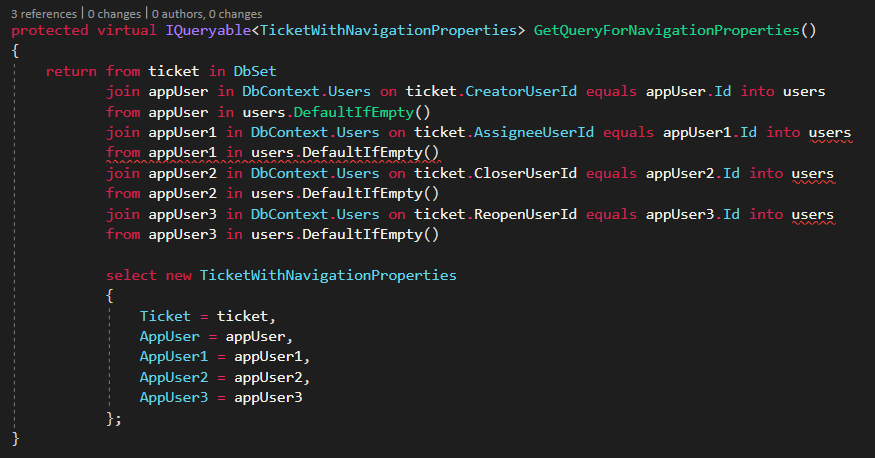
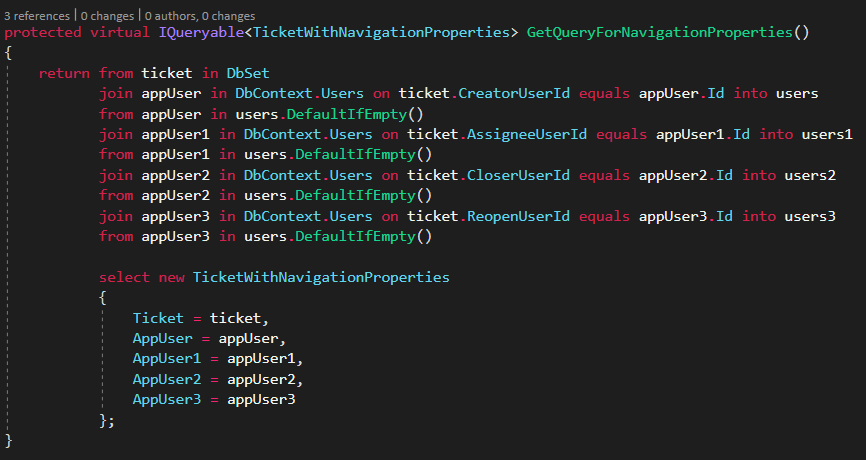
@alper, I think I found another issue this afternoon.
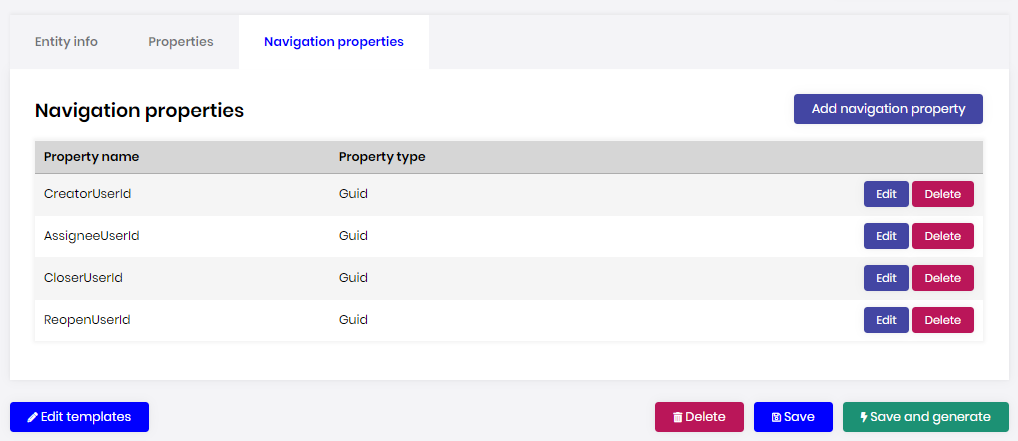
ABP Suite - Created
ABP Suite - Should Create
 Markdown supported.Copy, paste, or drag & drop images and files (max 100 MB per file, 100 MB total per post)
 -
0
Hi,
Minor improvement:
- Please trim URLs pasted into the Identity Server configuration screen.
- When copying URLs from an existing Identity Server configuration, they are padded with whitespace... please make them not padded for easier copying.
- Please add a 'Duplicate' button to aid in copying Identity Server clients.
The problem is that if the URL in the 'RedirectUrl' field has some white space on it, it creates reallly hard to identify issues.
Thanks!
Terry
Markdown supported.Copy, paste, or drag & drop images and files (max 100 MB per file, 100 MB total per post) -
0
Hi @ninomartini
The header's avatar in a previous version was a more generic user avatar.
 The current version has a different user avatar.
 Was this changed in the template or controlled by a setting? Can you point me to any addtional information?
Thank you in advance.
Was this changed in the template or controlled by a setting? Can you point me to any addtional information?
Thank you in advance.
We have created a component called CurrentUserImageComponent and made the component replaceable. You can replace this component with your own component in v2.8. I created a GitHub gist to explain how to replace the CurrentUserImageComponent. See https://gist.github.com/mehmet-erim/f83f1c0f9f95281a42b50d758eff33c8.
Account self registration not displaying correctly when switching tenants. When switching tenants, the login page does not show or hide the register link correctly unless the page is refreshed. Steps to reproduce:
- Tenant-A has sef-registraion enabled
- Tenant-B has self registration disabled
- When switching from Tenant-A to Tenant-B on login form--the register link is showing even though the Tenant has self registration disabled
- Refreshing the page (F5) will hide the register link
Thanks for reporting. We'll fix the problem.
Markdown supported.Copy, paste, or drag & drop images and files (max 100 MB per file, 100 MB total per post) -
0
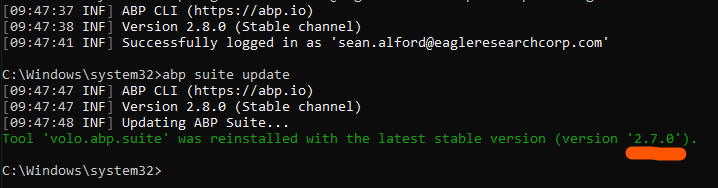
Trouble updating ABP Suite 2.8.0
 Markdown supported.Copy, paste, or drag & drop images and files (max 100 MB per file, 100 MB total per post)
 -
1
@sean for this post, I've created an issue. thank you for the feedback! https://support.abp.io/QA/Questions/149#answer-dc4c68b2-bb05-4581-4827-39f540d8ecbf
Markdown supported.Copy, paste, or drag & drop images and files (max 100 MB per file, 100 MB total per post) -
0
@alper I updated the abp cli tool prior to attempting to update abp suite. (https://support.abp.io/QA/Questions/149#answer-c6e4f4d5-40b5-de60-9c0b-39f549d5cc24)
As you can see here:

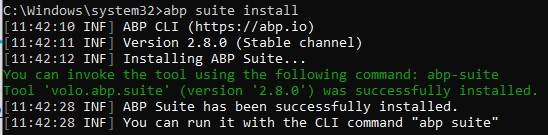
NOTE: I also tried abp suite remove, and then abp suite install and received the same result.
SOLUTION:
- Remove ABP Suite: abp suite remove
- Delete Folder:
C:\Users\Username\.abp\suite - Install abp suite install
 Markdown supported.Copy, paste, or drag & drop images and files (max 100 MB per file, 100 MB total per post)
 -
0
@mehmet Thank you for informtion theCurrentUserImageComponent.
Markdown supported.Copy, paste, or drag & drop images and files (max 100 MB per file, 100 MB total per post) -
0
ABP Suite 2.8.0
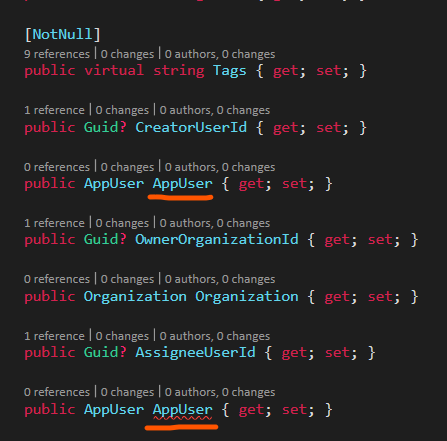
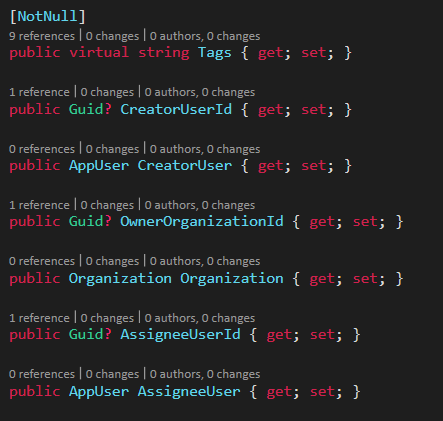
Here's another Navigation Property issues. It's related to the previous one, but in this case it doesn't create the entity propertly.
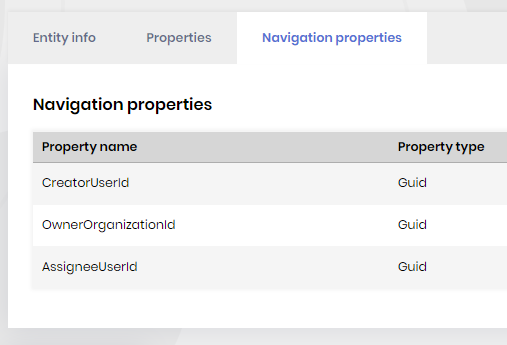
Generated
Should Generate
 Markdown supported.Copy, paste, or drag & drop images and files (max 100 MB per file, 100 MB total per post)