






- ABP Framework version: v4.3.3
- UI type: Blazor Server
- DB provider: EF Core
- Docs location: GitHub
I have the ABP doc module included in a Blazor Server app. https://docs.abp.io/en/abp/latest/Modules/Docs
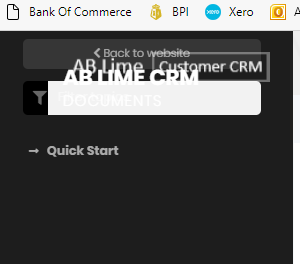
There is a problem with the left side menu with the items overlapping as per screen shot below:
I can also see this issue on this support case: https://support.abp.io/QA/Questions/1520/How-can-I-edit-markdown-document-with-using-ABP-Docs-Module
I manually added "@abp/aspnetcore.mvc.ui.theme.basic": "4.3.0", into the package.json of the blazor project. Not sure if that is needed, but had no effect. { "version": "1.0.0", "name": "my-app", "private": true, "dependencies": { "@abp/aspnetcore.mvc.ui.theme.basic": "4.3.0", "@abp/docs": "4.3.0", "@volo/abp.aspnetcore.components.server.leptontheme": "^4.3.0", "@volo/abp.aspnetcore.mvc.ui.theme.lepton": "^4.3.0", "@volo/account": "^4.3.0", "@volo/cms-kit-pro.admin": "^4.3.0" } }
Please advise how to fix the menu layout.
6 Answer(s)
-
0
-
0
Can I have an update on the progress for this issue.
My client is waiting for this issue to be resovled.This issue is closed: https://github.com/abpframework/abp/issues/9589
I don't have acces to view this: https://github.com/volosoft/volo/issues/7206
Thank you
Markdown supported.Copy, paste, or drag & drop images and files (max 100 MB per file, 100 MB total per post) -
0
Can I have an update on the progress for this issue.
My client is waiting for this issue to be resovled.This issue is closed: https://github.com/abpframework/abp/issues/9589
I don't have acces to view this: https://github.com/volosoft/volo/issues/7206
Thank you
Hi @cellero, the issue will be resolved in v5.0. (Planned release date for v5.0 is November 18)
Markdown supported.Copy, paste, or drag & drop images and files (max 100 MB per file, 100 MB total per post)



