






0
talhazengin created
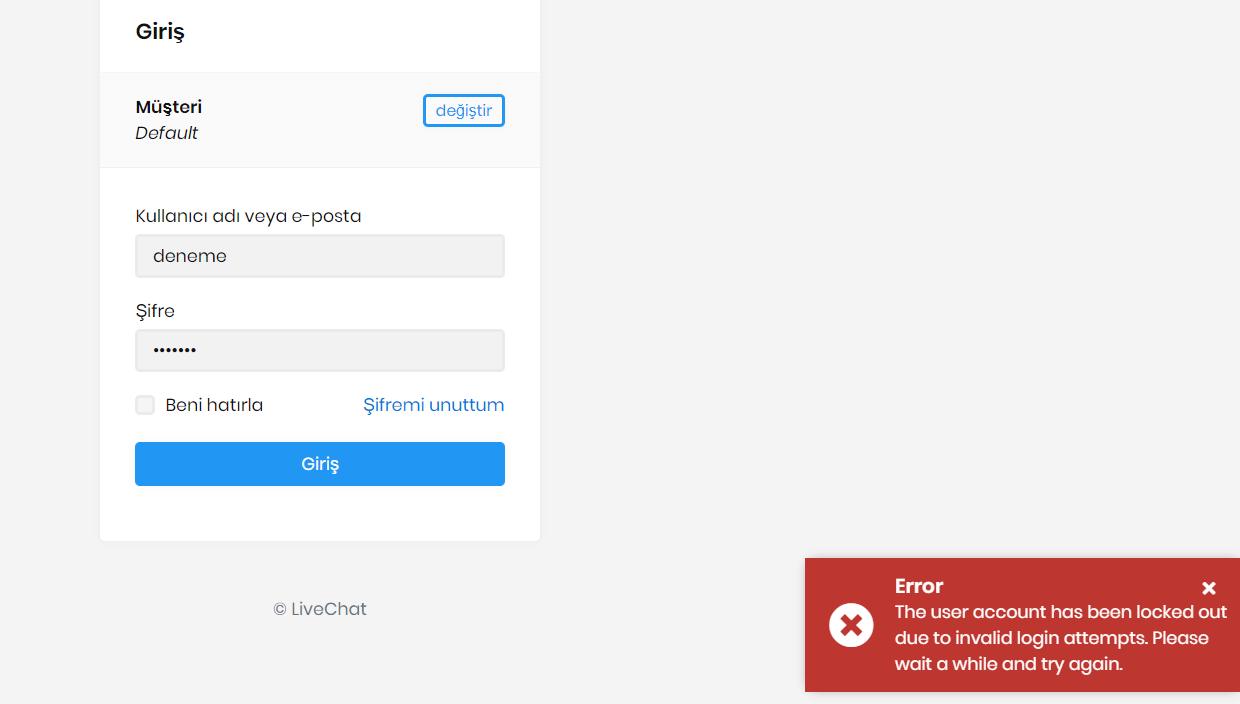
When login via Turkish language there are English warning messages.
Markdown supported.
Copy, paste, or drag & drop images and files (max 100 MB per file, 100 MB total per post)
6 Answer(s)
-
0
Hi ,
You need to find all
app.UseAbpRequestLocalization ();and move aboveapp.UseAuthentication ();. This is a problem with the template, we will fix it in the next version.Markdown supported.Copy, paste, or drag & drop images and files (max 100 MB per file, 100 MB total per post) -
0
Thanks this fixed.
Markdown supported.Copy, paste, or drag & drop images and files (max 100 MB per file, 100 MB total per post) -
0
Hi @talhazengin
It would be better to put
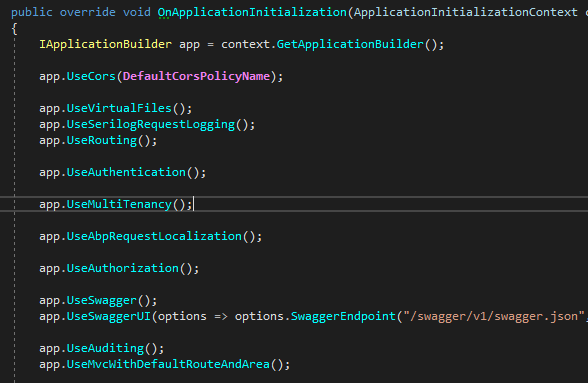
UseAbpRequestLocalizationjust after theUseMultiTenancy. Because AbpRequestLocalizationMiddleware gets the language of the current user or current tenant.Markdown supported.Copy, paste, or drag & drop images and files (max 100 MB per file, 100 MB total per post) -
0
Hi liangshiwei,
I am confused with other middlewares. Is this ordering right ? Anything to change?
 Markdown supported.Copy, paste, or drag & drop images and files (max 100 MB per file, 100 MB total per post)
 -
0
This is right.
Markdown supported.Copy, paste, or drag & drop images and files (max 100 MB per file, 100 MB total per post) -
0
Thanks
Markdown supported.Copy, paste, or drag & drop images and files (max 100 MB per file, 100 MB total per post)


