






- ABP Framework version: v4.0
- UI type: MVC
- DB provider: EF Core
- Tiered (MVC) or Identity Server Separated (Angular): yes / no
- Exception message and stack trace:
- Steps to reproduce the issue:"
I want to add a “View" function In CmsKit Page to direct view the content of a Page,So I add index.js in fold pages\CmsKit\Pages like this:
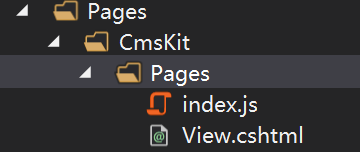
and change the index.js like this:
 {
                            text: l('Edit'),
                            visible: abp.auth.isGranted('CmsKit.Pages.Update'),
                            action: function (data) {
                                location.href = 'Pages/Update/' + data.record.id;
                            }
                        },
                        {
                            text: l('View'),
                            visible: abp.auth.isGranted('CmsKit.Pages.Update'),
                            action: function (data) {

                                location.href = 'Pages/View';
                            }
                        },
and I also add a page name View.cshtml.
but when I click the ”View" Button,

show wrong msg : can't fund the page View

please help me, thanks
6 Answer(s)
-
0
Hi @zsanhong, please check your View.cshtml file's @page attribute for routing path.
If you define the path like this =>
@page "/Cms/Pages/View"You should be able to navigate the page.If you want to click the view button and redirected to the page in public web-site application. You can access the page via
/pages/{slug}URL.
{
   text: l('View'),
   visible: abp.auth.isGranted('CmsKit.Pages.Update'),
   action: function (data)
   {
      var publicWebSiteBaseUrl = "<your-public-web-site-url>"; // like "https://localhost:44304"
      window.location.href = publicWebSiteBaseUrl + `/Pages/${data.record.slug}`;
   }
},
Markdown supported.Copy, paste, or drag & drop images and files (max 100 MB per file, 100 MB total per post) -
0
if I change the index.js like this:
{
                            text: l('View'),
                            visible: abp.auth.isGranted('CmsKit.Pages.Update'),
                            action: function (data) {

                                location.href = 'Pages/ViewModel/' + data.record.id;
                            }
                        },
and I write the ViewModel.cshtml like this:
@page "/Cms/Pages/ViewModel/"

@using ZSHTech.IPMS.Web.Utils
@using Volo.Abp.AspNetCore.Mvc.UI.Packages.HighlightJs
@using  ZSHTech.IPMS.Web.Pages.CmsKit.Pages;
@model ViewModel

@inject IMarkdownToHtmlRenderer MarkdownRenderer
@{
}


<abp-card>
    <abp-card-body>
        @Html.Raw(await MarkdownRenderer.RenderAsync(Model.View.Content))
    </abp-card-body>
</abp-card>
ViewModel.cshtml.cs:
using System;
using System.Collections.Generic;
using System.Linq;
using System.Threading.Tasks;
using Microsoft.AspNetCore.Mvc;
using Microsoft.AspNetCore.Mvc.RazorPages;
using Volo.CmsKit.Pages;
using Volo.CmsKit.Public.Pages;

namespace ZSHTech.IPMS.Web.Pages.CmsKit.Pages
{
    public class ViewModel : IPMSPageModel
    {
        [BindProperty(SupportsGet = true)]
        public Guid Id { get; set; }
        [BindProperty]
       public  PageViewModel View { get; set; }

        protected IPageRepository PageRepository { get; }

        public ViewModel(IPageRepository pageRepository)
        {
            PageRepository = pageRepository;
        }

        public async Task OnGetAsync()
        {
           var Page = await PageRepository.GetAsync(Id);


            View = new PageViewModel { Content = Page.Content, Title = Page.Title };


        }

    }

    public class PageViewModel
    {
        public Guid Id { get; set; }

        public string Title { get; set; }

        public string Content { get; set; }
    }
}
when I click the View button, I get the same wrong msg:
 Markdown supported.Copy, paste, or drag & drop images and files (max 100 MB per file, 100 MB total per post)
 -
0
Hi @zsanhong, in your case the url should be =>
@page "/Cms/Pages/ViewModel/{id:guid}"Because you need the Id parameter.Please check the razor page documentation.
Markdown supported.Copy, paste, or drag & drop images and files (max 100 MB per file, 100 MB total per post) -
0
thank you @EngincanV, now I encounter another question, how to Inject IMarkdownToHtmlRenderer? because When I run it,It show wrong msg:
An unhandled exception occurred while processing the request.
DependencyResolutionException: None of the constructors found with 'Volo.Abp.Autofac.AbpAutofacConstructorFinder' on type 'ZSHTech.IPMS.Web.Utils.MarkdownToHtmlRenderer' can be invoked with the available services and parameters:
Cannot resolve parameter 'Markdig.MarkdownPipeline markdownPipeline' of constructor 'Void .ctor(Markdig.MarkdownPipeline)'.
Autofac.Core.Activators.Reflection.ReflectionActivator.GetAllBindings(ConstructorBinder[] availableConstructors, IComponentContext context, IEnumerable<Parameter> parameters)

DependencyResolutionException: An exception was thrown while activating ZSHTech.IPMS.Web.Pages.CmsKit.Pages.ViewModel -> ZSHTech.IPMS.Web.Utils.MarkdownToHtmlRenderer.
Autofac.Core.Resolving.Middleware.ActivatorErrorHandlingMiddleware.Execute(ResolveRequestContext context, Action<ResolveRequestContext> next)
Markdown supported.Copy, paste, or drag & drop images and files (max 100 MB per file, 100 MB total per post) -
0
You're welcome. You should not use the
IMarkdownToHtmlRendererinterface from web layer because it's defined in public-web and it's registration in there. But if you want to use it anyway, you need to add[DependsOn(typeof(YourWebPublicModule))]above of your web module class.[DependsOn( ... typeof(CmsKitProAdminWebModule), typeof(AbpSwashbuckleModule), typeof(AbpAspNetCoreSerilogModule), typeof(YourWebPublicModule) //add this line )] public class YourWebModule : AbpModule { ... }Markdown supported.Copy, paste, or drag & drop images and files (max 100 MB per file, 100 MB total per post) -
0
I add a method in webModel like this:
 services
                 .AddSingleton(_ => new MarkdownPipelineBuilder()
                     .UseAutoLinks()
                     .UseBootstrap()
                     .UseGridTables()
                     .UsePipeTables()
                     .Build());
and it worked. thank you for your help @EngincanV,
Markdown supported.Copy, paste, or drag & drop images and files (max 100 MB per file, 100 MB total per post)


