- ABP Framework version: v4.4.2
- UI type: MVC
- DB provider: EF Core
- Tiered (MVC) or Identity Server Separated (Angular): yes
- Exception message and stack trace:
- Steps to reproduce the issue:"
Hi ,
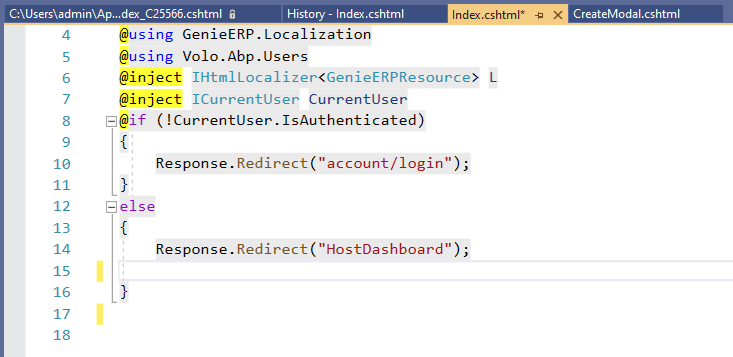
This is our code to redirect web page to dashboard.This is working fine in local.But we get internal server error when site gets published.
12 Answer(s)
-
0
2021-10-11 11:18:53.860 +00:00 [INF] Request starting HTTP/1.1 GET http://cozywebqa.azurewebsites.net/ - - 2021-10-11 11:18:53.867 +00:00 [INF] Executing endpoint '/Index' 2021-10-11 11:18:53.870 +00:00 [INF] Route matched with {page = "/Index", action = "", controller = "", area = ""}. Executing page /Index 2021-10-11 11:18:53.871 +00:00 [INF] Skipping the execution of current filter as its not the most effective filter implementing the policy Microsoft.AspNetCore.Mvc.ViewFeatures.IAntiforgeryPolicy 2021-10-11 11:18:53.877 +00:00 [INF] Executing handler method GenieERP.Web.Pages.IndexModel.OnGet - ModelState is "Valid" 2021-10-11 11:18:53.878 +00:00 [INF] AuthenticationScheme: oidc was challenged. 2021-10-11 11:18:53.878 +00:00 [INF] Executed handler method OnGet, returned result . 2021-10-11 11:18:53.878 +00:00 [INF] Executing an implicit handler method - ModelState is "Valid" 2021-10-11 11:18:53.878 +00:00 [INF] Executed an implicit handler method, returned result Microsoft.AspNetCore.Mvc.RazorPages.PageResult. 2021-10-11 11:18:53.966 +00:00 [INF] Authorization failed. These requirements were not met: PermissionRequirement: SettingManagement.Emailing 2021-10-11 11:18:53.966 +00:00 [INF] Authorization failed. These requirements were not met: PermissionRequirement: AbpAccount.SettingManagement 2021-10-11 11:18:53.966 +00:00 [INF] Authorization failed. These requirements were not met: PermissionRequirement: AbpIdentity.SettingManagement 2021-10-11 11:18:53.966 +00:00 [INF] Authorization failed. These requirements were not met: PermissionRequirement: LeptonThemeManagement.Settings 2021-10-11 11:18:53.966 +00:00 [INF] Authorization failed. These requirements were not met: PermissionRequirement: CmsKit.SettingManagement 2021-10-11 11:18:53.992 +00:00 [INF] Authorization failed. These requirements were not met: PermissionRequirement: Forms.Form 2021-10-11 11:18:54.028 +00:00 [INF] Executed page /Index in 158.33ms 2021-10-11 11:18:54.028 +00:00 [INF] Executed endpoint '/Index' 2021-10-11 11:18:54.029 +00:00 [INF] Request finished HTTP/1.1 GET http://cozywebqa.azurewebsites.net/ - - - 302 - text/html;+charset=utf-8 169.3132ms
Markdown supported.Copy, paste, or drag & drop images and files (max 100 MB per file, 100 MB total per post) -
0
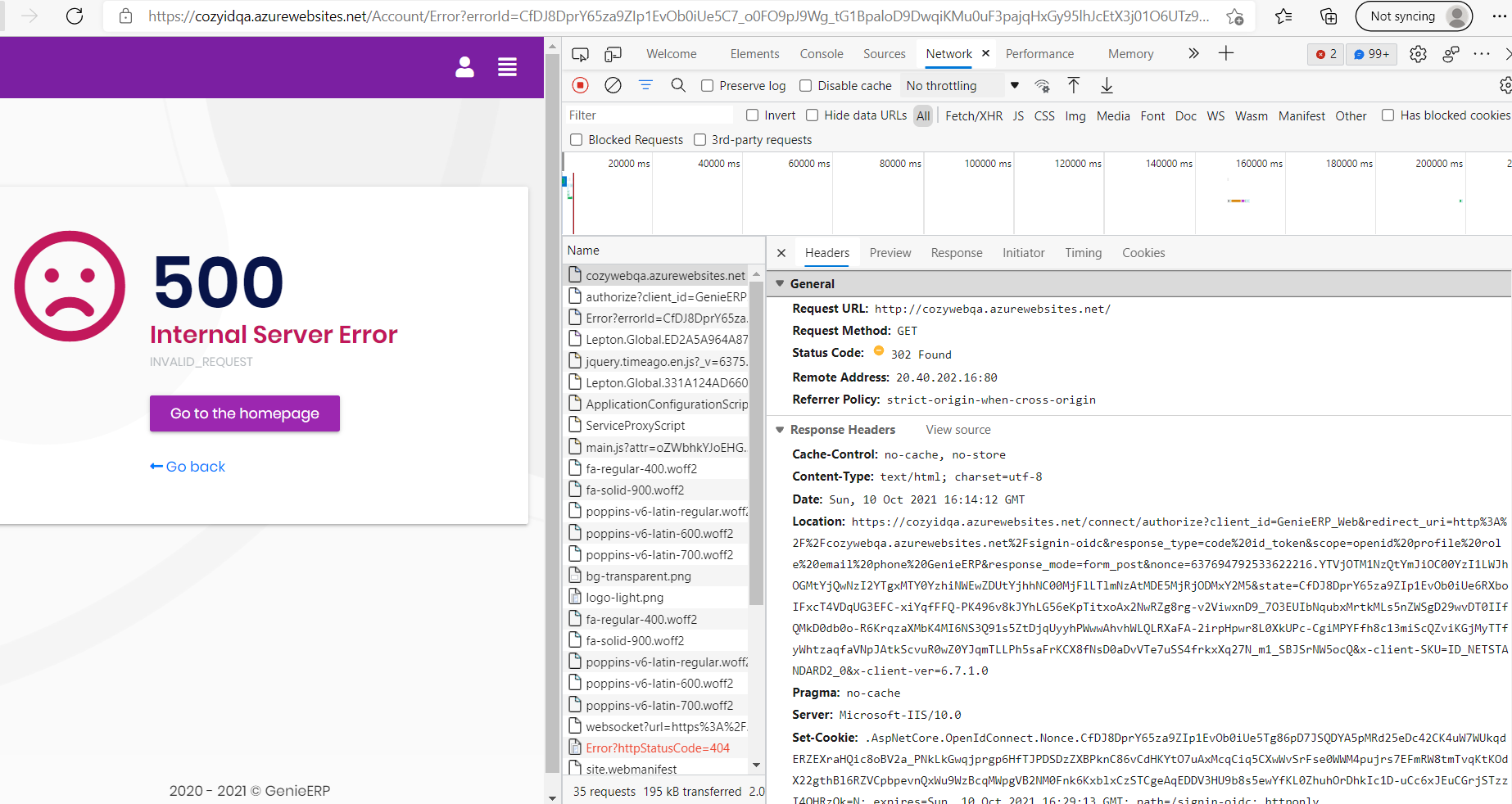
Reproducing steps .
Open Web site. shows 500 with go back home option.
Click Go back home. redirects to Login page
Login now all claims are displaying in ID server home page
Change the url directly in id to web in browser. Able to see the dashboard
The issue is in redirection,
Markdown supported.Copy, paste, or drag & drop images and files (max 100 MB per file, 100 MB total per post) -
0
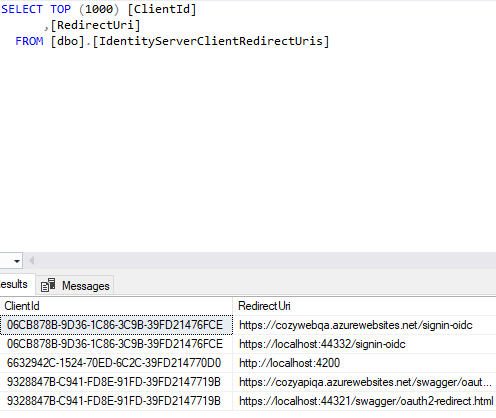
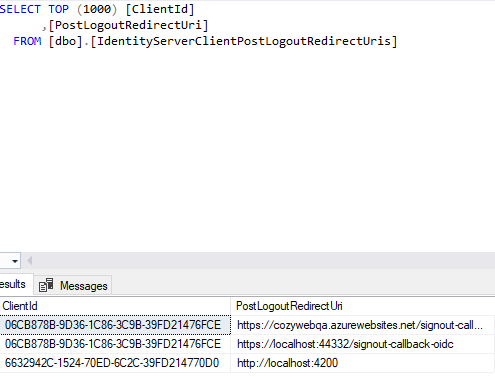
did you configure your Identity Server? Eg:
RootUrlin appsettings.json- database tables:
IdentityServerClientPostLogoutRedirectUris,IdentityServerClientRedirectUrisor any other tables
replace all
localhostaddresses in your settings!Markdown supported.Copy, paste, or drag & drop images and files (max 100 MB per file, 100 MB total per post) -
0
It is not possible to understand the error without checking the logs.
Please reproduce the error and then check the logs (Log/logs.txt or console output) and search for [ERR].
Markdown supported.Copy, paste, or drag & drop images and files (max 100 MB per file, 100 MB total per post) -
0
There is no error.It shows 302 code ,issue with redirection only.
2021-10-11 11:18:54.029 +00:00 [INF] Request finished HTTP/1.1 GET http://cozywebqa.azurewebsites.net/ - - - 302 - text/html;+charset=utf-8 169.3132ms
Markdown supported.Copy, paste, or drag & drop images and files (max 100 MB per file, 100 MB total per post)