






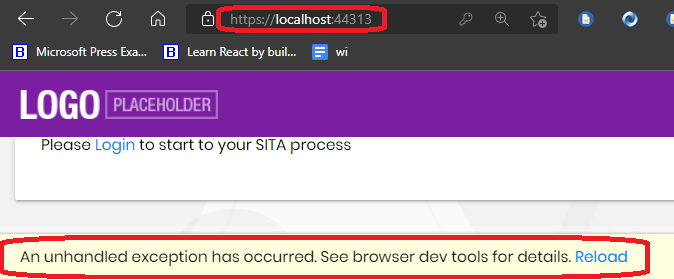
I created a new Blazor Server(Not Web Assembly) app and I get the following error as I run the app.
Sometimes it works, but most f the times, I am getting this error.
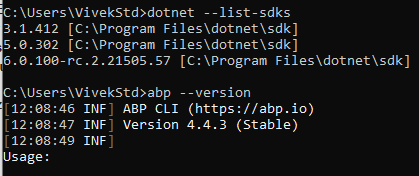
The dotnet version is 6.0.100-rc.2.21505.57 ABP version is 4.4.3 (Stable)
- DB provider: Its EF Core with Sql
- Tiered (MVC) or Identity Server Separated (Angular): no
Let me know, If you need any further details.
I used preview checkbox so the latest is used. I am keen for the preview because hot reloading is supported in .net 6, and with blazor server(not web assembly) and I have also the latest VS 2022 Preview 5. So a typical csproj file looks like this.
	  <PropertyGroup>
		<TargetFramework>net6.0</TargetFramework>
		<AspNetCoreHostingModel>InProcess</AspNetCoreHostingModel>
		<AutoGenerateBindingRedirects>true</AutoGenerateBindingRedirects>
		<GenerateBindingRedirectsOutputType>true</GenerateBindingRedirectsOutputType>
		<GenerateRuntimeConfigurationFiles>true</GenerateRuntimeConfigurationFiles>
		<MvcRazorExcludeRefAssembliesFromPublish>false</MvcRazorExcludeRefAssembliesFromPublish>
		<PreserveCompilationReferences>true</PreserveCompilationReferences>
	  </PropertyGroup>

	  <ItemGroup>
		<PackageReference Include="AspNetCore.HealthChecks.UI" Version="5.0.1" />
		<PackageReference Include="AspNetCore.HealthChecks.UI.Client" Version="5.0.1" />
		<PackageReference Include="AspNetCore.HealthChecks.UI.InMemory.Storage" Version="5.0.1" />
		<PackageReference Include="Serilog.AspNetCore" Version="4.0.0" />
		<PackageReference Include="Serilog.Sinks.Async" Version="1.5.0" />
		<PackageReference Include="Blazorise.Bootstrap" Version="0.9.4.1" />
		<PackageReference Include="Blazorise.Icons.FontAwesome" Version="0.9.4.1" />
		<PackageReference Include="Microsoft.AspNetCore.Authentication.Google" Version="6.0.0-rc.*" />
		<PackageReference Include="Microsoft.AspNetCore.Authentication.MicrosoftAccount" Version="6.0.0-rc.*" />
		<PackageReference Include="Microsoft.AspNetCore.Authentication.Twitter" Version="6.0.0-rc.*" />
	  </ItemGroup>

	  <ItemGroup>
		<ProjectReference Include="..\Bvh.HrSita.Application\Bvh.HrSita.Application.csproj" />
		<ProjectReference Include="..\Bvh.HrSita.HttpApi\Bvh.HrSita.HttpApi.csproj" />
		<ProjectReference Include="..\Bvh.HrSita.EntityFrameworkCore\Bvh.HrSita.EntityFrameworkCore.csproj" />
		<PackageReference Include="Volo.Abp.Autofac" Version="5.0.0-beta.1" />
		<PackageReference Include="Volo.Abp.Swashbuckle" Version="5.0.0-beta.1" />
		<PackageReference Include="Volo.Abp.AspNetCore.Authentication.JwtBearer" Version="5.0.0-beta.1" />
		<PackageReference Include="Volo.Abp.AspNetCore.Serilog" Version="5.0.0-beta.1" />
		<PackageReference Include="Volo.Abp.AspNetCore.Mvc.UI.Theme.Lepton" Version="5.0.0-beta.1" />
		<PackageReference Include="Volo.Abp.AspNetCore.Components.Server.LeptonTheme" Version="5.0.0-beta.1" />
		<PackageReference Include="Volo.Abp.Account.Pro.Public.Web.IdentityServer" Version="5.0.0-beta.1" />
		<PackageReference Include="Volo.Abp.Account.Pro.Admin.Blazor.Server" Version="5.0.0-beta.1" />
		<PackageReference Include="Volo.Abp.AuditLogging.Blazor.Server" Version="5.0.0-beta.1" />
		<PackageReference Include="Volo.Abp.Identity.Pro.Blazor.Server" Version="5.0.0-beta.1" />
		<PackageReference Include="Volo.Abp.LeptonTheme.Management.Blazor.Server" Version="5.0.0-beta.1" />
		<PackageReference Include="Volo.Abp.IdentityServer.Blazor.Server" Version="5.0.0-beta.1" />
		<PackageReference Include="Volo.Abp.LanguageManagement.Blazor.Server" Version="5.0.0-beta.1" />
		<PackageReference Include="Volo.Saas.Host.Blazor.Server" Version="5.0.0-beta.1" />
		<PackageReference Include="Volo.Abp.TextTemplateManagement.Blazor.Server" Version="5.0.0-beta.1" />
	  </ItemGroup>
The logs look below.
2021-10-17 12:17:34.118 +05:30 [INF] Authorization failed. These requirements were not met:
		PermissionRequirement: LeptonThemeManagement.Settings
		2021-10-17 12:17:34.121 +05:30 [INF] Authorization failed. These requirements were not met:
		PermissionRequirement: LeptonThemeManagement.Settings
		2021-10-17 12:17:34.389 +05:30 [WRN] Unhandled exception rendering component: Undefined permission: IdentitySer�
		Volo.Abp.AbpException: Undefined permission: IdentitySer�
		   at Volo.Abp.Authorization.Permissions.PermissionDefinitionManager.Get(String name)
		   at Volo.Abp.Authorization.Permissions.PermissionChecker.IsGrantedAsync(ClaimsPrincipal claimsPrincipal, String[] names)
		   at Volo.Abp.Authorization.Permissions.PermissionChecker.IsGrantedAsync(String[] names)
		   at Volo.Abp.Authorization.Permissions.RequirePermissionsSimpleBatchStateChecker`1.IsEnabledAsync(SimpleBatchStateCheckerContext`1 context)
		   at Volo.Abp.SimpleStateChecking.SimpleStateCheckerManager`1.IsEnabledAsync(TState[] states)
		   at Volo.Abp.UI.Navigation.MenuManager.CheckPermissionsAsync(IServiceProvider serviceProvider, IHasMenuItems menuWithItems)
		   at Volo.Abp.UI.Navigation.MenuManager.GetInternalAsync(String name)
		   at Volo.Abp.UI.Navigation.MenuManager.GetAsync(String[] menuNames)
		   at Volo.Abp.AspNetCore.Components.Web.LeptonTheme.Components.ApplicationLayout.Navigation.MainMenuProvider.GetMenuAsync()
		   at Volo.Abp.AspNetCore.Components.Web.LeptonTheme.Components.ApplicationLayout.MainHeader.MainHeader.OnInitializedAsync()
		   at Microsoft.AspNetCore.Components.ComponentBase.RunInitAndSetParametersAsync()
		   at Microsoft.AspNetCore.Components.RenderTree.Renderer.GetErrorHandledTask(Task taskToHandle, ComponentState owningComponentState)
		2021-10-17 12:17:34.395 +05:30 [ERR] Unhandled exception in circuit 'dIVgARWqvTUNtLj0M2vYqV8hgjEwCDp1me3m7bVpJdE'.


		2021-10-17 12:19:03.476 +05:30 [INF] Request starting HTTP/2 POST https://localhost:44313/_blazor/disconnect multipart/form-data;+boundary=----WebKitFormBoundarya2fTLzwEz9Z9ylvJ 359
		2021-10-17 12:19:03.496 +05:30 [INF] No CORS policy found for the specified request.
		2021-10-17 12:19:03.497 +05:30 [INF] Executing endpoint 'Blazor disconnect'
		2021-10-17 12:19:03.500 +05:30 [INF] Executed endpoint 'Blazor disconnect'
		2021-10-17 12:19:03.502 +05:30 [INF] Request finished HTTP/2 POST https://localhost:44313/_blazor/disconnect multipart/form-data;+boundary=----WebKitFormBoundarya2fTLzwEz9Z9ylvJ 359 - 200 - - 25.3870ms
4 Answer(s)
-
0
Hi,
Yes you need to just create a preview project. Blazor Server App. Let me know, if you need detailed steps, I will post them tomorrow.
Thanks and Regards Vivek
Markdown supported.Copy, paste, or drag & drop images and files (max 100 MB per file, 100 MB total per post) -
0
@maliming any list of features planned for abp commercial in November prelease?
Markdown supported.Copy, paste, or drag & drop images and files (max 100 MB per file, 100 MB total per post) -
0
We will introduce it in the blog.
https://blog.abp.io/abp https://github.com/abpframework/abp/blob/dev/docs/en/Blog-Posts/2021-10-05%20v5_0_Beta1/POST.md
Markdown supported.Copy, paste, or drag & drop images and files (max 100 MB per file, 100 MB total per post)



