






- ABP Framework version: v5
- UI type: Blazor
- DB provider: EF Core
- Tiered (MVC) or Identity Server Separated (Angular): yes
- Exception message and stack trace:
System.InvalidOperationException: 'The action 'Volo.FileManagement.Files.ClientProxies.FileDescriptorClientProxy.GetAsync (Volo.FileManagement.HttpApi.Client)' has ApiExplorer enabled, but is using conventional routing. Only actions which use attribute routing support ApiExplorer.' at Microsoft.AspNetCore.Mvc.ApplicationModels.ControllerActionDescriptorBuilder.AddApiExplorerInfo(ControllerActionDescriptor actionDescriptor, ApplicationModel application, ControllerModel controller, ActionModel action) at Microsoft.AspNetCore.Mvc.ApplicationModels.ControllerActionDescriptorBuilder.CreateActionDescriptor(ApplicationModel application, ControllerModel controller, ActionModel action, SelectorModel selector) at Microsoft.AspNetCore.Mvc.ApplicationModels.ApplicationModelFactory.Flatten[TResult](ApplicationModel application, Func5 flattener) at Microsoft.AspNetCore.Mvc.ApplicationModels.ControllerActionDescriptorBuilder.Build(ApplicationModel application) at Microsoft.AspNetCore.Mvc.ApplicationModels.ControllerActionDescriptorProvider.GetDescriptors() at Microsoft.AspNetCore.Mvc.ApplicationModels.ControllerActionDescriptorProvider.OnProvidersExecuting(ActionDescriptorProviderContext context) at Microsoft.AspNetCore.Mvc.Infrastructure.DefaultActionDescriptorCollectionProvider.UpdateCollection() at Microsoft.AspNetCore.Mvc.Infrastructure.DefaultActionDescriptorCollectionProvider.Initialize() at Microsoft.AspNetCore.Mvc.Routing.ActionEndpointDataSourceBase.<>c__DisplayClass11_0.<Subscribe>b__0() at Microsoft.Extensions.Primitives.ChangeToken.OnChange(Func1 changeTokenProducer, Action changeTokenConsumer) at Microsoft.AspNetCore.Mvc.Routing.ActionEndpointDataSourceBase.Subscribe() at Microsoft.AspNetCore.Mvc.Routing.ControllerActionEndpointDataSource..ctor(ControllerActionEndpointDataSourceIdProvider dataSourceIdProvider, IActionDescriptorCollectionProvider actions, ActionEndpointFactory endpointFactory, OrderedEndpointsSequenceProvider orderSequence) at Microsoft.AspNetCore.Builder.ControllerEndpointRouteBuilderExtensions.GetOrCreateDataSource(IEndpointRouteBuilder endpoints) at Microsoft.AspNetCore.Builder.ControllerEndpointRouteBuilderExtensions.MapControllerRoute(IEndpointRouteBuilder endpoints, String name, String pattern, Object defaults, Object constraints, Object dataTokens) at Volo.Abp.AspNetCore.Mvc.AbpAspNetCoreMvcModule.<>c.<ConfigureServices>b__1_10(EndpointRouteBuilderContext endpointContext) at Microsoft.AspNetCore.Builder.AbpAspNetCoreApplicationBuilderExtensions.<>c__DisplayClass0_0.<UseConfiguredEndpoints>b__0(IEndpointRouteBuilder endpoints) at Microsoft.AspNetCore.Builder.EndpointRoutingApplicationBuilderExtensions.UseEndpoints(IApplicationBuilder builder, Action1 configure) at Microsoft.AspNetCore.Builder.AbpAspNetCoreApplicationBuilderExtensions.UseConfiguredEndpoints(IApplicationBuilder app, Action1 additionalConfigurationAction) at FiveOhTest.Blazor.FiveOhTestBlazorModule.OnApplicationInitialization(ApplicationInitializationContext context) in C:\source\FiveOhTest\src\FiveOhTest.Blazor\FiveOhTestBlazorModule.cs:line 340 at Volo.Abp.Modularity.OnApplicationInitializationModuleLifecycleContributor.Initialize(ApplicationInitializationContext context, IAbpModule module) at Volo.Abp.Modularity.ModuleManager.InitializeModules(ApplicationInitializationContext context)
- Steps to reproduce the issue:"
- Using the Suite, create a new Blazor Server, EFCore, mysql, Separated tenant schema, tiered solution.
- Add the FileManagement Module as Source.
- Compile. See that no compilation errors occurred.
- Run the Blazor, HttpHost, and Identity projects
- See that VisualStudio breaks on
<SolutionName>.Blazor.<SolutionName>BlazorModule > app.UseConfiguredEndpoints();throwing the above error.
This is with no code changes made, or anything added or removed (besides the addition of the FileManagement Module)
5 Answer(s)
-
1
hi
add these to your
Volo.FileManagement.HttpApi.Client<ItemGroup> <EmbeddedResource Include="**\*generate-proxy.json" /> <Content Remove="**\*generate-proxy.json" /> </ItemGroup>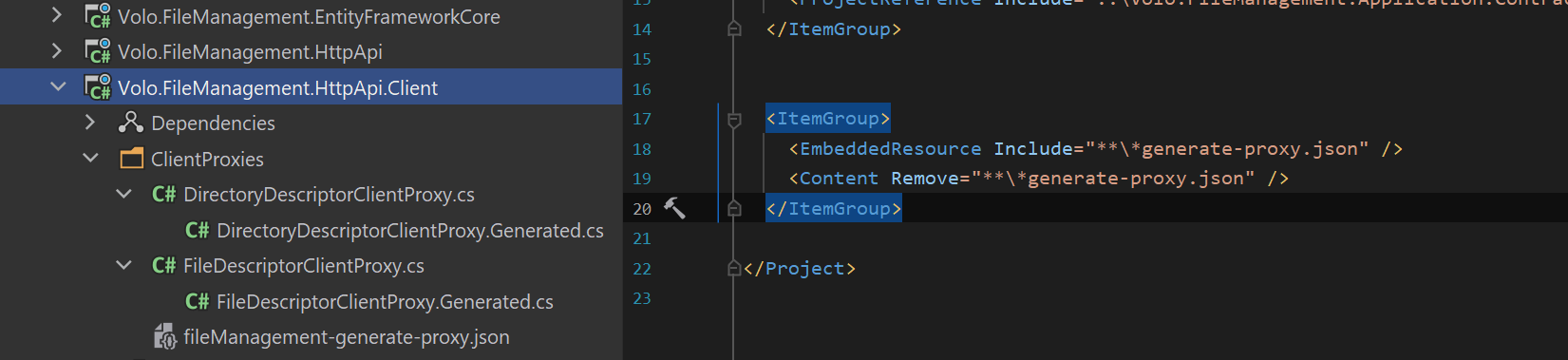 Markdown supported.Copy, paste, or drag & drop images and files (max 100 MB per file, 100 MB total per post)
 -
0
That worked, Thank you!
Also, what is the significance of having the project include then remove those json files?
And will this fix be included in the next release of the Suite?
Markdown supported.Copy, paste, or drag & drop images and files (max 100 MB per file, 100 MB total per post)


