






0
nielsklijn created
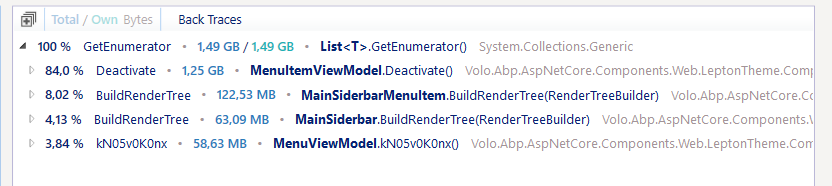
When adding two applicationMenuItems object to the menu contributor with the same URL, a memory leak occurs.
E.g:
var facilities = new ApplicationMenuItem(
SquareServerMenus.Facilities,
l["Menu:FacilityMenuItem1"],
url: "/identity/users",
requiredPermissionName: SquareServerPermissions.Facilities.Default,
order: rootOrder++);
var assessments = new ApplicationMenuItem(
"SquareServer.Facilities",
l["Menu:FacilityMenuItem2"],
url: "/identity/users",
order: rootOrder++);
Dotmemory profile :
- ABP Framework version: v5.1.3
- UI type: Blazor
- DB provider: EF Core
- Tiered (MVC) or Identity Server Separated (Angular): no
- Exception message and stack trace:
- Steps to reproduce the issue:"
-
- Add two applicationMenuItem objects with the same URL in the blazor MenuContributor
-
- Click one of the links in the menu
-
- After this the memory leak will occur
Markdown supported.
Copy, paste, or drag & drop images and files (max 100 MB per file, 100 MB total per post)
2 Answer(s)
-
0
Hi,
I will check it .
Markdown supported.Copy, paste, or drag & drop images and files (max 100 MB per file, 100 MB total per post) -
0
We will fix the problem in the next patch version.
For now, you can try:
[ExposeServices(typeof(MainSiderbarMenuItem))]
[Dependency(ReplaceServices = true)]
public partial class MyMainSiderbarMenuItem
{
    protected override void OnInitialized()
    {
        ActivateCurrentPage(null);
    }

    protected virtual void OnMenuItemClick(MenuItemViewModel currentMenuItem)
    {
        ActivateCurrentPage(currentMenuItem);
    }

    protected override void ActivateCurrentPage()
    {
        return;
    }

    protected virtual void ActivateCurrentPage(MenuItemViewModel currentMenuItem)
    {
        var menuItem = currentMenuItem ?? MenuItem;

        if (menuItem.MenuItem.Url.IsNullOrEmpty())
        {
            return;
        }

        var menuItemPath = menuItem.MenuItem.Url.Replace("~/", string.Empty).Trim('/');
        var currentPagePath = new Uri(NavigationManager.Uri.TrimEnd('/')).AbsolutePath.Trim('/');

        if (menuItemPath.TrimEnd('/').Equals(currentPagePath, StringComparison.InvariantCultureIgnoreCase) || currentMenuItem != null)
        {
            Menu.Activate(menuItem);
        }
    }
}
@inherits Volo.Abp.AspNetCore.Components.Web.LeptonTheme.Components.ApplicationLayout.Navigation.MainSiderbarMenuItem @if (MenuItem.MenuItem.IsLeaf) { var url = MenuItem.MenuItem.Url == null? "#" : MenuItem.MenuItem.Url.TrimStart('/', '~'); <li class="@(MenuItem.IsActive ? "current" : "") @MenuItem.MenuItem.CssClass" id="@MenuItem.MenuItem.ElementId"> <a href="@url" target="@MenuItem.MenuItem.Target" @onclick="() => OnMenuItemClick(MenuItem)"> <span class="lp-icon"> <i class="@(MenuItem.MenuItem.Icon ?? "")"></i> </span> <span class="lp-text"> @MenuItem.MenuItem.DisplayName </span> </a> </li> } else { <li class="@(MenuItem.IsActive ? "current" : "") has-drop"> <a href="#" @onclick:preventDefault @onclick="ToggleMenu"> <span class="lp-icon"> <i class="@(MenuItem.MenuItem.Icon ?? "")"></i> </span> <span class="lp-text"> @MenuItem.MenuItem.DisplayName </span> <span class="lp-arrow-icon" for="@MenuItem.MenuItem.ElementId"> <i class="fa fa-chevron-down"></i> </span> </a> <ul class="@MenuItem.MenuItem.CssClass" id="@MenuItem.MenuItem.ElementId" style="display:@(MenuItem.IsOpen || MenuItem.IsActive ? "block" : "none")"> @foreach (var childMenuItem in MenuItem.Items) { <MyMainSiderbarMenuItem Menu="@Menu" MenuItem="@childMenuItem"/> } </ul> </li> }Markdown supported.Copy, paste, or drag & drop images and files (max 100 MB per file, 100 MB total per post)


