






I've added a REST endpoint via a Service in the Application subproject.
I can see the endpoint in Swagger, and I can call it successfully.
But now I want to be able to call this endpoint from some REST client on the internet which will not be a logged-in user.
What is your convention for securing RESTful endpoints so they can be called by external clients?
16 Answer(s)
-
0
Hi
You can use client credentials, See : https://docs.identityserver.io/en/aspnetcore2/topics/grant_types.html#client-credentials
Markdown supported.Copy, paste, or drag & drop images and files (max 100 MB per file, 100 MB total per post) -
0
That tutorial says to configure Identity Server like this:
public void ConfigureServices(IServiceCollection services)
{
    var builder = services.AddIdentityServer()
        .AddInMemoryIdentityResources(Config.GetIdentityResources())
        .AddInMemoryApiResources(Config.GetApis())
        .AddInMemoryClients(Config.GetClients());
}
Where to do this in the ABP code?
Markdown supported.Copy, paste, or drag & drop images and files (max 100 MB per file, 100 MB total per post) -
0
Hi,
You don't need do this, because abp has completed the configuration.
Markdown supported.Copy, paste, or drag & drop images and files (max 100 MB per file, 100 MB total per post) -
0
Hi,
Example (c# client):
var client = new HttpClient();
var disco = await client.GetDiscoveryDocumentAsync(_configuration["IdentityClients:Default:Authority"]);
if (disco.IsError)
{
    Console.WriteLine(disco.Error);
    return;
}

// request token
var tokenResponse = await client.RequestClientCredentialsTokenAsync(new ClientCredentialsTokenRequest()
{
    Address = disco.TokenEndpoint,
    ClientId = _configuration["IdentityClients:Default:ClientId"],
    ClientSecret = _configuration["IdentityClients:Default:ClientSecret"],
    Scope = _configuration["IdentityClients:Default:Scope"]
});

using (var httpClient = new HttpClient())
{
    httpClient.SetBearerToken(tokenResponse.AccessToken);

    var url = _configuration["RemoteServices:MyProjectName:BaseUrl"] +
              "api/MyProjectName/sample/authorized";

    var responseMessage = await httpClient.GetAsync(url);
    if (responseMessage.IsSuccessStatusCode)
    {
        var responseString = await responseMessage.Content.ReadAsStringAsync();
        Console.WriteLine("Result: " + responseString);
    }
    else
    {
        throw new Exception("Remote server returns error code: " + responseMessage.StatusCode);
    }
}
Markdown supported.Copy, paste, or drag & drop images and files (max 100 MB per file, 100 MB total per post) -
0
I've added a client using ABP and I can get a token
But after I set the token using SetBearerToken(...), when I call GetAsync, I get a HTML response that shows I have been redirected to the ABP login page
How can I get the token to allow access to any of the API endpoints I choose?
Markdown supported.Copy, paste, or drag & drop images and files (max 100 MB per file, 100 MB total per post) -
0
you can create a new user in your application and set a role for the new user. then get token with your new user. hence you can restrict application service methods (WebAPIs) via permission.
Markdown supported.Copy, paste, or drag & drop images and files (max 100 MB per file, 100 MB total per post) -
0
I don't think what you just said is entirely correct. I think you mean create a new Client. And roles do not apply to Clients, I think you mean API Resources/Scopes.
So given that what I have just said is assumed to be true, what is the authorization header I need to use to decorate my API methods?
Something like:
[Authorize]except that doesn't seem to work.
Markdown supported.Copy, paste, or drag & drop images and files (max 100 MB per file, 100 MB total per post) -
0
I can help with this, @robb, did you make it work ?
I have a working version here calling everything in API from another system.
Markdown supported.Copy, paste, or drag & drop images and files (max 100 MB per file, 100 MB total per post) -
0
No, I wasn't able to make it work. After almost 2 days of trying everything imaginable twice, I was forced to implement API key authentication instead.
I think the problem was with the attribute on the API method (i.e. like
[Authorize]) and/or with the permissions setup (client, "API resources", etc).I'm sorry, but the documentation and provided support was quite insufficient.
I'd be interested to see a working example, but then ideally you would also need to show how the Identity Server client is configured. That's a data thing so screenshots of the UI would be good.
Markdown supported.Copy, paste, or drag & drop images and files (max 100 MB per file, 100 MB total per post) -
0
hi robb,
in your solution there's a console application that calls authenticated endpoints. go to your test folder and open
Acme.BookStore.HttpApi.Client.ConsoleTestApp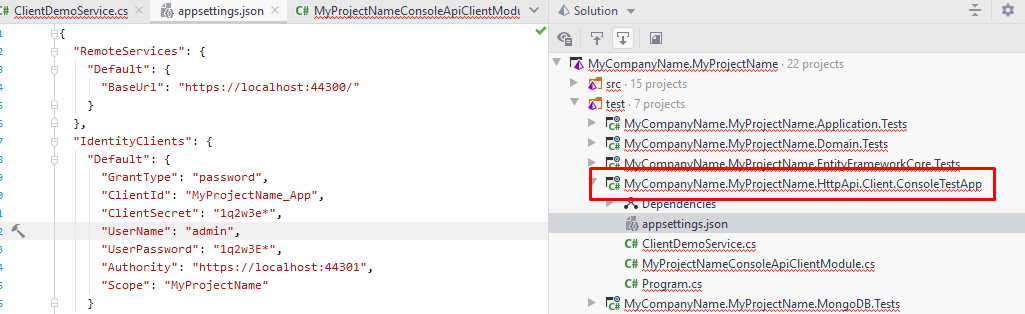
the below code, fetches all users
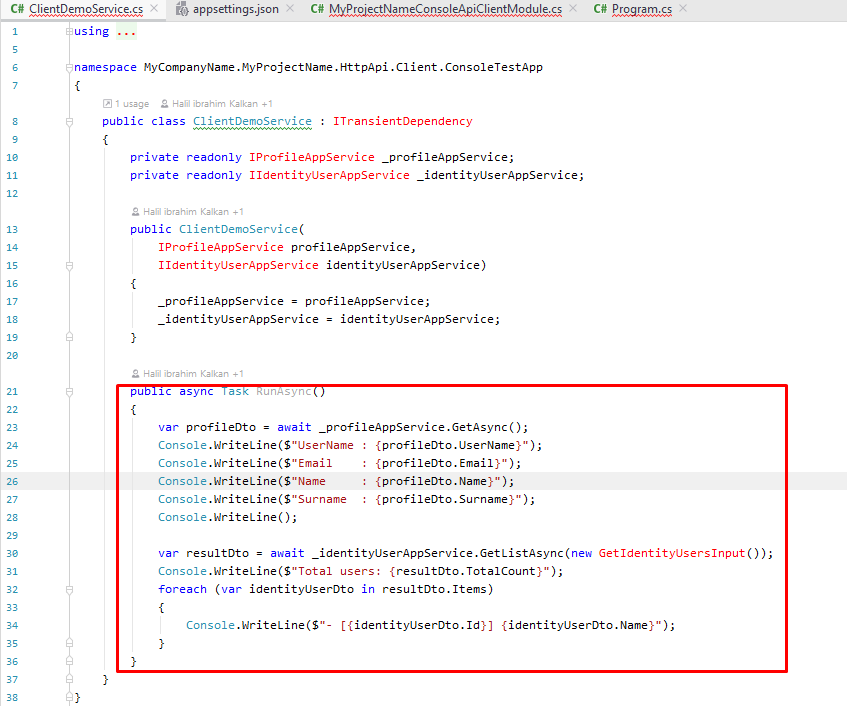 Markdown supported.Copy, paste, or drag & drop images and files (max 100 MB per file, 100 MB total per post)
 -
0
@camping89@gmail.com , you can also post your sample code to call external services. Our new platform ABP Community is live! Create your first article on https://community.abp.io/
Markdown supported.Copy, paste, or drag & drop images and files (max 100 MB per file, 100 MB total per post) -
0
Hi alper,
I'm not sure about that.
You say the console application in the Acme demo calls authenticated endpoints, but if it does do, the way it does it is buried in your assembly internals.
In the code example you provided above, the access method is via services that are injected into the application from your internals.
For example, IProfileAppService is located in assembly Volo.Abp.Identity.Pro.Application.Contracts
I don't see how this relates at all to Identity Server/Client Credentials, which was the original recommendation made by liangshiwei above. My version of the "console application" is an AWS Lambda and I don't want to have to load it up with assemblies, etc. I want a nice, lightweight client that uses a standard toolset like HttpClient.
Are you sure we're still talking about the same thing?
Markdown supported.Copy, paste, or drag & drop images and files (max 100 MB per file, 100 MB total per post) -
0
you need to reference the Contracts project to your HttpClient for best practise. but if you don't want to do that, see the below
This is the HTTP Client used for ABP CLI
- https://github.com/abpframework/abp/blob/dev/framework/src/Volo.Abp.Cli.Core/Volo/Abp/Cli/Http/CliHttpClient.cs
This is a test function, that calls an external service
- https://github.com/abpframework/abp/blob/4228ce096ee3d9ab063f3a9799e9137ae82f2556/templates/module/aspnet-core/test/MyCompanyName.MyProjectName.HttpApi.Client.ConsoleTestApp/ClientDemoService.cs#L54
Markdown supported.Copy, paste, or drag & drop images and files (max 100 MB per file, 100 MB total per post)



