






Hi
I want to show the account layout UI on the login screen. I am using commercial abp blazor io project and the login screen comes with no theme only login forms come so can we show the layout here same as we show after login but before login, we will hide all menus.
- ABP Framework version: v4.43
- UI type: Blazor
- DB provider: EF Core
- Tiered (MVC) or Identity Server Separated (Angular): no
- Exception message and stack trace:
- Steps to reproduce the issue:"
39 Answer(s)
-
0
Hi,
I think this is not related to ABP
Please check your global.js code
 Markdown supported.Copy, paste, or drag & drop images and files (max 100 MB per file, 100 MB total per post)
 -
0
Hi,
I think this is not related to ABP
Please check your global.js code
Hi liangshiwel
Thanks for your suggestions and solution. It's working fine on local but if I am deploying code on my test server then all is working fine except the login screen UI. In login UI is not coming properly also no errors are coming in the console as well.
Can you suggest to me what I can do in this case?
Markdown supported.Copy, paste, or drag & drop images and files (max 100 MB per file, 100 MB total per post) -
0
Hi,
See: https://docs.abp.io/en/abp/latest/UI/AspNetCore/Bundling-Minification#ignore-for-minification
You can try to ignoring the global.js file.
Markdown supported.Copy, paste, or drag & drop images and files (max 100 MB per file, 100 MB total per post) -
0
Hi,
See: https://docs.abp.io/en/abp/latest/UI/AspNetCore/Bundling-Minification#ignore-for-minification
You can try to ignoring the global.js file.
I already removed this. On local it's taking CSS from global-style.css file but if we are deploying code it's taking references from
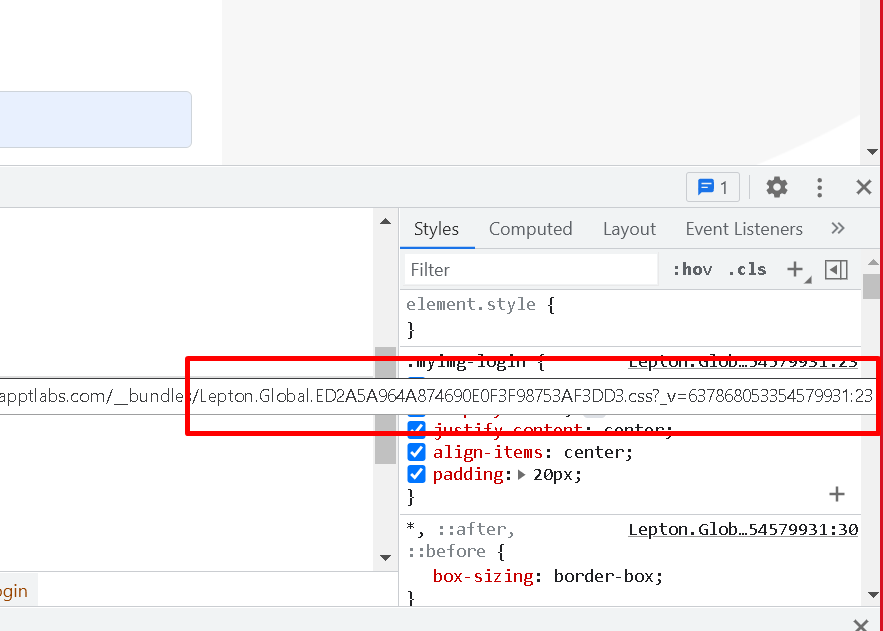 file this is the issue.Markdown supported.Copy, paste, or drag & drop images and files (max 100 MB per file, 100 MB total per post)
 -
0
Hi,
I think we are talking about js not css.
However, if you don't want to use bundles & minifies, you can change it. see: https://docs.abp.io/en/abp/latest/UI/AspNetCore/Bundling-Minification#bundling-mode
Markdown supported.Copy, paste, or drag & drop images and files (max 100 MB per file, 100 MB total per post) -
0
Hi,
I think we are talking about js not css.
However, if you don't want to use bundles & minifies, you can change it. see: https://docs.abp.io/en/abp/latest/UI/AspNetCore/Bundling-Minification#bundling-mode
Not able to understand why it's not loading HTML properly on test server

On local login HTML is
 Markdown supported.Copy, paste, or drag & drop images and files (max 100 MB per file, 100 MB total per post)
 -
0
Did you try this?
Configure<AbpBundlingOptions>(options =>
{
    options.Mode = BundlingMode.None;
});
Markdown supported.Copy, paste, or drag & drop images and files (max 100 MB per file, 100 MB total per post) -
0
You can try to ignoring the global.js file.
When you ignore the global.js file, is it working?
Actually, we recommend using the bundling system, because It can effectively reduce the size of CSS and JS files to makes your app load faster.
If everything is ok, you don't have to care about it
Markdown supported.Copy, paste, or drag & drop images and files (max 100 MB per file, 100 MB total per post) -
0
You can try to ignoring the global.js file.
When you ignore the global.js file, is it working?
Actually, we recommend using the bundling system, because It can effectively reduce the size of CSS and JS files to makes your app load faster.
If everything is ok, you don't have to care about it
I already removed this
Markdown supported.Copy, paste, or drag & drop images and files (max 100 MB per file, 100 MB total per post) -
0
Is there any problem?
Markdown supported.Copy, paste, or drag & drop images and files (max 100 MB per file, 100 MB total per post) -
0
https://zoom.us/j/96542343855?pwd=YUZvWjBoMEdSS2w3Y2xhelh6MHU2Zz09
Markdown supported.Copy, paste, or drag & drop images and files (max 100 MB per file, 100 MB total per post) -
0
Hi,
You can change the layout.
@{
    Layout = ThemeManager.CurrentTheme.GetApplicationLayout();
}
Solved, you missed this.
Markdown supported.Copy, paste, or drag & drop images and files (max 100 MB per file, 100 MB total per post)


