






Check the docs before asking a question: https://docs.abp.io/en/commercial/latest/ Check the samples, to see the basic tasks: https://docs.abp.io/en/commercial/latest/samples/index The exact solution to your question may have been answered before, please use the search on the homepage.
- ABP Framework version: v2.7.0
- UI type: Angular
- Tiered (MVC) or Identity Server Seperated (Angular): yes
- Exception message and stack trace:
- Steps to reproduce the issue:
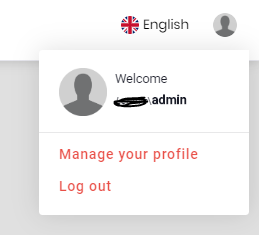
How to change default profile icon, link text and css, how to redirect to login page on user logout. (without component replacement)
4 Answer(s)
-
0
Any update on this.
Markdown supported.Copy, paste, or drag & drop images and files (max 100 MB per file, 100 MB total per post) -
0
Hi vishalnikam,
Thanks for your inquiry.
Before v3, there was no way to change these without component replacement as described here:
https://docs.abp.io/en/abp/latest/UI/Angular/Component-Replacement#how-to-replace-navitemscomponent
However, as of v3, we have introduced
NavItemsServicewhich can be used to replace only the current user component:https://docs.abp.io/en/abp/latest/UI/Angular/Modifying-the-Menu#how-to-patch-or-remove-an-right-part-element
So, if you can upgrade to the latest version, you may replace only that component. Please see the migration guide for details:
https://docs.abp.io/en/abp/latest/UI/Angular/Migration-Guide-v3
In order to make it easier for you, here is the latest
CurrentUserComponentsource code:import { ApplicationConfiguration, AuthService, ConfigState, SessionState, ABP, } from '@abp/ng.core'; import { Component, OnInit } from '@angular/core'; import { Router } from '@angular/router'; import { Select } from '@ngxs/store'; import { Observable } from 'rxjs'; import { eThemeLeptonComponents } from '../../enums/components'; @Component({ selector: 'abp-current-user', // tslint:disable-next-line: component-max-inline-declarations templateUrl: 'current-user.component.html', }) export class CurrentUserComponent implements OnInit { @Select(ConfigState.getOne('currentUser')) currentUser$: Observable<ApplicationConfiguration.CurrentUser>; @Select(SessionState.getTenant) selectedTenant$: Observable<ABP.BasicItem>; currentUserImageComponentKey = eThemeLeptonComponents.CurrentUserImage; get smallScreen(): boolean { return window.innerWidth < 992; } constructor(private authService: AuthService, private router: Router) {} ngOnInit() {} logout() { this.authService.logout().subscribe(() => { this.router.navigate(['/'], { state: { redirectUrl: this.router.url } }); }); } }...and its template:
<ng-container *ngIf="currentUser$ | async as user">
  <ng-template #loginBtn>
    <a role="button" routerLink="/account/login" class="btn ">{{
      'AbpAccount::Login' | abpLocalization
    }}</a>
  </ng-template>
  <div *ngIf="user.isAuthenticated; else loginBtn" class="dropdown btn-group" ngbDropdown>
    <a ngbDropdownToggle class="btn pointer">
      <abp-current-user-image
        *abpReplaceableTemplate="{
          componentKey: currentUserImageComponentKey,
          inputs: { currentUser: { value: user }, classes: { value: 'user-avatar' } }
        }"
        [currentUser]="user"
        classes="user-avatar"
      ></abp-current-user-image>
      <span class="d-lg-none ml-1">
        <small *ngIf="(selectedTenant$ | async)?.name as tenantName"
          ><i>{{ tenantName }}</i></small
        >
        <span>{{ user.userName }}</span>
      </span>
    </a>
    <div ngbDropdownMenu class="dropdown-menu dropdown-menu-right">
      <div class="p-2 row">
        <div class="pr-0 col col-auto">
          <abp-current-user-image
            *abpReplaceableTemplate="{
              componentKey: currentUserImageComponentKey,
              inputs: { currentUser: { value: user }, classes: { value: 'user-avatar-big' } }
            }"
            [currentUser]="user"
            classes="user-avatar-big"
          ></abp-current-user-image>
        </div>
        <div class="pl-2 col">
          <span>{{ 'AbpAccount::Welcome' | abpLocalization }}</span
          ><br />
          <small *ngIf="(selectedTenant$ | async)?.name as tenantName"
            ><i>{{ tenantName }}</i></small
          >
          <strong>{{ user.userName }}</strong>
        </div>
      </div>
      <div class="dropdown-divider"></div>
      <a class="dropdown-item pointer" routerLink="/account/manage-profile">{{
        'AbpAccount::ManageYourProfile' | abpLocalization
      }}</a>
      <a class="dropdown-item pointer" id="logout" (click)="logout()">{{
        'AbpUi::Logout' | abpLocalization
      }}</a>
    </div>
  </div>
</ng-container>
I hope this answers your question. Please let me know if it does.
Have a nice day.
Markdown supported.Copy, paste, or drag & drop images and files (max 100 MB per file, 100 MB total per post)


