

Open Closed

LDAP on project #2992


User avatar
0
berly created

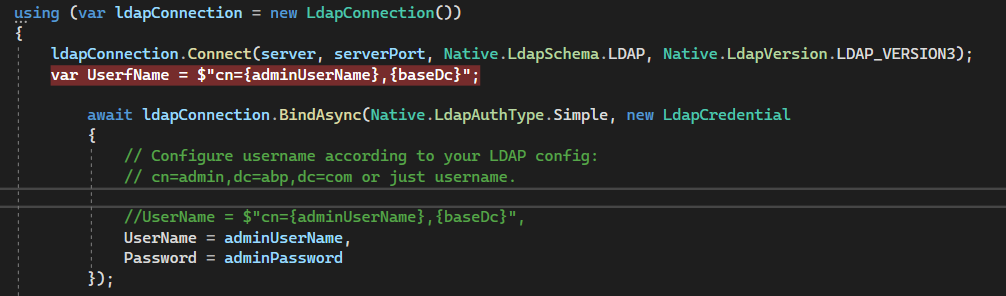
Hello, I just tried using LDAP with the sample. I have to replace the username for it to work. How to make the same modification on abp commercial?
  • ABP Framework version: v5.2.1
  • UI type: Blazor
  • DB provider: EF Core
  • Tiered (MVC) or Identity Server Separated (Angular): no
Markdown supported.
Copy, paste, or drag & drop images and files (max 100 MB per file, 100 MB total per post)
14 Answer(s)
  • User Avatar
    0
    berly created

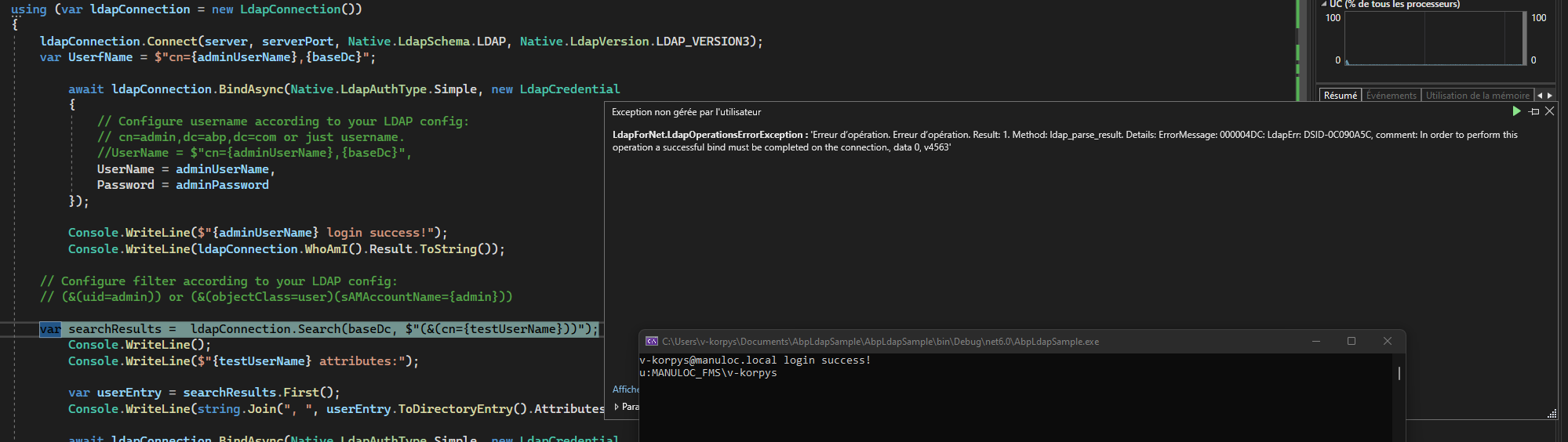
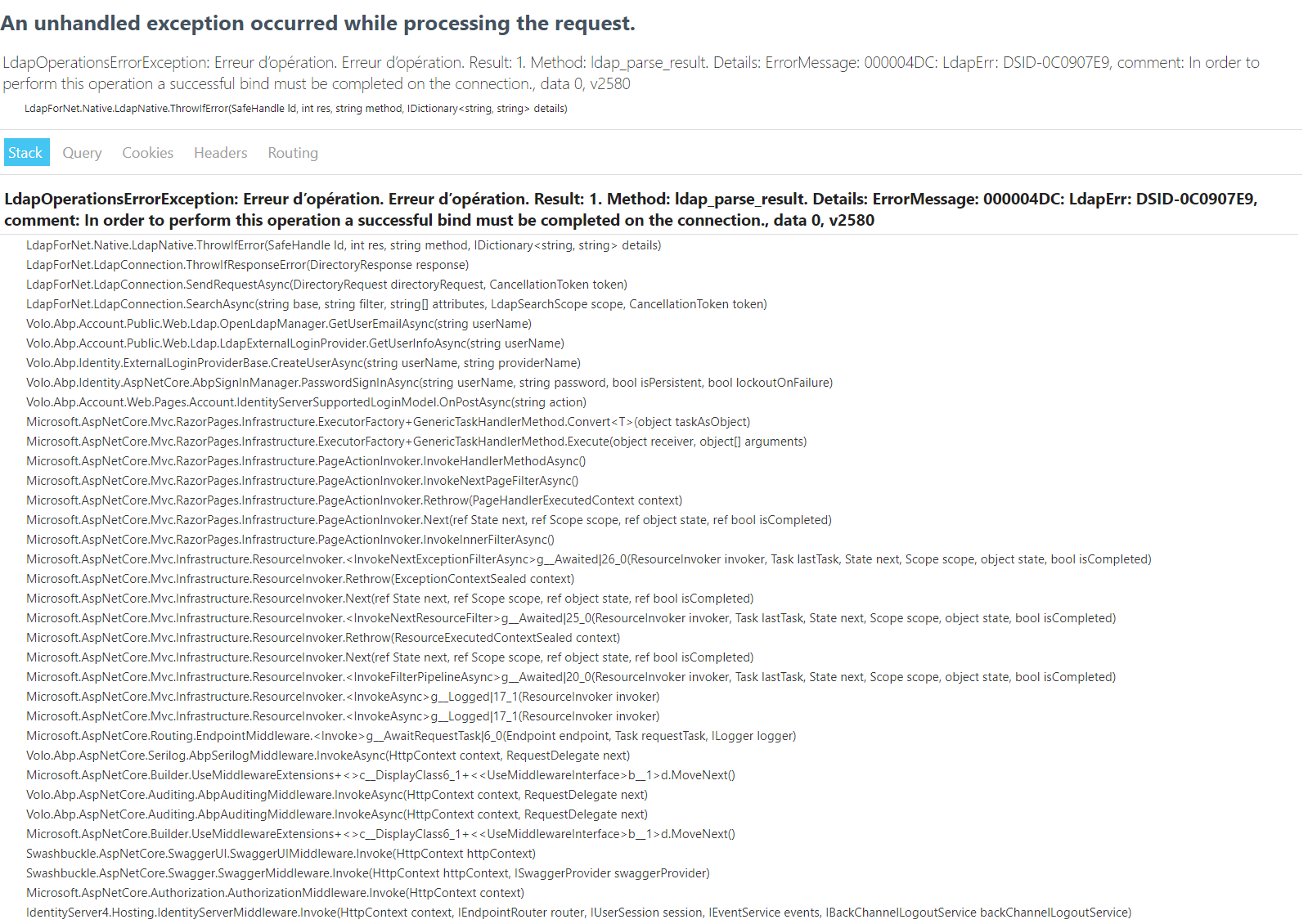
    i have also one error.

    Markdown supported.
    Copy, paste, or drag & drop images and files (max 100 MB per file, 100 MB total per post)
  • User Avatar
    0
    maliming created
    Support Team Fullstack Developer

    hi

    How to make the same modification on abp commercial?

    https://docs.abp.io/en/commercial/latest/modules/account/ldap#customize-built-in-services

    i have also one error.

    This seems to be an issue with the LDAP server?

    Markdown supported.
    Copy, paste, or drag & drop images and files (max 100 MB per file, 100 MB total per post)
  • User Avatar
    0
    berly created

    In fact it works half the time, maybe there is an asynchronous problem?

    I need to overdrive only the NormalizeUserNameAsync method ?

    Markdown supported.
    Copy, paste, or drag & drop images and files (max 100 MB per file, 100 MB total per post)

  • User Avatar
    0
    maliming created
    Support Team Fullstack Developer

    I need to overdrive only the NormalizeUserNameAsync method ?

    Yes You can give it a try

    Markdown supported.
    Copy, paste, or drag & drop images and files (max 100 MB per file, 100 MB total per post)

  • User Avatar
    0
    berly created

    When i try to log i have this error.

    Markdown supported.
    Copy, paste, or drag & drop images and files (max 100 MB per file, 100 MB total per post)
  • User Avatar
    0
    maliming created
    Support Team Fullstack Developer

    hi

    Can you share the sample code include your username and password?

    liming.ma@volosoft.com

    Markdown supported.
    Copy, paste, or drag & drop images and files (max 100 MB per file, 100 MB total per post)
  • User Avatar
    0
    berly created

    Done

    Markdown supported.
    Copy, paste, or drag & drop images and files (max 100 MB per file, 100 MB total per post)
  • User Avatar
    0
    maliming created
    Support Team Fullstack Developer

    ok, I will check it asap.

    Markdown supported.
    Copy, paste, or drag & drop images and files (max 100 MB per file, 100 MB total per post)
  • User Avatar
    0
    berly created

    in the sample i switchNative.LdapVersion.LDAP_VERSION3to this Native.LdapVersion.LDAP_VERSION But no in my abp project

    Markdown supported.
    Copy, paste, or drag & drop images and files (max 100 MB per file, 100 MB total per post)
  • User Avatar
    0
    maliming created
    Support Team Fullstack Developer

    hi

    I can't connect to srad01.manuloc.local. Maybe you can check on https://github.com/flamencist/ldap4net

    we not very good at LDAP-related details.

    Markdown supported.
    Copy, paste, or drag & drop images and files (max 100 MB per file, 100 MB total per post)
  • User Avatar
    0
    berly created
                ldapConnection.Connect(server, serverPort, Native.LdapSchema.LDAP, Native.LdapVersion.LDAP_VERSION2);
                var UserfName = $"cn={adminUserName},{baseDc}";
    
                    await ldapConnection.BindAsync(Native.LdapAuthType.Negotiate, new LdapCredential


    Do you know where can i switch Native.LdapAuthType.Negotiate and Native.LdapVersion.LDAP_VERSION2 ?

    Markdown supported.
    Copy, paste, or drag & drop images and files (max 100 MB per file, 100 MB total per post)
  • User Avatar
    0
    maliming created
    Support Team Fullstack Developer

    I'm not sure. You can search on https://github.com/flamencist/ldap4net

    Markdown supported.
    Copy, paste, or drag & drop images and files (max 100 MB per file, 100 MB total per post)
  • User Avatar
    0
    berly created

    I download the Volo.Account.Pro module but i dont't find where the ldap configuration is made.

    Markdown supported.
    Copy, paste, or drag & drop images and files (max 100 MB per file, 100 MB total per post)
  • User Avatar
    0
    maliming created
    Support Team Fullstack Developer

    hi

    The class is LdapExternalLoginProvider

    Markdown supported.
    Copy, paste, or drag & drop images and files (max 100 MB per file, 100 MB total per post)
Boost Your Development
ABP Live Training
Packages
See Trainings
Mastering ABP Framework Book
The Official Guide
Mastering
ABP Framework
Learn More
Mastering ABP Framework Book
Made with ❤️ on ABP v10.8.0-preview. Updated on September 16, 2026, 14:50
1
ABP Assistant
🔐 You need to be logged in to use the chatbot. Please log in first.