






- ABP Framework version: v5.3.0.rc.1
- UI type: Angular
- DB provider: EF Core
- Tiered (MVC) or Identity Server Separated (Angular): yes
- Exception message and stack trace:
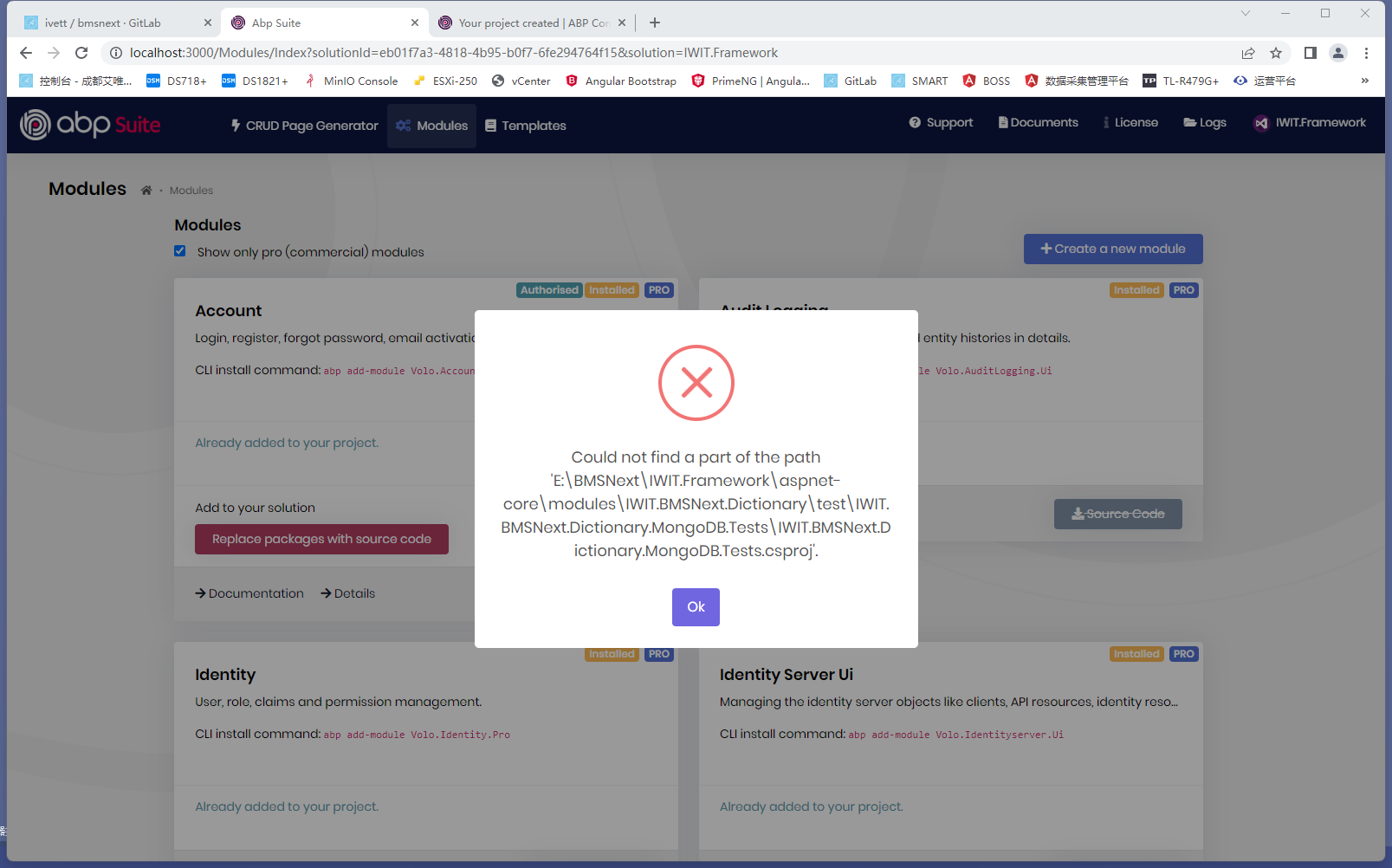 Could not find a part of the path 'E:\BMSNext\IWIT.Framework\aspnet-core\modules\IWIT.BMSNext.Dictionary\test\IWIT.BMSNext.Dictionary.MongoDB.Tests\IWIT.BMSNext.Dictionary.MongoDB.Tests.csproj'.
   at Microsoft.Win32.SafeHandles.SafeFileHandle.CreateFile(String fullPath, FileMode mode, FileAccess access, FileShare share, FileOptions options)
   at Microsoft.Win32.SafeHandles.SafeFileHandle.Open(String fullPath, FileMode mode, FileAccess access, FileShare share, FileOptions options, Int64 preallocationSize)
   at System.IO.Strategies.OSFileStreamStrategy..ctor(String path, FileMode mode, FileAccess access, FileShare share, FileOptions options, Int64 preallocationSize)
   at System.IO.StreamReader.ValidateArgsAndOpenPath(String path, Encoding encoding, Int32 bufferSize)
   at System.IO.File.InternalReadAllText(String path, Encoding encoding)
   at Volo.Abp.Cli.ProjectModification.NugetPackageToLocalReferenceConverter.ConvertToLocalReference(String folder, List`1 nugetPackageList, String localPathPrefix, String sourceFile, String modulePrefix) in D:\ci\Jenkins\workspace\abp-commercial-release\abp\framework\src\Volo.Abp.Cli.Core\Volo\Abp\Cli\ProjectModification\NugetPackageToLocalReferenceConverter.cs:line 31
   at Volo.Abp.Cli.ProjectModification.NugetPackageToLocalReferenceConverter.Convert(ModuleWithMastersInfo module, String solutionFile, String modulePrefix) in D:\ci\Jenkins\workspace\abp-commercial-release\abp\framework\src\Volo.Abp.Cli.Core\Volo\Abp\Cli\ProjectModification\NugetPackageToLocalReferenceConverter.cs:line 22
   at Volo.Abp.Cli.ProjectModification.SolutionModuleAdder.AddAsync(String solutionFile, String moduleName, String version, Boolean skipDbMigrations, Boolean withSourceCode, Boolean addSourceCodeToSolutionFile, Boolean newTemplate, Boolean newProTemplate) in D:\ci\Jenkins\workspace\abp-commercial-release\abp\framework\src\Volo.Abp.Cli.Core\Volo\Abp\Cli\ProjectModification\SolutionModuleAdder.cs:line 135
   at Volo.Abp.Cli.Commands.AddModuleCommand.ExecuteAsync(CommandLineArgs commandLineArgs) in D:\ci\Jenkins\workspace\abp-commercial-release\abp\framework\src\Volo.Abp.Cli.Core\Volo\Abp\Cli\Commands\AddModuleCommand.cs:line 68
   at Volo.Abp.Suite.Controllers.AbpSuiteController.CreateModuleAsync(CreateModuleInput input)
- Steps to reproduce the issue:"
SETUP1. Create solution:IWIT.Framework (Angular / EF Core ) successful!
SETUP2. Open Solution:IWIT.Framework Create the first module successful!
SETUP3. Create the second module fail. The error is shown above
11 Answer(s)
-
0
this exists?
E:\BMSNext\IWIT.Framework\aspnet-core\modules\IWIT.BMSNext.Dictionary\test\IWIT.BMSNext.Dictionary.MongoDB.Tests\IWIT.BMSNext.Dictionary.MongoDB.Tests.csprojif not you can write a correct path in the Suite's DB
%UserProfile%\.abp\suite\appsettings.jsonMarkdown supported.Copy, paste, or drag & drop images and files (max 100 MB per file, 100 MB total per post) -
0
I guess it is related with the naming but i couldn't reproduce.
Can you type the module names?
main solution:
IWIT.BMSNextfirst module:IWIT.BMSNext.Dictionary? second module: ?Markdown supported.Copy, paste, or drag & drop images and files (max 100 MB per file, 100 MB total per post) -
0
this exists?
E:\BMSNext\IWIT.Framework\aspnet-core\modules\IWIT.BMSNext.Dictionary\test\IWIT.BMSNext.Dictionary.MongoDB.Tests\IWIT.BMSNext.Dictionary.MongoDB.Tests.csprojif not you can write a correct path in the Suite's DB
%UserProfile%\.abp\suite\appsettings.jsonThe main solution uses EF core (MSSqlServer), which has nothing to do with mongodb.
This error will occur when the module is created continuously and the second module is created.
Markdown supported.Copy, paste, or drag & drop images and files (max 100 MB per file, 100 MB total per post) -
0
Hi,
I can't reproduce the problem.
- Created a project. (
IWIT.BMSNext) - Added a new module (
IWIT.BMSNext.Dictionary) - Added an another new module (
IWIT.BMSNext.Basic)
It worked successfuly and i could build the whole solution.
Markdown supported.Copy, paste, or drag & drop images and files (max 100 MB per file, 100 MB total per post) - Created a project. (
-
0
Hi,
I can't reproduce the problem.
- Created a project. (
IWIT.BMSNext) - Added a new module (
IWIT.BMSNext.Dictionary) - Added an another new module (
IWIT.BMSNext.Basic)
It worked successfuly and i could build the whole solution.
I have upgraded to 5.3 Rc-2, there is still this error on my computer, but it can be used normally only after closing ABP suite and entering again.
Markdown supported.Copy, paste, or drag & drop images and files (max 100 MB per file, 100 MB total per post) - Created a project. (
-
0
Could you try the same process with CLI?
run this command to create the project:
abp new IWIT.BMSNext -u angular --separate-identity-server --previewthen move to
aspnet-corefolder and run:abp add-module IWIT.BMSNext.Dictionary --new -t module-pro --add-to-solution-fileabp add-module IWIT.BMSNext.Basic --new -t module-pro --add-to-solution-fileMarkdown supported.Copy, paste, or drag & drop images and files (max 100 MB per file, 100 MB total per post) -
0
Could you try the same process with CLI?
run this command to create the project:
abp new IWIT.BMSNext -u angular --separate-identity-server --previewthen move to
aspnet-corefolder and run:abp add-module IWIT.BMSNext.Dictionary --new -t module-pro --add-to-solution-fileabp add-module IWIT.BMSNext.Basic --new -t module-pro --add-to-solution-file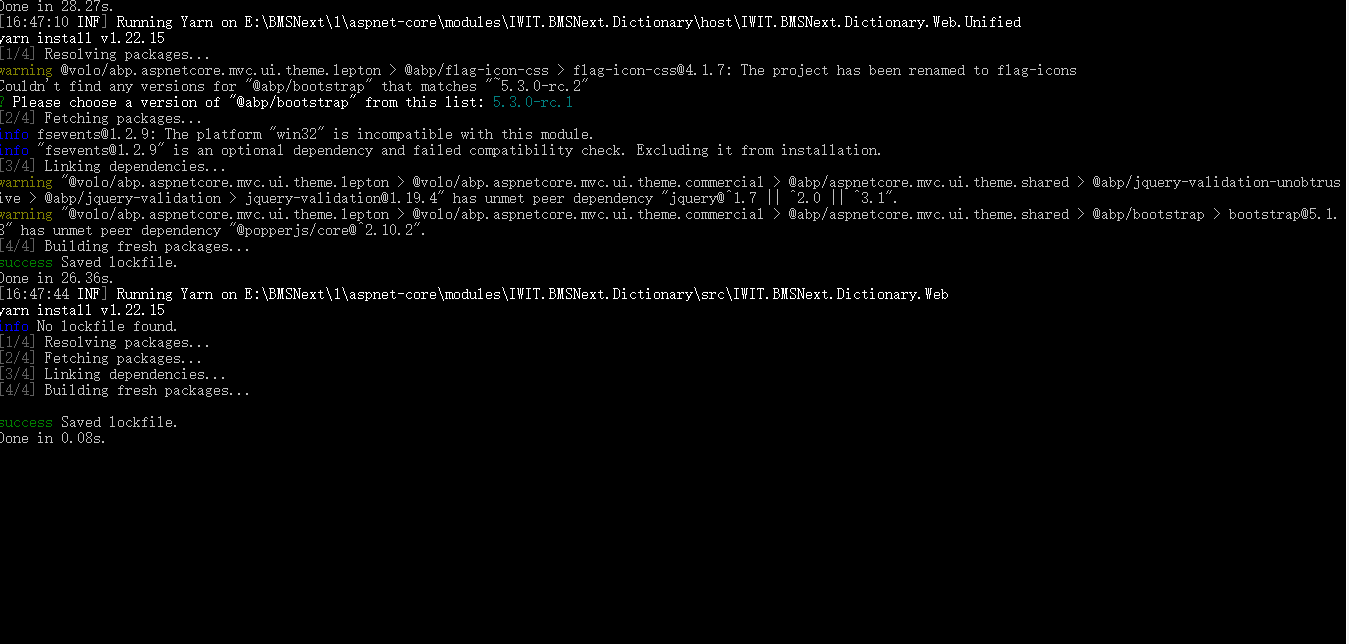
There will be no error prompt, but it has not ended normally.
Markdown supported.Copy, paste, or drag & drop images and files (max 100 MB per file, 100 MB total per post) -
0
Could you try the same process with CLI?
run this command to create the project:
abp new IWIT.BMSNext -u angular --separate-identity-server --previewthen move to
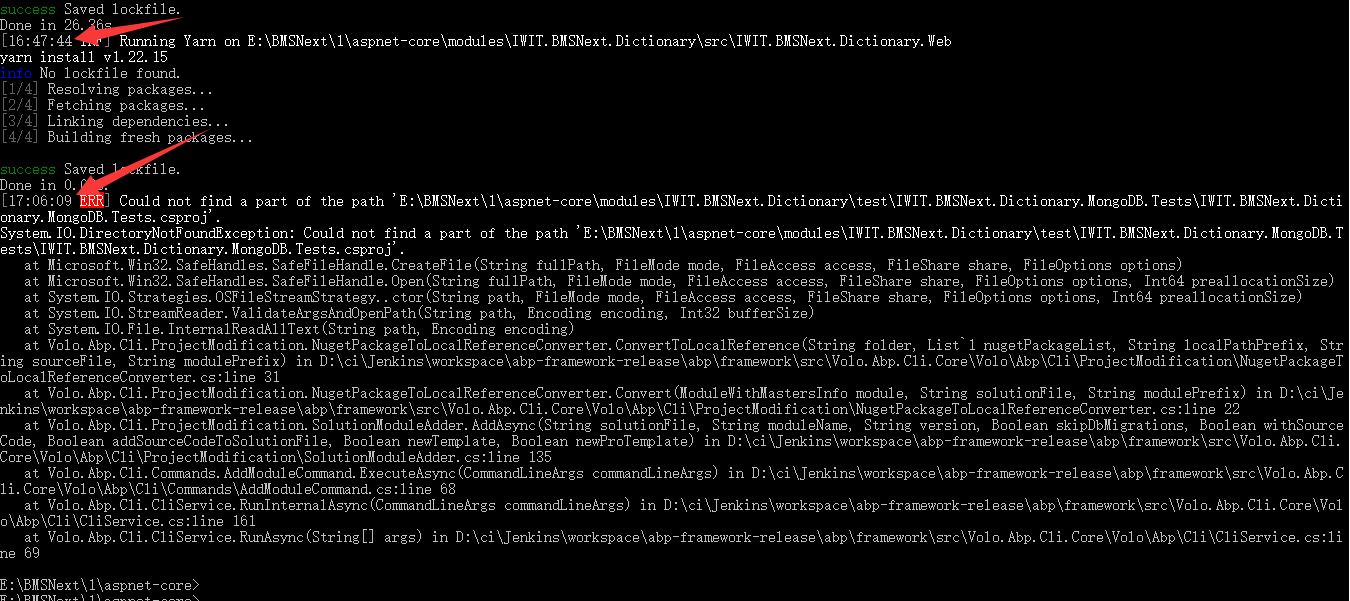
aspnet-corefolder and run:abp add-module IWIT.BMSNext.Dictionary --new -t module-pro --add-to-solution-fileabp add-module IWIT.BMSNext.Basic --new -t module-pro --add-to-solution-fileThere will be no error prompt, but it has not ended normally.
After waiting for more than 10 minutes, the error message is still prompted.
 Markdown supported.Copy, paste, or drag & drop images and files (max 100 MB per file, 100 MB total per post)
 -
0
This is very interesting. See the source code https://github.com/abpframework/abp/blob/dev/framework/src/Volo.Abp.Cli.Core/Volo/Abp/Cli/ProjectModification/NugetPackageToLocalReferenceConverter.cs#L33
We use
Directory.GetFiles(...)to find csproj files, and when we try to read one of them we shouldn't receive DirectoryNotFoundException. I don't understand why you are facing this issue.However, i placed a
File.Exist(...)check before reading a csproj file. See https://github.com/abpframework/abp/pull/12768I'm closing the issue since it will be resolved with that pull request. If you continue to face this issue after stable 5.3 release, you can re-open.
Markdown supported.Copy, paste, or drag & drop images and files (max 100 MB per file, 100 MB total per post)



