






- ABP Framework version: v5.2.2
- UI type: MVC
- DB provider: EF Core
- Tiered (MVC) or Identity Server Separated (Angular): no
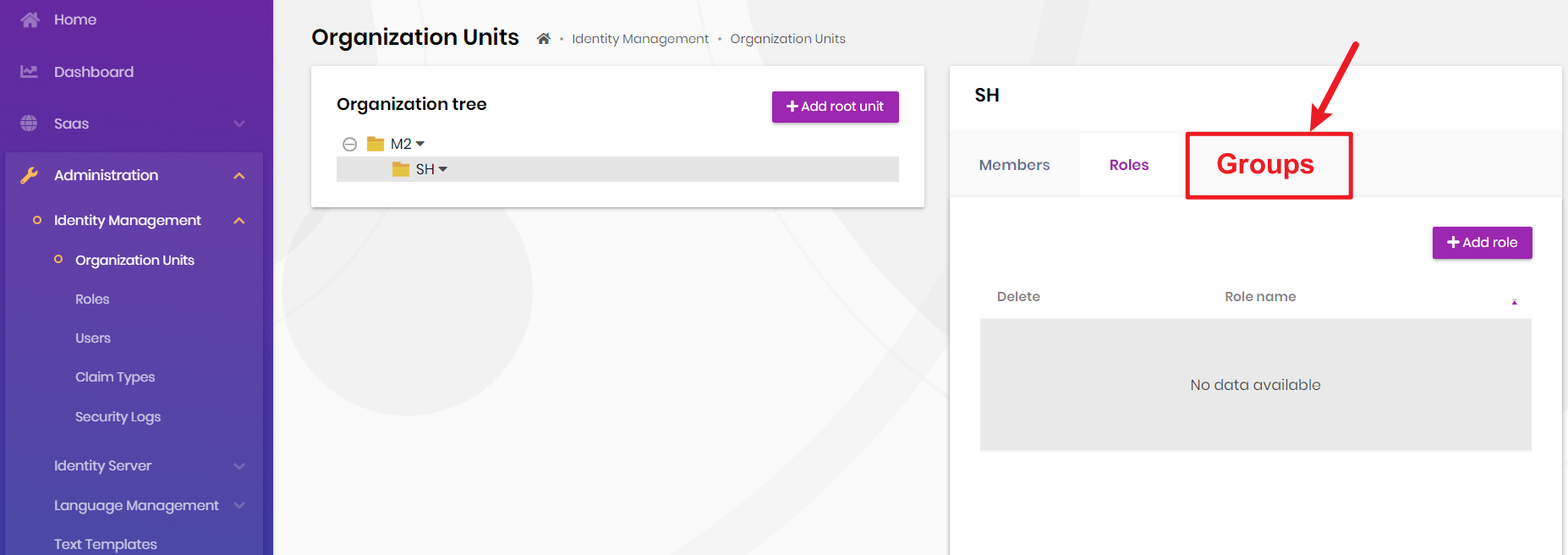
How can I modify OrganizationUnits ; I want to add another Tab (Groups) like Roles . But I did't find the OrganizationUnits Razor Page in my project can you share me the docs or example , thanks ~
5 Answer(s)
-
0
Hi @
You can place the following page in your .Web project to customize it.
/Pages/Identity/OrganizationUnits/Index.cshtml@page @using System.Net @using Microsoft.AspNetCore.Authorization @using Microsoft.AspNetCore.Mvc.Localization @using Volo.Abp.AspNetCore.Mvc.UI.Layout @using Volo.Abp.AspNetCore.Mvc.UI.Packages.JsTree @using Volo.Abp.Identity @using Volo.Abp.Identity.Localization @using Volo.Abp.Identity.Web.Navigation @using Volo.Abp.Identity.Web.Pages.Identity.OrganizationUnits @model IndexModel @inject IHtmlLocalizer<IdentityResource> L @inject IAuthorizationService Authorization @inject IPageLayout PageLayout @{ PageLayout.Content.Title = L["OrganizationUnits"].Value; PageLayout.Content.BreadCrumb.Add(L["Menu:IdentityManagement"].Value); PageLayout.Content.MenuItemName = IdentityMenuNames.OrganizationUnits; } @section styles { <abp-style-bundle name="@typeof(IndexModel).FullName"> <abp-style type="typeof(JsTreeStyleContributor)" /> <abp-style src="/Pages/AbpPermissionManagement/permission-management-modal.css" /> <abp-style src="/Pages/Identity/OrganizationUnits/organization-unit.css" /> </abp-style-bundle> } @section scripts { <abp-script-bundle name="@typeof(IndexModel).FullName"> <abp-script src="/client-proxies/identity-proxy.js" /> <abp-script type="typeof(JsTreeScriptContributor)" /> <abp-script src="/Pages/AbpPermissionManagement/permission-management-modal.js" /> <abp-script src="/Pages/Identity/OrganizationUnits/index.js"></abp-script> <abp-script src="/Pages/Identity/OrganizationUnits/addMemberModal.js"></abp-script> <abp-script src="/Pages/Identity/OrganizationUnits/addRoleModal.js"></abp-script> </abp-script-bundle> } @section content_toolbar { } <div id="OrganizationUnitsWrapper"> <abp-row> <abp-column size-md="_12" size-lg="_6"> <abp-card> <abp-card-body> <abp-card-title> <abp-row h-align="Between"> <abp-column> <span style="font-size:initial"> @L["OrganizationTree"]</span> </abp-column> <abp-column> @if (await Authorization.IsGrantedAsync(IdentityPermissions.OrganizationUnits.ManageOU)) { <abp-button class="float-end" button-type="Primary" size="Small" name="CreateOrganizationUnit" text="@L["AddRootUnit"].Value" icon="plus" /> } </abp-column> </abp-row> </abp-card-title> <div id="OrganizationUnitEditTree"></div> <div id="OrganizationUnitTreeEmptyInfo" class="text-muted">@L["NoOrganizationUnits"]</div> </abp-card-body> </abp-card> </abp-column> <abp-column size-md="_12" size-lg="_6"> <abp-card> <abp-card-header> <h3 class="selected-organizationunit-name"></h3> </abp-card-header> <abp-card-body class="p-0"> <abp-tabs> <abp-tab name="Members" title="@L["Members"].Value"> <div id="OuMembersTable" style="display:none"> @if (await Authorization.IsGrantedAsync(IdentityPermissions.OrganizationUnits.ManageUsers)) { <div class="text-end mb-3"> <abp-button button-type="Primary" size="Small" name="AddMember" text="@L["AddMember"].Value" icon="plus" /> </div> } <abp-table striped-rows="true" class="nowrap"></abp-table> </div> <div id="OuMembersEmptyInfo" class="text-muted"> @L["SelectAnOrganizationUnitToSeeMembers"] </div> </abp-tab> <abp-tab name="Roles" title="@L["Roles"].Value"> <div id="OuRolesTable" style="display:none"> @if (await Authorization.IsGrantedAsync(IdentityPermissions.OrganizationUnits.ManageRoles)) { <div class="text-end mb-3"> <abp-button button-type="Primary" size="Small" name="AddRole" text="@L["AddRole"].Value" icon="plus" /> </div> } <abp-table striped-rows="true" class="nowrap"></abp-table> </div> <div id="OuRolesEmptyInfo" class="text-muted"> @L["SelectAnOrganizationUnitToSeeRoles"] </div> </abp-tab> </abp-tabs> </abp-card-body> </abp-card> </abp-column> </abp-row> </div>You can follow this documentation for overriding razor pages: https://docs.abp.io/en/abp/latest/UI/AspNetCore/Customization-User-Interface#completely-overriding-a-razor-page
Markdown supported.Copy, paste, or drag & drop images and files (max 100 MB per file, 100 MB total per post) -
0
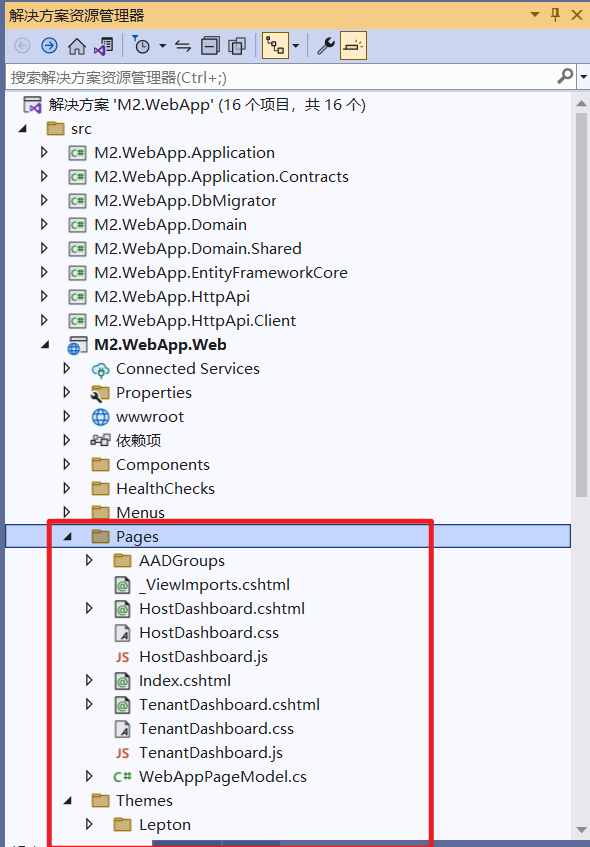
hi @enisn, But thers is no this file in my project : /Pages/Identity/OrganizationUnits/Index.cshtml
 Markdown supported.Copy, paste, or drag & drop images and files (max 100 MB per file, 100 MB total per post)
 -
0
Yeah, I know. Please check this documentation: https://docs.abp.io/en/abp/latest/UI/AspNetCore/Customization-User-Interface#completely-overriding-a-razor-page
You should create that file in that path to override it. After creating that file and pasting the content which I posted above, you're ready to customize that page. You can make changes however you want in that file.
Markdown supported.Copy, paste, or drag & drop images and files (max 100 MB per file, 100 MB total per post) -
0
@enisn
Thanks , and can you share me more OrganizationUnits Files in /Pages/Identity/OrganizationUnits eg : js , css ,addMember ;I want to custom the Organizaiton Page , Thanks ~
Markdown supported.Copy, paste, or drag & drop images and files (max 100 MB per file, 100 MB total per post) -
0
@i-shanghai thanks for contacting us. Due to your license restrictions, you cannot access the source-code of PRO modules. contact info@abp.io for more information.
Markdown supported.Copy, paste, or drag & drop images and files (max 100 MB per file, 100 MB total per post)



