






Example Setup: Remove or disable all languages except English in the Admin console. Logout, clear all cookies, Log back in. Expected: The login/logged out redirection pages should respect the fact that there is no choice for languages and not show the flag icon Actual: The Login page when displayed show the 1 language enabled
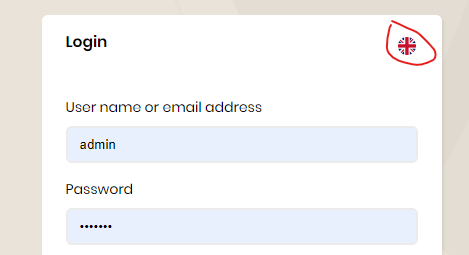
The Blazor client works OK.

- ABP Framework version: v5.3.0
- UI type: Blazor
- DB provider: EF Core
- Tiered (MVC) or Identity Server Separated (Angular): no
4 Answer(s)
-
0
hi
You can override the
LanguageSwitchcomponent.lepton-theme\src\Volo.Abp.AspNetCore.Mvc.UI.Theme.Lepton\Themes\Lepton\Components\Toolbar\LanguageSwitch\Default.cshtmllepton-theme\src\Volo.Abp.AspNetCore.Mvc.UI.Theme.Lepton\Themes\Lepton\Components\Toolbar\LanguageSwitch\LanguageSwitchViewComponent.csVolo.Abp.AspNetCore.Mvc.UI.Theme.Lepton.Themes.Lepton.Components.Toolbar.LanguageSwitch.LanguageSwitchViewComponentMarkdown supported.Copy, paste, or drag & drop images and files (max 100 MB per file, 100 MB total per post) -
0
OK, thanks for the answer. may I suggest making the developer do a little less heavy lifting to merely hide a icon in the same way the Web UI does. Happy to close.
Markdown supported.Copy, paste, or drag & drop images and files (max 100 MB per file, 100 MB total per post) -
0
Really! - oh that is great. Really appreciate your help - very happy with how everything is going with ABP -- please pass on my compliments to the Team.
Markdown supported.Copy, paste, or drag & drop images and files (max 100 MB per file, 100 MB total per post)


