






- ABP Framework version: v5.1.4
- UI type: MVC
- DB provider: EF Core
- Tiered (MVC) or Identity Server Separated (Angular): yes
Hi,
Please help me to add keyboard support for sub-menus on the main menu region of the public website.
When the user hovers on the menu item, the sub-menu opens, which is great.
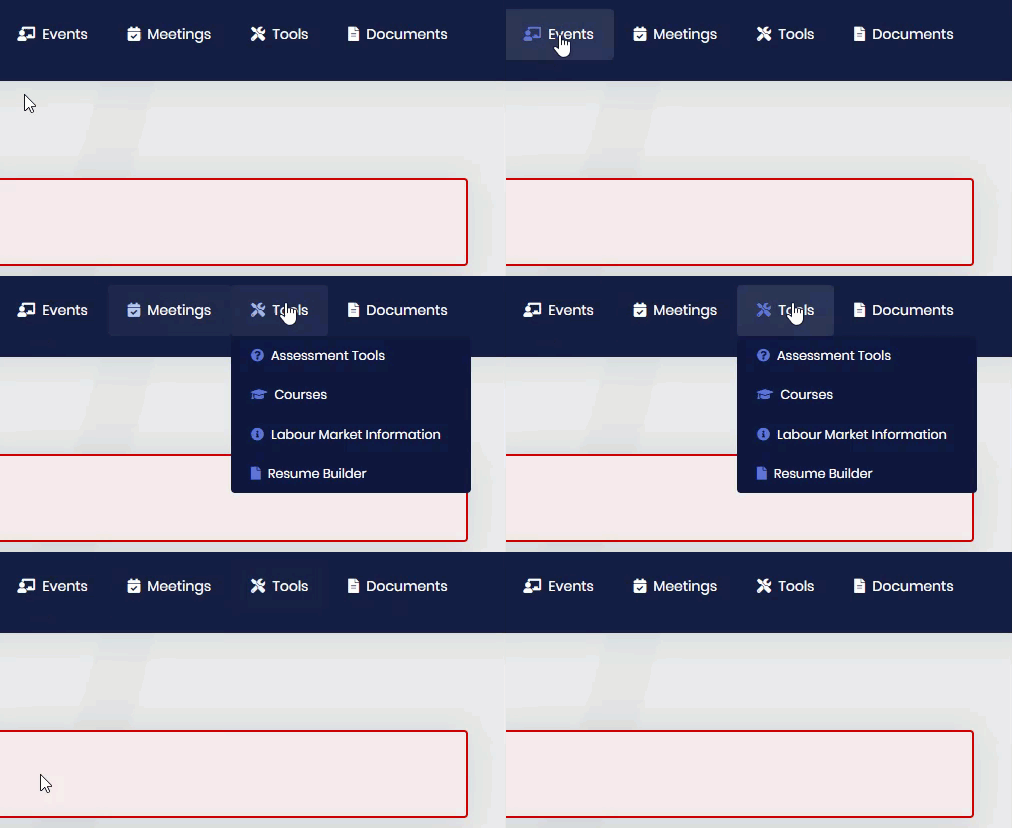
For users navigating with the keyboard, the submenu should open when the user presses enter on the menu item (as described here https://www.w3.org/WAI/tutorials/menus/flyout/#flyoutnavkbfixed).
The current behaviour does not support keyboard access to sub-menus.
I tried adding javascript (from the w3 example) for it in the /Themes/Lepton/Components/MainMenu/_MenuItem.cshtml page without success.
var menuItems = document.querySelectorAll('li.has-drop');
Array.prototype.forEach.call(menuItems, function(el, i){
	el.querySelector('a').addEventListener("click",  function(event){
		if (this.parentNode.className == "has-drop") {
			this.parentNode.className = "has-drop open";
			this.setAttribute('aria-expanded', "true");
		} else {
			this.parentNode.className = "has-submenu";
			this.setAttribute('aria-expanded', "false");
		}
		event.preventDefault();
		return false;
	});
});
Menu configuration from public class PortalPublicMenuContributor : IMenuContributor
           // Tools
            var tools =
                new ApplicationMenuItem(
                    PortalPublicMenus.Tools,
                    l["Menu:Tools"],
                    icon: "fas fa-tools",
                    order: 6
                    )
            ;
            context.Menu.AddItem(tools);

            // AssessmentTools
            tools.AddItem(
                new ApplicationMenuItem(
                    PortalPublicMenus.AssessmentTools,
                    l["Menu:AssessmentTools"],
                    "~/assessment-tools",
                    icon: "fas fa-question-circle",
                    order: 1
                    ).RequirePermissions(PortalPermissions.PublicWeb.AssessmentTools)
            );

            // courses
            tools.AddItem(
                new ApplicationMenuItem(
                    PortalPublicMenus.Courses,
                    l["Menu:Courses"],
                    "~/courses",
                    icon: "fas fa-graduation-cap",
                    order: 2
                    ).RequirePermissions(PortalPermissions.PublicWeb.Courses)
            );

            // LabourMarketInfo
            tools.AddItem(
                new ApplicationMenuItem(
                    PortalPublicMenus.LabourMarketInfo,
                    l["Menu:LabourMarketInfo"],
                    "~/labour-market-info",
                    icon: "fas fa-info-circle",
                    order: 3
                    ).RequirePermissions(PortalPermissions.PublicWeb.LabourMarketInfo)
            );

            // Resume Builder
            tools.AddItem(
                new ApplicationMenuItem(
                    PortalPublicMenus.ResumeBuilder,
                    l["Menu:ResumeBuilder"],
                    "~/resume-builder",
                    icon: "fas fa-file",
                    order: 4
                    ).RequirePermissions(PortalPermissions.PublicWeb.ResumeBuilder)
            );
Thanks
2 Answer(s)
-
0
Hello,
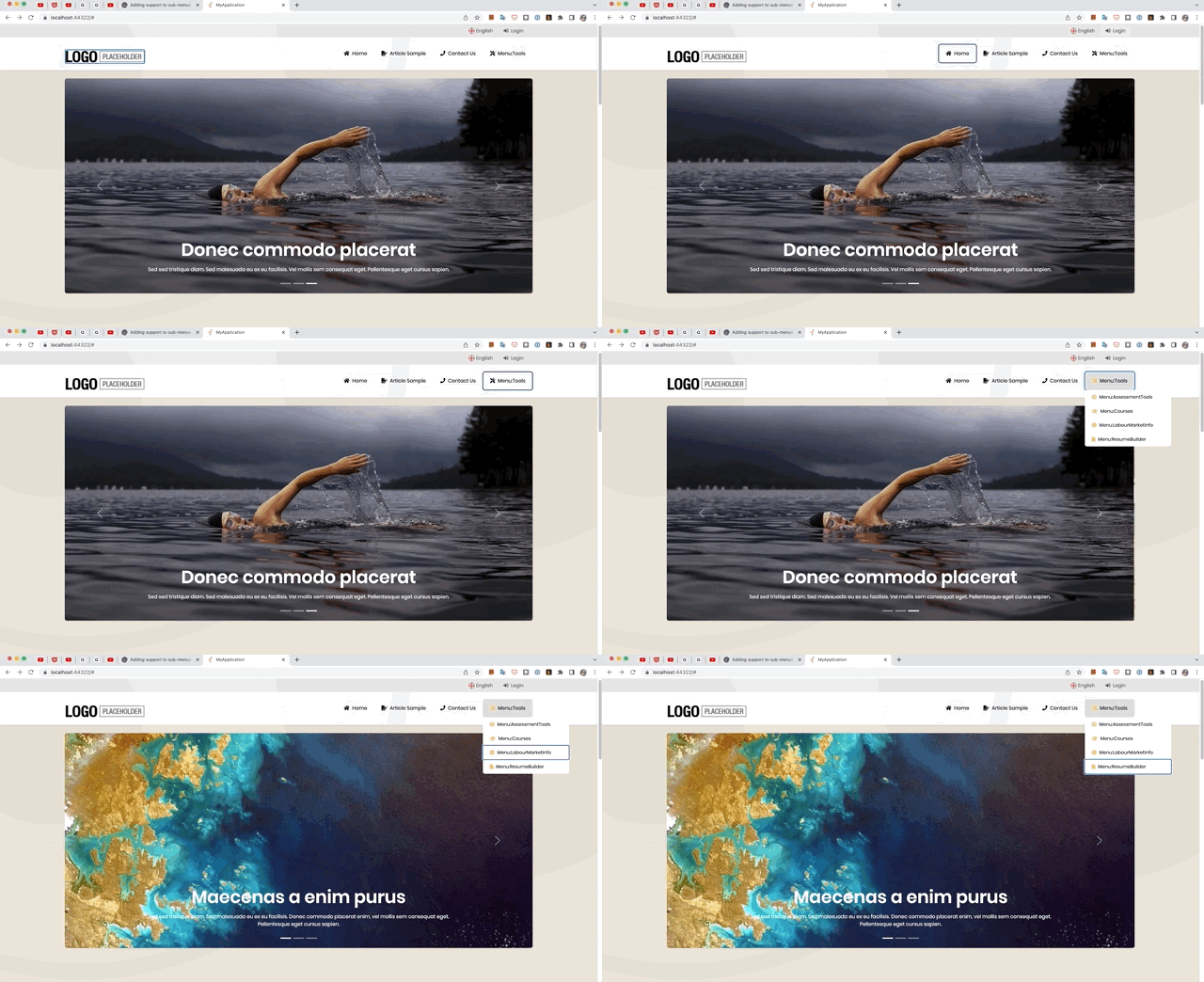
I am going to explain how to do this step by step below.
1-) Create
menu.jsandmenu.cssinThemes/Lepton/Component/Headerfolder.menu.js
$(function () {
    var menuItems = document.querySelectorAll('li.has-drop');
    Array.prototype.forEach.call(menuItems, function (el, i) {
        el.querySelector('a').addEventListener("click", function (event) {
            if (this.parentNode.classList.contains("has-drop")) {
                this.parentNode.classList.add('open'); // The important thing is that you add this class because we will arrange it accordingly on the css side.
            } else {
                this.parentNode.className = "has-submenu";
                this.setAttribute('aria-expanded', "false");
            }

            event.preventDefault();
            return false;
        });
    });
});
menu.css
.lp-topmenu .lp-sidebar .lp-sidebar-wrapper nav ul li.open {
    background: rgba(0, 0, 0, 0.1);
}
.lp-topmenu .lp-sidebar .lp-sidebar-wrapper nav ul li.open > ul {
    display: block !important;
}
.lp-topmenu .lp-sidebar .lp-sidebar-wrapper nav ul li.open .lp-icon {
    color: #feba57;
}
.lp-topmenu .lp-sidebar .lp-sidebar-wrapper nav ul li.open a {
    color: #000000;
}
2-) Finally, add the following code to the
ConfigureServicesmethod ofMyProjectNameWebPublicModule.Configure<AbpBundlingOptions>(options => { options.ScriptBundles .Configure( StandardBundles.Scripts.Global, bundleConfig => { bundleConfig.AddFiles("/Themes/Lepton/Components/Header/menu.js"); }); options.StyleBundles .Configure( StandardBundles.Styles.Global, bundleConfig => { bundleConfig.AddFiles("/Themes/Lepton/Components/Header/menu.css"); }); });Result
 Markdown supported.Copy, paste, or drag & drop images and files (max 100 MB per file, 100 MB total per post)
 -
0
@berkansasmaz
Thanks for the solution. It worked well!
I made one minor change to the script to close the sub-menu if enter is pressed when the sub-menu is expanded:
$(function () {
    var menuItems = document.querySelectorAll('li.has-drop');
    Array.prototype.forEach.call(menuItems, function (el, i) {
        el.querySelector('a').addEventListener("click", function (event) {
            if (this.parentNode.classList.contains("has-drop")) {
                if (!this.parentNode.classList.contains("open"))
                    this.parentNode.classList.add('open');
                else
                    this.parentNode.classList.remove('open');
            } else {
                this.parentNode.className = "has-submenu";
                this.setAttribute('aria-expanded', "false");
            }

            event.preventDefault();
            return false;
        });
    });
});
Markdown supported.Copy, paste, or drag & drop images and files (max 100 MB per file, 100 MB total per post)


