

Open Closed

Error 400: "RequestVerificationToken" is not present in Abp 5.3.2 #3396


User avatar
0
hakan.uskaner created
  • ABP Framework version: v5.3.2
  • UI type: Blazor
  • DB provider: EF Core
  • Tiered (MVC) or Identity Server Separated (Angular): yes

I tried this on a new generated microservice-template..: Stepts to reproduce:

  • generate a microservice solution: abp new AppMicro -t microservice-pro -u blazor-server -csf
  • run solution with powershell .\run-tye.ps1
  • open product service api and authenticate with WebGateway_Swagger account
  • Try a get on products --> this works fine
  • Try to post a new product -> Error 400

I receive this error:
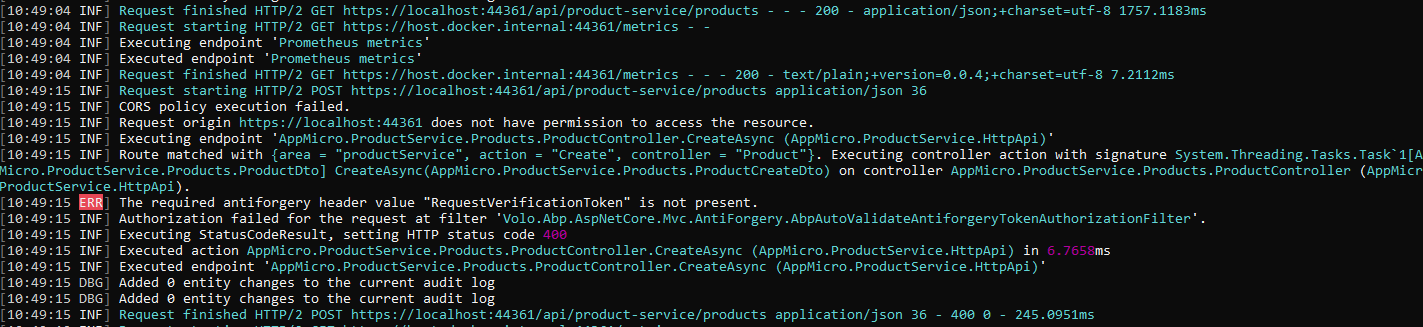
Seems like the antifogery token is not set properly? i also checked permissions in gui and granted WebGateway_Swagger all permissions. No change.

What i am not getting here ~ ?

Markdown supported.
Copy, paste, or drag & drop images and files (max 100 MB per file, 100 MB total per post)

8 Answer(s)
  • User Avatar
    0
    maliming created
    Support Team Fullstack Developer

    open product service api and authenticate with WebGateway_Swagger account

    Refresh the swagger API page works?

    Markdown supported.
    Copy, paste, or drag & drop images and files (max 100 MB per file, 100 MB total per post)

  • User Avatar
    0
    hakan.uskaner created

    Yes this works fine. also cleared all cookies in browser. If i generate a product from blazor app menu the product is created fine.

    but in swagger i receive the above error. Same swagger problem also with the other services.

    Markdown supported.
    Copy, paste, or drag & drop images and files (max 100 MB per file, 100 MB total per post)

  • User Avatar
    0
    maliming created
    Support Team Fullstack Developer

    ok, I got this, I will try to refresh the swagger page after the authcatation.

    Markdown supported.
    Copy, paste, or drag & drop images and files (max 100 MB per file, 100 MB total per post)
  • User Avatar
    0
    hakan.uskaner created

    No, sorry a page refresh wont change something. There error still persits. i did misunderstood you.

    Markdown supported.
    Copy, paste, or drag & drop images and files (max 100 MB per file, 100 MB total per post)
  • User Avatar
    0
    maliming created
    Support Team Fullstack Developer

    ok I will check it again

    Markdown supported.
    Copy, paste, or drag & drop images and files (max 100 MB per file, 100 MB total per post)
  • User Avatar
    0
    maliming created
    Support Team Fullstack Developer

    hi

    Please try to replace all UseSwaggerUI with UseAbpSwaggerUI in your project.

    Markdown supported.
    Copy, paste, or drag & drop images and files (max 100 MB per file, 100 MB total per post)
  • User Avatar
    0
    hakan.uskaner created

    Yes, this fixed it. Can you explain why ? Will it be replaced in the template or through abp-cli for future ?

    Markdown supported.
    Copy, paste, or drag & drop images and files (max 100 MB per file, 100 MB total per post)
  • User Avatar
    0
    maliming created
    Support Team Fullstack Developer

    Yes, We will update this in the next patch version.

    Markdown supported.
    Copy, paste, or drag & drop images and files (max 100 MB per file, 100 MB total per post)
Boost Your Development
ABP Live Training
Packages
See Trainings
Mastering ABP Framework Book
The Official Guide
Mastering
ABP Framework
Learn More
Mastering ABP Framework Book
Made with ❤️ on ABP v10.8.0-preview. Updated on September 16, 2026, 14:50
1
ABP Assistant
🔐 You need to be logged in to use the chatbot. Please log in first.