






- ABP Framework version: v6.0.0
- UI type: MVC
- DB provider: EF Core
- Tiered (MVC): no
- Steps to reproduce the issue:"
- Added "datatables.net-buttons": "2.2.3" in package.json
- Run yarn command
- But I dont see the datatables.net-buttons folder created with abp.resourcemapping.js under node_modules.
May I know how this resource mapping works for no-layered MVC application?
6 Answer(s)
-
0
Hi,
I believe you will find relevant information in this document.
Markdown supported.Copy, paste, or drag & drop images and files (max 100 MB per file, 100 MB total per post) -
0
Hi @berkansasmaz, I'm working together with Siva on this.
Can you please point out the relevant section? Because we don't get it.
In the standard sample Layered / MVC application its clear. The abp.resourcemapping.js can be found in the Acme.BookStore.Web project.
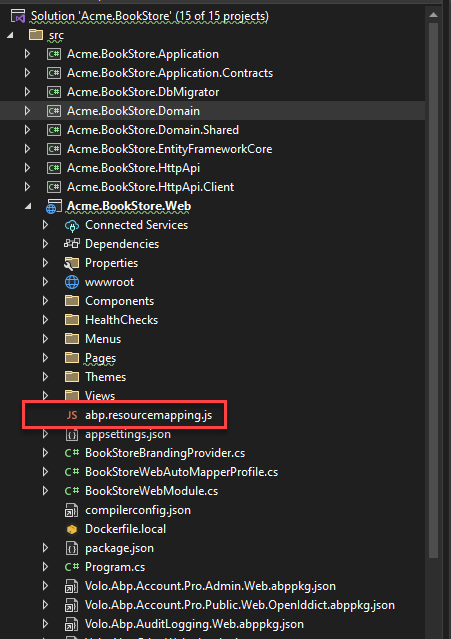
However in the NoLayer / MVC application, there is no such file in the whole project.
So lets try again, can somebody - in the paid support channel - tell us how we can add additional libs to our solution. Is the only thing we need to do create the PR as describe in the documentation that you referenced? https://docs.abp.io/en/abp/latest/UI/AspNetCore/Client-Side-Package-Management#package-contribution
Markdown supported.Copy, paste, or drag & drop images and files (max 100 MB per file, 100 MB total per post) -
0
Oops! Really sorry I missed that NoLayer / MVC application. I will create an internal issue on the subject.
Can you try the following steps for a solution?
- Create
abp.resourcemapping.jsin the folder wherepackage.jsonis.
abp.resourcemapping.jsmodule.exports = { aliases: { }, clean: [ ], mappings: { } };Then, after defining the relevant mapping, simply run the
abp install-libscommand.For example:
package.json{ "version": "1.0.0", "name": "my-app", "private": true, "dependencies": { ... ... ... "cookieconsent": "^3.1.1", // added with "yarn add cookieconsent" command "jquery-unveil": "^1.3.2" // added with "yarn add jquery-unveil" command } }abp.resourcemapping.jsmodule.exports = { aliases: { }, clean: [ ], mappings: { "@node_modules/cookieconsent/build/*": "@libs/cookieconsent/", // added "@node_modules/jquery-unveil/*": "@libs/jquery-unveil/" // added } };run
abp install-libscommandAs a result, you can check the
libsfolder underwwwrootfolder.Please let me know if this works or not works for you.
Markdown supported.Copy, paste, or drag & drop images and files (max 100 MB per file, 100 MB total per post) - Create
-
0
Closing the issue. Feel free to re-open or create a new issue if you have further questions.
Markdown supported.Copy, paste, or drag & drop images and files (max 100 MB per file, 100 MB total per post)



