






Check the docs before asking a question: I have checked the docs and the samples and there is nothing documented on how to get Angular and signalR working with Abp. I found this github issue https://github.com/abpframework/abp/issues/5239 but it is still not clear on how this should be done.
- ABP Framework version: v3.0.4
- UI type: Angular
- Tiered (MVC) or Identity Server Seperated (Angular): no
- Exception message and stack trace:

- Steps to reproduce the issue: I followed the SignalRTieredDemo sample. My hub is in my HttpApi project. I am initializing my hub connection on the Angular side like this:
``` this.hubConnection = new signalR.HubConnectionBuilder() .withUrl(environment.apis.default.url + this.idmHubUrl ).build(); ```
I need to be able to get the CurrentUser.Id in the OnConnectedAsync() of my hub.
public override async Task OnConnectedAsync()
{
    _connections.Add(CurrentUser.Id.Value, Context.ConnectionId);

    await base.OnConnectedAsync();
}
I have added the [Authorize] attribute to my hub class. With this in place I receive the exception message above. If I remove the attribute I am able to connect to the hub but then obviously the CurrentUser.Id value is null.
Please provide a working example of how I can get this to work.
Thanks.
9 Answer(s)
-
0
Did you miss some code:
this.hubConnection = new HubConnectionBuilder()
    .withUrl(`${environment.apis.default.url}/signalr-hubs/chatting`,
        { accessTokenFactory: () => this.oAuthService.getAccessToken() })
    .build();
this.hubConnection.invoke('Join');
Markdown supported.Copy, paste, or drag & drop images and files (max 100 MB per file, 100 MB total per post) -
0
Hi liangshiwei
This is my code.
constructor(private oAuthService: OAuthService) {
    this.buildConnection();
    this.startConnection();
    this.initEvents();
  }

  private buildConnection() {
    this.hubConnection = new signalR.HubConnectionBuilder()
      .withUrl(environment.apis.default.url + this.idmHubUrl, {
        accessTokenFactory: () => this.oAuthService.getAccessToken(),
      })
      .build();
  }

  private startConnection() {
    this.hubConnection
      //.invoke("Join")
      .start()
      .then(() => {
        this.hubConnectionEstablished$.next(true);
      })
      .catch((err) => {
        console.error('Error while starting connection: ' + err);
      });
  }
If I use the .invoke("Join") I get this error in the browser console. None of my breakpoints on the hub constructor or OnConnectedAsync are hit.

If I use .start() my breakpoint on the hub constructor gets hit but not the breakpoint on the OnConnectedAsync method and I receive the following error in the browser console.
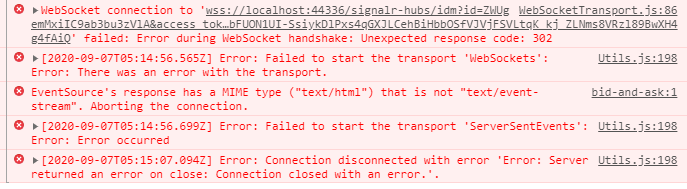
Am I missing some extra setup on the server side to get this to work?
Markdown supported.Copy, paste, or drag & drop images and files (max 100 MB per file, 100 MB total per post) -
0
I guess your token has expired. Please try again.
Markdown supported.Copy, paste, or drag & drop images and files (max 100 MB per file, 100 MB total per post) -
0
Which token? I have logged out and logged back in and I still receive the same error.
Here is the log output on the server side.
2020-09-07 08:15:57.335 +02:00 [Error] (Microsoft.AspNetCore.SignalR.HubConnectionHandler.) Error when dispatching '"OnConnectedAsync"' on hub. Volo.Abp.Authorization.AbpAuthorizationException: Authorization failed! Given policy has not granted. at Microsoft.AspNetCore.Authorization.AbpAuthorizationServiceExtensions.CheckAsync(IAuthorizationService authorizationService, AuthorizationPolicy policy) at Volo.Abp.Authorization.MethodInvocationAuthorizationService.CheckAsync(MethodInvocationAuthorizationContext context) at Volo.Abp.Authorization.AuthorizationInterceptor.AuthorizeAsync(IAbpMethodInvocation invocation) at Volo.Abp.Authorization.AuthorizationInterceptor.InterceptAsync(IAbpMethodInvocation invocation) at Volo.Abp.Castle.DynamicProxy.CastleAsyncAbpInterceptorAdapter
1.InterceptAsync(IInvocation invocation, IInvocationProceedInfo proceedInfo, Func3 proceed) at Microsoft.AspNetCore.SignalR.Internal.DefaultHubDispatcher1.OnConnectedAsync(HubConnectionContext connection) at Microsoft.AspNetCore.SignalR.Internal.DefaultHubDispatcher1.OnConnectedAsync(HubConnectionContext connection) at Microsoft.AspNetCore.SignalR.HubConnectionHandler`1.RunHubAsync(HubConnectionContext connection) 2020-09-07 08:16:06.393 +02:00 [Debug] (IdentityServer4.AccessTokenValidation.IdentityServerAuthenticationHandler.) AuthenticationScheme: "Bearer" was successfully authenticated. 2020-09-07 08:16:06.396 +02:00 [Debug] (IdentityServer4.Hosting.CorsPolicyProvider.) CORS request made for path: "/signalr-hubs/idm" from origin: "http://localhost:4200" but was ignored because path was not for an allowed IdentityServer CORS endpointWhich policy has not been granted? I am using the [Authorize] attribute.
Markdown supported.Copy, paste, or drag & drop images and files (max 100 MB per file, 100 MB total per post) -
0
Sorry, I don't know your project much, can you create an sample project to reproduce this question? thanks. you can send the project to my email: shiwei.liang@volosoft.com
Markdown supported.Copy, paste, or drag & drop images and files (max 100 MB per file, 100 MB total per post) -
0
Hi liangshiwei
I currently dont have any time to setup a sample project to reproduce this.
Can you please provide me with a sample project or sample code with the steps I need to perform to get an Angular frontend connecting to a Hub that needs the user to be authorized. I need to get the Currentusers id value in the OnConnectedAsync() method of the hub.
This is not documented anywhere and all signalR samples are using the MVC frontends.
Thanks.
Markdown supported.Copy, paste, or drag & drop images and files (max 100 MB per file, 100 MB total per post) -
0
OK. I will create an example.
Markdown supported.Copy, paste, or drag & drop images and files (max 100 MB per file, 100 MB total per post) -
0
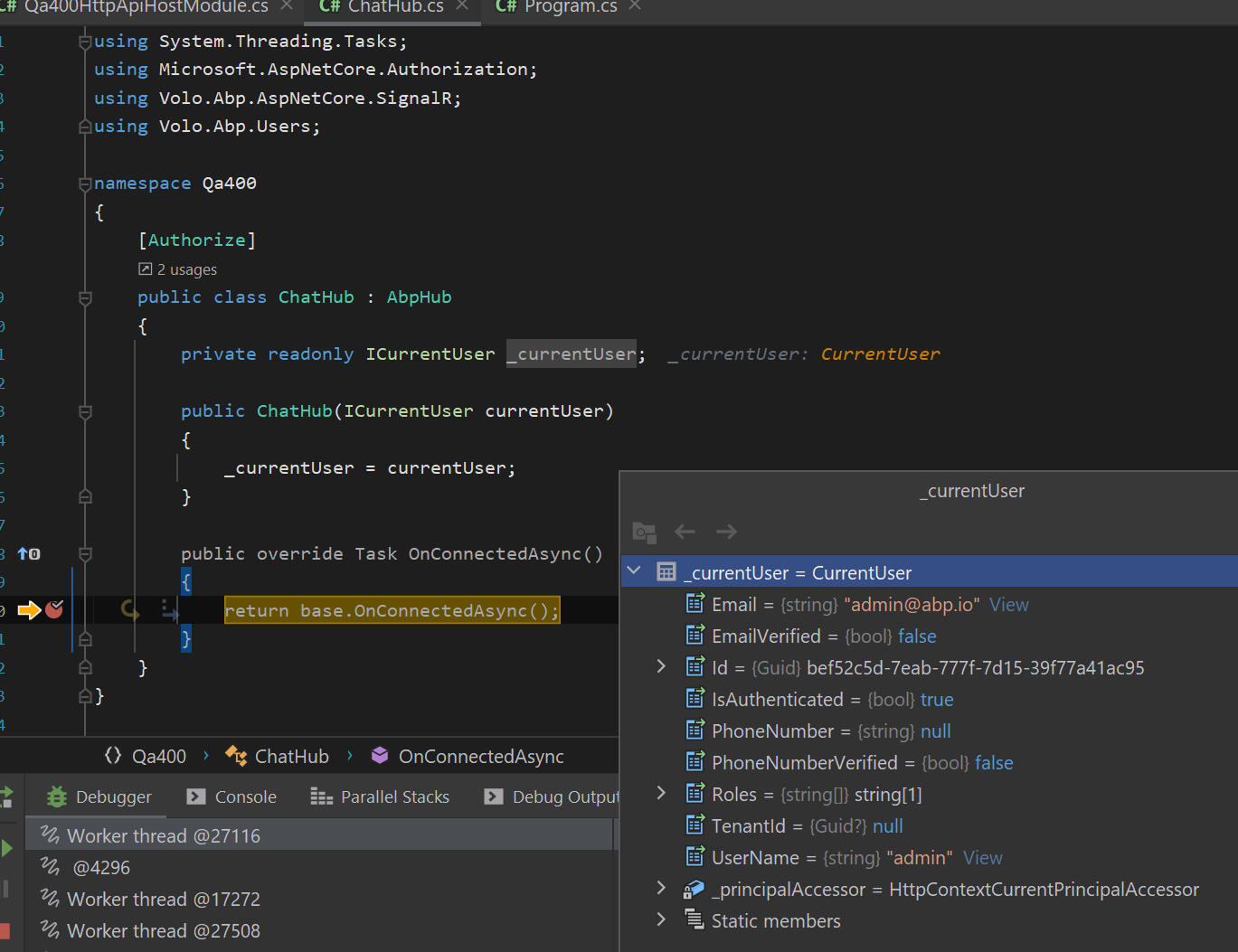
Please see https://github.com/realLiangshiwei/AbpQa400
 Markdown supported.Copy, paste, or drag & drop images and files (max 100 MB per file, 100 MB total per post)
 -
0
Hi liangshiwei
Thank you very much for taking the time to create a sample project. That is exactly what I needed to find what my problem was.
I am able to connect to my hub and get the id of the current user now.
Thanks again.
Markdown supported.Copy, paste, or drag & drop images and files (max 100 MB per file, 100 MB total per post)


