






- ABP Framework version: v3.10
- UI type: Angular
- Tiered (MVC) or Identity Server Seperated (Angular): yes
I have been trying to figure out with ABPs Background system how to enqueue to a custom hangfire queue. WIth using just the basic hangfire api I just put an attribute above the method I am calling in the enqueue method [Queue("CustomQueue")] but that does not work with ABPs hangfire version. Is there anyway to get it to enqueue to my custom queue besides the default queue?
8 Answer(s)
-
0
Hi,
First , create a filter:
public class MyJobFilterAttribute : JobFilterAttribute, IElectStateFilter
{
    public void OnStateElection(ElectStateContext context)
    {
        if (context.CandidateState is EnqueuedState enqueuedState)
        {
            enqueuedState.Queue = "myqueue";
        }
    }
}
Add the following configuration to your module:
Configure<AbpHangfireOptions>(options =>
{
    options.ServerOptions = new BackgroundJobServerOptions()
    {
        Queues = new[] {"default", "myqueue"}
    };
});


context.Services.AddHangfire(options =>
{
    //options.UseMemoryStorage();
    options.UseFilter(new MyJobFilterAttribute());
});
Now, your all job will enqueue to the
myqueuequeue and you can custom if you need.Markdown supported.Copy, paste, or drag & drop images and files (max 100 MB per file, 100 MB total per post) -
0
Thank you for the help. What method would this attribute go above then? Would it be the one that does the work? or above the Execute method in the below job class?
` public class RenderChartJob : BackgroundJob
    public RenderChartJob(IChartsAppService chartsAppService)
    {
        _chartsAppService = chartsAppService;
    }

    public override void Execute(RenderChartsJobArgs args)
    {
        args.Subject = "Job Scheduled to Render Chart to PDF";
        args.Body = $"Job rendering chart successful. ";


        try
        {
            //Pass in Render chart input and render chart to PDF
           _chartsAppService.RenderChartToPdf(args.RenderChartInput);

            //We will not be rescheduling this since it is a one time execution
            args.Body = $"{DateTime.UtcNow}: {args.Body}";
            emailSender.Send(args.FromEmail, args.ToEmail, args.Subject, args.Body);

        }
        catch (Exception e)
        {
            throw new Exception(e.StackTrace);
        }
    }
}`
Markdown supported.Copy, paste, or drag & drop images and files (max 100 MB per file, 100 MB total per post) -
0
The filter will work on global. you don't need add attribute to method.
Markdown supported.Copy, paste, or drag & drop images and files (max 100 MB per file, 100 MB total per post) -
0
Sorry I should have explained it better. I want to create multiple Queues. This only works with just one.
Markdown supported.Copy, paste, or drag & drop images and files (max 100 MB per file, 100 MB total per post) -
0
Hi, you can custom the code if you need.
public class MyJobFilterAttribute : JobFilterAttribute, IElectStateFilter
{
    public void OnStateElection(ElectStateContext context)
    {
        if (context.CandidateState is EnqueuedState enqueuedState)
        {
            // you can custom if iyou need.
            enqueuedState.Queue = "myqueue";
        }
    }
}
Markdown supported.Copy, paste, or drag & drop images and files (max 100 MB per file, 100 MB total per post) -
0
I understand I can, I guess I am just having a hard time how to. Thanks though
Markdown supported.Copy, paste, or drag & drop images and files (max 100 MB per file, 100 MB total per post) -
0
Okey, I will give you a usable example
Markdown supported.Copy, paste, or drag & drop images and files (max 100 MB per file, 100 MB total per post) -
0
See https://github.com/realLiangshiwei/AbpQa431
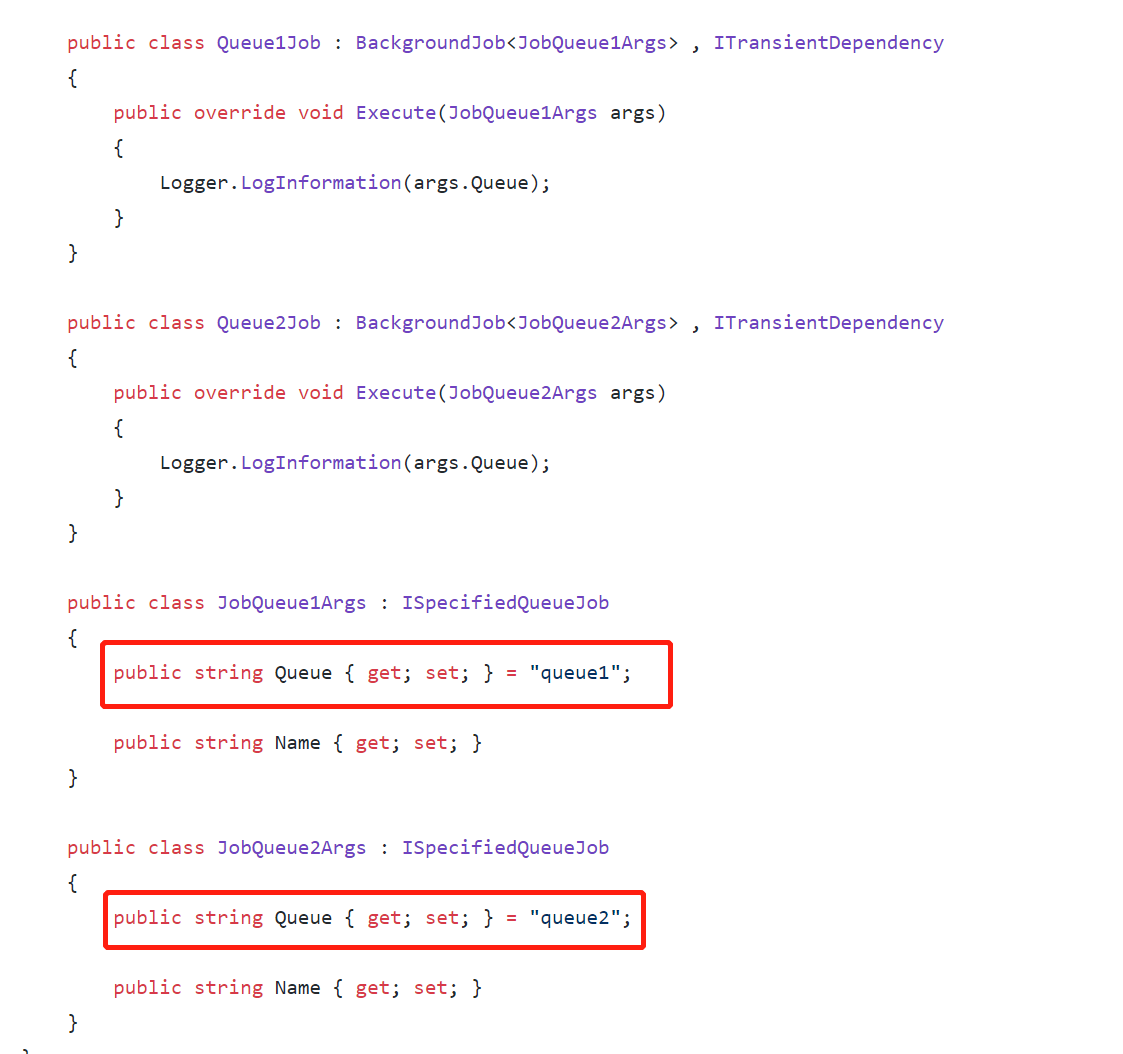
In the way, you can customize the queue of all jobs
Markdown supported.Copy, paste, or drag & drop images and files (max 100 MB per file, 100 MB total per post)


