






- ABP Framework version: v7.0
- UI type: Blazor wasm
- DB provider: EF Core
- Tiered (MVC) or Identity Server Separated (Angular): no
Hi!
I have a strange situation in which, after publishing the apps on Azure, after the user logs in with Azure B2C as external identity provider, the menu is not rendering and gravatar image is unclickable.
Only after I do a refresh of the page the menu is rendered and user menu by clicking the gravatar starts working.
On local dev env, no problem, it works.
My menu contributor for the Blazor app looks like this. Does anyone encountered this problem? Am I doing too many checks before adding the menu items? The menu is rendered based on various roles and other things.
private async Task ConfigureMainMenuAsync(MenuConfigurationContext context)
{
bool IsDoctorApproved = false;
bool IsDoctorClinicAdmin = false;
var l = context.GetLocalizer<MHUResource>();
var currentUser = context.ServiceProvider.GetRequiredService<ICurrentUser>();


if(currentUser != null && currentUser.IsAuthenticated)
{
    context.Menu.AddItem(new ApplicationMenuItem(
                     MHUMenus.Home,
                     l["Menu:Home"],
                     "/",
                     icon: "fas fa-home",
                     order: 1
                 ));
    if (currentUser.IsInRole("Doctor"))
    {
        var doctorAppService = context.ServiceProvider.GetRequiredService<IDoctorsAppService>();
        var clinicAppService = context.ServiceProvider.GetRequiredService<IClinicsAppService>();
        var FilterDoctors = new GetDoctorsInput
        {
            IdentityUserId = currentUser.Id.Value
        };
        var result = await doctorAppService.GetListAsync(FilterDoctors);
        if (result.Items.Any())
        {
            var currentDoctor = result.Items.FirstOrDefault().Doctor;
            IsDoctorApproved = currentDoctor.IsApproved;
            var clinic = await clinicAppService.GetAsync(currentDoctor.ClinicId.Value);
            IsDoctorClinicAdmin = clinic.AdministratorId == currentDoctor.Id;
        }
        if (IsDoctorApproved)
        {
            context.Menu.AddItem(new ApplicationMenuItem(
                          MHUMenus.Home,
                          l["Menu:MySubmissions"],
                          "/doctor-submissions",
                          icon: "fas fa-book-medical",
                          requiredPermissionName: null,
                          order: 2
                        ));
            context.Menu.AddItem(new ApplicationMenuItem(
                          MHUMenus.Home,
                          l["Menu:Payments"],
                          "/payments",
                          icon: "far fa-credit-card",
                          requiredPermissionName: null,
                          order: 5
                        ));
            context.Menu.AddItem(new ApplicationMenuItem(
                          MHUMenus.Home,
                          l["Menu:Patients"],
                          "/doctor-patients",
                          icon: "fas fa-user-injured",
                          requiredPermissionName: null,
                          order: 3
                        ));

        }
        if (IsDoctorClinicAdmin)
        {
            context.Menu.AddItem(new ApplicationMenuItem(
                      MHUMenus.Home,
                      l["Menu:MyClinic"],
                      "/myclinic",
                      icon: "fas fa-clinic-medical",
                      requiredPermissionName: null,
                      order: 4
                    ));
        }
    }
    else if (currentUser.IsInRole("Patient"))
    {
        context.Menu.AddItem(new ApplicationMenuItem(
          MHUMenus.Home,
          l["Menu:MySubmissions"],
          "/patient-submissions",
          icon: "fas fa-book-medical",
          requiredPermissionName: null,
          order: 2
        ));
        context.Menu.AddItem(new ApplicationMenuItem(
           MHUMenus.Home,
           l["Menu:MyDocuments"],
           "/mydocuments",
           icon: "fa fa-folder",
           requiredPermissionName: null,
           order: 3
        ));
        context.Menu.AddItem(new ApplicationMenuItem(
           MHUMenus.Home,
           l["Menu:Certificates"],
           "/certificates",
           icon: "fas fa-certificate",
           requiredPermissionName: null,
           order: 4
        ));
    }
    else if(currentUser.IsInRole("MHUVO"))
    {
        context.Menu.Items.Clear();
        context.Menu.AddItem(new ApplicationMenuItem(
           MHUMenus.Home,
           l["Menu:Dashboard"],
           "/vo-dashboard",
           icon: "fas fa-house-medical-circle-check",
           requiredPermissionName: null,
           order: 1
        ));
    }
    else if(currentUser.IsInRole("MHURO"))
    {
        context.Menu.Items.Clear();
        context.Menu.AddItem(new ApplicationMenuItem(
           MHUMenus.Home,
           l["Menu:Dashboard"],
           "/ro-dashboard",
           icon: "fas fa-house-medical-circle-check",
           requiredPermissionName: null,
           order: 1
        ));
    }
    else if (currentUser.IsInRole("MHUDR"))
    {
        context.Menu.Items.Clear();
        context.Menu.AddItem(new ApplicationMenuItem(
           MHUMenus.Home,
           l["Menu:Dashboard"],
           "/mhu-doctor",
           icon: "fas fa-file-medical",
           requiredPermissionName: null,
           order: 1
        ));
    }
}
11 Answer(s)
-
0
Hi
Unfortunately no, I cannot see any failed request.
Anyhow, the website is: delete
I created a test username, please login with:
Username: delete Pass: delete
You will see the behavior. After refreshing the page, menu is displayed, but at first login -- not rendered and gravatar's user menu not working.
Tks a bunch.
Markdown supported.Copy, paste, or drag & drop images and files (max 100 MB per file, 100 MB total per post) -
0
It looks like your server doesn't have WebSocket enabled.
https://learn.microsoft.com/en-us/aspnet/core/fundamentals/websockets?view=aspnetcore-5.0#iisiis-express-support
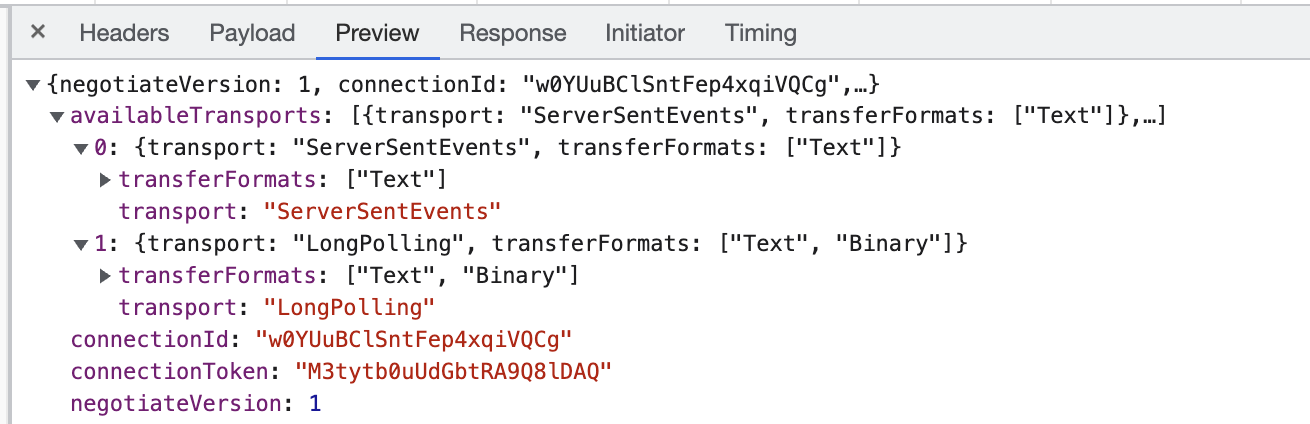 Markdown supported.Copy, paste, or drag & drop images and files (max 100 MB per file, 100 MB total per post)
 -
0
Hi,
Can I do smth until then?
If not, is it possible to have a rough estimation when the new version gonna be released, to know when I should expect to deploy in production?
Tks alot, maliming!
Markdown supported.Copy, paste, or drag & drop images and files (max 100 MB per file, 100 MB total per post)



