






0
mel@quadsoftpa.com created
- ABP Framework version: v7.0.1
- UI type: MVC
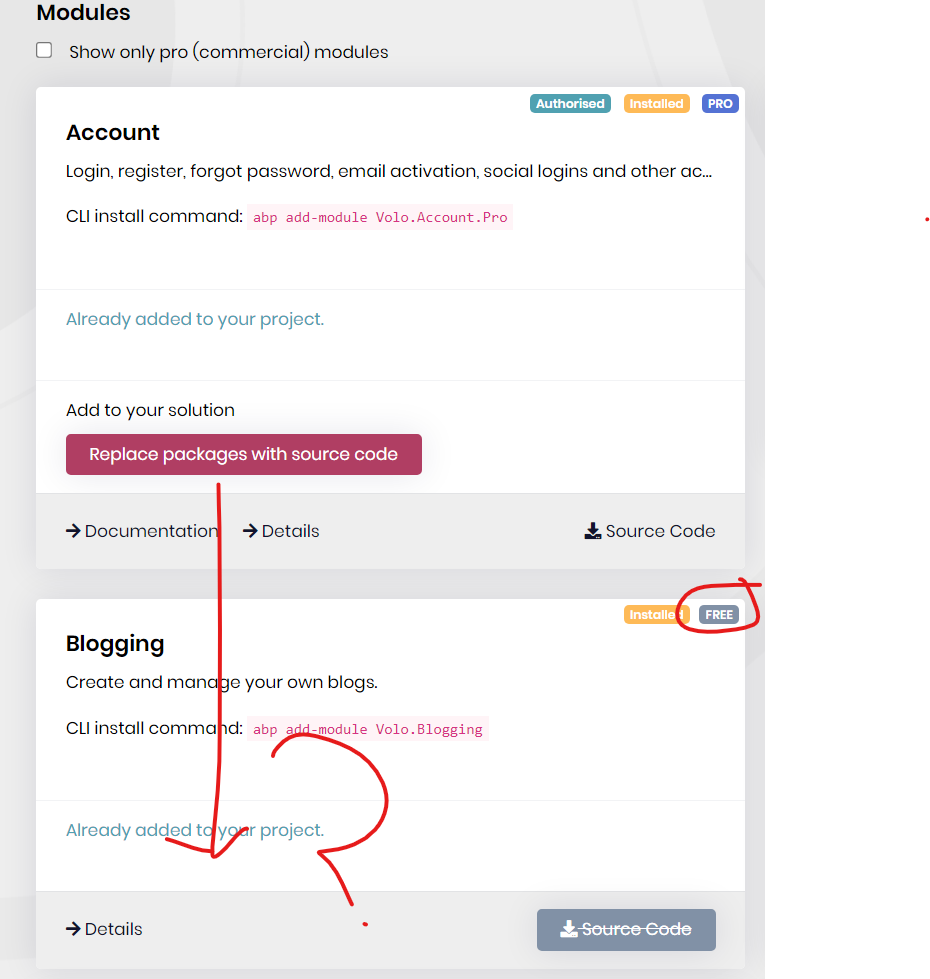
Is this missing a bug or did something change? thank you
Markdown supported.
Copy, paste, or drag & drop images and files (max 100 MB per file, 100 MB total per post)
6 Answer(s)
-
0
Hi,
Sorry, I can't reproduce the problem. What's your suite version?
Markdown supported.Copy, paste, or drag & drop images and files (max 100 MB per file, 100 MB total per post) -
0
7.0.1. I have since uninstalled ABP suite with the same results. I really need this source integrated. Thank you
Markdown supported.Copy, paste, or drag & drop images and files (max 100 MB per file, 100 MB total per post) -
0
Hi,
Can you share the ** full steps** to reproduce? thanks.
Markdown supported.Copy, paste, or drag & drop images and files (max 100 MB per file, 100 MB total per post) -
0
- Create new app through ABP suite
- Click on the modules button within that app Inside ABP suite
- Install module
- End up with the screenshot Included in the First message.
No option to Replace package with source code.
Markdown supported.Copy, paste, or drag & drop images and files (max 100 MB per file, 100 MB total per post) -
0
Could you share your abp.io account (username&password)with me? shiwei.liang@volosoft.com
Markdown supported.Copy, paste, or drag & drop images and files (max 100 MB per file, 100 MB total per post) -
0
Hi,
We will enhance the ABP Suite, you can use the
abp add-module Volo.Blogging --with-source-codecommand to install the module with source code.Markdown supported.Copy, paste, or drag & drop images and files (max 100 MB per file, 100 MB total per post)


