- ABP Framework version: v7.0.1
- UI type: Blazor Server
- DB provider: EF Core
- Project Template: Microservice
- Steps to reproduce the issue:"
- Created new microservice project template from abp suite
- Updated the connection strings to correct db
- Added microservice project "Global"
- Added entities to domain in Global.Domain
- Added repositories to Global.EfCore
- Added services for Global.Application.Contracts and Global.Application
- Added controller to Global.HttpApi
- Run the host for Global
- Generated client proxy with this command
abp generate-proxy -t csharp -u https://localhost:44395/ -m globalService - Used the generated client proxy on a wpf app that is already added as application client in openiddict Identity Service. Theb this annoying error happens:
The API description of the CmvPoint.GlobalService.Controllers.IDataReferenceAppService.GetNextReferenceIdAsync method was not found!
Even trying to change the configuration on the client module using AddStaticHttpClientProxies and AddHttpClientProxies isn't working.
15 Answer(s)
-
0
Hi,
Used the generated client proxy on a wpf app that is already added as application client in openiddict Identity Service. Theb this annoying error happens:
Can you share the WPF
appsettings.jsonfile content(RemoteServices section) and theglobalServicegenerate-proxy.jsonfile content?ps: it's better if you can share a project that can reproduce the problem with me, shiwei.liang@volosoft.com I can check it quickly.
Markdown supported.Copy, paste, or drag & drop images and files (max 100 MB per file, 100 MB total per post) -
0
Hello, Jeff and I are team members, however he is now unable to respond.
Here is the appsettings.json file
{
  "ConnectionStrings": {
    "ProductService": "mongodb://root:root123@localhost:27017/CMVPoint_ProductService?authSource=admin"
  },
  "RemoteServices": {
    "Default": {
      "BaseUrl": "https://localhost:44325/"
    }
  },
  "IdentityServer": {
    "AuthUri": "https://localhost:44322",
    "GatewayUri": "https://localhost:44325",
    "BrowserPort": 54955,
    "Oidc": {
      "RedirectUri": "http://127.0.0.1:54955/signin-oidc",
      "ClientId": "CmvPoint_WpfClient",
      "ClientSecret": "1q2w3e*",
      "Scope": "openid profile email ProductService AdministrationService IdentityService ShareholderService GlobalService"
    }
  }
}
Markdown supported.Copy, paste, or drag & drop images and files (max 100 MB per file, 100 MB total per post) -
0
In the meanwhile, here is globalServicegenerate-proxy.json. This is too long to put here, so I've uploaded it to Google Drive instead.
https://drive.google.com/file/d/1TQV3-oQe4Pry6DYTYFgqMsKAkPV4Fa3T/view?usp=sharing
Thank You!
Markdown supported.Copy, paste, or drag & drop images and files (max 100 MB per file, 100 MB total per post) -
0
Hi,
1. Check the
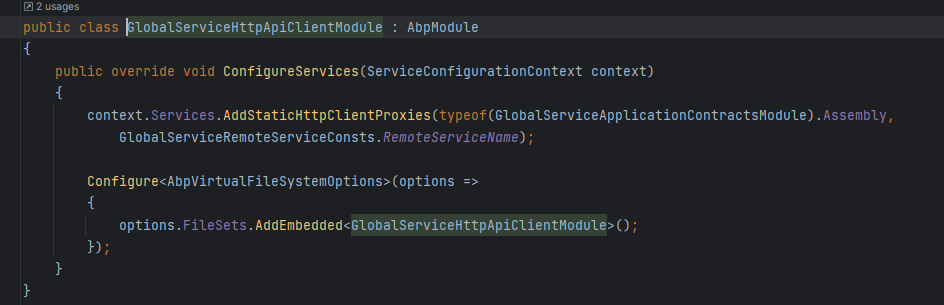
global serviceHttpApiClient module, and make sureAddStaticHttpClientProxiesinstead ofAddHttpClientProxies2. As you described, you generated the proxy on the WPF app, ABP loads proxy files from the virtual file system. you need to configure the virtual file system:
Configure<AbpVirtualFileSystemOptions>(options =>
{
    options.FileSets.AddEmbedded<WpfAppModule>();
});
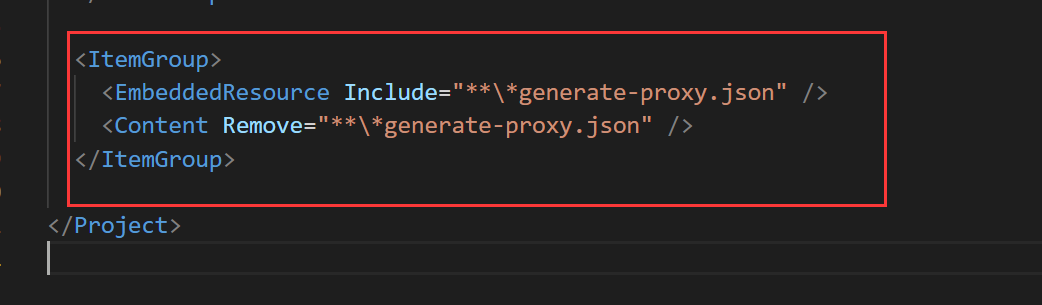
Use JSON files as embedded resources
 .
.Or you can generate the proxy files on the
global serviceHttpApiClient project.Markdown supported.Copy, paste, or drag & drop images and files (max 100 MB per file, 100 MB total per post) -
0
Hi,
Can we have a meeting via zoom? I'd like to check it remotely. shiwei.liang@volosoft.com
Markdown supported.Copy, paste, or drag & drop images and files (max 100 MB per file, 100 MB total per post) -
0
https://us05web.zoom.us/j/89547175766?pwd=RVpQd3A2WXo0LzBLVk9vMk4xSExRZz09
Markdown supported.Copy, paste, or drag & drop images and files (max 100 MB per file, 100 MB total per post) -
1
Try:
abp generate-proxy -t csharp -u https://localhost:44395/ -m globalService --without-contractsMarkdown supported.Copy, paste, or drag & drop images and files (max 100 MB per file, 100 MB total per post) -
1
After my check, the ABP CLI is no problem.
I think you changed the proxy namespace generated by ABP.
You can always use
--without-contractsoption to avoid generating unnecessary filesMarkdown supported.Copy, paste, or drag & drop images and files (max 100 MB per file, 100 MB total per post) -
0
I don't think the problem is related to this. I had a meeting with @jim before and it works. you can ask him.
Markdown supported.Copy, paste, or drag & drop images and files (max 100 MB per file, 100 MB total per post) -
0
You can check the error log.
If you still facing the problem, you can create a new question for this.
Markdown supported.Copy, paste, or drag & drop images and files (max 100 MB per file, 100 MB total per post)