






0
t.abouzid created
I'm not able to run my default web application after adding an entityin a microservice module, all the default generated ABP SUITE as not altered or changed but once added the API is running and it's works, the web gateway is able to find the necessary messing APIs but the MVC web site is keep trying to run
- ABP Framework version: v7.0.2
- UI type: MVC
- DB provider: EF Core
- Tiered (MVC) or Identity Server Separated (Angular): yes (Microservice)
- Exception message and stack trace:Volo.Abp.AbpInitializationException: An error occurred during the initialize Volo.Abp.Modularity.OnApplicationInitializationModuleLifecycleContributor phase of the module ..Web.MsWebModule, ..Web, Version=1.0.0.0, Culture=neutral, PublicKeyToken=null: The action '..Micro1Service.EntityTests.ClientProxies.EntityTestsClientProxy.GetAsync (..Micro1Service.HttpApi.Client)' has ApiExplorer enabled, but is using conventional routing. Only actions which use attribute routing support ApiExplorer.. See the inner exception for details. ---> System.InvalidOperationException: The action '..Micro1Service.EntityTests.ClientProxies.EntityTestsClientProxy.GetAsync (..Micro1Service.HttpApi.Client)' has ApiExplorer enabled, but is using conventional routing. Only actions which use attribute routing support ApiExplorer.
- Steps to reproduce the issue: Add new microservice, Map from Database Model chosing Entity with string Type, configure the new web service as documented and run run-tye.ps1.
Markdown supported.
Copy, paste, or drag & drop images and files (max 100 MB per file, 100 MB total per post)
4 Answer(s)
-
0
hi
please make sure your all controller has the same
Areaname(Case Sensitive).then regenerate the proxy on
Ms.Micro1Service.HttpApi.Client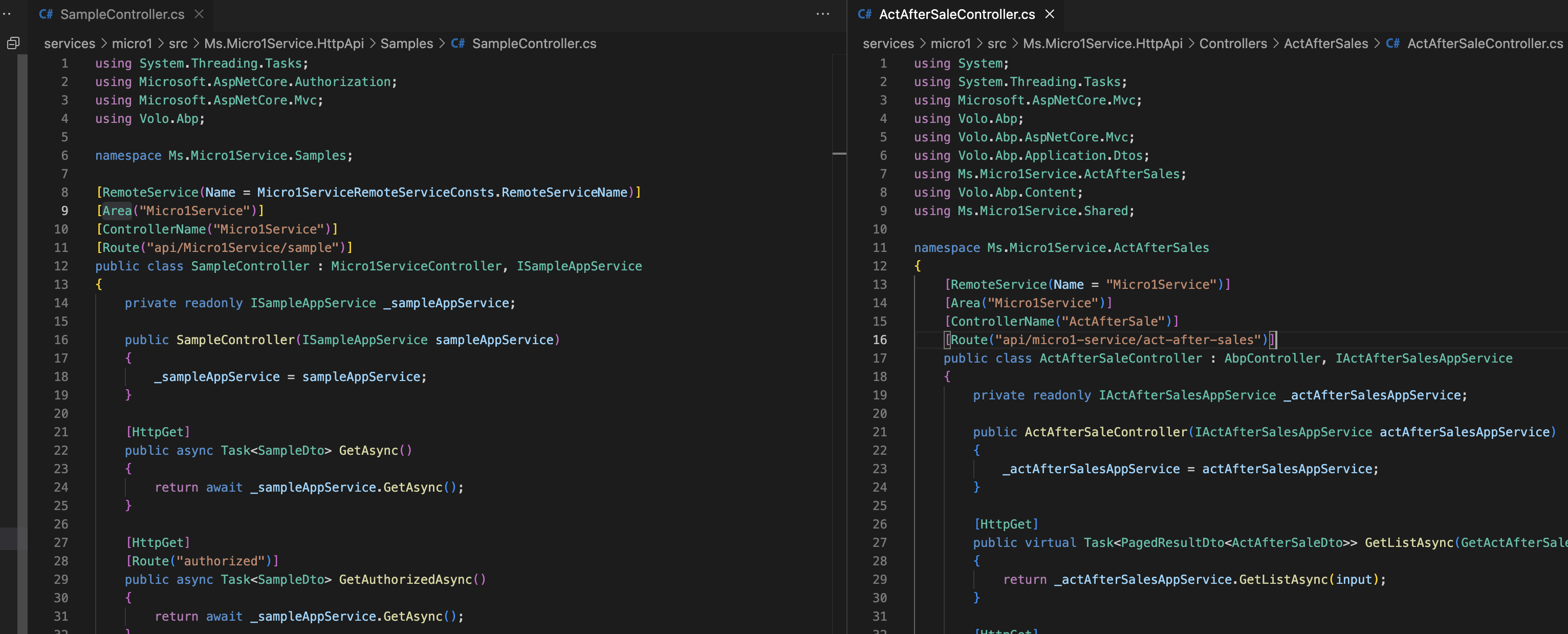 Markdown supported.Copy, paste, or drag & drop images and files (max 100 MB per file, 100 MB total per post)


