






Check the docs before asking a question: https://docs.abp.io/en/commercial/latest/ Check the samples, to see the basic tasks: https://docs.abp.io/en/commercial/latest/samples/index The exact solution to your question may have been answered before, please use the search on the homepage.
If you're creating a bug/problem report, please include followings:
- ABP Framework version: v7.0.1
- UI type: Angular
- DB provider: EF Core
- Exception message and stack trace:
| 3/2/2023, 3:33:19 PM | [10:03:19 FTL] PharmacyInventory.AuthServer terminated unexpectedly! | dev-pim-app-auth-service | | -------------------- | -------------------------------------------------------------------- | ------------------------ | | 3/2/2023, 3:33:19 PM | Volo.Abp.AbpInitializationException: An error occurred during ConfigureServicesAsync phase of the module Volo.Abp.OpenIddict.AbpOpenIddictAspNetCoreModule, Volo.Abp.OpenIddict.AspNetCore, Version=7.0.1.0, Culture=neutral, PublicKeyToken=null. See the inner exception for details. | dev-pim-app-auth-service | | 3/2/2023, 3:33:19 PM | ---> System.IO.FileNotFoundException: Signing Certificate couldn't found: /app/authserver.pfx | dev-pim-app-auth-service | | 3/2/2023, 3:33:19 PM | at PharmacyInventory.AuthServer.PharmacyInventoryAuthServerModule.GetSigningCertificate(IWebHostEnvironment hostingEnv, IConfiguration configuration) in /src/apps/auth-server/src/PharmacyInventory.AuthServer/PharmacyInventoryAuthServerModule.cs:line 336 | |
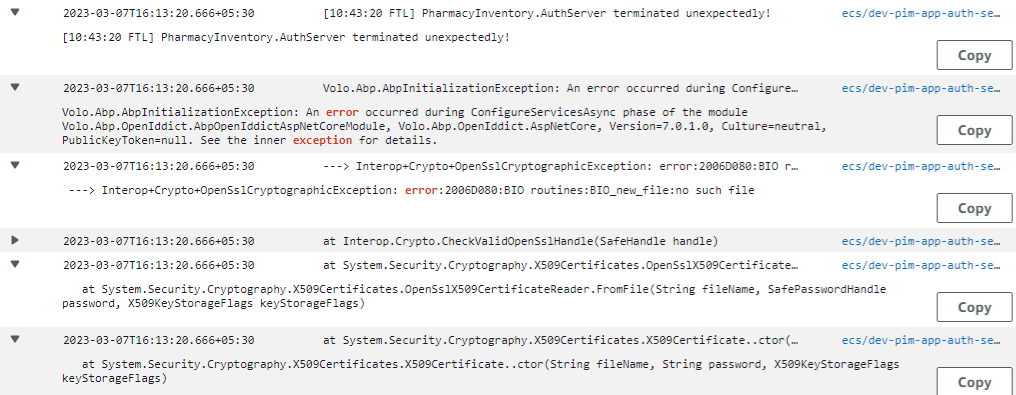
- Steps to reproduce the issue:"
- We where in place of deploying our microservice in AWS. By the time we are getting error saying that authserver.pfx not found.
- Don't see any document to generate .pfx file for QA/Staging/Production environment.
3 Answer(s)
-
0
You can use any tool to generate self-signed certificate or use any CA signed certificate.
dotnet dev-certs https -v -ep authserver.pfx -p YOURPASSWORDis a way to generate it.YOURPASSWORDmust match with the AuthServerModule code where it reads this file.Markdown supported.Copy, paste, or drag & drop images and files (max 100 MB per file, 100 MB total per post) -
0
You can use any tool to generate self-signed certificate or use any CA signed certificate.
dotnet dev-certs https -v -ep authserver.pfx -p YOURPASSWORDis a way to generate it.YOURPASSWORDmust match with the AuthServerModule code where it reads this file.My question is, is this required for when we deploy the code to AWS dev and qa environments or would having an endpoint with a valid SSL cert be enough?
Markdown supported.Copy, paste, or drag & drop images and files (max 100 MB per file, 100 MB total per post)



