

Open Closed

userfriendlyexception not working on index.cshtml page #4797


User avatar
0
Sraman created
  • ABP Framework version: v7.1.0
  • UI type: MVC
  • DB provider: EF Core
  • Tiered (MVC) or Identity Server Separated (Angular): no
  • Exception message and stack trace: { "error": { "code": null, "message": "Combination of Identification Number and Toolset Type already exists.", "details": null, "data": {}, "validationErrors": null } }
  • Steps to reproduce the issue: Facing above exception when throwing userfriendlyexception on index.cshtml page. But userfriendlyexception is working fine on create and edit pages.
Markdown supported.
Copy, paste, or drag & drop images and files (max 100 MB per file, 100 MB total per post)

5 Answer(s)
  • User Avatar
    0
    maliming created
    Support Team Fullstack Developer

    hi

    The framework can only handle pages with an object of the return type.

    https://docs.abp.io/en/abp/latest/Exception-Handling

    Markdown supported.
    Copy, paste, or drag & drop images and files (max 100 MB per file, 100 MB total per post)
  • User Avatar
    0
    Sraman created

    It is working fine on popup pages. Can you suggest a way to show the userfriendlyexception on index page from appservice without a return type?

    Markdown supported.
    Copy, paste, or drag & drop images and files (max 100 MB per file, 100 MB total per post)

  • User Avatar
    0
    maliming created
    Support Team Fullstack Developer

    It is working fine on popup pages.

    This is because you are calling API, and the page cannot display such a style.

    You can check the Page-Alerts

    https://docs.abp.io/en/abp/latest/UI/AspNetCore/Page-Alerts

    Markdown supported.
    Copy, paste, or drag & drop images and files (max 100 MB per file, 100 MB total per post)

  • User Avatar
    0
    Sraman created

    Alert is not showing on appservice page.

    _alertManager.Alerts.Warning( text: L["ExpirationDateValidationMessage"], title: "Service Interruption" );

    Markdown supported.
    Copy, paste, or drag & drop images and files (max 100 MB per file, 100 MB total per post)
  • User Avatar
    0
    maliming created
    Support Team Fullstack Developer

    hi

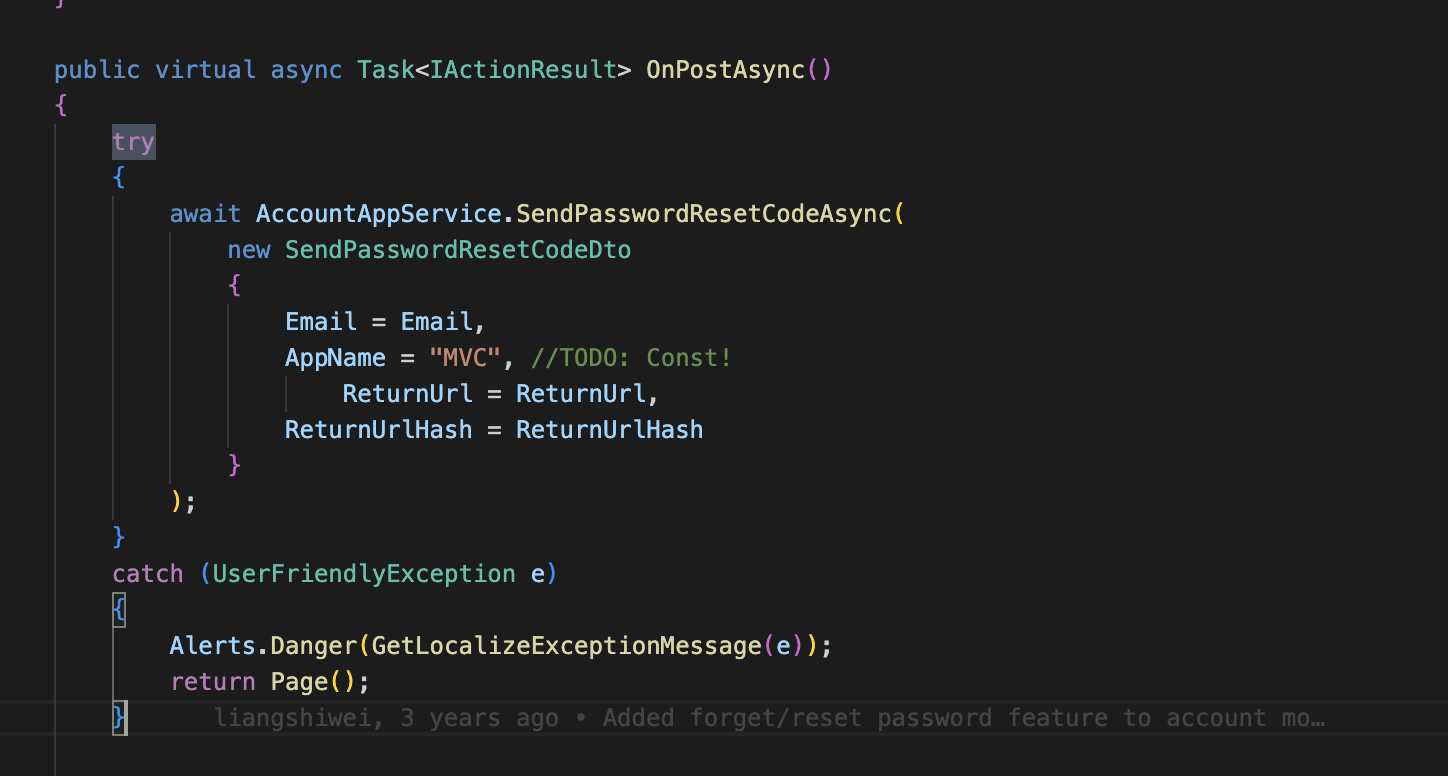
    You can try catch the exception on your index page.

    Markdown supported.
    Copy, paste, or drag & drop images and files (max 100 MB per file, 100 MB total per post)
Boost Your Development
ABP Live Training
Packages
See Trainings
Mastering ABP Framework Book
The Official Guide
Mastering
ABP Framework
Learn More
Mastering ABP Framework Book
Made with ❤️ on ABP v10.8.0-preview. Updated on September 28, 2026, 11:44
1
ABP Assistant
🔐 You need to be logged in to use the chatbot. Please log in first.