






0
saad.aldulaijan created
- ABP Framework version: v7.0.3
- UI type: Angular
- DB provider: EF Core
- Tiered (MVC) or Identity Server Separated (Angular): yes
- Exception message and stack trace:
- Steps to reproduce the issue:"
I am using FileManagementModule; and I want to allow anonymous uploads, how can i achieve this.
I tried overriding the following and it didn't work:
I tried to override the controller:
    [ExposeServices(typeof(FileDescriptorController))]
    [AllowAnonymous]
    public class MyFileDescriptorController : FileDescriptorController
    {
        public MyFileDescriptorController(IFileDescriptorAppService fileDescriptorAppService) : base(fileDescriptorAppService)
        {
        }


        [AllowAnonymous]
        [HttpPost]
        [Route("upload")]
        public override Task<FileDescriptorDto> CreateAsync(Guid? directoryId, CreateFileInputWithStream inputWithStream)
        {
            return FileDescriptorAppService.CreateAsync(directoryId, inputWithStream);
        }

    }
overriding the app service
[Dependency(ReplaceServices = true)]
[ExposeServices(typeof(IFileDescriptorAppService), typeof(FileDescriptorAppService), typeof(MyFileDescriptorAppService))]

[AllowAnonymous]
public class MyFileDescriptorAppService : FileDescriptorAppService
{
    public MyFileDescriptorAppService(IFileManager fileManager,
        IFileDescriptorRepository fileDescriptorRepository,
        IBlobContainer<FileManagementContainer> blobContainer,
        IDistributedCache<FileDownloadTokenCacheItem, string> downloadTokenCache)
        : base(fileManager, fileDescriptorRepository, blobContainer, downloadTokenCache)
    {
    }


    [AllowAnonymous]
    public override async Task<FileDescriptorDto> CreateAsync(Guid? directoryId, CreateFileInputWithStream inputWithStream)
    {
        await CheckSizeAsync(inputWithStream.File.ContentLength ?? 0);

        var fileDescriptor = await FileManager.CreateAsync(inputWithStream.Name, inputWithStream.File.ContentType, inputWithStream.File, directoryId, CurrentTenant.Id, overrideExisting: true);

        await CurrentUnitOfWork.SaveChangesAsync();

        fileDescriptor = await FileDescriptorRepository.FindAsync(fileDescriptor.Id);
        inputWithStream.MapExtraPropertiesTo(fileDescriptor);
        await FileDescriptorRepository.UpdateAsync(fileDescriptor);
        return ObjectMapper.Map<FileDescriptor, FileDescriptorDto>(fileDescriptor);

    }
}
Markdown supported.
Copy, paste, or drag & drop images and files (max 100 MB per file, 100 MB total per post)
3 Answer(s)
-
0
Hi,
You can try this:
[Dependency(ReplaceServices = true)]
[ExposeServices(typeof(FileDescriptorController), IncludeSelf = true)]
[AllowAnonymous]
public class MyFileDescriptorController : FileDescriptorController
{
    public MyFileDescriptorController(IFileDescriptorAppService fileDescriptorAppService) : base(fileDescriptorAppService)
    {
    }


    [AllowAnonymous]
    [HttpPost]
    [Route("upload")]
    public override Task CreateAsync(Guid? directoryId, CreateFileInputWithStream inputWithStream)
    {
        return FileDescriptorAppService.CreateAsync(directoryId, inputWithStream);
    }

}
Document: https://docs.abp.io/en/abp/latest/Customizing-Application-Modules-Overriding-Services#example-overriding-a-controller
Markdown supported.Copy, paste, or drag & drop images and files (max 100 MB per file, 100 MB total per post) -
0
I already tried it it didn't work, it returns 401 if not authenticated. It seems fileDescriptorAppService itself is secured.
Markdown supported.Copy, paste, or drag & drop images and files (max 100 MB per file, 100 MB total per post) -
0
Hi,
It works for me:
[Dependency(ReplaceServices = true)] [ExposeServices(typeof(FileDescriptorController), IncludeSelf = true)] [AllowAnonymous] public class MyFileDescriptorController : FileDescriptorController { public MyFileDescriptorController(IFileDescriptorAppService fileDescriptorAppService) : base(fileDescriptorAppService) { } [AllowAnonymous] [HttpPost] [Route("upload")] public override Task<FileDescriptorDto> CreateAsync(Guid? directoryId, CreateFileInputWithStream inputWithStream) { return FileDescriptorAppService.CreateAsync(directoryId, inputWithStream); } } [Dependency(ReplaceServices = true)] [ExposeServices(typeof(IFileDescriptorAppService), typeof(FileDescriptorAppService), typeof(MyFileDescriptorAppService))] [AllowAnonymous] public class MyFileDescriptorAppService : FileDescriptorAppService { public MyFileDescriptorAppService(IFileManager fileManager, IFileDescriptorRepository fileDescriptorRepository, IBlobContainer<FileManagementContainer> blobContainer, IDistributedCache<FileDownloadTokenCacheItem, string> downloadTokenCache) : base(fileManager, fileDescriptorRepository, blobContainer, downloadTokenCache) { } [AllowAnonymous] public override async Task<FileDescriptorDto> CreateAsync(Guid? directoryId, CreateFileInputWithStream inputWithStream) { return new FileDescriptorDto() { Name = "OK" }; } }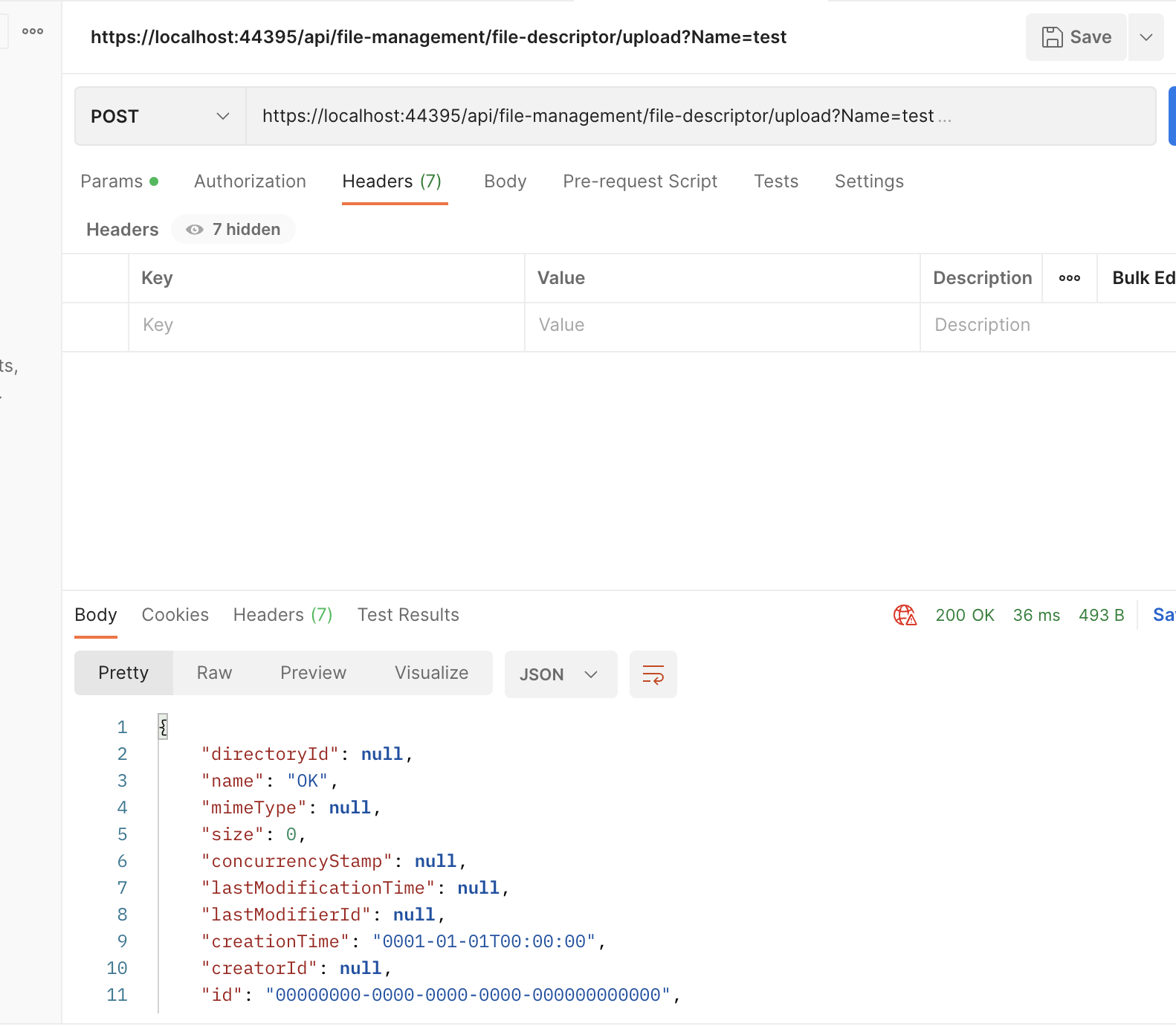 Markdown supported.Copy, paste, or drag & drop images and files (max 100 MB per file, 100 MB total per post)


