Check the docs before asking a question: https://docs.abp.io/en/commercial/latest/ Check the samples, to see the basic tasks: https://docs.abp.io/en/commercial/latest/samples/index The exact solution to your question may have been answered before, please use the search on the homepage.
ABP Framework version: v3.2.1
UI type: Angular
** Identity Server Seperated (Angular)**: yes
Exception message and stack trace:
**Httpapi.Host console:
[17:47:19 INF] Request starting HTTP/1.1 GET https://localhost:44352/api/abp/application-configuration [17:47:19 INF] CORS policy execution successful. [17:47:22 ERR] Exception occurred while processing message. System.InvalidOperationException: IDX20803: Unable to obtain configuration from: 'https://localhost:44337/.well-known/openid-configuration'. ---> System.IO.IOException: IDX20804: Unable to retrieve document from: 'https://localhost:44337/.well-known/openid-configuration'. ---> System.Net.Http.HttpRequestException: The SSL connection could not be established, see inner exception. ---> System.IO.IOException: Authentication failed because the remote party has closed the transport stream. at System.Net.Security.SslStream.StartReadFrame(Byte[] buffer, Int32 readBytes, AsyncProtocolRequest asyncRequest) at System.Net.Security.SslStream.PartialFrameCallback(AsyncProtocolRequest asyncRequest) --- End of stack trace from previous location where exception was thrown --- at System.Net.Security.SslStream.ThrowIfExceptional() at System.Net.Security.SslStream.InternalEndProcessAuthentication(LazyAsyncResult lazyResult) at System.Net.Security.SslStream.EndProcessAuthentication(IAsyncResult result) at System.Net.Security.SslStream.EndAuthenticateAsClient(IAsyncResult asyncResult) at System.Net.Security.SslStream.<>c.b__65_1(IAsyncResult iar) at System.Threading.Tasks.TaskFactory
1.FromAsyncCoreLogic(IAsyncResult iar, Func2 endFunction, Action1 endAction, Task1 promise, Boolean requiresSynchronization) --- End of stack trace from previous location where exception was thrown --- at System.Net.Http.ConnectHelper.EstablishSslConnectionAsyncCore(Stream stream, SslClientAuthenticationOptions sslOptions, CancellationToken cancellationToken) --- End of inner exception stack trace --- at System.Net.Http.ConnectHelper.EstablishSslConnectionAsyncCore(Stream stream, SslClientAuthenticationOptions sslOptions, CancellationToken cancellationToken) at System.Net.Http.HttpConnectionPool.ConnectAsync(HttpRequestMessage request, Boolean allowHttp2, CancellationToken cancellationToken) at System.Net.Http.HttpConnectionPool.CreateHttp11ConnectionAsync(HttpRequestMessage request, CancellationToken cancellationToken) at System.Net.Http.HttpConnectionPool.GetHttpConnectionAsync(HttpRequestMessage request, CancellationToken cancellationToken) at System.Net.Http.HttpConnectionPool.SendWithRetryAsync(HttpRequestMessage request, Boolean doRequestAuth, CancellationToken cancellationToken) at System.Net.Http.RedirectHandler.SendAsync(HttpRequestMessage request, CancellationToken cancellationToken) at System.Net.Http.DiagnosticsHandler.SendAsync(HttpRequestMessage request, CancellationToken cancellationToken) at System.Net.Http.HttpClient.FinishSendAsyncBuffered(Task1 sendTask, HttpRequestMessage request, CancellationTokenSource cts, Boolean disposeCts) at Microsoft.IdentityModel.Protocols.HttpDocumentRetriever.GetDocumentAsync(String address, CancellationToken cancel) --- End of inner exception stack trace --- at Microsoft.IdentityModel.Protocols.HttpDocumentRetriever.GetDocumentAsync(String address, CancellationToken cancel) at Microsoft.IdentityModel.Protocols.OpenIdConnect.OpenIdConnectConfigurationRetriever.GetAsync(String address, IDocumentRetriever retriever, CancellationToken cancel) at Microsoft.IdentityModel.Protocols.ConfigurationManager1.GetConfigurationAsync(CancellationToken cancel) --- End of inner exception stack trace --- at Microsoft.IdentityModel.Protocols.ConfigurationManager1.GetConfigurationAsync(CancellationToken cancel) at Microsoft.AspNetCore.Authentication.JwtBearer.JwtBearerHandler.HandleAuthenticateAsync() at Microsoft.AspNetCore.Authentication.JwtBearer.JwtBearerHandler.HandleAuthenticateAsync() at Microsoft.AspNetCore.Authentication.AuthenticationHandler1.AuthenticateAsync() at Microsoft.AspNetCore.Authentication.AuthenticationService.AuthenticateAsync(HttpContext context, String scheme) at Microsoft.AspNetCore.Authentication.AuthenticationMiddleware.Invoke(HttpContext context) at Microsoft.AspNetCore.Localization.RequestLocalizationMiddleware.Invoke(HttpContext context) at Microsoft.AspNetCore.RequestLocalization.AbpRequestLocalizationMiddleware.InvokeAsync(HttpContext context, RequestDelegate next) at Microsoft.AspNetCore.Builder.UseMiddlewareExtensions.<>c__DisplayClass5_1.<b__1>d.MoveNext() --- End of stack trace from previous location where exception was thrown --- at Microsoft.AspNetCore.Diagnostics.DeveloperExceptionPageMiddleware.Invoke(HttpContext contex**Identity server console:
[17:53:06 INF] Request starting HTTP/1.1 GET https://localhost:44337/.well-known/openid-configuration/jwks [17:53:06 INF] CORS policy execution successful. [17:53:06 DBG] CORS request made for path: /.well-known/openid-configuration/jwks from origin: http://localhost:4200 [17:53:06 WRN] Origin is not allowed: http://localhost:4200 [17:53:06 WRN] CorsPolicyService did not allow origin: http://localhost:4200 [17:53:06 INF] No CORS policy found for the specified request. [17:53:06 DBG] Request path /.well-known/openid-configuration/jwks matched to endpoint type Discovery [17:53:06 DBG] Endpoint enabled: Discovery, successfully created handler: IdentityServer4.Endpoints.DiscoveryKeyEndpoint [17:53:06 INF] Invoking IdentityServer endpoint: IdentityServer4.Endpoints.DiscoveryKeyEndpoint for /.well-known/openid-configuration/jwks [17:53:06 DBG] Start key discovery request [17:53:06 INF] Request finished in 109.7077ms 200 application/jwk-set+json; charset=UTF-8
Steps to reproduce the issue:
Deploy on windows , running normally ,could login and show page.
But deploy on Mac. At the angular page , login , then http-api console get these error(shown above).The page show:

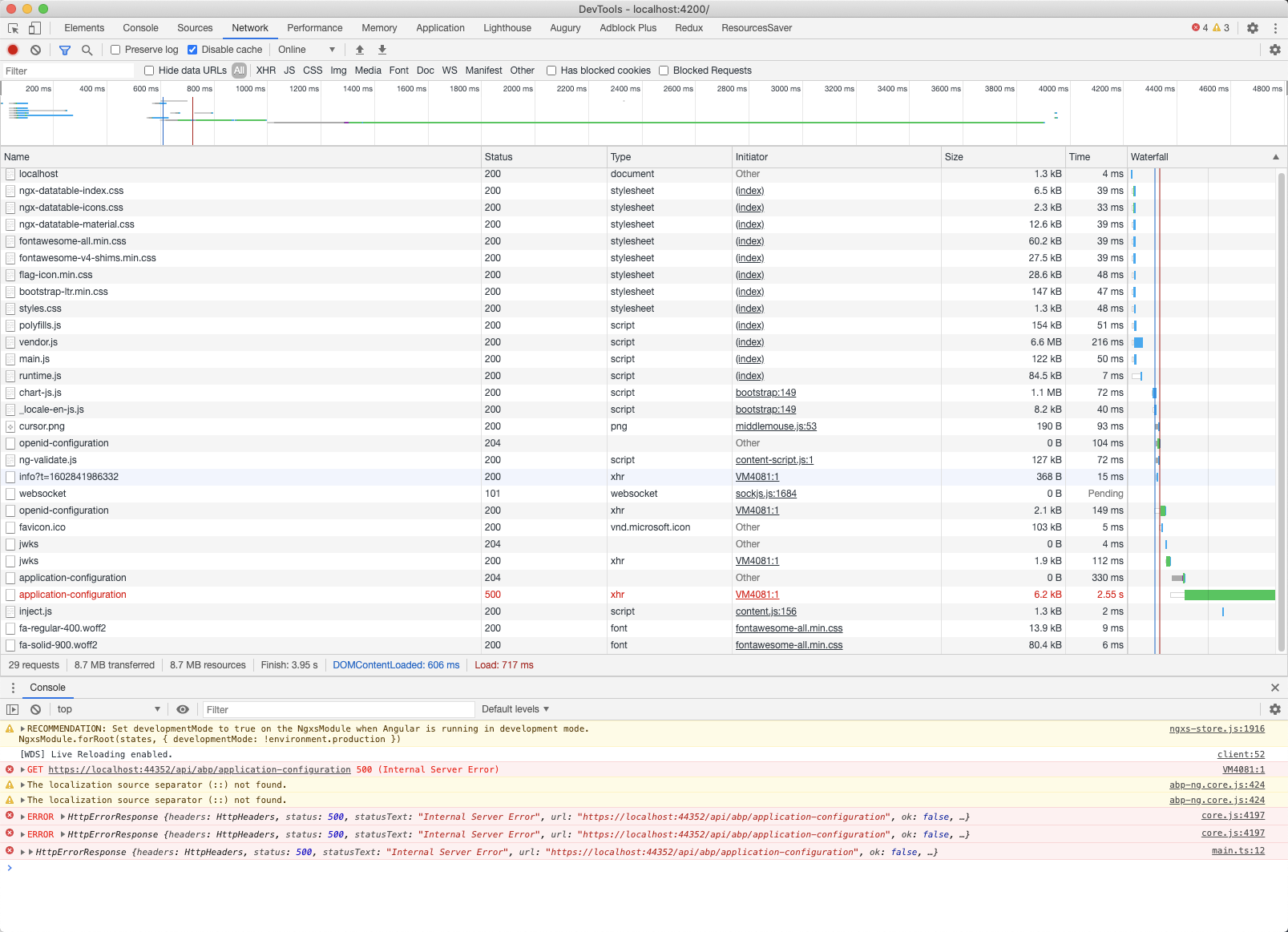
Google the error, someone says it's certificate error so we recreate a new certificate, but same error.
5 Answer(s)
-
0
hi
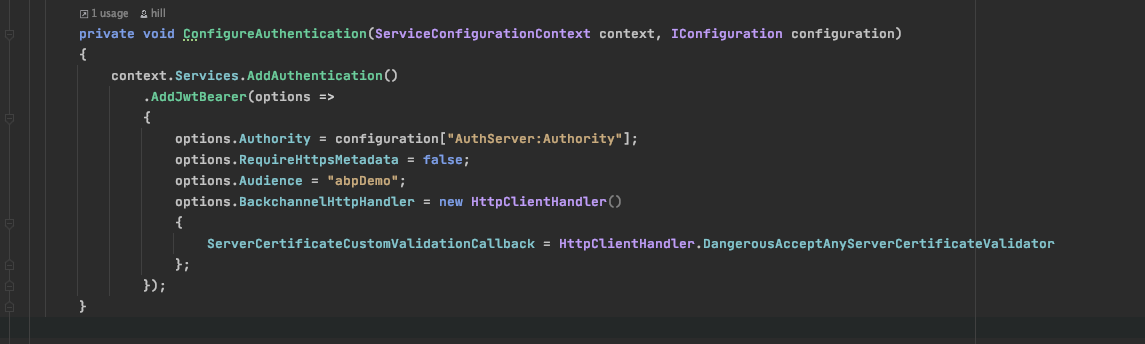
You can include option below to your IdentityServer or JwtBearer configuration for local usage;
options.JwtBackChannelHandler = new HttpClientHandler
{
	ServerCertificateCustomValidationCallback = HttpClientHandler.DangerousAcceptAnyServerCertificateValidator
}

or

options.BackchannelHttpHandler =  new HttpClientHandler
{
	ServerCertificateCustomValidationCallback = HttpClientHandler.DangerousAcceptAnyServerCertificateValidator
}
Markdown supported.Copy, paste, or drag & drop images and files (max 100 MB per file, 100 MB total per post)