






Menu items are disappearing when we use azure signalR in blazor server app and only the "Home" menu appears. If we remove the permission for other menu items, those get displayed. We were able to reproduce the issue in a new abp project.
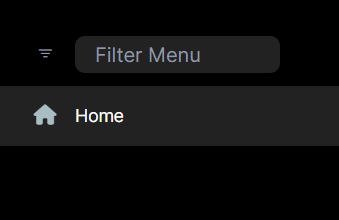
- ABP Framework version: v7.2.2
- UI type: Blazor Server
- DB provider: EF Core
- Tiered (MVC) or Identity Server Separated (Angular): yes
11 Answer(s)
-
0
We were able to reproduce the issue in a new abp project.
Could you share the project with me? shiwei.liang@volosoft.com. I will check it.
Markdown supported.Copy, paste, or drag & drop images and files (max 100 MB per file, 100 MB total per post) -
0
Hi,
I was not able to reproduce the issue here is a small video that is working. https://aman-waiin.tinytake.com/msc/ODM0ODczOV8yMTYxNTU1NA
Please Follow : https://docs.abp.io/en/abp/latest/SignalR-Integration https://learn.microsoft.com/en-us/azure/azure-signalr/signalr-tutorial-build-blazor-server-chat-app
Markdown supported.Copy, paste, or drag & drop images and files (max 100 MB per file, 100 MB total per post) -
0
Hi,
We are not building a chat application. We just added the azure signalR configuration context.Services.AddSignalR().AddAzureSignalR(); in blazor module and the connection string in appsettings.
https://custman-my.sharepoint.com/:v:/g/personal/aoomm_lighthousehq_com_au/EchOgOpX4oRJtj6NaBwqKKgB5xT9iByJUwjru6xYN10AmQ?e=8lUdPw
Markdown supported.Copy, paste, or drag & drop images and files (max 100 MB per file, 100 MB total per post) -
0
Hi,
I was not able to reproduce the issue here is a small video that is working. https://aman-waiin.tinytake.com/msc/ODM0ODczOV8yMTYxNTU1NA
Please Follow :
https://docs.abp.io/en/abp/latest/SignalR-Integration https://learn.microsoft.com/en-us/azure/azure-signalr/signalr-tutorial-build-blazor-server-chat-appHi,
Sorry, but the above video was just a sample which showed the working of azure SignalR with abp io blazor server and not the actual result you are trying to achieve.
Markdown supported.Copy, paste, or drag & drop images and files (max 100 MB per file, 100 MB total per post) -
0
Hi,
Where have you added this configuration, in which module?
Markdown supported.Copy, paste, or drag & drop images and files (max 100 MB per file, 100 MB total per post) -
0
Hi,
You should add this Services.AddSignalR().AddAzureSignalR(); where your hub is created. is your hub created in {POJECT_NAME}BlazorModule ?
Please use
Install the Microsoft.AspNetCore.SignalR.Client package to use the SignalR client. to communicate to your hub as mentioned in this example https://learn.microsoft.com/en-us/azure/azure-signalr/signalr-tutorial-build-blazor-server-chat-appMarkdown supported.Copy, paste, or drag & drop images and files (max 100 MB per file, 100 MB total per post) -
0
We are just trying to deploy Blazor Server App to Azure and want to use Azure Signal R Service.
"We recommend using the Azure SignalR Service for Blazor Server apps. The service works in conjunction with the app's Blazor Hub for scaling up a Blazor Server app to a large number of concurrent SignalR connections."
https://learn.microsoft.com/en-us/aspnet/core/blazor/host-and-deploy/server?view=aspnetcore-7.0#azure-signalr-service
The connection is working fine. The only issue is that the menu items with permission do not appear in the application.
Markdown supported.Copy, paste, or drag & drop images and files (max 100 MB per file, 100 MB total per post) -
1
Hi,
It's by Azure SignalR design: https://github.com/dotnet/aspnetcore/issues/17617
You can try:
[Dependency(ReplaceServices = true)]
public class AzureSignalRRemoteServiceHttpClientAuthenticator : IdentityModelRemoteServiceHttpClientAuthenticator
{
    public ICurrentPrincipalAccessor ICurrentPrincipalAccessor { get; set; }

    public AzureSignalRRemoteServiceHttpClientAuthenticator(
        IIdentityModelAuthenticationService identityModelAuthenticationService)
        : base(identityModelAuthenticationService)
    {
    }

    public override async Task Authenticate(RemoteServiceHttpClientAuthenticateContext context)
    {
        if (context.RemoteService.GetUseCurrentAccessToken() != false)
        {
            var accessToken =  GetAccessTokenOrNullAsync();
            if (accessToken != null)
            {
                context.Request.SetBearerToken(accessToken);
                return;
            }
        }

        await base.Authenticate(context);
    }

    protected virtual string? GetAccessTokenOrNullAsync()
    {
        var token = ICurrentPrincipalAccessor.Principal.FindFirst("access_token");
        if (token == null)
        {
            return null;
        }

        return token.Value;
    }
}


.AddAbpOpenIdConnect("oidc", options =>
{
    ......

    options.Events.OnTokenResponseReceived = receivedContext =>
    {
        if (!string.IsNullOrWhiteSpace(receivedContext.TokenEndpointResponse.AccessToken)
            && receivedContext.Principal.Identity is ClaimsIdentity identity
            && !identity.HasClaim(c => c.Type == "access_token"))
        {
            identity.AddClaim(new Claim("access_token", receivedContext.TokenEndpointResponse.AccessToken));
        }
        return Task.CompletedTask;
    };

});
Markdown supported.Copy, paste, or drag & drop images and files (max 100 MB per file, 100 MB total per post)



