






- ABP Framework version: v7.2.2
- UI type: MVC
- DB provider: EF Core
- Tiered (MVC) or Identity Server Separated (Angular): no
- Exception message and stack trace:
- Steps to reproduce the issue:"
Validation does not display when using the Bootstrap form floating control.
<form data-ajaxForm="true" asp-page="/Contact" autocomplete="off">
  <abp-modal>
    <abp-modal-body>
      <div class="col position-relative">
        <div class="form-floating">
          <input type="email" class="form-control" id="email" placeholder="Email" required aria-describedby="invalid-email"/>
          <label for="email">Email</label>
        </div>
        <div id="invalid-email" class="invalid-tooltip">A valid email address is required</div>
      </div>
    </abp-modal-body>
    <abp-modal-footer>
      <button type="submit" class="btn" busy-data-text="Saving..."><i class="fa fa-check"></i><span> Save</span></button>
    </abp-modal-footer>
  </abp-modal>
</form>
If the field is blank and I click save, the validation does not display.
8 Answer(s)
-
0
Hi Chrislarabell,
Let me have a look into your code to see what happens :)
Regards, Long
Markdown supported.Copy, paste, or drag & drop images and files (max 100 MB per file, 100 MB total per post) -
0
Hi,
You can use ABP Form Tag Helpers instead of normal Html input. Form Tag Helpers automatically validate the input based on the data annotation attributes and shows validation error messages on the user interface. Error messages are automatically localized based on the current culture.
Sample: @page @using Volo.Abp.AspNetCore.Mvc.UI.Bootstrap.TagHelpers.Modal @model MyProject.Web.Pages.Products.ProductCreateModalModel @{ Layout = null; } <form method="post" action="@Url.Page("/Products/ProductCreateModal")"> <abp-modal> <abp-modal-header title="Create New Product"></abp-modal-header> <abp-modal-body> <abp-input asp-for="Product.Name"/> <abp-input asp-for="Product.Description"/> <abp-input asp-for="Product.ReleaseDate"/> </abp-modal-body> <abp-modal-footer buttons="@AbpModalButtons.Save | @AbpModalButtons.Cancel"></abp-modal-footer> </abp-modal> </form>
References: https://docs.abp.io/en/abp/latest/UI/AspNetCore/Tag-Helpers/Form-elements#abp-input https://docs.abp.io/en/abp/latest/UI/AspNetCore/Forms-Validation#validation-localization
Markdown supported.Copy, paste, or drag & drop images and files (max 100 MB per file, 100 MB total per post) -
0
Hi Long,
Yes, but abp-input tag helpers do not add floating labels. The control I am using has a floating label. The top control is what I am after.
https://getbootstrap.com/docs/5.3/forms/floating-labels/, supported in bootstrap v5.
https://getbootstrap.com/docs/5.0/forms/floating-labels/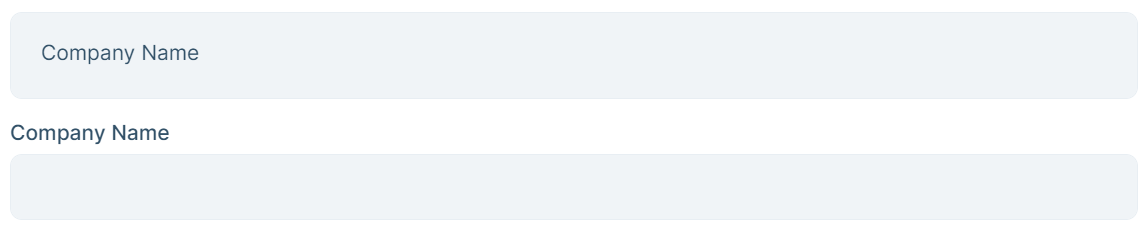
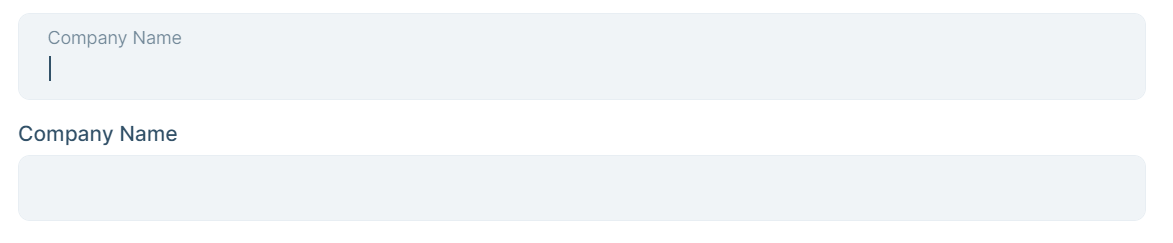
The validation does not add the validity class to the correct HTML tag. The validation code needs to be overridden, but I do not see where that can be done.
Markdown supported.Copy, paste, or drag & drop images and files (max 100 MB per file, 100 MB total per post) -
0
Hi,
You can try:
<form data-ajaxForm="true" asp-page="/Contact" autocomplete="off" id="testForm"> <abp-modal id="exampleModal"> <abp-modal-header> <span>Floating Class</span> </abp-modal-header> <abp-modal-body> <div class="col position-relative"> <div class="form-floating mb-3"> <input type="email" class="form-control" id="email" name="email" placeholder="Email" data-val="true" data-val-required="The Email field is required."/> <label class="form-label" for="email">Email</label> <span class="text-danger field-validation-valid" data-valmsg-for="email" data-valmsg-replace="true"></span> </div> </div> </abp-modal-body> <abp-modal-footer> <button type="submit" class="btn" busy-data-text="Saving..."> <i class="fa fa-check"></i><span> Save</span> </button> </abp-modal-footer> </abp-modal> </form>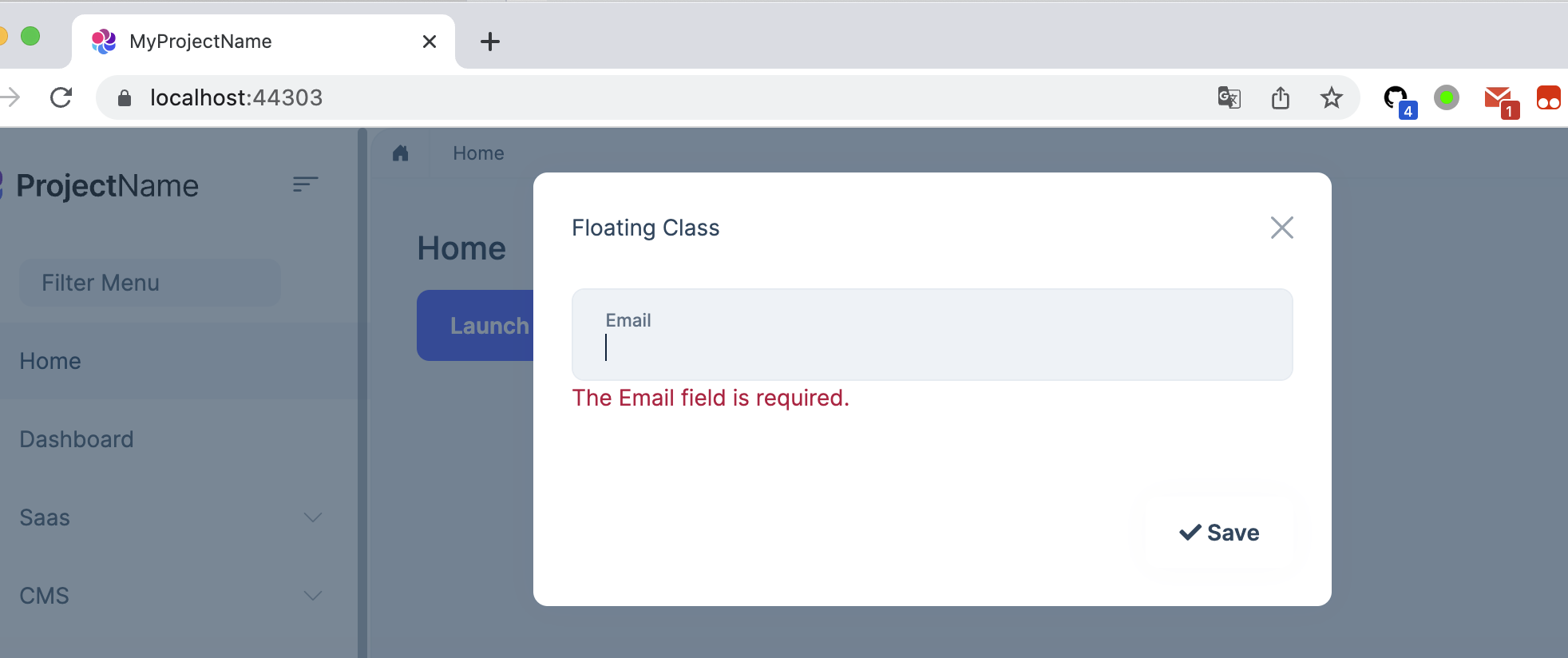 Markdown supported.Copy, paste, or drag & drop images and files (max 100 MB per file, 100 MB total per post)
 -
0
Yes, that is similar to how we are working around the issue, but it does not apply any visual to the textbox:
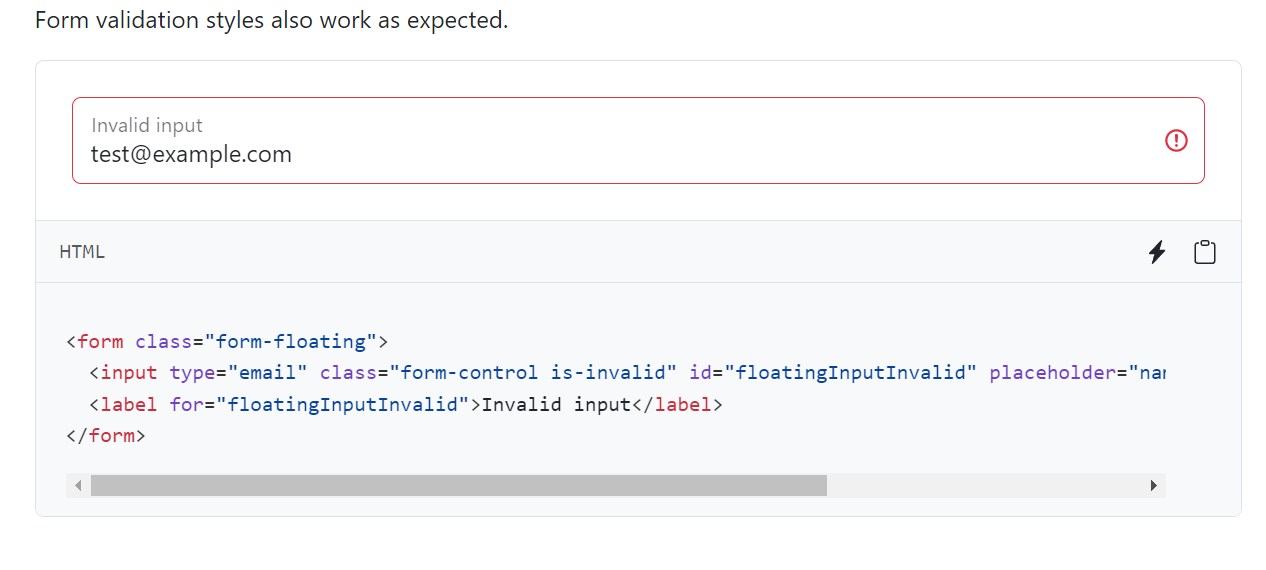
source: https://getbootstrap.com/docs/5.3/forms/floating-labels/
Markdown supported.Copy, paste, or drag & drop images and files (max 100 MB per file, 100 MB total per post) -
0
Hi,
You can try adding those to
global-styles.css:.was-validated .form-control:invalid, .form-control.input-validation-error { border-color: #c00d49; padding-right: calc(1.5em + 1.35rem); background-image: url("data:image/svg+xml,%3csvg xmlns='http://www.w3.org/2000/svg' viewBox='0 0 12 12' width='12' height='12' fill='none' stroke='%23c00d49'%3e%3ccircle cx='6' cy='6' r='4.5'/%3e%3cpath stroke-linejoin='round' d='M5.8 3.6h.4L6 6.5z'/%3e%3ccircle cx='6' cy='8.2' r='.6' fill='%23c00d49' stroke='none'/%3e%3c/svg%3e"); background-repeat: no-repeat; background-position: right calc(0.375em + 0.3375rem) center; background-size: calc(0.75em + 0.675rem) calc(0.75em + 0.675rem); } .was-validated .form-control:invalid:focus, .form-control.input-validation-error:focus { border-color: #c00d49; box-shadow: 0 0 0 0 rgba(192, 13, 73, 0.25); } .was-validated textarea.form-control:invalid, textarea.form-control.input-validation-error { padding-right: calc(1.5em + 1.35rem); background-position: top calc(0.375em + 0.3375rem) right calc(0.375em + 0.3375rem); } .was-validated .form-select:invalid, .form-select.input-validation-error { border-color: #c00d49; } .was-validated .form-select:invalid:not([multiple]):not([size]), .was-validated .form-select:invalid:not([multiple])[size="1"], .form-select.input-validation-error:not([multiple]):not([size]), .form-select.input-validation-error:not([multiple])[size="1"] { padding-right: 6.875rem; background-image: url("data:image/svg+xml,%3csvg xmlns='http://www.w3.org/2000/svg' viewBox='0 0 16 16'%3e%3cpath fill='none' stroke='%23343a40' stroke-linecap='round' stroke-linejoin='round' stroke-width='2' d='m2 5 6 6 6-6'/%3e%3c/svg%3e"), url("data:image/svg+xml,%3csvg xmlns='http://www.w3.org/2000/svg' viewBox='0 0 12 12' width='12' height='12' fill='none' stroke='%23c00d49'%3e%3ccircle cx='6' cy='6' r='4.5'/%3e%3cpath stroke-linejoin='round' d='M5.8 3.6h.4L6 6.5z'/%3e%3ccircle cx='6' cy='8.2' r='.6' fill='%23c00d49' stroke='none'/%3e%3c/svg%3e"); background-position: right 1.25rem center, center right 3.75rem; background-size: 16px 12px, calc(0.75em + 0.675rem) calc(0.75em + 0.675rem); } .was-validated .form-select:invalid:focus, .form-select.input-validation-error:focus { border-color: #c00d49; box-shadow: 0 0 0 0 rgba(192, 13, 73, 0.25); } .was-validated .form-control-color:invalid, .form-control-color.input-validation-error { width: calc(3rem + calc(1.5em + 1.35rem)); } .was-validated .form-check-input:invalid, .form-check-input.input-validation-error { border-color: #c00d49; } .was-validated .form-check-input:invalid:checked, .form-check-input.input-validation-error:checked { background-color: #c00d49; } .was-validated .form-check-input:invalid:focus, .form-check-input.input-validation-error:focus { box-shadow: 0 0 0 0 rgba(192, 13, 73, 0.25); }Markdown supported.Copy, paste, or drag & drop images and files (max 100 MB per file, 100 MB total per post) -
0
Thanks!
Markdown supported.Copy, paste, or drag & drop images and files (max 100 MB per file, 100 MB total per post) -
0
We will support Floating labels in 7.3.0 https://github.com/abpframework/abp/pull/17009
Markdown supported.Copy, paste, or drag & drop images and files (max 100 MB per file, 100 MB total per post)



