






- ABP Framework version: v7.3.1
- UI Type: Blazor WASM
- Database System: EF Core (SQL Server.)
- Tiered (for MVC) or Auth Server Separated (for Angular): no
- Exception message and full stack trace: When I deploy the solution in Azure Web App I get this error my App:
System.AggregateException: AggregateException_ctor_DefaultMessage (Could not load type Innovain.Sports.Contribution.ContributionHttpApiClientModule, INNOVAIN.SPORTS.CONTRIBUTION.HTTPAPI.CLIENT, Version=0.1.0.0, Culture=neutral, PublicKeyToken=null while decoding custom attribute: (null))
---> System.TypeLoadException: Could not load type Innovain.Sports.Contribution.ContributionHttpApiClientModule, INNOVAIN.SPORTS.CONTRIBUTION.HTTPAPI.CLIENT, Version=0.1.0.0, Culture=neutral, PublicKeyToken=null while decoding custom attribute: (null)
at System.Reflection.CustomAttribute.GetCustomAttributesBase(ICustomAttributeProvider , Type , Boolean )
at System.Reflection.CustomAttribute.GetCustomAttributes(ICustomAttributeProvider , Type , Boolean )
at System.Reflection.CustomAttribute.GetCustomAttributes(ICustomAttributeProvider , Boolean )
at System.Attribute.GetCustomAttributes(MemberInfo )
at System.Reflection.CustomAttributeExtensions.GetCustomAttributes(MemberInfo )
at Volo.Abp.Modularity.AbpModuleHelper.FindDependedModuleTypes(Type moduleType)
at Volo.Abp.Modularity.AbpModuleHelper.AddModuleAndDependenciesRecursively(List1 moduleTypes, Type moduleType, ILogger logger, Int32 depth) at Volo.Abp.Modularity.AbpModuleHelper.AddModuleAndDependenciesRecursively(List1 moduleTypes, Type moduleType, ILogger logger, Int32 depth)
at Volo.Abp.Modularity.AbpModuleHelper.FindAllModuleTypes(Type startupModuleType, ILogger logger)
at Volo.Abp.Modularity.ModuleLoader.FillModules(List1 modules, IServiceCollection services, Type startupModuleType, PlugInSourceList plugInSources) at Volo.Abp.Modularity.ModuleLoader.GetDescriptors(IServiceCollection services, Type startupModuleType, PlugInSourceList plugInSources) at Volo.Abp.Modularity.ModuleLoader.LoadModules(IServiceCollection services, Type startupModuleType, PlugInSourceList plugInSources) at Volo.Abp.AbpApplicationBase.LoadModules(IServiceCollection services, AbpApplicationCreationOptions options) at Volo.Abp.AbpApplicationBase..ctor(Type startupModuleType, IServiceCollection services, Action1 optionsAction)
at Volo.Abp.AbpApplicationWithExternalServiceProvider..ctor(Type startupModuleType, IServiceCollection services, Action1 optionsAction) at Volo.Abp.AbpApplicationFactory.Create(Type startupModuleType, IServiceCollection services, Action1 optionsAction)
at Volo.Abp.AbpApplicationFactory.Create[SportsBlazorModule](IServiceCollection services, Action1 optionsAction) at Microsoft.Extensions.DependencyInjection.ServiceCollectionApplicationExtensions.AddApplication[SportsBlazorModule](IServiceCollection services, Action1 optionsAction)
at Microsoft.AspNetCore.Components.WebAssembly.Hosting.AbpWebAssemblyHostBuilderExtensions.AddApplication[SportsBlazorModule](WebAssemblyHostBuilder builder, Action`1 options)
at Innovain.Sports.Blazor.Program.Main(String[] args)
Exception_EndOfInnerExceptionStack
- Steps to reproduce the issue: I have module application in Blazor Wasm, not microservice, but I don't know why when deploy this generate assemblys in uppercase automatically and finally not deploy, when I generate release display this in ouput window:
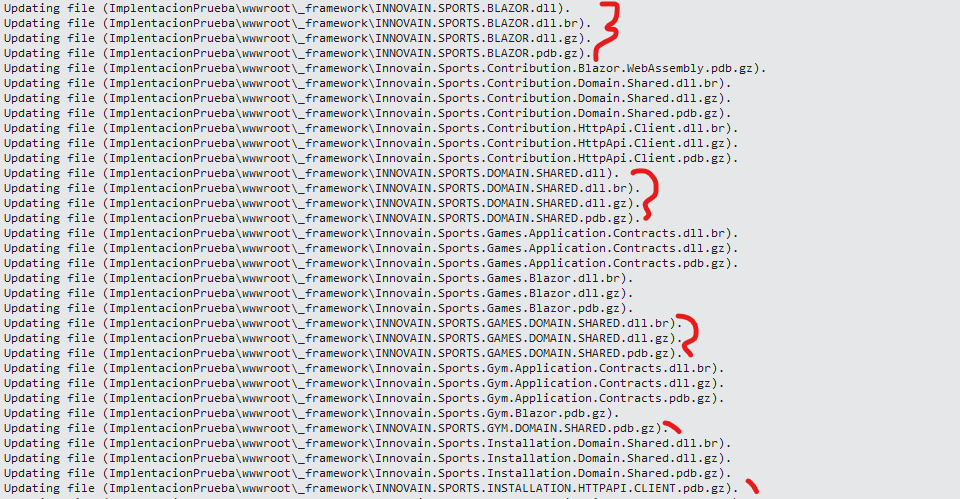
And this kind of messages when re-deploy:
44>D:\Innovain\Innovain.Sports\modules\Innovain.Sports.Games\src\Innovain.Sports.Games.Blazor\Pages\Games\Inscriptions.razor.cs(): warning CS1998: This async method lacks 'await' operators and will run synchronously. Consider using the 'await' operator to await non-blocking API calls, or 'await Task.Run(...)' to do CPU-bound work on a background thread. 64>INNOVAIN.SPORTS.CONTRIBUTION.HTTPAPI.CLIENT -> D:\INNOVAIN\INNOVAIN.SPORTS\MODULES\INNOVAIN.SPORTS.CONTRIBUTION\SRC\INNOVAIN.SPORTS.CONTRIBUTION.HTTPAPI.CLIENT\bin\Debug\netstandard2.0\INNOVAIN.SPORTS.CONTRIBUTION.HTTPAPI.CLIENT.dll 64>Innovain.Sports.Contribution.HttpApi.Client -> D:\Innovain\Innovain.Sports\modules\Innovain.Sports.Contribution\src\Innovain.Sports.Contribution.HttpApi.Client\bin\Debug\net7.0\Innovain.Sports.Contribution.HttpApi.Client.dll 59>INNOVAIN.SPORTS.GAMES.HTTPAPI.CLIENT -> D:\INNOVAIN\INNOVAIN.SPORTS\MODULES\INNOVAIN.SPORTS.GAMES\SRC\INNOVAIN.SPORTS.GAMES.HTTPAPI.CLIENT\bin\Debug\netstandard2.0\INNOVAIN.SPORTS.GAMES.HTTPAPI.CLIENT.dll 66>------ Rebuild All started: Project: Innovain.Sports.Games.HttpApi.Client.ConsoleTestApp, Configuration: Debug Any CPU ------
Thank you,
4 Answer(s)
-
0
Hi,
How do I reproduce the problem? Could you provide a new project to reproduce the problem? I will check it out. shiwei.liang@volosoft.com
Markdown supported.Copy, paste, or drag & drop images and files (max 100 MB per file, 100 MB total per post) -
0
Hi,
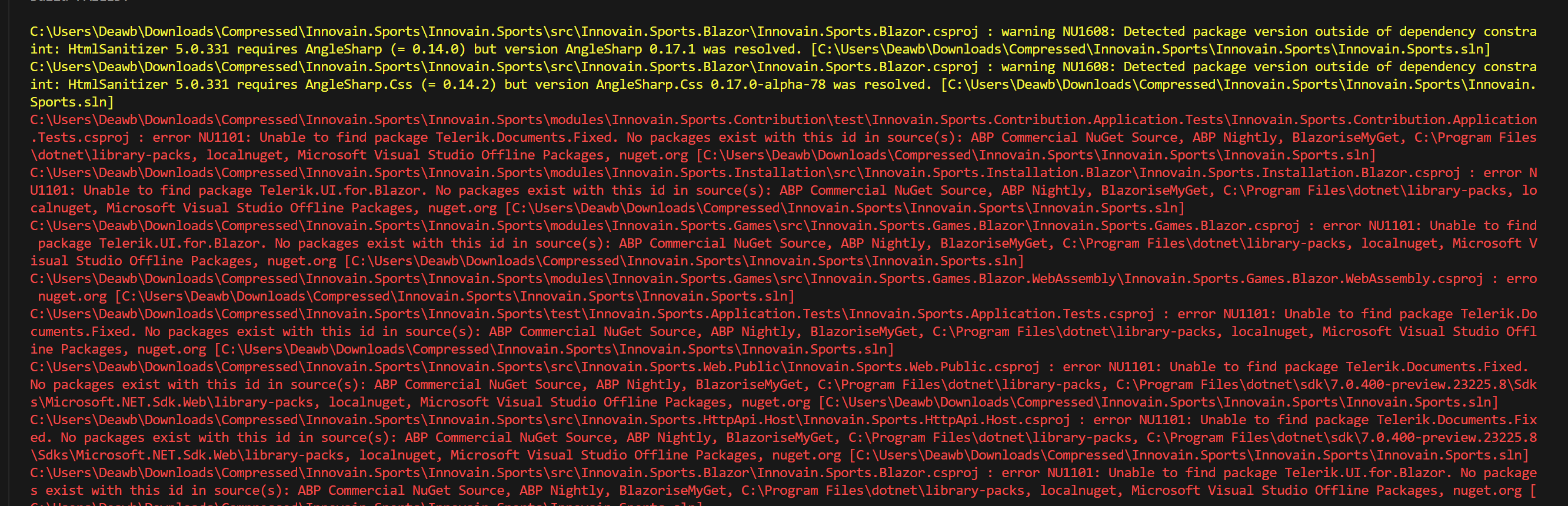
I could not build the solution:
 Markdown supported.Copy, paste, or drag & drop images and files (max 100 MB per file, 100 MB total per post)
 -
0
Hi Shiwei,
I'm sorry this error it's coz I use Telerik controls, can you install a trial version?, and other error it's coz controls used for abp Blazorise use this nuget resourse BlazoriseMyGet, but now this source not found I don't know why. I fix that unchecked this source from nuget settings.
Thank you,
Markdown supported.Copy, paste, or drag & drop images and files (max 100 MB per file, 100 MB total per post) -
0
Hi,
can you install a trial version?
I installed the trial version before and it has expired, so I can't get the trial version again.
Could you reproduce this issue using a minimal project? thanks.
Markdown supported.Copy, paste, or drag & drop images and files (max 100 MB per file, 100 MB total per post)


