






- ABP Framework version: v7.3
- UI Type: Angular
- Database System: EF Core (MySQL)
- Tiered (for MVC) or Auth Server Separated (for Angular): Auth separated angular
- Exception message and full stack trace: NA
- Steps to reproduce the issue: need steps to host docker container with SSL
5 Answer(s)
-
0
Hi,
This has nothing to do with ABP actually, you can check Microsoft's documentation https://learn.microsoft.com/en-us/aspnet/core/security/docker-https?view=aspnetcore-7.0 https://docs.abp.io/en/commercial/latest/startup-templates/application/deployment-docker-compose?UI=NG&DB=EF&Tiered=Yes
Markdown supported.Copy, paste, or drag & drop images and files (max 100 MB per file, 100 MB total per post) -
0
After implementing the above solution getting blow abp error. .AuthServer terminated unexpectedly! System.Security.Cryptography.CryptographicException: ASN1 corrupted data. ---> System.Formats.Asn1.AsnContentException: The encoded length exceeds the number of bytes remaining in the input buffer. at System.Formats.Asn1.AsnDecoder.ReadEncodedValue(ReadOnlySpan
1 source, AsnEncodingRules ruleSet, Int32& contentOffset, Int32& contentLength, Int32& bytesConsumed) at System.Security.Cryptography.X509Certificates.UnixPkcs12Reader.ParsePkcs12(ReadOnlySpan1 data) --- End of inner exception stack trace --- at System.Security.Cryptography.X509Certificates.OpenSslX509CertificateReader.FromFile(String fileName, SafePasswordHandle password, X509KeyStorageFlags keyStorageFlags) at System.Security.Cryptography.X509Certificates.X509Certificate..ctor(String fileName, String password, X509KeyStorageFlags keyStorageFlags) at Microsoft.AspNetCore.Server.Kestrel.Core.Internal.Certificates.CertificateConfigLoader.LoadCertificate(CertificateConfig certInfo, String endpointName) at Microsoft.AspNetCore.Server.Kestrel.KestrelConfigurationLoader.LoadDefaultCert() at Microsoft.AspNetCore.Server.Kestrel.KestrelConfigurationLoader.Reload() at Microsoft.AspNetCore.Server.Kestrel.KestrelConfigurationLoader.Load() at Microsoft.AspNetCore.Server.Kestrel.Core.KestrelServerImpl.BindAsync(CancellationToken cancellationToken) at Microsoft.AspNetCore.Server.Kestrel.Core.KestrelServerImpl.StartAsync[TContext](IHttpApplication`1 application, CancellationToken cancellationToken) at Microsoft.AspNetCore.Hosting.GenericWebHostService.StartAsync(CancellationToken cancellationToken) at Microsoft.Extensions.Hosting.Internal.Host.StartAsync(CancellationToken cancellationToken) at Microsoft.Extensions.Hosting.HostingAbstractionsHostExtensions.RunAsync(IHost host, CancellationToken token) at Microsoft.Extensions.Hosting.HostingAbstractionsHostExtensions.RunAsync(IHost host, CancellationToken token) at G1.health.AuthServer.Program.Main(String[] args) in /src/apps/auth-server/src/G1.health.AuthServer/Program.cs:line 30Markdown supported.Copy, paste, or drag & drop images and files (max 100 MB per file, 100 MB total per post) -
0
Hi,
This error has nothing to do with ABP.
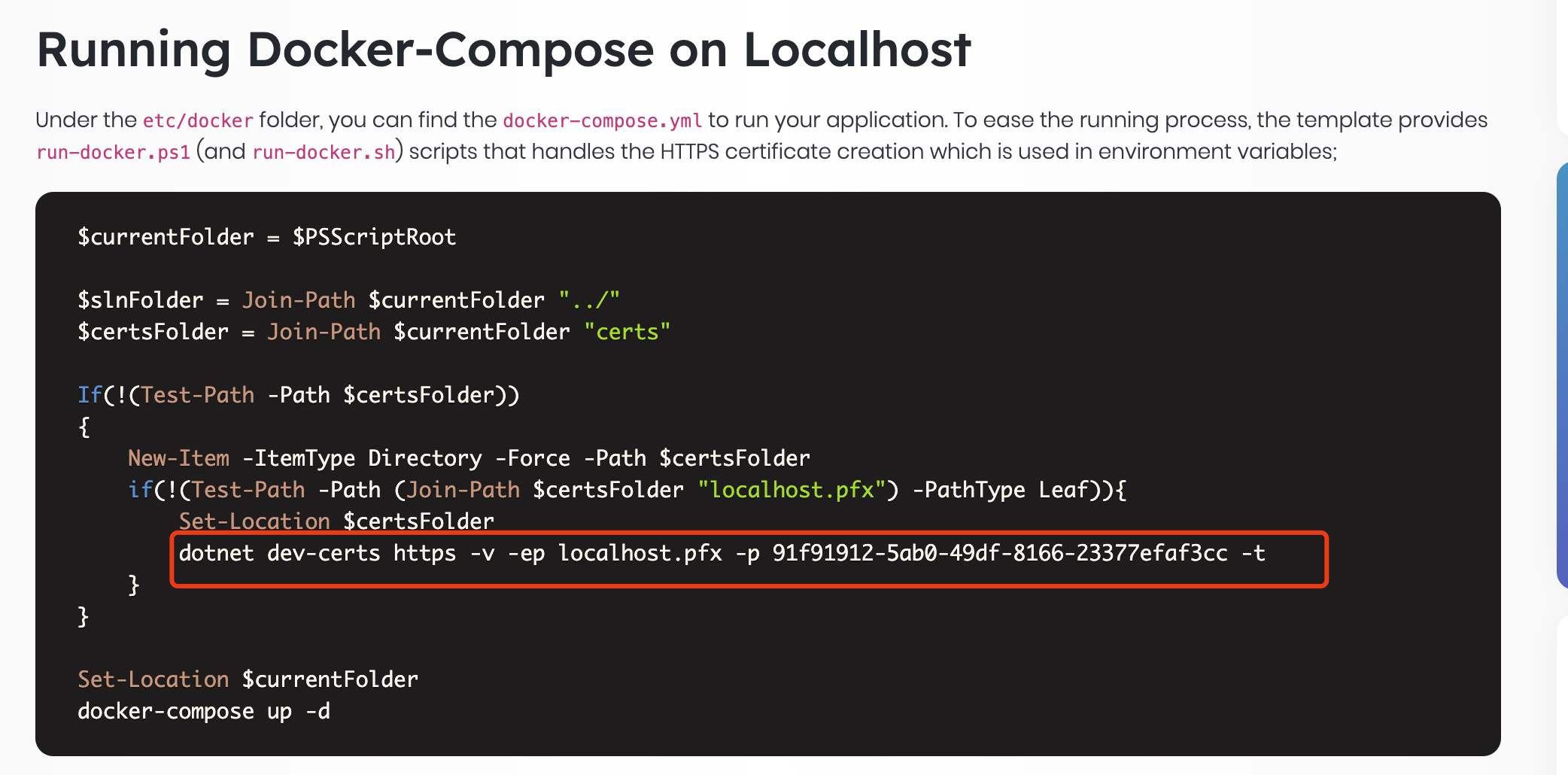
ABP also provides documents, you can refer to: https://docs.abp.io/en/commercial/latest/startup-templates/application/deployment-docker-compose?UI=NG&DB=EF&Tiered=Yes#running-docker-compose-on-localhost
Basically, you need a valid HTTPS certificate. You can create a local certificate for testing:
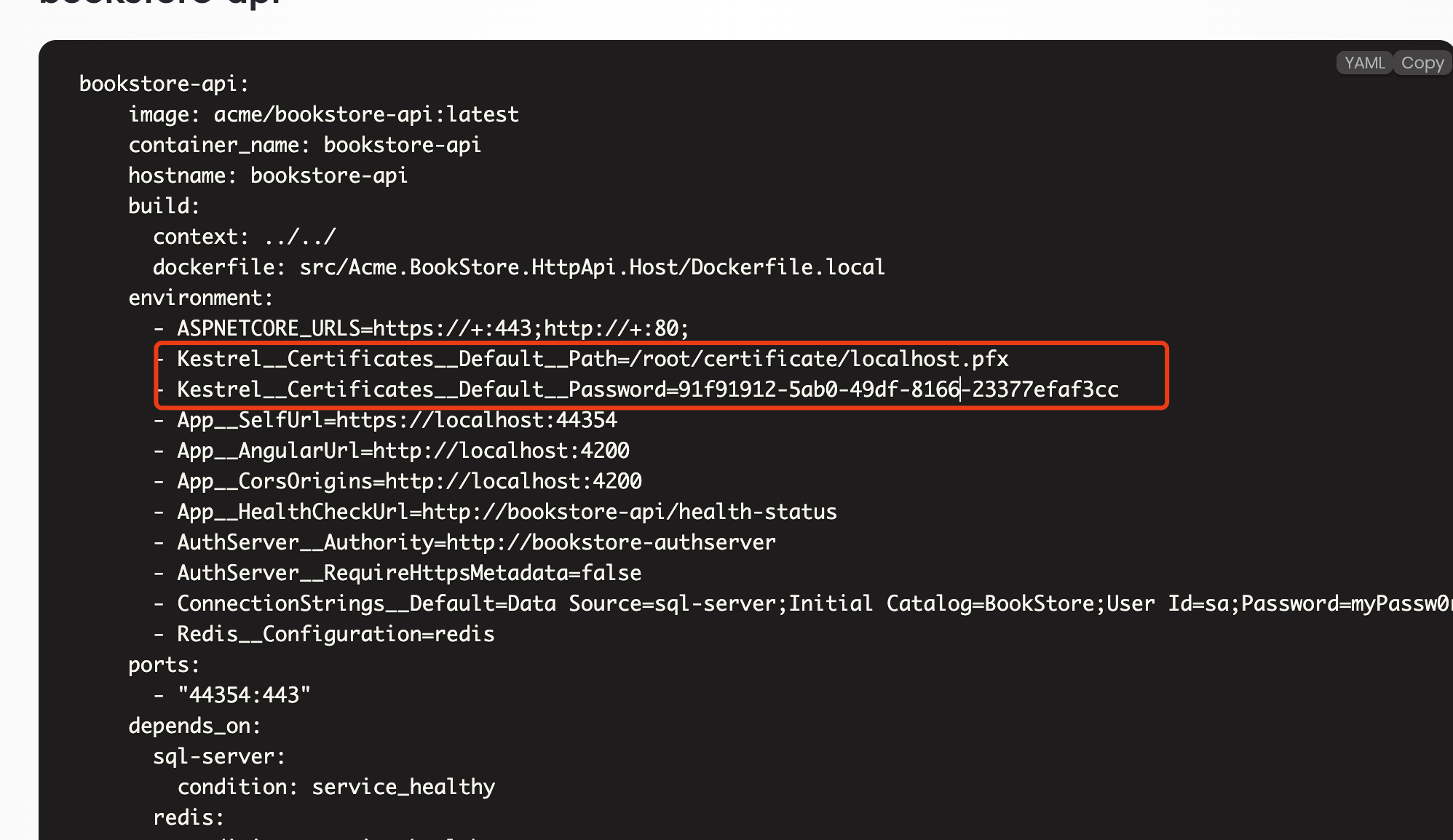
And specify the certificate path and password in the environment variable.
 Markdown supported.Copy, paste, or drag & drop images and files (max 100 MB per file, 100 MB total per post)
 -
0
This is a valid certificate only. im not using docker compose though. i was able to make it work with angular app and nginx server. But for .net app its not working. I have used similar docker command. its just that i have not used dev-certs command as im not using dev certificates for local host. my docker file looks like below:
FROM mcr.microsoft.com/dotnet/aspnet:7.0 AS base


WORKDIR /app
EXPOSE 80
EXPOSE 443

# Copy the SSL pfx files into the image
COPY Deploy/sslcertificates /app/https
RUN true

FROM mcr.microsoft.com/dotnet/sdk:7.0 AS build
WORKDIR /src

#** It's important to keep lines from here down to "COPY . ." identical in all Dockerfiles****
**# to take advantage of Docker's build cache, to speed up local container builds**
COPY "G1.health.sln" "G1.health.sln"

**# Applications**
COPY "apps/auth-server/src/G1.health.AuthServer/G1.health.AuthServer.csproj" "apps/auth-server/src/G1.health.AuthServer/G1.health.AuthServer.csproj"
RUN true
COPY "apps/public-web/src/G1.health.PublicWeb/G1.health.PublicWeb.csproj" "apps/public-web/src/G1.health.PublicWeb/G1.health.PublicWeb.csproj"
RUN true
#COPY *"apps/blazor/src/G1.health.Blazor/G1.health.Blazor.csproj" "apps/blazor/src/G1.health.Blazor/G1.health.Blazor.csproj"
#RUN true
#COPY *"apps/blazor/src/G1.health.Blazor.Server/G1.health.Blazor.Server.csproj" "apps/blazor/src/G1.health.Blazor.Server/G1.health.Blazor.Server.csproj"

#COPY *"apps/web/src/G1.health.Web/G1.health.Web.csproj" "apps/web/src/G1.health.Web/G1.health.Web.csproj"


**# Shared Projects**
COPY "shared/G1.health.DbMigrator/G1.health.DbMigrator.csproj" "shared/G1.health.DbMigrator/G1.health.DbMigrator.csproj"
RUN true
COPY "shared/G1.health.Shared.Hosting/G1.health.Shared.Hosting.csproj" "shared/G1.health.Shared.Hosting/G1.health.Shared.Hosting.csproj"
RUN true
COPY "shared/G1.health.Shared.Hosting.Gateways/G1.health.Shared.Hosting.Gateways.csproj" "shared/G1.health.Shared.Hosting.Gateways/G1.health.Shared.Hosting.Gateways.csproj"
RUN true
COPY "shared/G1.health.Shared.Hosting.Microservices/G1.health.Shared.Hosting.Microservices.csproj" "shared/G1.health.Shared.Hosting.Microservices/G1.health.Shared.Hosting.Microservices.csproj"
RUN true
COPY "shared/G1.health.Shared.Hosting.AspNetCore/G1.health.Shared.Hosting.AspNetCore.csproj" "shared/G1.health.Shared.Hosting.AspNetCore/G1.health.Shared.Hosting.AspNetCore.csproj"
RUN true
COPY "shared/G1.health.Shared.Hosting/G1.health.Shared.Hosting.csproj" "shared/G1.health.Shared.Hosting/G1.health.Shared.Hosting.csproj"
RUN true
COPY "shared/G1.health.Shared.Localization/G1.health.Shared.Localization.csproj" "shared/G1.health.Shared.Localization/G1.health.Shared.Localization.csproj"
RUN true

**# Microservices**
COPY "services/administration/src/G1.health.AdministrationService.HttpApi.Host/G1.health.AdministrationService.HttpApi.Host.csproj" "services/administration/src/G1.health.AdministrationService.HttpApi.Host/G1.health.AdministrationService.HttpApi.Host.csproj"
RUN true
COPY "services/identity/src/G1.health.IdentityService.HttpApi.Host/G1.health.IdentityService.HttpApi.Host.csproj" "services/identity/src/G1.health.IdentityService.HttpApi.Host/G1.health.IdentityService.HttpApi.Host.csproj"
RUN true
COPY "services/saas/src/G1.health.SaasService.HttpApi.Host/G1.health.SaasService.HttpApi.Host.csproj" "services/saas/src/G1.health.SaasService.HttpApi.Host/G1.health.SaasService.HttpApi.Host.csproj"
RUN true
COPY "services/product/src/G1.health.ProductService.HttpApi.Host/G1.health.ProductService.HttpApi.Host.csproj" "services/product/src/G1.health.ProductService.HttpApi.Host/G1.health.ProductService.HttpApi.Host.csproj"
RUN true
COPY "services/clinic/src/G1.health.ClinicService.HttpApi.Host/G1.health.ClinicService.HttpApi.Host.csproj" "services/clinic/src/G1.health.ClinicService.HttpApi.Host/G1.health.ClinicService.HttpApi.Host.csproj"
RUN true
**# Gateways**
COPY "gateways/web/src/G1.health.WebGateway/G1.health.WebGateway.csproj" "gateways/web/src/G1.health.WebGateway/G1.health.WebGateway.csproj"
RUN true
COPY "gateways/web-public/src/G1.health.PublicWebGateway/G1.health.PublicWebGateway.csproj" "gateways/web-public/src/G1.health.PublicWebGateway/G1.health.PublicWebGateway.csproj"
RUN true
COPY "NuGet.Config" "NuGet.Config"
RUN true

RUN dotnet restore "G1.health.sln"
RUN true

COPY . .
WORKDIR "/src/apps/auth-server/src/G1.health.AuthServer"
RUN dotnet publish -c Release -o /app
RUN dotnet dev-certs https -v -ep /app/authserver.pfx -p 2D7AA457-5D33-48D6-936F-C48E5EF468ED
**# Should be used after .net6 is out of preview for better performance
**# RUN dotnet publish --no-restore -c Release -o /app ****

FROM build AS publish

FROM base AS final
WORKDIR /app
COPY --from=publish /app .
ENTRYPOINT ["dotnet", "G1.health.AuthServer.dll"]
docker run --rm -d -p 44322:443 -v ${HOME}/https:/https -e ASPNETCORE_URLS="https://+;http://+" -e ASPNETCORE_HTTPS_PORT=44344 -e ASPNETCORE_Kestrel__Certificates__Default__Password="passsss" -e ASPNETCORE_Kestrel__Certificates__Default__Path=/https/certificate.pfx --name AuthServer --network g1-health imagepath
Markdown supported.Copy, paste, or drag & drop images and files (max 100 MB per file, 100 MB total per post) -
0
Hi,
Will it work If you use an empty ASPNETCore application without ABP?
If not, I think it might be an issue with notnet and I have no idea. You can try to use other certificates, you can also get help from Microsoft https://github.com/dotnet/runtime/issues
Markdown supported.Copy, paste, or drag & drop images and files (max 100 MB per file, 100 MB total per post)


