






- ABP Framework version: v7.4.0
- UI Type:Blazor Server
- Database System: EF Core (SQL Server)
- Tiered (for MVC) or Auth Server Separated (for Angular): yes
- Exception message and full stack trace:
- Steps to reproduce the issue:
I developed a project with Blazor Tiered version. After a user logs in to the system, I want to terminate the first session when the same user logs in from another browser. how can I do that.
10 Answer(s)
-
0
Hi,
We have an example: https://github.com/abpframework/abp-samples/tree/master/ConcurrentLogin https://github.com/abpframework/abp-samples/blob/master/ConcurrentLogin/src/ConcurrentLogin.Web/ConcurrentLoginWebModule.cs#L264
It's MVCUI but the principle is the same. use middleware to check the current user and log out.
Markdown supported.Copy, paste, or drag & drop images and files (max 100 MB per file, 100 MB total per post) -
0
Thank you for your interest. I tried the codes in this example. But I guess it didn't work because my project was layered. AuthServer project won't log out
Markdown supported.Copy, paste, or drag & drop images and files (max 100 MB per file, 100 MB total per post) -
0
Hi,
You can also add the
middlewareto theAuthServerproject.Markdown supported.Copy, paste, or drag & drop images and files (max 100 MB per file, 100 MB total per post) -
0
app.Use(async (httpContext, func) => { var currentUser = httpContext.RequestServices.GetRequiredService<ICurrentUser>(); if (currentUser.IsAuthenticated) { var claimToken = currentUser.GetConcurrentLoginToken(); var userManager = httpContext.RequestServices.GetRequiredService<IdentityUserManager>(); var user = await userManager.FindByIdAsync(currentUser.Id.ToString()); if (claimToken != user.GetProperty(ConcurrentLoginConsts.ConcurrentLoginToken).ToString()) { //Cookies if (httpContext.User.Identity != null && httpContext.User.Identity.AuthenticationType == "Identity.Application") { await httpContext.RequestServices.GetRequiredService<AbpSignInManager>().SignOutAsync(); await httpContext.ChallengeAsync("Identity.Application"); } //JWT if (httpContext.User.Identity != null && httpContext.User.Identity.AuthenticationType == "AuthenticationTypes.Federation") { await httpContext.ChallengeAsync(JwtBearerDefaults.AuthenticationScheme); } //Other return; } } await func();});//JWT if (httpContext.User.Identity != null && httpContext.User.Identity.AuthenticationType == "AuthenticationTypes.Federation") { await httpContext.ChallengeAsync(JwtBearerDefaults.AuthenticationScheme); }
It falls under the "AuthenticationTypes.Federation" condition but It is not covered by the "Identity.Application" condition. so it doesn't log out
Markdown supported.Copy, paste, or drag & drop images and files (max 100 MB per file, 100 MB total per post) -
0
Hi,
You can try :
Blazor server project
app.UseAuthorization();

app.Use(async (httpContext, func) =>
{
    var currentUser = httpContext.RequestServices.GetRequiredService<ICurrentUser>();
    if (currentUser.IsAuthenticated && !httpContext.Request.Path.ToString().Contains("account/logout", StringComparison.InvariantCultureIgnoreCase))
    {
        var userAppService = httpContext.RequestServices.GetRequiredService<IIdentityUserAppService>();
        var user = await userAppService.GetAsync(currentUser.GetId());
        // you can also use cache
        if (claimToken != user.GetProperty(ConcurrentLoginConsts.ConcurrentLoginToken).ToString())
        {
             httpContext.Response.Redirect("/Account/logout");
             return;
        }
    }

    await func();
});
Markdown supported.Copy, paste, or drag & drop images and files (max 100 MB per file, 100 MB total per post) -
0
You are a genius my friend. worked. But there is one more small problem. I don't know if it's because it's Blazor, but if I press f5 it redirects to the logout page. If I don't press f5, I can view the pages without logging out.
Markdown supported.Copy, paste, or drag & drop images and files (max 100 MB per file, 100 MB total per post) -
0
Now I noticed something. I logged in to the system and opened any page. Then I opened a new page in the side tab. and I continued to perform the operations on that page. Then I logged out of the first tab I opened. but I continued trading in the second tab I opened. So it didn't terminate the session. but when I did f5 I saw that the session was logged out
Markdown supported.Copy, paste, or drag & drop images and files (max 100 MB per file, 100 MB total per post) -
0
Hi,
Okay, Because the Blazor server is handled over a SignalR connection, you also need to add a
HubFilterto check the current userhttps://learn.microsoft.com/en-us/aspnet/core/signalr/hub-filters?view=aspnetcore-7.0#create-hub-filters
Markdown supported.Copy, paste, or drag & drop images and files (max 100 MB per file, 100 MB total per post) -
0
I have no idea how to implement this. Could you please give an example?
Markdown supported.Copy, paste, or drag & drop images and files (max 100 MB per file, 100 MB total per post) -
0
Hi,
Try:
public class MyHubFilter : IHubFilter
{
    public async ValueTask<object?> InvokeMethodAsync(HubInvocationContext invocationContext, Func<HubInvocationContext, ValueTask<object?>> next)
    {
        var currentUser = invocationContext.ServiceProvider.GetRequiredService<ICurrentUser>();

        if (!currentUser.IsAuthenticated || invocationContext.HubMethodName == "StartCircuit")
        {
            return await next.Invoke(invocationContext);
        }

        var args = invocationContext.HubMethodArguments.FirstOrDefault()?.ToString();
        if (args != null && args.Contains("account/logout", StringComparison.InvariantCultureIgnoreCase))
        {
            return await next.Invoke(invocationContext);
        }

        var userAppService = invocationContext.ServiceProvider.GetRequiredService<IIdentityUserAppService>();
        var user = await userAppService.GetAsync(currentUser.GetId());
        // you can also use cache
        if (claimToken != user.GetProperty(ConcurrentLoginConsts.ConcurrentLoginToken).ToString())
        {
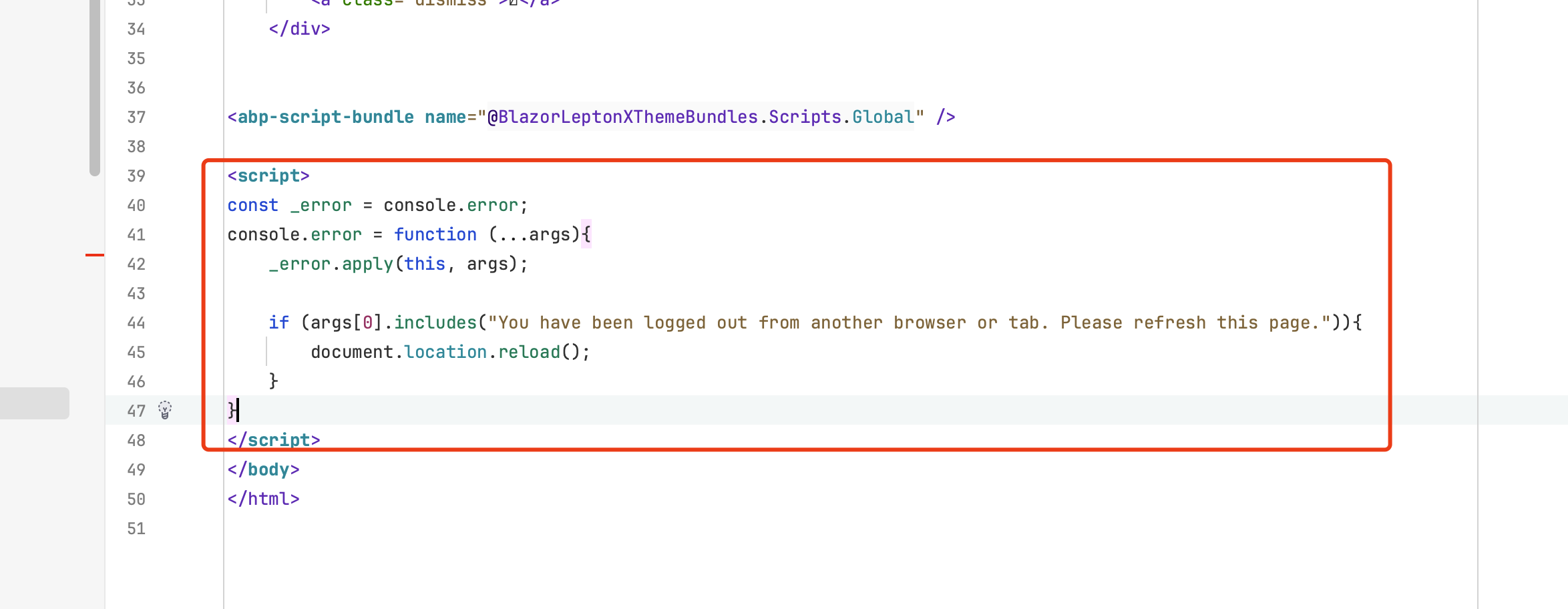
            await invocationContext.Hub.Clients.Caller.SendAsync("JS.Error", "You have been logged out from another browser or tab. Please refresh this page.");
            throw new AbpAuthorizationException();
        }

        return await next.Invoke(invocationContext);
    }
}


Configure<HubOptions>(options =>
{
    options.AddFilter<MyHubFilter>();
});
And
 Markdown supported.Copy, paste, or drag & drop images and files (max 100 MB per file, 100 MB total per post)


