






- ABP Framework version: v7.4.2
- UI Type: Blazor Server
- Database System: EF Core (SQL Server)
- Tiered (for MVC) or Auth Server Separated (for Angular): yes
- Exception message and full stack trace:
- Steps to reproduce the issue:
Hello there, I want to update my application that I developed via abp suite from 7.4.2 to 7.4.3. I ran abp cli update and abp suite update codes successfully. but then when I click Update all ABP packages, I get the error "An internal error occurred during your request!". when I look at the log record, I see the following lines.
2023-12-13 10:14:33.064 +03:00 [ERR] One or more errors occurred. (StartIndex cannot be less than zero. (Parameter 'startIndex')) (StartIndex cannot be less than zero. (Parameter 'startIndex')) System.AggregateException: One or more errors occurred. (StartIndex cannot be less than zero. (Parameter 'startIndex')) (StartIndex cannot be less than zero. (Parameter 'startIndex')) ---> System.ArgumentOutOfRangeException: StartIndex cannot be less than zero. (Parameter 'startIndex') at System.String.ThrowSubstringArgumentOutOfRange(Int32 startIndex, Int32 length) at System.String.Substring(Int32 startIndex, Int32 length) at Volo.Abp.Cli.ProjectModification.NpmPackagesUpdater.ExtractVersions(String output) in D:\ci\Jenkins\workspace\abp-volo-release\abp\framework\src\Volo.Abp.Cli.Core\Volo\Abp\Cli\ProjectModification\NpmPackagesUpdater.cs:line 357 at Volo.Abp.Cli.ProjectModification.NpmPackagesUpdater.GetPackageVersionList(JProperty package, String workingDirectory) in D:\ci\Jenkins\workspace\abp-volo-release\abp\framework\src\Volo.Abp.Cli.Core\Volo\Abp\Cli\ProjectModification\NpmPackagesUpdater.cs:line 348 at Volo.Abp.Cli.ProjectModification.NpmPackagesUpdater.GetLatestVersion(JProperty package, Boolean includeReleaseCandidates, Boolean includePreviews, String workingDirectory) in D:\ci\Jenkins\workspace\abp-volo-release\abp\framework\src\Volo.Abp.Cli.Core\Volo\Abp\Cli\ProjectModification\NpmPackagesUpdater.cs:line 274 at Volo.Abp.Cli.ProjectModification.NpmPackagesUpdater.TryUpdatingPackage(String filePath, JProperty package, Boolean includePreviews, Boolean includeReleaseCandidates, Boolean switchToStable, String specifiedVersion) in D:\ci\Jenkins\workspace\abp-volo-release\abp\framework\src\Volo.Abp.Cli.Core\Volo\Abp\Cli\ProjectModification\NpmPackagesUpdater.cs:line 238 at Volo.Abp.Cli.ProjectModification.NpmPackagesUpdater.UpdatePackagesInFile(String filePath, Boolean includePreviews, Boolean includeReleaseCandidates, Boolean switchToStable, String specifiedVersion) in D:\ci\Jenkins\workspace\abp-volo-release\abp\framework\src\Volo.Abp.Cli.Core\Volo\Abp\Cli\ProjectModification\NpmPackagesUpdater.cs:line 179 at Volo.Abp.Cli.ProjectModification.NpmPackagesUpdater.<>c__DisplayClass18_0.<<Update>g__UpdateAsync|0>d.MoveNext() in D:\ci\Jenkins\workspace\abp-volo-release\abp\framework\src\Volo.Abp.Cli.Core\Volo\Abp\Cli\ProjectModification\NpmPackagesUpdater.cs:line 83 --- End of inner exception stack trace --- at System.Threading.Tasks.Task.WaitAllCore(Task[] tasks, Int32 millisecondsTimeout, CancellationToken cancellationToken) at System.Threading.Tasks.Task.WaitAll(Task[] tasks) at Volo.Abp.Cli.ProjectModification.NpmPackagesUpdater.Update(String rootDirectory, Boolean includePreviews, Boolean includeReleaseCandidates, Boolean switchToStable, String version) in D:\ci\Jenkins\workspace\abp-volo-release\abp\framework\src\Volo.Abp.Cli.Core\Volo\Abp\Cli\ProjectModification\NpmPackagesUpdater.cs:line 89 at Volo.Abp.Cli.Commands.UpdateCommand.UpdateNpmPackages(String directory, String version) in D:\ci\Jenkins\workspace\abp-volo-release\abp\framework\src\Volo.Abp.Cli.Core\Volo\Abp\Cli\Commands\UpdateCommand.cs:line 55 at Volo.Abp.Cli.Commands.UpdateCommand.ExecuteAsync(CommandLineArgs commandLineArgs) in D:\ci\Jenkins\workspace\abp-volo-release\abp\framework\src\Volo.Abp.Cli.Core\Volo\Abp\Cli\Commands\UpdateCommand.cs:line 49 at Volo.Abp.Suite.Areas.AbpSuite.CrudPageGenerator.Services.SolutionService.UpdatePackagesInSolutionAsync(String solutionPath, Boolean npm, Boolean nuget) at Volo.Abp.Suite.Controllers.AbpSuiteController.UpdatePackagesInSolution(String solutionPath, Boolean npm, Boolean nuget) at lambda_method1991(Closure, Object) at Microsoft.AspNetCore.Mvc.Infrastructure.ActionMethodExecutor.AwaitableObjectResultExecutor.Execute(ActionContext actionContext, IActionResultTypeMapper mapper, ObjectMethodExecutor executor, Object controller, Object[] arguments) at Microsoft.AspNetCore.Mvc.Infrastructure.ControllerActionInvoker.<InvokeActionMethodAsync>g__Awaited|12_0(ControllerActionInvoker invoker, ValueTask`1 actionResultValueTask) at Microsoft.AspNetCore.Mvc.Infrastructure.ControllerActionInvoker.
3 Answer(s)
-
0
Hello,
When we update application from previous version to new one, we need to follow migration guides
Please check https://docs.abp.io/en/abp/latest/Migration-Guides/Abp-7_4
Thanks
Markdown supported.Copy, paste, or drag & drop images and files (max 100 MB per file, 100 MB total per post) -
0
I could not find an expression to correct the error I received when I wanted to update via ABP suite on the document you specified.
Markdown supported.Copy, paste, or drag & drop images and files (max 100 MB per file, 100 MB total per post) -
0
Hi,
This may be a network issue
ABP CLI tried to get NPM package versions using
npm show <package-name> versions --jsoncommand, but it didn't get the expected results. https://github.com/abpframework/abp/blob/dev/framework/src/Volo.Abp.Cli.Core/Volo/Abp/Cli/ProjectModification/NpmPackagesUpdater.cs#L344C2-L358You can manually replace the version with 7.4.3 and run the
abp install-libsto restore packages. for example: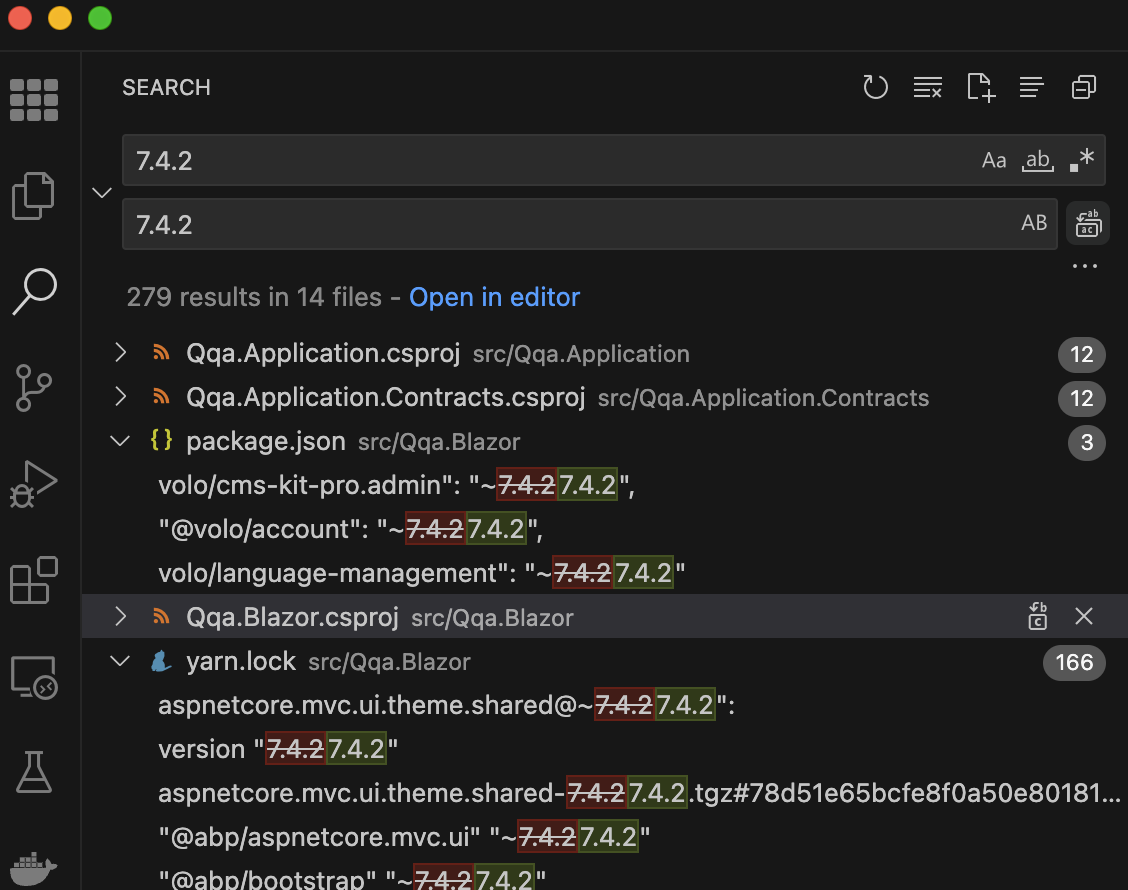 Markdown supported.Copy, paste, or drag & drop images and files (max 100 MB per file, 100 MB total per post)



