






Hi Support Team,
I want to test my develop environment at year end timestamp, so I changed host server date setting & my local setting to midnight of 31 Dec 2023.
However, after logging in dev, the browser tab was reloading infinitely and the console showed this:

My app stores token in local storage, I tried clearing them but it kept reloading, I also tried incognito mode but it is the same.
Is there a way to solve this?
- ABP Framework version: v5.3.3
- UI Type: Angular
- Database System: EF Core
- Tiered (for MVC) or Auth Server Separated (for Angular): yes
- Exception message and full stack trace:
- Steps to reproduce the issue:
3 Answer(s)
-
0
Hi,
ABP uses
angular-oauth2-oidclibary, you can check the code here: https://github.com/manfredsteyer/angular-oauth2-oidc/blob/f1d3c38bdc77b37a21df2e63f8cbe40eadfc6152/projects/lib/src/oauth-service.ts#L2268-L2279Markdown supported.Copy, paste, or drag & drop images and files (max 100 MB per file, 100 MB total per post) -
0
Thanks liangshiwei. Is there a way to log/increase the value of
clockSkewInMSec? I tried a few ways but it did not work, nor did I can log the value.I tried changing the value in .NET:
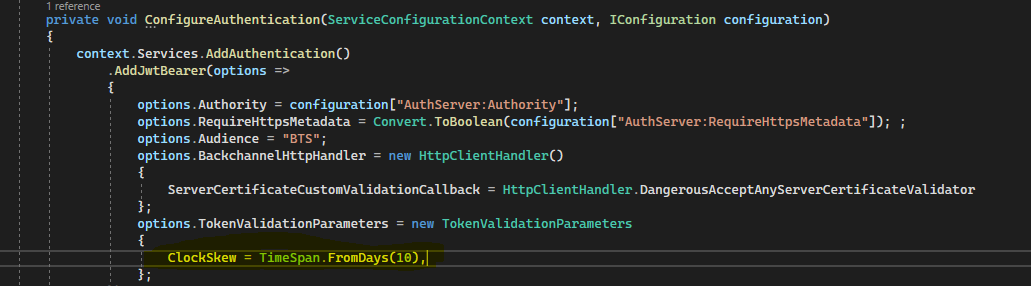 In app.component:
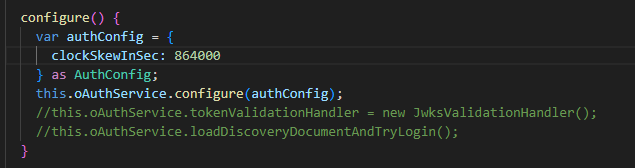
Could you take a look at this?
Markdown supported.Copy, paste, or drag & drop images and files (max 100 MB per file, 100 MB total per post) -
0
Hi,
Will it work if you configure the
clockSkewInSecinenvironmentfile?export const environment = { production: false, application: { baseUrl, name: 'MyProjectName', logoUrl: '', }, oAuthConfig: { issuer: 'https://localhost:44305/', redirectUri: baseUrl, clientId: 'MyProjectName_App', responseType: 'code', scope: 'offline_access MyProjectName', requireHttps: true, clockSkewInSec: 100 }, apis: { default: { url: 'https://localhost:44305', rootNamespace: 'MyCompanyName.MyProjectName', }, }, } as Environment;Markdown supported.Copy, paste, or drag & drop images and files (max 100 MB per file, 100 MB total per post)


