






- ABP Framework version: v7.3.2
- UI Type: Angular
- Database System: EF Core (SQL Server)
- Tiered (for MVC) or Auth Server Separated (for Angular): yes
- Exception message and full stack trace:
- Steps to reproduce the issue:
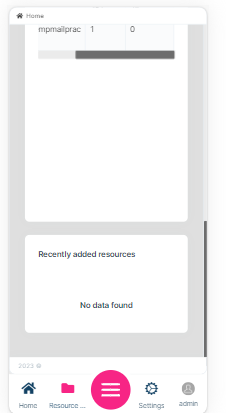
Below I have attached the Sub menus displaying under second main menu Item in Desktop view. The second menu (Resource Library) contains list of sub menus like
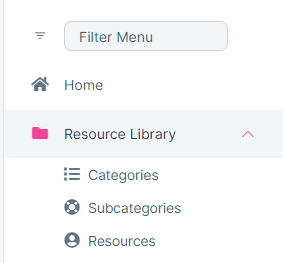 when I click second menu (Resource Library) in mobile view, it is not showing the sub menus inside that Main menu. We are facing this issue in only in mobile view.
How can i fix this issue?
when I click second menu (Resource Library) in mobile view, it is not showing the sub menus inside that Main menu. We are facing this issue in only in mobile view.
How can i fix this issue?
5 Answer(s)
-
0
Hi, i understand your problem and it's related to the leptonx theme. I created a pull request about it, it will be fixed in next release.
I'll give back your question credit.
Markdown supported.Copy, paste, or drag & drop images and files (max 100 MB per file, 100 MB total per post) -
0
Hi Sinan, Thanks for your response.
Markdown supported.Copy, paste, or drag & drop images and files (max 100 MB per file, 100 MB total per post) -
0
Hi Sinan, Is the above mentioned issue got fixed? What should I do If it got fixed?
Markdown supported.Copy, paste, or drag & drop images and files (max 100 MB per file, 100 MB total per post) -
0
yes it has fixed. update your @abp/ng.theme.lepton-x to latest version which is 3.0.1.
btw in order to update lepton to version 3, you have to update angular to version 17 and abp to version 8.
our migration guides;
- https://docs.abp.io/en/abp/latest/Migration-Guides/Index
Let me know if you have still problem
Markdown supported.Copy, paste, or drag & drop images and files (max 100 MB per file, 100 MB total per post)



