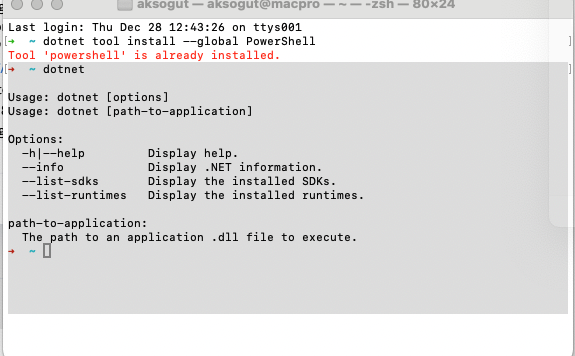
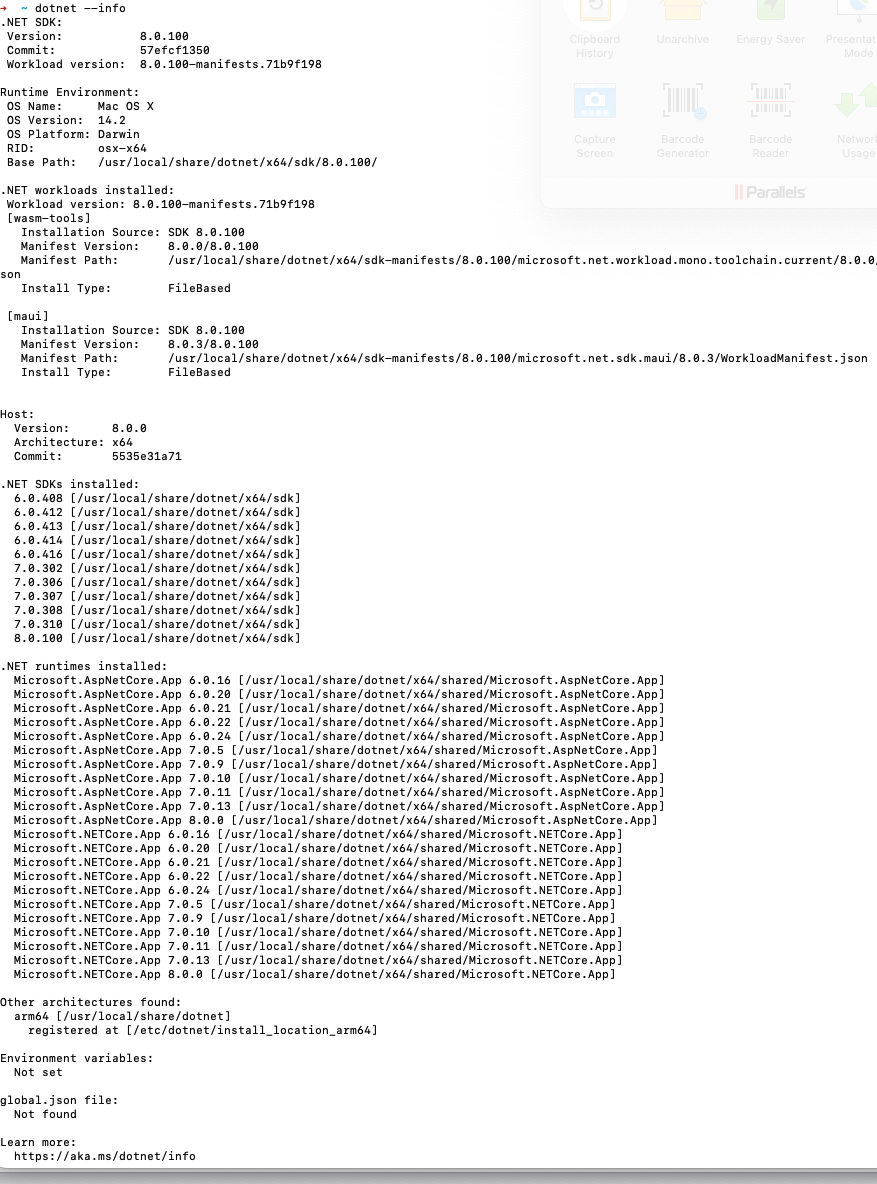
Check the docs before asking a question: https://docs.abp.io/en/commercial/latest/ Check the samples to see the basic tasks: https://docs.abp.io/en/commercial/latest/samples/index The exact solution to your question may have been answered before, and please first use the search on the homepage. Provide us with the following info:
- ABP Framework version: 8.0
- UI Type: Angular / MVC / Blazor WASM / Blazor Server
- Database System: EF Core (SQL Server, Oracle, MySQL, PostgreSQL, etc..) / MongoDB
- Tiered (for MVC) or Auth Server Separated (for Angular): yes/no
- Exception message and full stack trace:
- Steps to reproduce the issue:
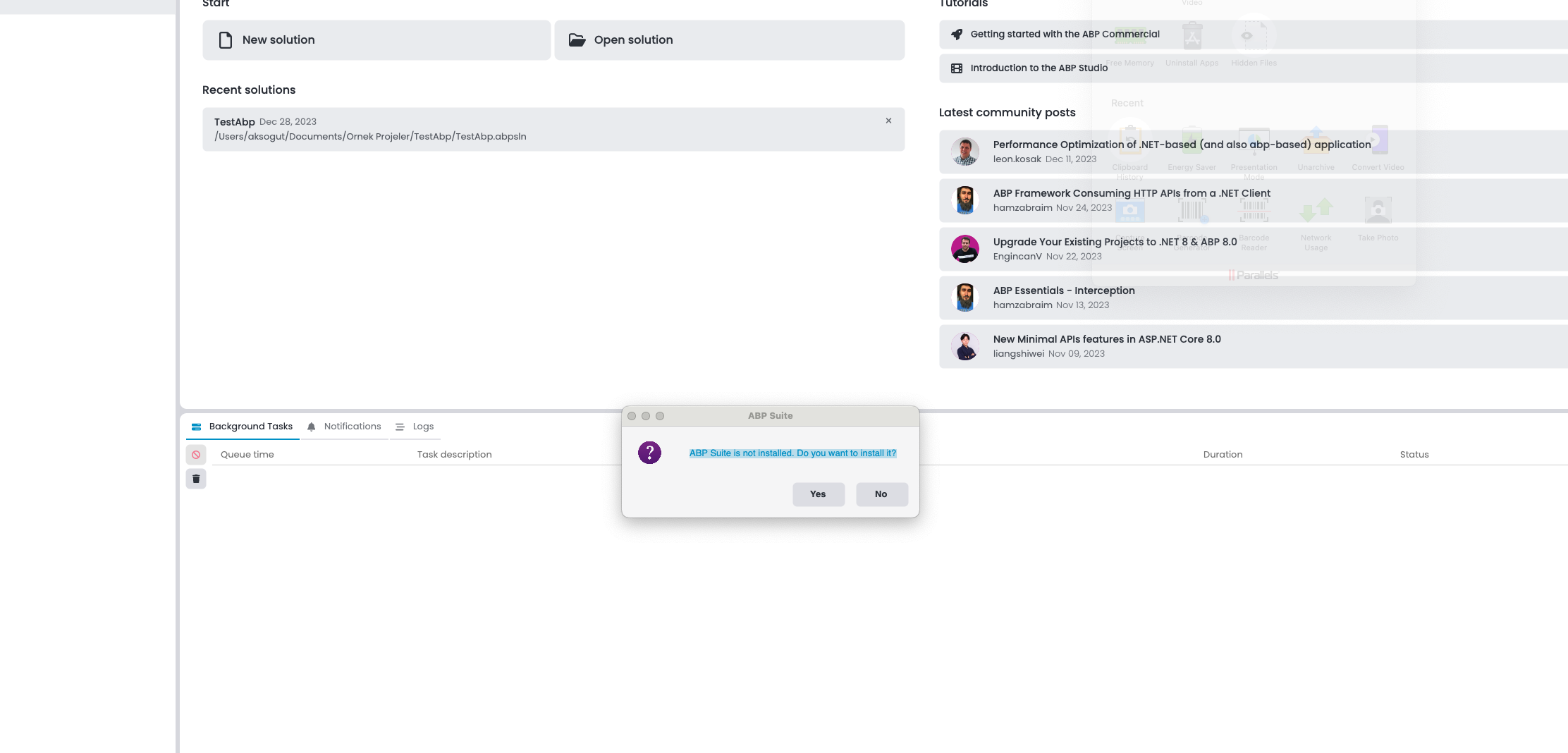
Hello, AbpStudio m1 MAC (Sonoma 14.2.1 (23C71) zsh shell). It gives the following error.
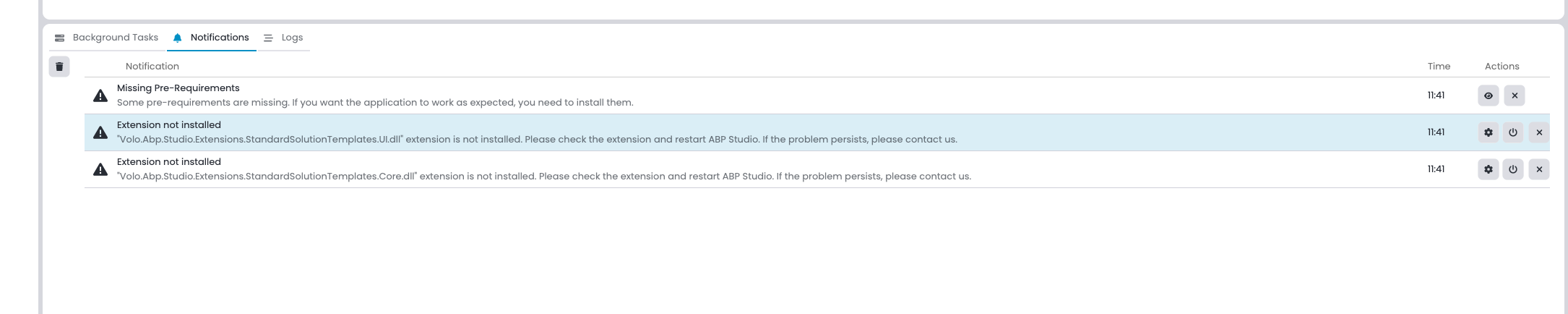
New Solutions:
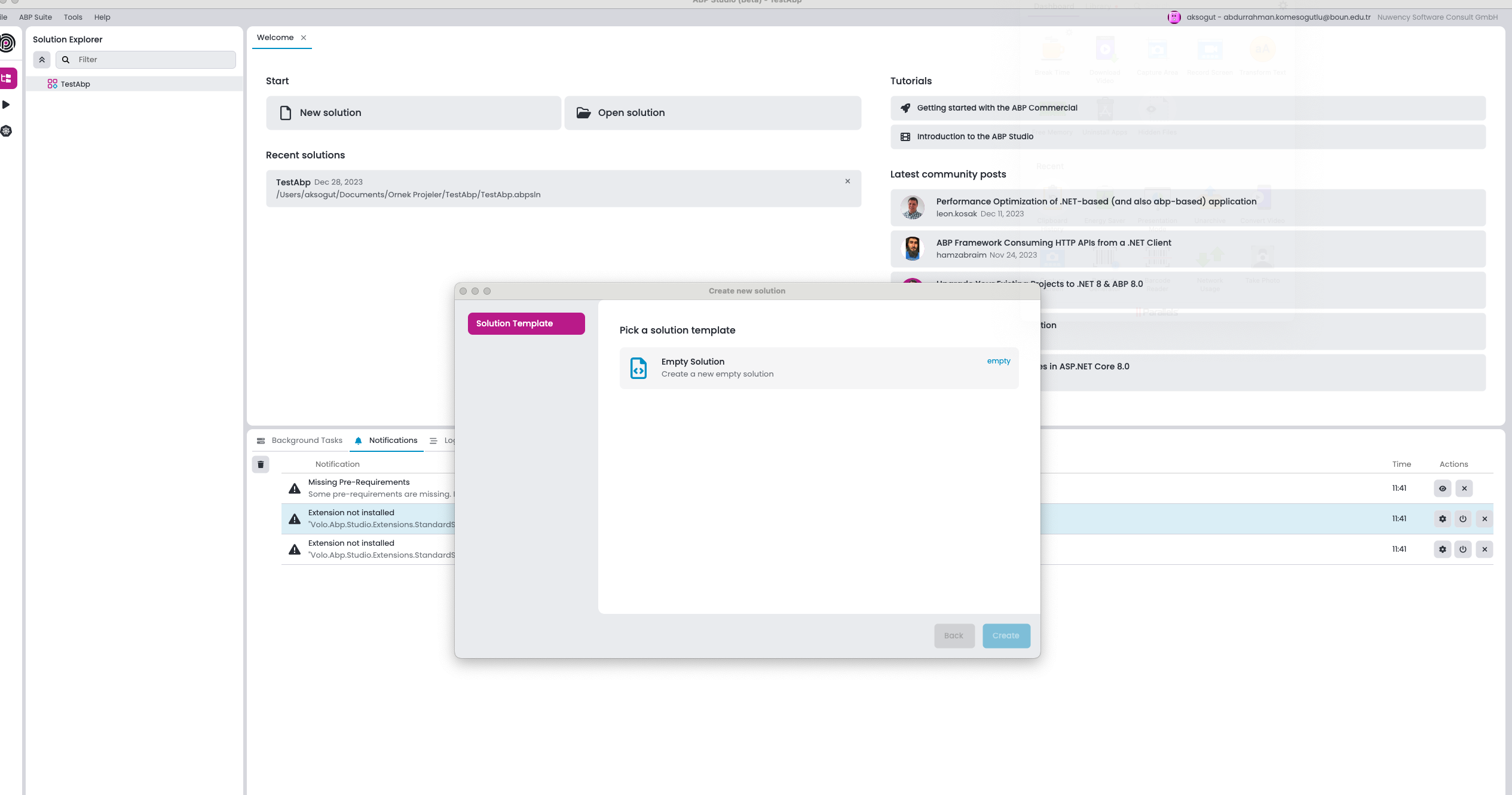
Abp Suite installed but;
6 Answer(s)
-
0
14:04:42.846 Information - Volo.Abp.UI.Navigation.AbpUiNavigationModule 14:04:42.846 Information - Volo.Abp.UI.AbpUiModule 14:04:42.846 Information - Volo.Abp.GlobalFeatures.AbpGlobalFeaturesModule 14:04:42.846 Information - Volo.Abp.Application.AbpDddApplicationModule 14:04:42.846 Information - Volo.Abp.Features.AbpFeaturesModule 14:04:42.846 Information - Volo.Abp.BackgroundWorkers.Quartz.AbpBackgroundWorkersQuartzModule 14:04:42.846 Information - Volo.Abp.Quartz.AbpQuartzModule 14:04:42.846 Information - Volo.Abp.Studio.UI.Theming.AbpStudioUIThemingModule 14:04:42.875 Information Initialized Scheduler Signaller of type: Quartz.Core.SchedulerSignalerImpl 14:04:42.875 Information Quartz Scheduler created 14:04:42.875 Information JobFactory set to: Quartz.Simpl.MicrosoftDependencyInjectionJobFactory 14:04:42.876 Information RAMJobStore initialized. 14:04:42.876 Information Quartz Scheduler 3.7.0.0 - 'QuartzScheduler' with instanceId 'NON_CLUSTERED' initialized 14:04:42.877 Information Using thread pool 'Quartz.Simpl.DefaultThreadPool', size: 10 14:04:42.877 Information Using job store 'Quartz.Simpl.RAMJobStore', supports persistence: False, clustered: False 14:04:42.882 Information Adding 0 jobs, 0 triggers. 14:04:42.903 Information Scheduler QuartzScheduler_$_NON_CLUSTERED started. 14:04:43.164 Information Initialized all ABP modules. 14:04:43.170 Information User profile is available. Using '"/Users/aksogut/.aspnet/DataProtection-Keys"' as key repository; keys will not be encrypted at rest. 14:04:43.193 Information Now listening on: "http://localhost:38271" 14:04:43.193 Information Application started. Press Ctrl+C to shut down. 14:04:43.193 Information Hosting environment: "Production" 14:04:43.193 Information Content root path: "/" 14:04:47.312 Information Received HTTP response headers after 207.5767ms - 200 14:04:47.312 Information End processing HTTP request after 212.9181ms - 200 14:04:47.531 Information Start processing HTTP request "GET" "https://community.abp.io/api/app/post?maxResultCount=5&Languages=en&Languages=en" 14:04:47.531 Information Sending HTTP request "GET" "https://community.abp.io/api/app/post?maxResultCount=5&Languages=en&Languages=en" 14:04:47.649 Information Received HTTP response headers after 61.1053ms - 200 14:04:47.649 Information End processing HTTP request after 61.268ms - 200 14:04:47.728 Information Received HTTP response headers after 197.1467ms - 200 14:04:47.728 Information End processing HTTP request after 197.4085ms - 200 14:04:49.626 Information Starting task execution: "Checking license end time" 14:04:49.627 Information Completed task execution: "Checking license end time" 14:04:49.642 Information Starting task execution: "Loading extensions" 14:04:49.682 Warning Command failed: dotnet restore Output: /bin/bash: dotnet: command not found 14:04:49.682 Warning Code: 14:04:49.682 Warning Details: 14:04:49.684 Warning Extension 'Volo.Abp.Studio.Extensions.StandardSolutionTemplates.Core.dll' is not loaded! Path: /Applications/ABP Studio.app/Contents/MacOS/Volo.Abp.Studio.Extensions.StandardSolutionTemplates.Core.dll. 14:04:49.684 Warning Extension 'Volo.Abp.Studio.Extensions.StandardSolutionTemplates.UI.dll' is not loaded! Path: /Applications/ABP Studio.app/Contents/MacOS/Volo.Abp.Studio.Extensions.StandardSolutionTemplates.UI.dll. 14:04:49.685 Information Completed task execution: "Loading extensions" 14:04:49.685 Information Starting task execution: "Checking for new version of extensions" 14:04:49.687 Warning Extension 'Volo.Abp.Studio.Extensions.StandardSolutionTemplates.Core.dll' is not loaded! Path: /Applications/ABP Studio.app/Contents/MacOS/Volo.Abp.Studio.Extensions.StandardSolutionTemplates.Core.dll. 14:04:49.687 Warning Extension 'Volo.Abp.Studio.Extensions.StandardSolutionTemplates.UI.dll' is not loaded! Path: /Applications/ABP Studio.app/Contents/MacOS/Volo.Abp.Studio.Extensions.StandardSolutionTemplates.UI.dll. 14:04:49.687 Information Completed task execution: "Checking for new version of extensions" 14:04:49.687 Information Starting task execution: "Checking pre-requirements" 14:04:49.717 Information Received HTTP response headers after 162.6568ms - 200 14:04:49.717 Information End processing HTTP request after 163.1484ms - 200 14:04:49.890 Information Completed task execution: "Checking pre-requirements" 14:04:49.891 Information Starting task execution: "Checking for new version of ABP Studio" 14:04:49.911 Information Start processing HTTP request "GET" "https://commercial.abp.io/api/abp-studio/appcast?os=osx" 14:04:49.911 Information Sending HTTP request "GET" "https://commercial.abp.io/api/abp-studio/appcast?os=osx" 14:04:50.098 Information Received HTTP response headers after 186.8303ms - 200 14:04:50.098 Information End processing HTTP request after 187.0498ms - 200 14:04:50.281 Information Completed task execution: "Checking for new version of ABP Studio"
Markdown supported.Copy, paste, or drag & drop images and files (max 100 MB per file, 100 MB total per post) -
0
Hi,
Thanks, the ABP studio is still in the development stage, we will fix it.
Markdown supported.Copy, paste, or drag & drop images and files (max 100 MB per file, 100 MB total per post) -
0
Hello, we are dealing with the issue, but as a workaround, I suggest you run ABP Studio with administrator privileges. You can use the following code for this:
sudo open /Applications/ABP\ Studio.app
Since it is an internal issue that we are already tracking and a workaround has been provided, I am closing this issue.
Markdown supported.Copy, paste, or drag & drop images and files (max 100 MB per file, 100 MB total per post)